
Introduction
Thank you for choosing the SakerPlus 4V Rechargeable Electric Scissors. This cordless rotary cutter is designed for efficient and effortless cutting of various materials. Please read this manual thoroughly before use to ensure safe operation, optimal performance, and proper maintenance of your device.
Important Safety Instructions
Always follow basic safety precautions to reduce the risk of fire, electric shock, and personal injury.
- Keep the work area clean and well-lit. Cluttered or dark areas invite accidents.
- Do not operate power tools in explosive atmospheres, such as in the presence of flammable liquids, gases, or dust. Power tools create sparks which may ignite the dust or fumes.
- Keep children and bystanders away while operating a power tool. Distractions can cause you to lose control.
- Avoid accidental starting. Ensure the switch is in the off-position before connecting to battery pack, picking up or carrying the tool.
- Always use the safety lock feature to prevent unintentional activation, especially during storage or when changing blades.
- Do not overreach. Keep proper footing and balance at all times. This enables better control of the power tool in unexpected situations.
- Dress properly. Do not wear loose clothing or jewelry. Keep your hair and clothing away from moving parts.
- Disconnect the battery pack from the power tool before making any adjustments, changing accessories, or storing power tools.
- Store idle power tools out of the reach of children and do not allow persons unfamiliar with the power tool or these instructions to operate the power tool.
- Maintain power tools. Check for misalignment or binding of moving parts, breakage of parts and any other condition that may affect the power tool’s operation. If damaged, have the power tool repaired before use.
- Use the power tool, accessories and tool bits etc. in accordance with these instructions, taking into account the working conditions and the work to be performed. Use of the power tool for operations different from those intended could result in a hazardous situation.
Package Contents
- SakerPlus Electric Scissors (Model SM-5001)
- 1 x Cutting Blade (pre-installed or included separately)
- USB Type-C Charging Cable
- User Manual
Product Overview
Familiarize yourself with the components of your SakerPlus Electric Scissors:
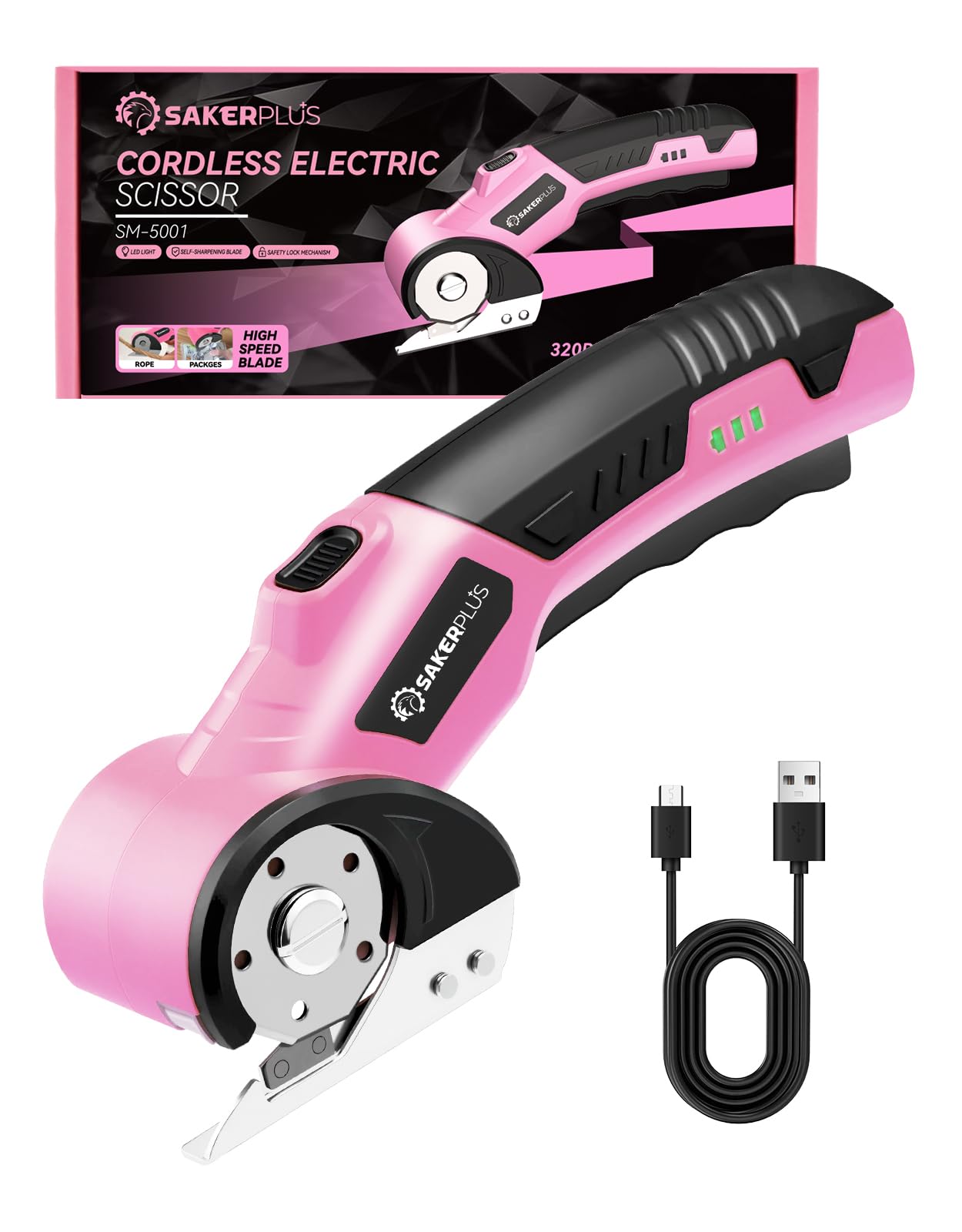
Image: The SakerPlus Electric Scissors in operation, highlighting its design and cutting mechanism.
- Cutting Blade: The rotary blade for cutting materials.
- Blade Guard: Protects the blade and user during operation.
- Power Switch: Activates and deactivates the device.
- Safety Lock Button: Prevents accidental activation of the power switch.
- Ergonomic Grip: Designed for comfortable handling.
- Type-C Charging Port: For recharging the internal battery.
- LED Indicator: Shows charging status and battery level.
Setup
1. Charging the Battery
Before first use, fully charge the electric scissors. The device is equipped with a 1500mAh rechargeable Lithium-Ion battery.

Image: Battery specifications, indicating 1500mAh capacity and 35 minutes maximum runtime.
- Connect the provided USB Type-C charging cable to the charging port on the device.
- Connect the other end of the cable to a 5V 2A USB power adapter (not included).
- The LED indicator will show the charging status. A full charge takes approximately 1.5 hours.
- Once fully charged, the device provides up to 35 minutes of continuous operation under no-load conditions.

Image: Type-C charging port and indicators for charging status.
2. Blade Installation/Replacement
The electric scissors come with one blade. If replacement is necessary, ensure the device is powered off and the battery is disconnected before proceeding.
- Locate the blade retention mechanism (refer to the product diagram for specific details).
- Carefully remove the old blade, taking precautions to avoid injury from sharp edges.
- Insert the new blade, ensuring it is correctly seated and secured.
- Always ensure the blade guard is properly positioned before operating the device.
Operating Instructions
1. Powering On/Off and Safety Lock
- To power on the device, first press and hold the Safety Lock Button.
- While holding the safety lock, press the Power Switch. The blade will begin to rotate.
- Release the Safety Lock Button once the device is running.
- To power off, simply release the Power Switch. The blade will stop rotating.
2. Cutting Materials
The SakerPlus Electric Scissors are designed for smooth cutting of various materials at a maximum rotational speed of 320 RPM.

Image: Examples of materials being cut, including fabric, cardboard, leather, and carpet.
- Fabric: Can cut fabric up to 0.1 inch (2.5 mm) thick.
- Cardboard: Suitable for cardboard up to 0.06 inch (1.5 mm) thick. For heavier corrugated cardboard, the performance may vary.
- Leather: Cuts leather up to 0.25 inch (6.3 mm) thick.
- Corrugated Board: Cuts corrugated board up to 0.25 inch (6.3 mm) thick.
- Thin Metal Sheet: Can cut metal sheets as thin as 0.04 inch (1 mm).
Cutting Tips:
- Ensure the material is laid flat and stable before cutting.
- Guide the scissors steadily along the desired cutting line. Do not force the tool.
- For optimal results, allow the blade to do the work.
Maintenance
1. Cleaning
- Always ensure the device is powered off and disconnected from the charger before cleaning.
- Use a soft, dry cloth to wipe down the exterior of the electric scissors.
- Carefully remove any material debris from around the blade area using a small brush or compressed air.
- Do not use harsh chemicals or abrasive cleaners, as these can damage the device.
2. Blade Care
- Regularly inspect the blade for signs of wear or damage. A dull or damaged blade can affect cutting performance and safety.
- Replace the blade when it becomes dull or damaged. Use only genuine SakerPlus replacement blades.
- Store spare blades safely and out of reach of children.
Troubleshooting
- Device does not turn on:
- Ensure the battery is charged. Connect to the charger and check the LED indicator.
- Verify that the safety lock button is pressed simultaneously with the power switch.
- Poor cutting performance:
- Check if the blade is dull or damaged. Replace if necessary.
- Ensure the material thickness is within the specified limits for the tool.
- Clean any debris from around the blade.
- Battery not charging:
- Ensure the Type-C cable is securely connected to both the device and the power adapter.
- Verify that the power adapter is a 5V 2A charger and is functioning correctly.
Specifications
| Model Number | SM-5001 |
| Power Source | Battery Powered |
| Battery Type | 1500mAh Lithium-Ion (4V) |
| Charging Port | USB Type-C |
| Charging Time | Approx. 1.5 hours (with 5V 2A charger) |
| Max. Runtime | Up to 35 minutes (no load) |
| Max. Rotational Speed | 320 RPM |
| Item Weight | 458 g (approx. 0.9 lbs) |
| Special Features | Compact, Cordless, Ergonomic Grip, Lock Button, Multi-Use |
Storage
The SakerPlus Electric Scissors are designed to be compact and lightweight for easy storage and portability.

Image: The compact design allows for convenient storage in small spaces like drawers.
- Always engage the safety lock before storing the device.
- Store the electric scissors in a dry, clean place, away from direct sunlight and extreme temperatures.
- Keep out of reach of children and pets.
Warranty and Support
For warranty information, technical support, or to purchase replacement parts, please contact SakerPlus customer service through the retailer where the product was purchased or visit the official SakerPlus website. Please have your model number (SM-5001) and purchase details ready.

