
1. Introduction
Thank you for choosing the BANPESTT Indoor Insect Trap, Model CPI-09. This device is designed to effectively attract and capture various flying insects such as mosquitoes, gnats, moths, and fruit flies using a combination of UV light, a powerful fan, and sticky glue boards. Please read this manual carefully before use to ensure proper operation and maintenance.

Image 1.1: BANPESTT Indoor Insect Trap and its components, including the USB plug and 40-inch charging cable.
2. Safety Information
- Indoor Use Only: This device is intended for indoor use in dry locations. Do not expose to water or high humidity.
- Electrical Safety: Ensure the power source matches the device's requirements. Do not use if the cord or plug is damaged.
- Child and Pet Safety: Keep the device out of reach of children and pets. While designed with physical trapping technology, direct contact with the fan or UV light should be avoided.
- Ventilation: Do not block the air inlets or outlets of the device.
- Cleaning: Always unplug the device before cleaning or replacing sticky boards.
3. Package Contents
Verify that all items are present in your package:
- 1 x BANPESTT Indoor Insect Trap Device
- 6 x Sticky Glue Board Refills
- 1 x USB Plug (Power Adapter)
- 1 x 40-inch Charging Cable
4. Product Features
- Auto Night Sensor Design: Features a dusk-to-dawn sensor for energy-saving automatic activation in low-light conditions.
- 3-Stage Trapping System:
- Attraction: Emits 395nm UV light to lure flying insects.
- Suction: A powerful fan draws insects into the trap.
- Capture: Insects are trapped on a replaceable sticky glue board.
- Quiet Operation: Designed for noiseless operation, suitable for bedrooms and living areas.
- Child & Pet Friendly: Utilizes physical trapping technology without zappers or harmful chemicals.
- Portable Design: Compact and lightweight for versatile placement.

Image 4.1: The 3-stage insect trapping mechanism of the device.
5. Setup Instructions
- Unpack: Carefully remove all components from the packaging.
- Insert Sticky Board: Remove the protective film from one sticky glue board. Open the bottom compartment of the insect trap and place the sticky board inside, ensuring the sticky side faces upwards. Close the compartment securely.
- Connect Power: Insert the USB cable into the device and then into the provided USB power adapter. Plug the adapter into a standard electrical outlet.
- Placement: Place the trap in an optimal location. Recommended areas include near fruit plates, potted plants, and trash bins where insects are commonly found. For best results, ensure the trap is the primary light source in its immediate vicinity during operation.

Image 5.1: Inserting a sticky glue board into the trap.
6. Operating Instructions
The BANPESTT Indoor Insect Trap offers two operating modes:
- Normal Mode (Lights Sensor Deactivated): Press the ON/OFF button once. The device will operate continuously as long as it is powered on, regardless of ambient light conditions.
- AUTO CDS Mode (Lights Sensor Activated): Press the ON/OFF button a second time to activate AUTO CDS mode. In this mode, the device will automatically turn on in dim conditions (at night) and turn off during bright or well-lit surroundings (during the day). If you are in a bright environment, the device may turn off within 10 seconds after startup in this mode.
To turn off the device, press the ON/OFF button until the light and fan cease operation.
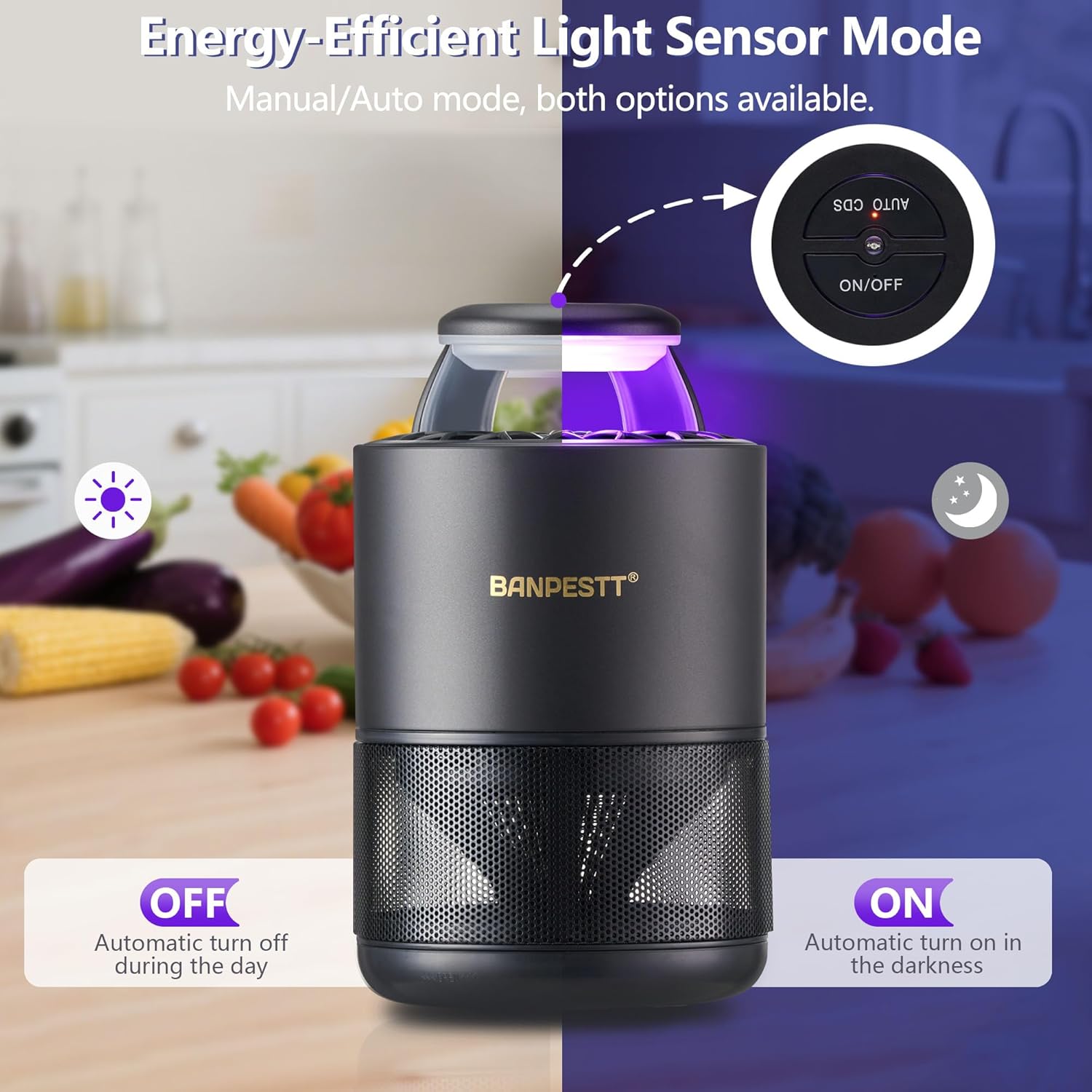
Image 6.1: Illustration of the Energy-Efficient Light Sensor Mode (AUTO CDS Mode).
Video 6.1: A demonstration of the BANPESTT Indoor Insect Trap in operation, showing its effectiveness against fruit flies.
7. Maintenance
- Cleaning: Power off and unplug the device before cleaning. Use a soft, dry cloth to wipe dust from the exterior. Do not use liquid cleaners or immerse the device in water.
- Replacing Sticky Boards: Replace the sticky glue board every 1-2 weeks, or when it is fully covered with insects and no longer sticky. Additional refills can be purchased separately.

Image 7.1: Example of a used sticky board showing trapped insects, indicating when replacement is needed.

Image 7.2: Removing a used sticky board from the trap.

Image 7.3: Peeling the protective film from a new sticky board.

Image 7.4: Discarding a used sticky board.
8. Troubleshooting
| Problem | Possible Cause | Solution |
|---|---|---|
| Device not turning on or fan not running. | 1. Not plugged in correctly. 2. AUTO CDS Mode activated in a bright environment. 3. Power adapter or cable issue. | 1. Ensure the USB cable and power adapter are securely connected and plugged into a working outlet. 2. Switch to Normal Mode or move the device to a darker area. 3. Try a different USB power adapter or cable. |
| Limited insect capture. | 1. Incorrect placement. 2. Sticky board is full or lost adhesion. 3. Other light sources competing with the trap. 4. Target insects (e.g., houseflies) are not effectively attracted by UV light. | 1. Relocate the trap closer to insect activity (e.g., near fruit, plants, trash). 2. Replace the sticky board. 3. Operate the trap in a dark room or ensure it is the only light source in its area. 4. Note that efficacy against houseflies is limited. |
| Device is noisy. | Fan obstruction or initial operation noise. | Ensure no debris is obstructing the fan. Some users report initial noise settling after a day or two of use. If noise persists and is excessive, contact customer support. |
9. Specifications
| Feature | Detail |
|---|---|
| Brand | BANPESTT |
| Model Number | CPI-09 |
| Color | Black |
| Material | ABS Plastic |
| Product Dimensions (L x W x H) | 5" x 5" x 6.8" |
| Item Weight | 0.64 kg |
| Power Source | AC (via USB adapter) |
| UV Light Wavelength | 395nm |
10. Warranty and Support
BANPESTT products are manufactured with quality and performance in mind. For specific warranty details, please refer to the warranty card included with your purchase or contact BANPESTT customer support directly. If you encounter any issues or have questions regarding your Indoor Insect Trap, please reach out to our support team for assistance.
Contact Information: Please visit the official BANPESTT website or refer to your product packaging for the most up-to-date customer support contact details.