Introduction
This manual provides essential information for the safe and efficient use of your Belkin BoostCharge Pro Wireless Power Bank 10K mAh with Qi2. Please read these instructions thoroughly before operating the device and retain them for future reference.
Package Contents
Verify that all items are present in your package:
- 1 x Belkin BoostCharge Pro Wireless Power Bank 10K mAh
- 1 x 1M USB-C to USB-C cable

Image: The BoostCharge Pro Wireless Power Bank and the included 1-meter USB-C to USB-C cable.
Product Features
- Fast, Portable Charging with Qi2: Provides up to 15W wireless charging for Qi2-enabled devices, including iPhone 15, 14, and 13 series. Magnetic alignment ensures a secure connection.
- High Battery Capacity: Features a 10,000 mAh internal battery, offering significant additional battery life for your smartphone.
- Compact & Lightweight Design: Engineered for portability, making it ideal for travel.
- Integrated Pop-up Kickstand: Allows for hands-free viewing of your device while charging.
- Simultaneous Charging: Charge up to three devices concurrently: one wirelessly and two via USB-C ports.
- Pass-Through Charging: Recharge the power bank and charge your device simultaneously when connected to a wall outlet.
- Case Compatibility: Works with MagSafe-compatible and other cases up to 3mm thick.
- Safety Features: Designed with overcharge protection and rigorous safety tests to keep connected devices safe.

Image: A smartphone magnetically attaching to the power bank, illustrating the Qi2 magnetic alignment feature.

Image: A smartphone standing upright, supported by the power bank's built-in kickstand, ideal for media consumption.

Image: A smartphone, AirPods, and an Apple Watch all connected and charging from the power bank, demonstrating its multi-device charging capability.

Image: The power bank connected to a wall charger, simultaneously charging a smartphone attached to it, illustrating pass-through charging.

Image: A shield icon with a lightning bolt and snowflake, symbolizing the safety features and temperature regulation of the power bank.
Setup
Initial Charging of the Power Bank
- Connect the included USB-C to USB-C cable to the power bank's USB-C port.
- Plug the other end of the cable into a compatible USB-C wall charger (not included).
- The LED indicator lights on the power bank will illuminate to show the charging status. All four LEDs will be solid white when fully charged.
Checking Battery Level
Press the power button on the side of the power bank. The LED indicators will light up to show the remaining battery charge:
- 1 LED: 0-25% charge
- 2 LEDs: 25-50% charge
- 3 LEDs: 50-75% charge
- 4 LEDs: 75-100% charge
Operating Instructions
Wireless Charging (Qi2/MagSafe)
- Ensure your device is Qi2 or MagSafe compatible.
- Align the power bank magnetically to the back of your compatible smartphone. The magnets will snap it into place.
- Wireless charging will begin automatically.
Wired Charging (USB-C Ports)
- Connect your device to one of the power bank's USB-C output ports using a compatible USB-C cable.
- Charging will begin automatically.
Using the Integrated Kickstand
- Gently pull out the kickstand from the back of the power bank.
- Place your device (with the power bank attached) on a flat surface to utilize the kickstand for hands-free viewing.
Simultaneous Charging
The power bank supports charging up to three devices simultaneously:
- One device wirelessly via Qi2/MagSafe.
- Two additional devices via the USB-C output ports.
Pass-Through Charging
To charge both the power bank and your devices at the same time:
- Connect the power bank to a wall charger using the USB-C input port.
- Attach your smartphone wirelessly or via a USB-C cable to the power bank. Both will charge.
Maintenance
- Keep the power bank dry and away from moisture.
- Avoid extreme temperatures.
- Clean the device with a soft, dry cloth. Do not use harsh chemicals or abrasive materials.
- Store in a cool, dry place when not in use.
Troubleshooting
- Device Not Charging:
- Ensure the power bank is sufficiently charged.
- Verify that your device is properly aligned for wireless charging or that the USB-C cable is securely connected.
- Check for any obstructions between the power bank and your device (e.g., thick phone cases exceeding 3mm).
- Restart both the power bank and your device. - Slow Charging:
- Ensure you are using a compatible charging cable and wall adapter for optimal speed.
- Wireless charging speeds can vary based on device and environmental factors.
- If multiple devices are charging simultaneously, the power output may be distributed, affecting individual charging speeds. - Overheating:
- It is normal for the power bank and your device to become slightly warm during charging. If it becomes excessively hot, discontinue use immediately.
- Ensure adequate ventilation around the device during charging.
- Avoid charging in direct sunlight or hot environments. - LED Indicators Not Working:
- Try charging the power bank to see if the indicators react.
- If the issue persists, contact customer support.
Specifications
| Feature | Detail |
|---|---|
| Model Number | BPD008 |
| Battery Capacity | 10,000 mAh |
| Wireless Output | Up to 15W Qi2 MPP |
| Wired Input (USB-C) | PD20W max (Pass-thru) / 18W max (Power bank recharge) |
| Wired Output (USB-C) | 20W max (one device) / 10W max (three devices total) |
| Dimensions | 3.94 x 2.76 x 0.81 inches |
| Item Weight | 9.9 ounces |
| Special Features | Fast Charging, Integrated Kickstand, LED Indicator Lights, Magnetic Attachment, Power Pass-Through |
Official Product Video
Video: An official overview of the Belkin Power Bank, showcasing its features and design.
Warranty and Support
Your Belkin BoostCharge Pro Wireless Power Bank comes with a 2-year limited warranty. Additionally, it includes a Connected Equipment Warranty (CEW) up to $2,500, providing peace of mind for your connected devices.
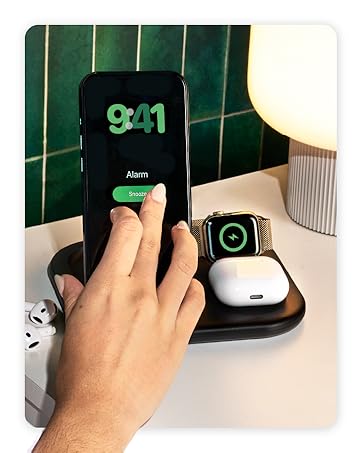
Image: A graphic illustrating the Belkin 2-year warranty and $2,500 Connected Equipment Warranty.
For detailed terms and conditions, or to access customer support, please visit the official Belkin website: Belkin Support


