
B&G ZUES SR (10-inch)
B&G Zeus SR Chartplotters User Manual
Model: ZUES SR (10-inch)
Brand: B&G
1. Introduction
The B&G Zeus SR Chartplotter is an advanced marine navigation system designed for sailors. Featuring a powerful 8-core processor and a SolarMAX HD display, it offers a smooth, fast, and intuitive user experience. This manual provides essential information for the installation, operation, maintenance, and troubleshooting of your Zeus SR Chartplotter, ensuring optimal performance and longevity.


2. Unboxing and Package Contents
Before beginning installation, carefully unpack all components and verify that all items are present. If any items are missing or damaged, contact your dealer immediately.
Included Components:
- Sun cover
- 4-pin power cable
- Gimble bracket
- Rear mount kit
- ZEUS SR MFD (Multi-Function Display)
- C-MAP DISCOVER® X Chart Card (AMER region only)
3. Setup
3.1 Physical Installation
The Zeus SR Chartplotter can be installed using either the included gimble bracket for surface mounting or the rear mount kit for flush mounting. Ensure the chosen location provides clear visibility, protection from direct sunlight and excessive moisture, and adequate ventilation. Refer to the detailed installation template provided in the packaging for precise cut-out dimensions for flush mounting.

3.2 Electrical Connection
Connect the supplied 4-pin power cable to the corresponding port on the rear of the Zeus SR unit. Ensure the power source is a stable 12V DC supply, suitable for marine electronics. Observe correct polarity (red to positive, black to negative) to prevent damage. It is recommended to install an inline fuse appropriate for the unit's power consumption.
3.3 Initial Configuration
Upon first power-on, the unit will guide you through an initial setup wizard. This includes setting language preferences, time zone, and basic network configurations. Insert the C-MAP DISCOVER® X Chart Card into the designated card slot before initial use to ensure chart data is available.
4. Operating Instructions
4.1 User Interface Overview
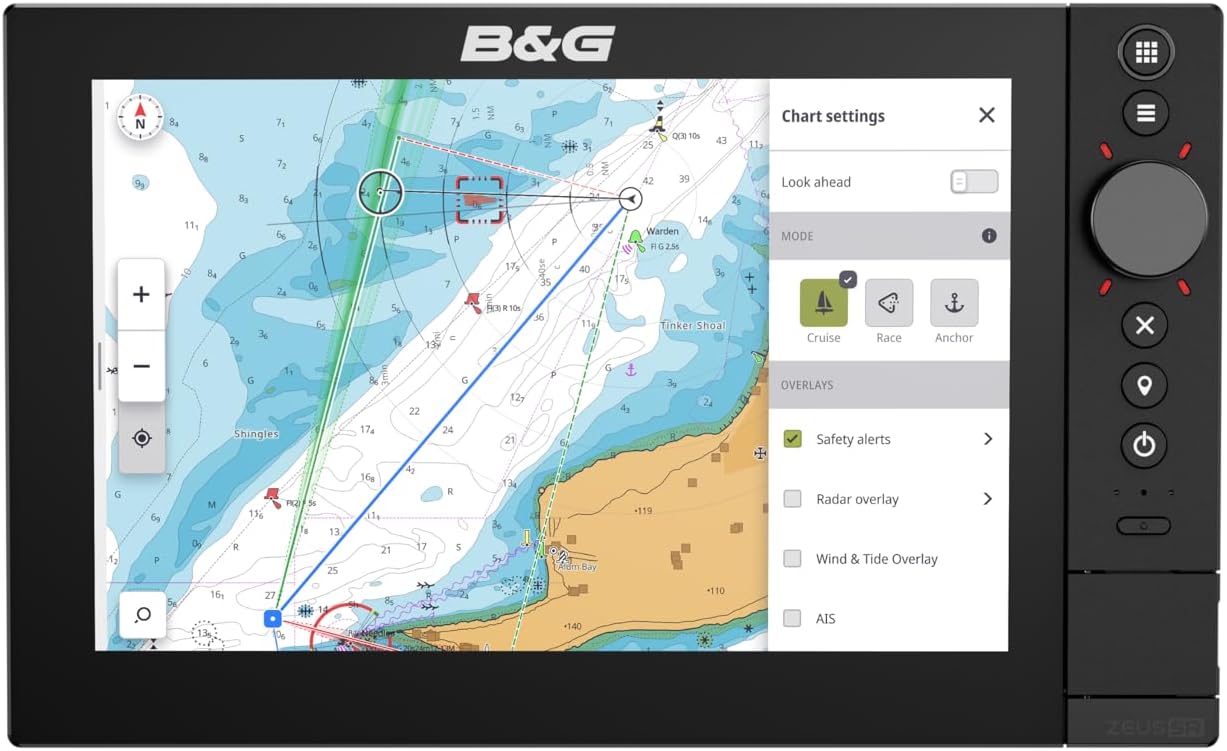
The Zeus SR features a responsive SolarMAX IPS HD touchscreen for primary interaction. For precise control in challenging conditions, a rotary dial and dedicated keypad buttons are also provided on the side of the unit. The redesigned interface allows for quick navigation between applications and customizable home screens.


4.2 Core Functions
4.2.1 Charting and Navigation
Utilize the pre-loaded C-MAP Discover X chart card for detailed navigation. Create and manage waypoints, routes, and tracks directly on the display. Access various chart overlays such as safety alerts, radar overlay, and wind & tide information to enhance situational awareness.


4.2.2 Instrument Display
Monitor critical sailing data such as boat speed, wind speed and direction, depth, and course over ground. The instrument display can be customized to show the most relevant information for your current activity.

4.2.3 Radar Integration
The Zeus SR is compatible with HALO Radars, allowing for seamless integration of radar imagery directly onto your chart display. This provides enhanced collision avoidance and navigation capabilities, especially in low visibility conditions.
4.2.4 System Integration
The Zeus SR offers full integration with other B&G systems, including Triton 2 Sailing Auto Pilots, Triton 2 and Nemesis Instruments, various sensors, and sonar. It also supports mobile app integration for remote viewing and control, enhancing flexibility and convenience.

5. Maintenance
5.1 Cleaning
Regularly clean the display and unit casing with a soft, damp cloth. For stubborn marks, use a mild, non-abrasive cleaning solution specifically designed for electronic screens. Avoid using harsh chemicals, solvents, or abrasive materials, as these can damage the screen coating and casing.
5.2 Software Updates
Periodically check the B&G website for software updates. Keeping your Zeus SR's software up-to-date ensures you have the latest features, performance enhancements, and bug fixes. Follow the instructions provided with the software update package carefully.
6. Troubleshooting
This section provides solutions to common issues you might encounter with your Zeus SR Chartplotter. For problems not listed here, or if the suggested solutions do not resolve the issue, please contact B&G customer support.
| Problem | Possible Cause | Solution |
|---|---|---|
| Unit does not power on | No power supply; Blown fuse; Loose connection | Check power cable connection; Inspect and replace fuse if necessary; Verify battery voltage. |
| Display is dim or unreadable | Brightness setting too low; Direct sunlight glare | Adjust brightness settings in the menu; Reposition unit or use sun cover. |
| GPS position not acquired | Poor satellite signal; External GPS antenna issue | Ensure clear view of sky; Check external GPS antenna connection if applicable. |
| Touchscreen unresponsive | Screen dirty; Software glitch | Clean screen thoroughly; Restart the unit; Use physical buttons if available. |
7. Specifications
Detailed technical specifications for the B&G Zeus SR Chartplotter (10-inch model).
| Feature | Specification |
|---|---|
| Brand | B&G |
| Model Name | ZUES SR |
| Screen Size | 10 Inches |
| Display Type | LCD (SolarMAX IPS HD) |
| Item Weight | 4.23 Pounds |
| Product Dimensions (LxWxH) | 12.43" x 4.68" x 7.73" |
| Color | Black |
| Material | Plastic |
| Manufacturer | NAVICO GROUP APAC LIMITED |
| Part Number | 000-16021-001 |

8. Warranty and Support
The B&G Zeus SR Chartplotter comes with a 2 Year Manufacturer Warranty. This warranty covers defects in materials and workmanship under normal use. Please retain your proof of purchase for warranty claims.
For technical support, service, or warranty inquiries, please contact your authorized B&G dealer or visit the official B&G website for contact information and support resources. Providing your model name (ZUES SR) and part number (000-16021-001) will help expedite your support request.
Ask a question about this manual
Ask about setup, troubleshooting, compatibility, parts, safety, or missing instructions. Manuals+ will review the question and use this page’s manual context to help answer it.