
Introduction
Thank you for choosing the OttLite Creative Curves LED Desk Lamp. This manual provides essential information for the safe and efficient operation of your new lamp. Designed for optimal visual clarity, this lamp features OttLite's ClearSun LED technology, multiple brightness settings, and a convenient USB charging port. Please read these instructions thoroughly before use and retain them for future reference.
Important Safety Instructions
- Read all instructions before using the lamp.
- To reduce the risk of electric shock, do not immerse the lamp in water or other liquids.
- Do not operate the lamp with a damaged cord or plug.
- Keep the lamp away from heat sources and direct sunlight.
- This lamp is for indoor use only.
- Do not attempt to modify or repair the lamp yourself. Contact qualified service personnel for assistance.
Package Contents
- OttLite Creative Curves LED Desk Lamp
- Power Adapter
Setup
- Carefully remove the lamp from its packaging.
- Place the lamp on a stable, flat surface. The weighted base ensures stability.
- Connect the power adapter to the DC IN port on the back of the lamp base.
- Plug the power adapter into a standard electrical outlet.
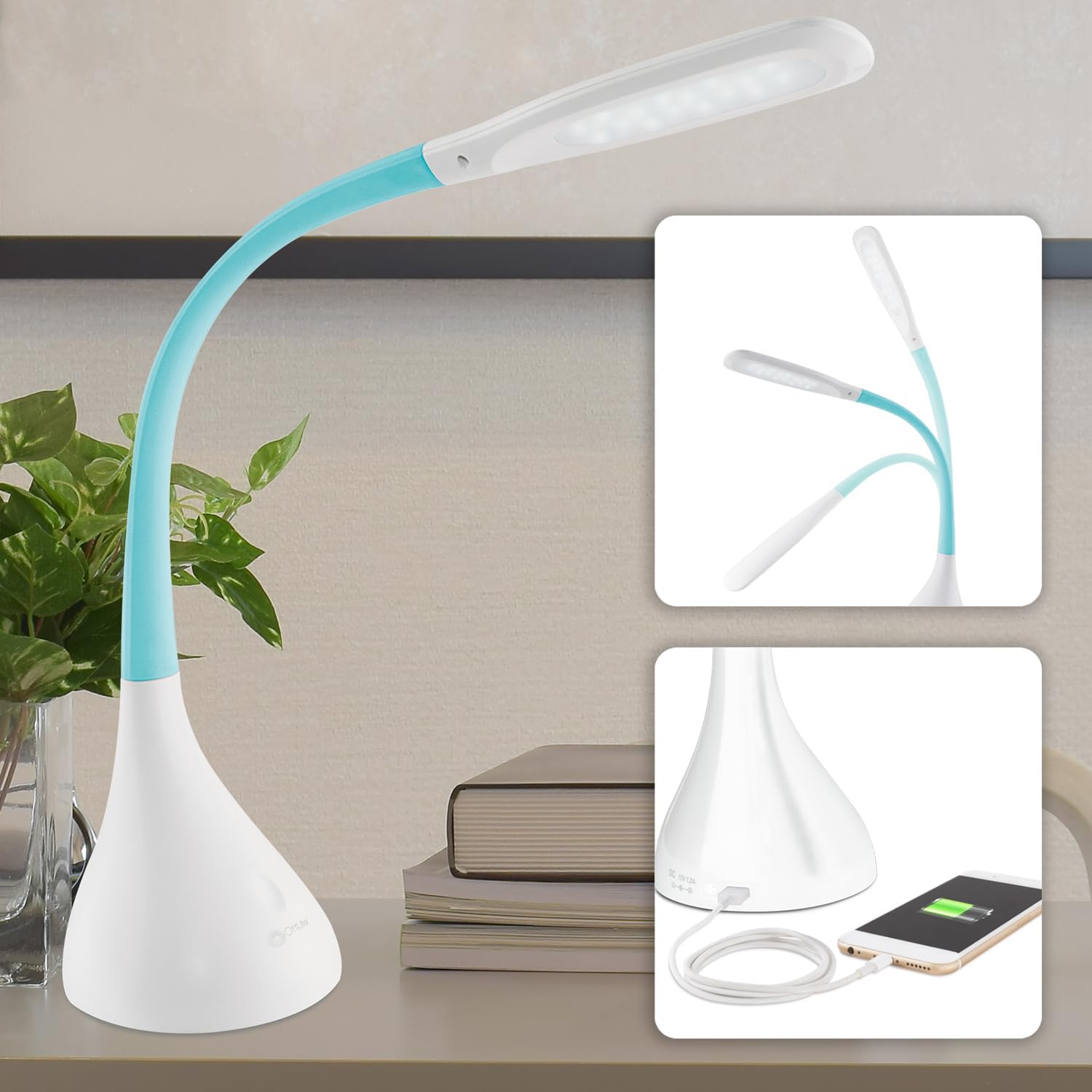
Figure 1: The OttLite Creative Curves LED Desk Lamp, showcasing its flexible neck and the USB charging port on the base.
Operating Instructions
1. Powering On/Off and Brightness Adjustment
The lamp features touch-sensitive controls for easy operation.
- To turn the lamp ON, lightly touch the power button on the lamp base.
- To cycle through the four brightness levels, continue to lightly touch the power button.
- To turn the lamp OFF, touch the power button after the fourth brightness level.

Figure 2: The touch-sensitive power button on the lamp base allows for easy control of power and brightness settings.
2. Flexible Neck Adjustment
The lamp's rubberized flexible neck allows for precise light positioning. Gently bend the neck to direct the illumination exactly where needed. The neck extends in height from 11.25 to 23.75 inches and holds its position securely.

Figure 3: The flexible gooseneck design enables users to adjust the light to any desired angle for optimal task lighting.
3. USB Charging Port
A built-in 2.1A USB charging port is located on the back of the lamp base. Use this port to conveniently charge your mobile devices, such as smartphones or tablets, while using the lamp.

Figure 4: The integrated 2.1A USB port provides a convenient charging solution for electronic devices directly from the lamp base.
Key Features
ClearSun LED Technology
OttLite's exclusive ClearSun LED technology is designed to provide natural daylight illumination, which helps reduce eyestrain by up to 51%. This technology matches the spectral output of the sun, creating balanced, smooth lighting that is easier on the eyes compared to standard LEDs.

Figure 5: Visual representation of ClearSun LED technology's balanced light spectrum, designed to minimize eye strain.
High Color Accuracy (CRI 95+)
The Color Rendering Index (CRI) measures how accurately a light source reveals the true colors of objects. With a CRI score of 95+, the OttLite Creative Curves LED Desk Lamp ensures exceptionally vivid and true-to-life color representation, similar to natural daylight.

Figure 6: Explanation of CRI and how OttLite's 95+ CRI ensures accurate color perception.
Adjustable Height
The lamp's design allows for height adjustment from 11.25 inches to 23.75 inches, providing versatility for various tasks and desk configurations.

Figure 7: The lamp's adjustable height feature, making it suitable for different uses and users.
Maintenance
- Cleaning: Ensure the lamp is unplugged before cleaning. Use a soft, dry cloth to wipe down the lamp. Do not use abrasive cleaners or solvents.
- Bulb Replacement: The LED lights are integrated and not user-replaceable. The LEDs are designed for long-lasting performance.
- Storage: When not in use for extended periods, unplug the lamp and store it in a cool, dry place.
Troubleshooting
| Problem | Possible Cause | Solution |
|---|---|---|
| Lamp does not turn on. | Power adapter not properly connected or no power from outlet. | Check power connections. Try a different outlet. |
| USB port not charging device. | Device not properly connected or lamp not powered on. | Ensure the device is securely plugged into the USB port. Confirm the lamp is powered on. |
| Light flickers or is dim. | Loose connection or power issue. | Check power connections. Ensure the lamp is on a stable power supply. |
Specifications
| Feature | Detail |
|---|---|
| Brand | OttLite |
| Model Name | Creative Curves LED Desk Lamp w/ USB, Clearsun |
| Model Number | CSA30WTC-SHPR |
| Light Source Type | LED |
| Number of Light Sources | 4 (Brightness Levels) |
| Color | White/Blue |
| Material | Aluminum |
| Finish Type | Polished |
| Item Weight | 4.63 Pounds |
| Product Dimensions | 6.75"D x 6.75"W x 15"H (Adjustable height up to 23.75") |
| USB Port Output | 2.1A |
| Power Source | Corded Electric (Not Battery Powered as stated in data, correcting based on context) |
| CRI | 95+ |
Official Product Videos
OttLite Creative Curves LED Desk Lamp with Adjustable Neck
Video demonstrating the adjustable neck and various features of the OttLite Creative Curves LED Desk Lamp. This video highlights the lamp's flexibility and ease of use for different tasks.
Every Feature You Need to Know of the OttLite Desk Lamp
A detailed overview of all the features of the OttLite Desk Lamp, including brightness settings, flexible design, and USB charging capabilities.
Warranty and Support
Warranty information is not available in the provided product data. For support or further inquiries, please visit the official OttLite website or contact their customer service department.
OttLite Website: www.ottlite.com


