
1. Introduction
Thank you for choosing the HAMMER Ultra Pods HTWS003 TWS Wireless Bluetooth Earbuds. This manual provides essential information on how to set up, operate, maintain, and troubleshoot your new earbuds. Please read this guide thoroughly before use to ensure optimal performance and longevity of your device.

Image: HAMMER Ultra Pods HTWS003 TWS Wireless Bluetooth Earbuds in blue, shown with charging case.
2. What's in the Box
Upon unboxing your HAMMER Ultra Pods HTWS003, please ensure all the following items are present:
- 1 Unit Earbuds (Left and Right)
- 1 Unit Charging Case
- 1 Unit USB Type-A to C Charging Cable
- Ear Cushions (various sizes)
- User Manual (Digital version available via QR Code)

Image: Contents of the HAMMER Ultra Pods HTWS003 box, including earbuds, charging case, USB-C cable, and user manual.
3. Setup
3.1. Charging the Earbuds and Case
Before first use, fully charge the earbuds and charging case. Use the provided USB Type-C cable to connect the charging case to a power source. A full charge typically takes 1 hour.

Image: Illustration showing the HAMMER Ultra Pods charging case and earbuds, highlighting 50 hours of playtime and 1 hour to full charge via USB Type-C.
3.2. Pairing with a Device
- Open the charging case. The earbuds will automatically enter pairing mode.
- On your device (smartphone, tablet, laptop), enable Bluetooth.
- Search for available devices and select "HAMMER Ultra Pods HTWS003" from the list.
- Once connected, the earbuds are ready for use. They will automatically reconnect to the last paired device when taken out of the case.

Image: Diagram illustrating Bluetooth V6.0 features: 10-meter transmission range, 1-step pairing, auto reconnect, and low latency.
4. Operating the Earbuds
4.1. Touch Controls
The Ultra Pods feature intuitive touch controls for managing audio playback, calls, and voice assistant functions.
| Action | Function |
|---|---|
| Single Tap (Left/Right) | Play/Pause Music, Answer/End Call |
| Double Tap (Right) | Next Track |
| Double Tap (Left) | Previous Track |
| Long Press (Left/Right) | Activate Voice Assistant, Reject Call |
| Press and hold right earbud for 2 seconds | Switch ANC Modes |
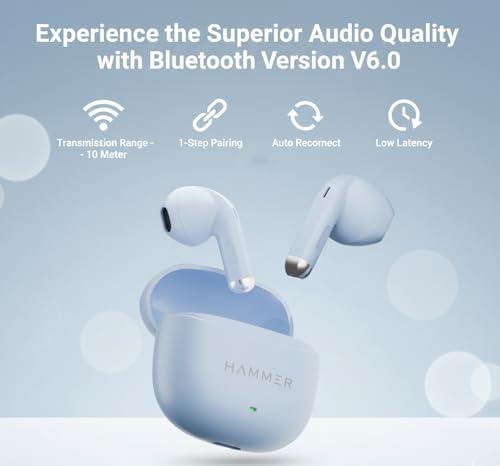
Image: A person demonstrating touch control on an earbud, with text indicating 'Control the Rhythm WITH A TOUCH'.
4.2. Voice Assistant
To activate your device's voice assistant (e.g., Siri, Google Assistant), press and hold either the left or right earphone for a few seconds until you hear a prompt.

Image: A person activating voice assistance on an earbud by pressing and holding, with icons for popular voice assistants.
4.3. Making and Receiving Calls
The earbuds feature an in-built high-definition microphone and Environmental Noise Cancellation (ENC) with 4 microphones for clear communication.
- Answer Call: Single tap either earbud.
- End Call: Single tap either earbud during a call.
- Reject Call: Long press either earbud.

Image: A woman wearing an earbud, with text highlighting ENC and 4 microphones for clear calling.
4.4. Active Noise Cancellation (ANC)
The earbuds support Active Noise Cancellation up to 32dB, reducing unwanted background sound. To switch between ANC modes, press and hold the right earbud for 2 seconds.

Image: Illustration showing 32dB ANC feature with a person wearing earbuds in a quiet outdoor setting.
5. Features
- Immersive Sound: Equipped with 13mm dynamic drivers for deep bass and clear highs.
- Extended Playtime: Up to 50 hours of combined playback with the charging case, and 100 hours of standby time.
- Advanced Bluetooth: Bluetooth V6.0 ensures stable connectivity, faster pairing, and lower latency within a 10-meter range.
- Water Resistance: IPX5 water-resistant rating protects against splashes and sweat, making them suitable for workouts.
- Compact Design: Ergonomically designed for comfort and portability.

Image: Close-up of an earbud driver with sound waves, indicating 13mm sound driver for deep bass and crystal-clear vocals.

Image: Illustration of Next-Gen Bluetooth V6.0 offering faster, stronger, and more reliable connectivity with quick pairing and stable connection.

Image: Image showcasing the compact and bold design of the earbuds and charging case.
6. Maintenance
Proper maintenance ensures the longevity and performance of your earbuds.
- Cleaning: Regularly clean the earbuds and charging case with a soft, dry, lint-free cloth. Do not use abrasive cleaners or solvents.
- Ear Tips: Remove and clean ear tips periodically with water and mild soap, then dry completely before reattaching.
- Charging Ports: Ensure the USB-C charging port is free from dust and debris.
- Storage: When not in use, store the earbuds in their charging case to protect them from damage and dust. Avoid extreme temperatures.
7. Troubleshooting
If you encounter issues with your earbuds, refer to the following common solutions:
- Earbuds not pairing: Ensure earbuds are charged. Turn off and on your device's Bluetooth. Try forgetting the device in your Bluetooth settings and re-pairing.
- No sound from one earbud: Place both earbuds back in the case, close it, wait a few seconds, then take them out again. Ensure they are properly charged.
- Charging issues: Check the USB-C cable and power adapter. Ensure the charging contacts on the earbuds and inside the case are clean and free of debris.
- Low volume or poor sound quality: Adjust the volume on your connected device. Ensure ear tips are correctly sized and seated in your ear for a good seal. Clean any earwax from the earbud nozzles.
- Voice Assistant not responding: Ensure the earbuds are connected and your device's voice assistant is enabled. Check the touch control settings.
8. Specifications
| Feature | Detail |
|---|---|
| Model Number | HTWS003 |
| Brand | HAMMER |
| Ear Placement | In Ear |
| Form Factor | In Ear |
| Bluetooth Version | 6.0 |
| Bluetooth Range | 10 Metres |
| Audio Driver Size | 13 Millimetres |
| Playtime | Up to 50 Hours (with charging case) |
| Standby Time | 100 Hours |
| Battery Charge Time | 1 Hour |
| Charging Port | USB Type-C |
| Water Resistance | IPX5 Water Resistant |
| Control Type | Touch Control |
| Microphone | In-Built High-Definition Microphone, ENC with 4 Mics |
| Active Noise Cancellation (ANC) | Up to 32dB |
| Compatible Devices | Laptops, Smartphones |
| Item Weight | 6 Grams |
| Material | Plastic |
| Country of Origin | India |
9. Warranty and Support
Your HAMMER Ultra Pods HTWS003 come with a 6-month warranty from the date of purchase. This warranty covers manufacturing defects. Please retain your proof of purchase for warranty claims.
Customer Support:
For any queries, technical assistance, or warranty claims, please contact HAMMER customer support:
- Email: Info@hammeronline.in
- Phone: 0180-4008081, 9991108081