
1. Product Overview
The Avutrel TPMS Solar Tire Pressure Monitoring System is designed to provide real-time tire pressure and temperature data, enhancing driving safety. This system includes a main display unit and four external sensors, offering multiple alarm modes and flexible charging options.
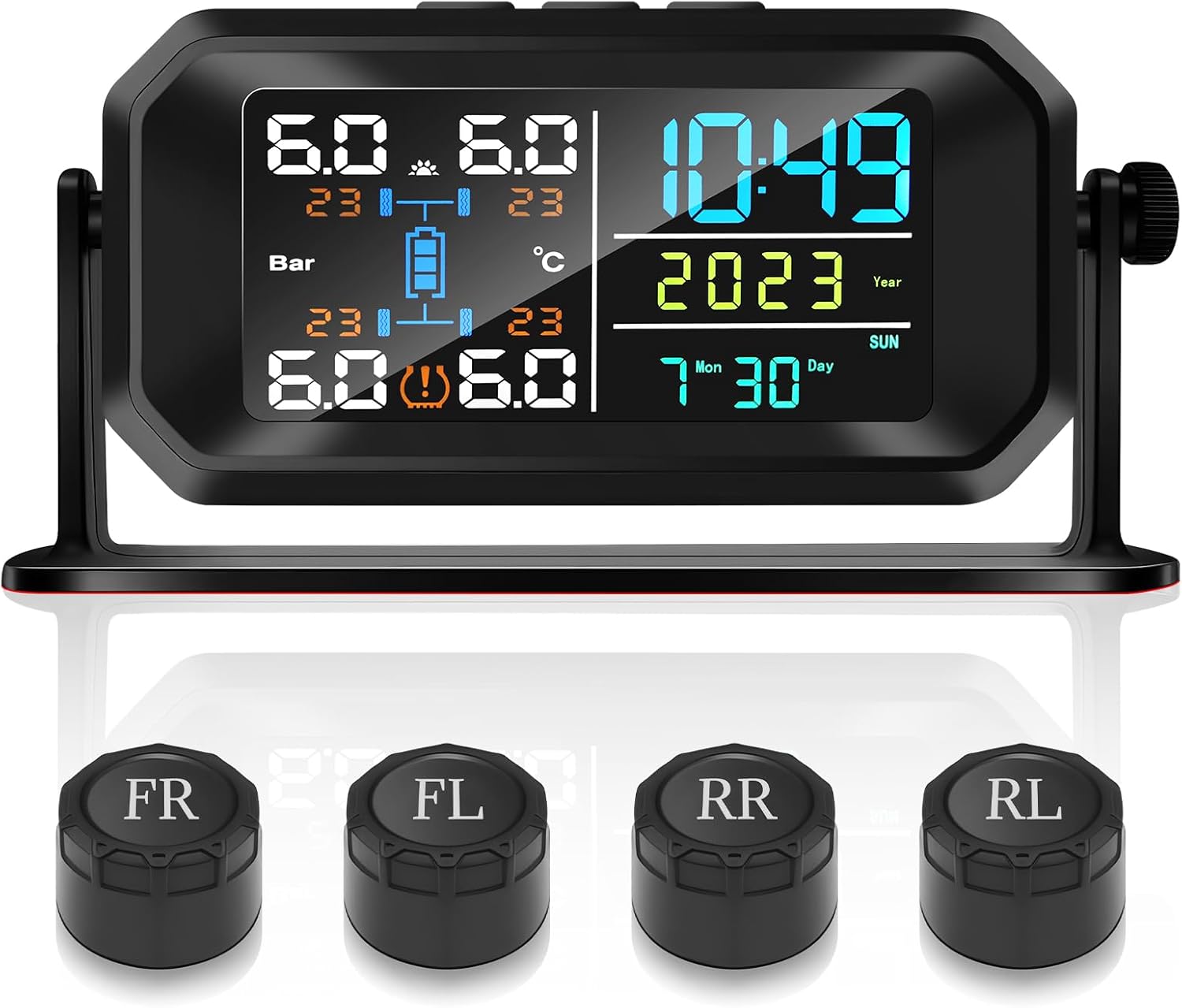
Image 1.1: Avutrel TPMS Solar Tire Pressure Monitoring System, showing the main display unit and four external sensors labeled FR, FL, RR, RL.
Package Contents
- 1 x TPMS Display Unit
- 4 x External Tire Pressure Sensors
- 1 x USB Charging Cable
- 1 x Installation Wrench
- 4 x Anti-theft Nuts
- 1 x User Manual
2. Setup and Installation
2.1 Charging the Display Unit
The display unit can be charged via solar power or USB. Ensure the unit is fully charged before initial use for optimal performance.
- Solar Charging: Place the display unit in direct sunlight. The integrated solar panel will charge the internal 1200mAh battery.
- USB Charging: Connect the provided USB charging cable to the Type-C port on the display unit and a 5V USB power source.

Image 2.1: Dual charging methods for the TPMS display unit, illustrating solar charging and USB cable charging.
Video 2.1: Demonstrates connecting the USB charging cable to the TPMS display unit.
2.2 Sensor Installation
The four external sensors are labeled for specific tire positions (FR: Front Right, FL: Front Left, RR: Rear Right, RL: Rear Left). Install them according to the labels.
- Unscrew the original valve cap from the tire valve.
- Screw on an anti-theft nut onto the tire valve.
- Screw the corresponding sensor onto the tire valve.
- Tighten the anti-theft nut against the sensor using the provided wrench to secure it.
- Repeat for all four tires.

Image 2.2: Step-by-step guide for installing the external tire pressure sensors, including the anti-theft nuts.
2.3 Mounting the Display Unit
The display unit features an upgraded detachable 360° rotating shockproof bracket, allowing for flexible placement.
- Dashboard Placement: Use the adhesive pad to secure the bracket base to your vehicle's dashboard.
- Windshield/Sun Visor Placement: The bracket can be adjusted to attach to the windshield or sun visor, optimizing solar charging exposure and viewing angle.

Image 2.3: Two installation methods for the display unit: mounted on the windshield and placed on the center console.
3. Operating Instructions
3.1 Power On/Off and Display Modes
The display unit features automatic wake-up and sleep modes to conserve battery life.
- Automatic Wake-up: The unit automatically senses vibration and turns on when you enter the car.
- Automatic Sleep Mode: The display enters sleep mode after approximately 15 minutes of no vibration or activity.
- Manual Power On/Off: Press and hold the power button (usually the middle button) to manually turn the unit on or off.

Image 3.1: Illustration of the vibration detection function for automatic wake-up and the automatic sleep mode.
3.2 Real-time Monitoring and Alarm Modes
The system continuously monitors tire pressure and temperature, alerting you to potential issues with visual and audible alarms.

Image 3.2: The display unit illustrating various monitoring and alarm modes.
The 6 monitoring alarm modes include:
- High Pressure Alarm: Alerts when tire pressure exceeds the set high limit.
- Low Pressure Alarm: Alerts when tire pressure drops below the set low limit.
- High Temperature Alarm: Alerts when tire temperature exceeds the set limit.
- Fast Leak Alarm: Alerts for rapid pressure loss.
- Slow Leak Alarm: Alerts for gradual pressure loss.
- Low Sensor Battery Alarm: Indicates a sensor battery needs replacement.
- Sensor Failure Alarm: Indicates a sensor is not functioning correctly.
Video 3.1: Shows the TPMS display unit in operation, cycling through different display modes and settings.
3.3 Setting Parameters
The display unit allows for customization of various parameters to suit your vehicle and preferences. Refer to the detailed instructions in the included user manual for specific steps on how to adjust:
- Pressure Units (e.g., PSI, Bar)
- Temperature Units (e.g., °C, °F)
- High/Low Pressure Alarm Thresholds for front and rear tires
- High Temperature Alarm Threshold
4. Maintenance
4.1 Sensor Battery Replacement
When a low sensor battery alarm is triggered, replace the CR1632 battery in the affected sensor.
- Remove the sensor from the tire valve.
- Use the provided wrench to carefully open the sensor casing.
- Remove the old CR1632 battery.
- Insert a new CR1632 battery, ensuring correct polarity.
- Close the sensor casing securely and re-install the sensor on the tire valve.
Video 4.1: Demonstrates the process of replacing the battery in an external tire pressure sensor.
4.2 Cleaning
Wipe the display unit and sensors with a soft, damp cloth. Avoid using abrasive cleaners or solvents that may damage the components.
5. Troubleshooting
If you encounter issues with your Avutrel TPMS, refer to the following common problems and solutions:
| Problem | Possible Cause | Solution |
|---|---|---|
| Display not turning on | Low battery; Unit in sleep mode; Power button not pressed correctly | Charge the unit via solar or USB. Gently shake the unit or press the power button to wake it up. |
| No tire data displayed / Connectivity issues | Sensors not installed correctly; Sensor battery low; Interference; Distance too far (for trailers/RVs) | Ensure sensors are tightly screwed on. Replace sensor batteries if needed. Reposition the display unit to reduce interference. |
| Inaccurate readings | Sensor malfunction; Incorrect tire pressure calibration | Verify tire pressure with a reliable gauge. Re-pair sensors if possible (refer to full manual). Contact support if issue persists. |
| Alarm sounds frequently | Tire pressure/temperature outside set limits; Alarm thresholds set too narrow | Check actual tire pressure/temperature. Adjust alarm thresholds in settings if necessary. |
6. Specifications
Key technical specifications for the Avutrel TPMS Solar Tire Pressure Monitoring System:
- Model: T13
- Brand: Avutrel
- Display Type: LCD Color Screen
- Charging: Solar & USB (Type-C)
- Internal Battery: 1200mAh
- Sensor Battery: CR1632 (replaceable)
- Sensor Water Resistance: IP67
- Alarm Modes: 6 (High/Low Pressure, High Temperature, Fast/Slow Leak, Low Sensor Battery, Sensor Failure)
- Compatibility: Universal for Car, RV, SUV, MPV, Sedans, Trucks, Trailers
- Product Dimensions: 7.6 x 6.2 x 1.8 inches
- Item Weight: 9 ounces
7. Warranty and Support
7.1 Warranty Information
Avutrel products are designed for durability and performance. For specific warranty details, including coverage period and terms, please refer to the warranty card included with your product or contact Avutrel customer service.
7.2 Customer Support
If you require further assistance, have questions about installation, operation, or troubleshooting that are not covered in this manual, please contact Avutrel customer support. Contact information can typically be found on the product packaging or the official Avutrel website.