
1. Introduction
This manual provides detailed instructions for the installation, operation, and maintenance of your Avutrel Motorcycle Tire Pressure Monitoring System (TPMS). This system is designed to enhance riding safety by providing real-time tire pressure and temperature data, alerting you to potential issues before they become critical. Please read this manual thoroughly before using the product.
2. Product Features
- Smart Multi-Alert Protection: Provides timely alerts for receiver leakage, low pressure, high pressure, high temperature, low battery, and no signal.
- Real-Time Display: LCD screen simultaneously shows tire position, real-time PSI values, and temperature for both tires.
- Solar and Magnetic Charging: Features magnetic solar charging technology, reducing the need for frequent battery replacement.
- Military-Grade Durability: IP67 waterproof and dustproof sensors withstand various weather conditions, from rain to desert heat (-40°F to 257°F).
- Easy Installation: Quick installation without tire removal or complex wiring.
- Smart Switch: Automatically turns on with motorcycle start and enters sleep standby mode after 10 minutes of inactivity.
- Wide Compatibility: Suitable for various motorcycles, electric bicycles, and two-wheeled motor vehicles.

Image 2.1: Overview of the Avutrel Motorcycle TPMS display and its key functions.

Image 2.2: Detailed view of the Avutrel Motorcycle TPMS display interface, indicating real-time data points.
3. Package Contents
The Avutrel Motorcycle TPMS package includes the following items:
- 1 x Motorcycle Tire Pressure Monitoring System (Monitor)
- 2 x External Tire Pressure Sensors
- 2 x Anti-theft Nuts
- 1 x Support Bracket
- 1 x Wrench
- 1 x Charging Cable
- 1 x User Manual (this document)

Image 3.1: All components included in the Avutrel Motorcycle TPMS package.
4. Setup and Installation
4.1 Display Installation
The monitor can be installed on your motorcycle handlebars using the provided support bracket. The bracket is rotatable and adjustable for optimal viewing.
- Attach the support bracket to your motorcycle's handlebars.
- Secure the monitor onto the bracket, adjusting the angle for clear visibility.

Image 4.1: Example of the display unit mounted on a motorcycle handlebar.
4.2 Sensor Installation
The external sensors are designed for quick and easy installation on your tire valve stems.
- Unscrew the original valve cap from the tire valve.
- Screw on one of the anti-theft nuts onto the valve stem.
- Screw the sensor onto the valve stem until it is hand-tight.
- Rotate the anti-theft nut counter-clockwise towards the sensor.
- Use the provided wrench to tighten the anti-theft nut against the sensor to secure it.
- Check for air leakage by applying soapy water around the sensor and valve stem. No bubbles should appear.
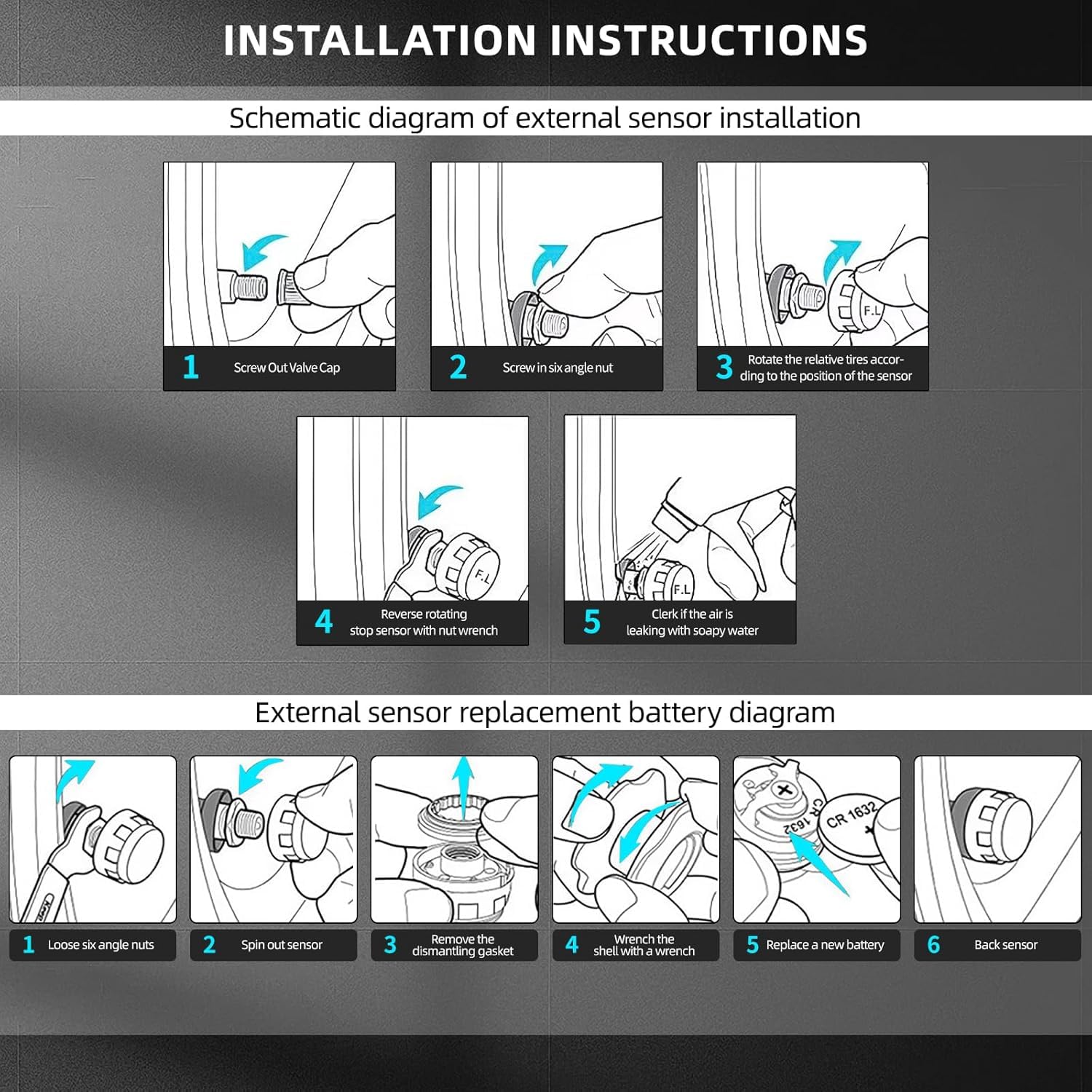
Image 4.2: Schematic diagram illustrating the external sensor installation process.

Image 4.3: Visual representation of the external sensor installation on a motorcycle tire.
4.3 Initial Power On and Pairing
Once installed, the system should automatically power on when the motorcycle starts. The sensors are pre-paired with the monitor. If pairing is lost or new sensors are used, refer to the detailed pairing instructions in the full user manual (QR code on packaging).
Video 4.1: This video demonstrates the components of the Avutrel Motorcycle TPMS and shows the display unit powering on and cycling through its readings, including time and tire pressure/temperature. It also briefly shows the display turning off.
5. Operating Instructions
5.1 Display Overview
The LCD display provides real-time information for both front (FW) and rear (RW) tires, including pressure (PSI/Bar) and temperature (°C/°F). It also shows the current time and battery status.
5.2 Interpreting Alerts
The system will issue audio and visual alerts for the following conditions:
- Receiver Leakage: Indicates a potential leak in the system.
- Low Pressure: Tire pressure falls below the set threshold.
- High Pressure: Tire pressure exceeds the set threshold.
- High Temperature: Tire temperature exceeds the set threshold.
- Low Battery: The monitor or sensor battery is low.
- No Signal: Loss of communication with a sensor.
Upon receiving an alert, safely pull over and inspect your tires and the TPMS system. Address any issues promptly.
6. Maintenance
6.1 Charging the Monitor
The monitor features both solar and magnetic charging. Ensure the solar panel is exposed to sunlight for continuous charging. For faster charging or in low-light conditions, use the provided USB charging cable.

Image 6.1: Illustration of the solar and magnetic charging capabilities of the TPMS monitor.
6.2 Sensor Battery Replacement
The external sensors use replaceable batteries. When a sensor battery is low, the monitor will display a low battery alert for that specific tire.
- Loosen the anti-theft nut and unscrew the sensor from the valve stem.
- Carefully open the sensor casing.
- Remove the old battery (CR1632).
- Insert a new CR1632 battery, ensuring correct polarity.
- Close the sensor casing and re-install it on the tire valve stem following the installation steps in Section 4.2.
Image 6.2: Detailed steps for replacing the battery in an external sensor.
6.3 Cleaning
Wipe the monitor and sensors with a soft, damp cloth. Do not use abrasive cleaners or solvents.
7. Troubleshooting
If you encounter issues with your Avutrel Motorcycle TPMS, refer to the following common problems and solutions:
| Problem | Possible Cause | Solution |
|---|---|---|
| No display on monitor | Low battery; Monitor off | Charge the monitor; Press any button to wake up or ensure motorcycle is running. |
| Sensor data not displayed / "No Signal" alert | Sensor battery low; Sensor not installed correctly; Interference | Replace sensor battery; Re-install sensor securely; Move away from strong electromagnetic sources. |
| Inaccurate pressure/temperature readings | Sensor not fully seated; Sensor damaged | Ensure sensor is tightly installed; Contact support for replacement if damaged. |
| Air leakage from sensor | Sensor not tightened correctly; Damaged O-ring | Re-tighten sensor and anti-theft nut; Inspect O-ring for damage and replace if necessary. |
If the problem persists after attempting these solutions, please contact Avutrel customer support.
8. Specifications
- Pressure Range: 0-6.6 bar
- Pressure Accuracy: +/-0.1 bar
- Waterproof Rating: IP67 (sensors)
- Operating Temperature: -40°F to 257°F (-40°C to 125°C)
- Sensor Battery Type: CR1632
- Power Source: Solar charging, Magnetic USB charging
- Display: LCD
- Material: Glass, Metal, Plastic
- Item Weight: Approximately 9.1 ounces
- Package Dimensions: 7.52 x 4.53 x 2.48 inches
9. Warranty and Support
Avutrel products are designed for quality and reliability. For warranty information, product support, or to report any issues, please refer to the contact details provided on the product packaging or visit the official Avutrel website. Keep your purchase receipt for warranty claims.