1. Introduction
This manual provides essential instructions for setting up, operating, and maintaining your realme 14x 5G Smartphone. Please read this manual thoroughly before using your device to ensure proper function and safety.
The realme 14x 5G is designed with advanced features including a 120Hz display, a 6000mAh battery, an 80MP AI camera, and a MediaTek Dimensity 6300 5G processor, all protected by ArmorShell and IP69 water and dust resistance.
2. Package Contents
Verify that your package contains the following items:
- realme 14x 5G Smartphone
- USB Cable
- Quick Start Guide (may vary by region)
- Safety Information (may vary by region)

Image: realme 14x 5G Smartphone, Crystal Black variant, showcasing its front and rear design with key features like IP69 rating and 6000mAh battery.
3. Device Overview
Familiarize yourself with the physical components of your realme 14x 5G Smartphone.
3.1. Physical Components
- Front Camera: Located at the top center of the display.
- Display: 6.67-inch screen with 120Hz refresh rate.
- Volume Buttons: Typically on the left side for adjusting audio levels.
- Power Button: Usually on the right side, used for power on/off and screen lock/unlock.
- USB-C Port: Located at the bottom for charging and data transfer.
- Speaker: Located at the bottom.
- Microphone: Located at the bottom.
- SIM Card Tray: Location may vary, typically on the side.
- Rear Cameras: Multiple lenses located on the back, including the 80MP AI camera.
4. Setup
4.1. Initial Power On
- Press and hold the Power Button until the realme logo appears.
- Follow the on-screen prompts to select your language, region, and connect to a Wi-Fi network.
- Sign in with your Google account or create a new one.
4.2. Inserting SIM Card
- Locate the SIM card tray on the side of the device.
- Insert the SIM ejector tool (if provided) into the small hole next to the tray and push gently until the tray pops out.
- Place your Nano-SIM card(s) into the tray with the gold contacts facing down.
- Carefully reinsert the tray into the phone.
4.3. Charging the Battery
Connect the provided USB cable to the phone's USB-C port and the other end to a compatible power adapter. For optimal charging speed, use a 45W fast charger.

Image: Visual representation of the 6000mAh battery and 45W fast charging capability, highlighting extended usage times for various applications.
5. Operating Instructions
5.1. Display and Navigation
The 6.67-inch display features a 120Hz refresh rate for smooth scrolling and responsiveness. It also includes 10 visual protection modes to reduce eye strain. Navigate using touch gestures or on-screen buttons as configured during setup.
5.2. Camera Operation
The realme 14x 5G is equipped with an 80MP AI-enhanced rear camera system and a front camera. To access the camera, tap the Camera icon on your home screen or app drawer.
- Photo Mode: Tap the shutter button to capture still images.
- Video Mode: Switch to video mode to record footage.
- AI Enhancements: The AI camera automatically optimizes settings for various scenes, preserving fine details in complex environments.
5.3. Battery Management
The 6000mAh battery provides extended usage. With 45W fast charging, you can quickly replenish power. Optimize battery life by managing background apps and screen brightness.

Image: Graphic illustrating the extended battery life of the realme 14x 5G, showing usage times for calls, YouTube, Instagram, and other applications on a single charge.
5.4. Performance and Connectivity
Powered by the MediaTek Dimensity 6300 5G chipset, the device offers efficient performance. It supports 5G connectivity for faster data speeds where available, along with Bluetooth and Wi-Fi for wireless connections.

Image: Diagram illustrating the MediaTek Dimensity 6300 5G chipset, highlighting its 6nm advanced process, 8-cores, and performance enhancements.
5.5. AI Smart Signal Adjustment
The device features AI Smart Signal Adjustment to enhance signal reliability, even in areas with poor network coverage such as underground parking garages. This technology aims to improve call connection rates and app download speeds.
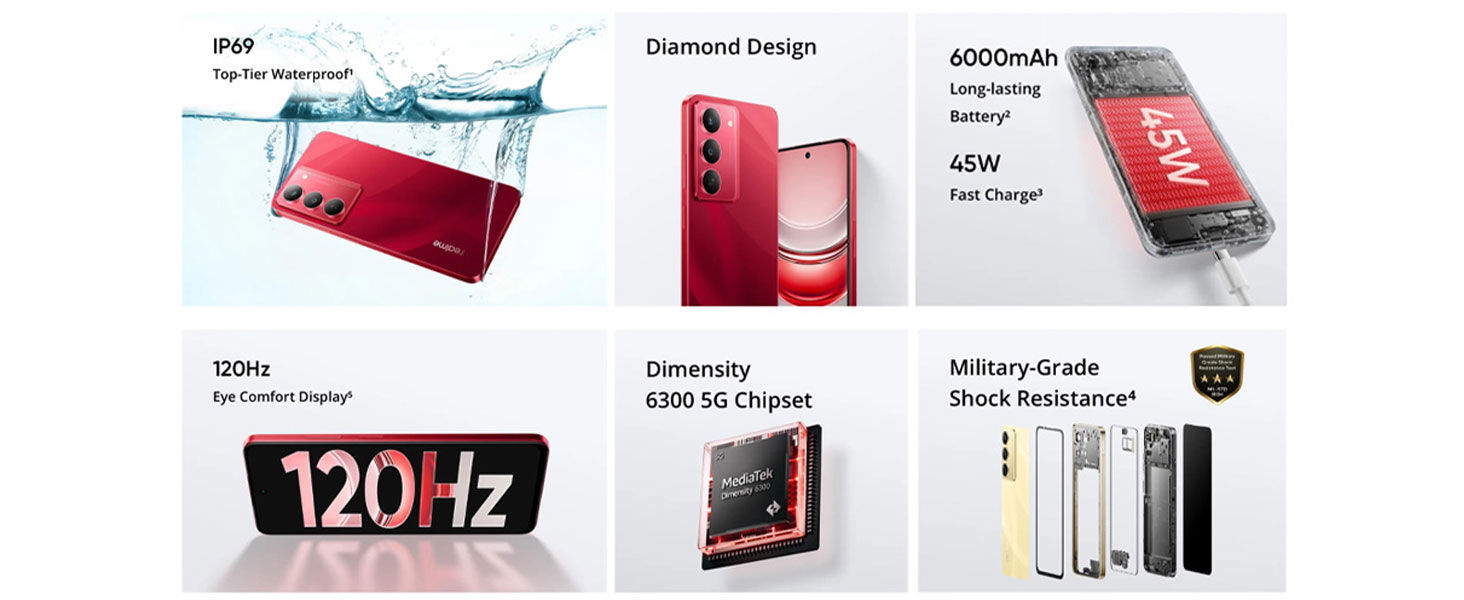
Image: A smartphone displaying a game, with text indicating improvements in call connection, app download speed, Instagram lag rate, and Snapchat lag rate due to AI Smart Signal Adjustment.
5.6. Memory and Storage
The device comes with 8GB of RAM and 128GB of internal storage. This configuration supports smooth multitasking and ample space for applications and media.

Image: Graphic depicting 8GB Dynamic RAM and 128GB Massive Storage, illustrating the device's memory capabilities.
6. Durability Features
The realme 14x 5G is built with enhanced durability features to withstand daily use.
6.1. Military-Grade Shock Resistance
Equipped with ArmorShell protection, the device has passed military-grade impact resistance tests, providing robust fall protection.

Image: A smartphone being held over stairs, with an emblem indicating MIL-STD-810H military-grade shock resistance, demonstrating its drop-proof design.
6.2. IP69 Water and Dust Resistance
The device features an IP69 rating, indicating high resistance to dust ingress and protection against close-range high-pressure, high-temperature spray downs. This provides protection against water splashes and dust exposure.

Image: A realme 14x 5G smartphone submerged in water, illustrating its IP69 water and dust resistance.
6.3. Extreme Environment Adaptation
The phone is designed for stable operation even in challenging conditions, including features like SonicWave Water Ejection and tested performance at temperatures up to 85°C.

Image: A graphic showing the phone's resistance to water and high temperatures, with text "85°C Hot Water Spill? No Problem" and "Showering with Your Phone? No Stress".
7. Maintenance
- Cleaning: Use a soft, lint-free cloth to clean the screen and body. Avoid abrasive materials or harsh chemicals.
- Software Updates: Regularly check for and install system updates to ensure optimal performance and security.
- Battery Care: To prolong battery life, avoid extreme temperatures and do not let the battery drain completely frequently.
- Storage Management: Periodically clear unnecessary files and apps to maintain sufficient storage space and device speed.
8. Troubleshooting
| Problem | Possible Solution |
|---|---|
| Device does not power on | Ensure the battery is charged. Connect to a charger for at least 10 minutes, then try powering on again. |
| Screen is unresponsive | Perform a force restart by holding the Power button and Volume Down button simultaneously for about 10-15 seconds. |
| Poor network signal | Check SIM card insertion. Move to an area with better network coverage. Enable AI Smart Signal Adjustment in settings for improved signal in challenging areas. |
| Battery drains quickly | Reduce screen brightness, close unused apps, disable unnecessary background processes, and limit location services. |
| Apps crashing or freezing | Clear app cache, update the app, or reinstall it. Ensure sufficient free storage space. |
9. Specifications
| Feature | Detail |
|---|---|
| Model Number | RMX3940 |
| Operating System | Android 14 |
| Processor | MediaTek Dimensity 6300 5G Octa-Core, 2.4 GHz |
| RAM | 8 GB |
| Internal Storage | 128 GB |
| Display | 6.67-inch, 720 x 1600 Resolution, 120Hz Refresh Rate |
| Rear Camera | 80MP AI Camera |
| Front Camera | Yes |
| Battery Capacity | 6000mAh |
| Charging | 45W Fast Charging (compatible charger required) |
| Connectivity | 5G, Wi-Fi, Bluetooth, USB |
| Water & Dust Resistance | IP69 |
| Shock Resistance | Military-Grade (ArmorShell Protection) |
| Dimensions (LxWxH) | 16.57 x 7.62 x 0.79 cm |
| Weight | 100 g |
| Audio Jack | No headphone jack |
| What's in the Box | USB Cable |
10. Warranty and Support
Your realme 14x 5G Smartphone comes with a standard manufacturer's warranty. Please refer to the warranty card included in your package for specific terms and conditions, including coverage duration and service procedures.
For technical support, service inquiries, or to find authorized service centers, please visit the official realme support website or contact their customer service helpline. Contact details can typically be found on the realme official website or in the documentation provided with your device.
Manufacturer: Padget Electronics Pvt Ltd
Country of Origin: India


