
Bunn 0009-G06A
Bunn 0009-G06A Transformer Instruction Manual
Model: 0009-G06A | Input: 120V | Output: 12V | Power: 10VA | Frequency: 60Hz
Introduction
This manual provides essential information for the safe and effective installation, operation, and maintenance of the Bunn 0009-G06A Transformer. This component is designed to convert 120 Volt AC input to 12 Volt AC output, suitable for specific Bunn equipment requiring 10VA power at 60Hz. Please read this manual thoroughly before proceeding with any installation or service.
Important Safety Information
- Electrical Hazard: Always disconnect power to the equipment before installing, servicing, or removing the transformer. Failure to do so can result in severe injury or death.
- Qualified Personnel: Installation and service should only be performed by qualified and authorized personnel.
- Correct Voltage: Ensure the input voltage matches the transformer's specifications (120V AC). Connecting to incorrect voltage can damage the transformer and connected equipment.
- Proper Wiring: Follow all local and national electrical codes. Ensure all connections are secure and insulated.
- Environmental Conditions: Do not expose the transformer to moisture, excessive heat, or corrosive environments.
Setup and Installation
The Bunn 0009-G06A Transformer is an OEM replacement part. Refer to the specific equipment's service manual for detailed installation instructions. The following are general guidelines:
- Power Disconnection: Before beginning, ensure the main power supply to the Bunn equipment is completely disconnected and locked out.
- Locate Existing Transformer: Identify the location of the old transformer within the equipment.
- Disconnect Wiring: Carefully disconnect the input (120V) and output (12V) wiring from the old transformer. Note the color coding and connection points for accurate reinstallation.
- Remove Old Transformer: Unmount and remove the old transformer.
- Install New Transformer: Mount the new Bunn 0009-G06A Transformer in the same location, ensuring it is securely fastened.
- Connect Wiring: Connect the input (120V) wires to the primary side of the new transformer and the output (12V) wires to the secondary side. Ensure all connections match the original configuration and are tight. Refer to the equipment's wiring diagram if available.
- Verify Connections: Double-check all wiring connections for correctness and security.
- Restore Power: Once installation is complete and verified, restore power to the equipment.
- Test Functionality: Test the equipment to ensure the transformer is functioning correctly and providing the specified 12V output.
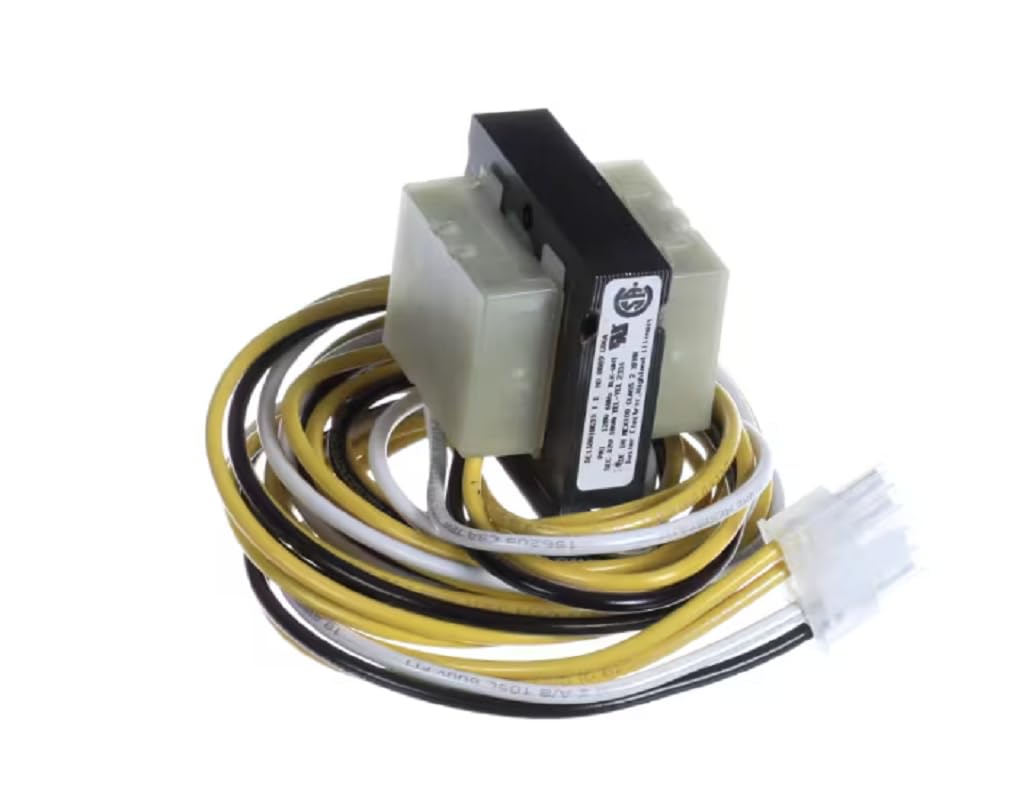
Image 1: The Bunn 0009-G06A Transformer. This image displays the compact transformer unit with its primary and secondary wiring harnesses, featuring various colored wires (yellow, black, white) and a white multi-pin connector on one end. The transformer itself is a rectangular block with a black label indicating specifications and certifications.
Operation
The Bunn 0009-G06A Transformer operates automatically once installed and power is supplied to the equipment. Its function is to step down the incoming 120V AC line voltage to a stable 12V AC output, which powers the low-voltage components of the Bunn machine it is integrated into. There are no user-adjustable settings on the transformer itself.
Ensure the equipment it is installed in is operating within its specified parameters to prevent undue stress on the transformer.
Maintenance
The Bunn 0009-G06A Transformer is a sealed unit and requires minimal maintenance. Regular inspection is recommended as part of the overall equipment maintenance schedule.
- Visual Inspection: Periodically inspect the transformer for any signs of physical damage, discoloration (indicating overheating), or loose connections.
- Cleanliness: Ensure the area around the transformer is free from dust, debris, and moisture to allow for proper heat dissipation. Use a dry, soft cloth for cleaning.
- Connection Integrity: Check that all wiring connections remain secure and free from corrosion.
- Replacement: If the transformer shows signs of failure (e.g., no output voltage, excessive heat, burning smell), it must be replaced by a qualified technician. Do not attempt to repair the unit.
Troubleshooting
If the equipment powered by the transformer is not functioning correctly, consider the following troubleshooting steps. Always disconnect power before inspecting electrical components.
| Symptom | Possible Cause | Action |
|---|---|---|
| No power to low-voltage components. |
|
|
| Transformer is excessively hot. |
|
|
| Burning smell from transformer. | Internal winding damage. | Immediately disconnect power. Replace transformer. |
If troubleshooting steps do not resolve the issue, contact a qualified service technician or Bunn customer support.
Specifications
- Model: 0009-G06A
- Type: Step-down Transformer
- Input Voltage: 120V AC
- Output Voltage: 12V AC
- Power Rating: 10VA
- Frequency: 60Hz
- Compatibility: OEM Part for Bunn equipment
Support and Warranty
For technical support or warranty inquiries regarding the Bunn 0009-G06A Transformer, please refer to the documentation provided with your specific Bunn equipment or contact Bunn customer service directly. As an OEM part, its warranty may be covered under the larger equipment warranty.
Always ensure you are using genuine Bunn replacement parts to maintain equipment performance and warranty validity.
Ask a question about this manual
Ask about setup, troubleshooting, compatibility, parts, safety, or missing instructions. Manuals+ will review the question and use this page’s manual context to help answer it.