
1. Introduction
The S ZEVZO ET05 is a portable car jump starter designed to provide emergency power for starting vehicles with dead batteries. It also functions as a power bank for electronic devices and includes an LED flashlight for various situations. This manual provides essential information for safe and effective use of your ET05 jump starter.
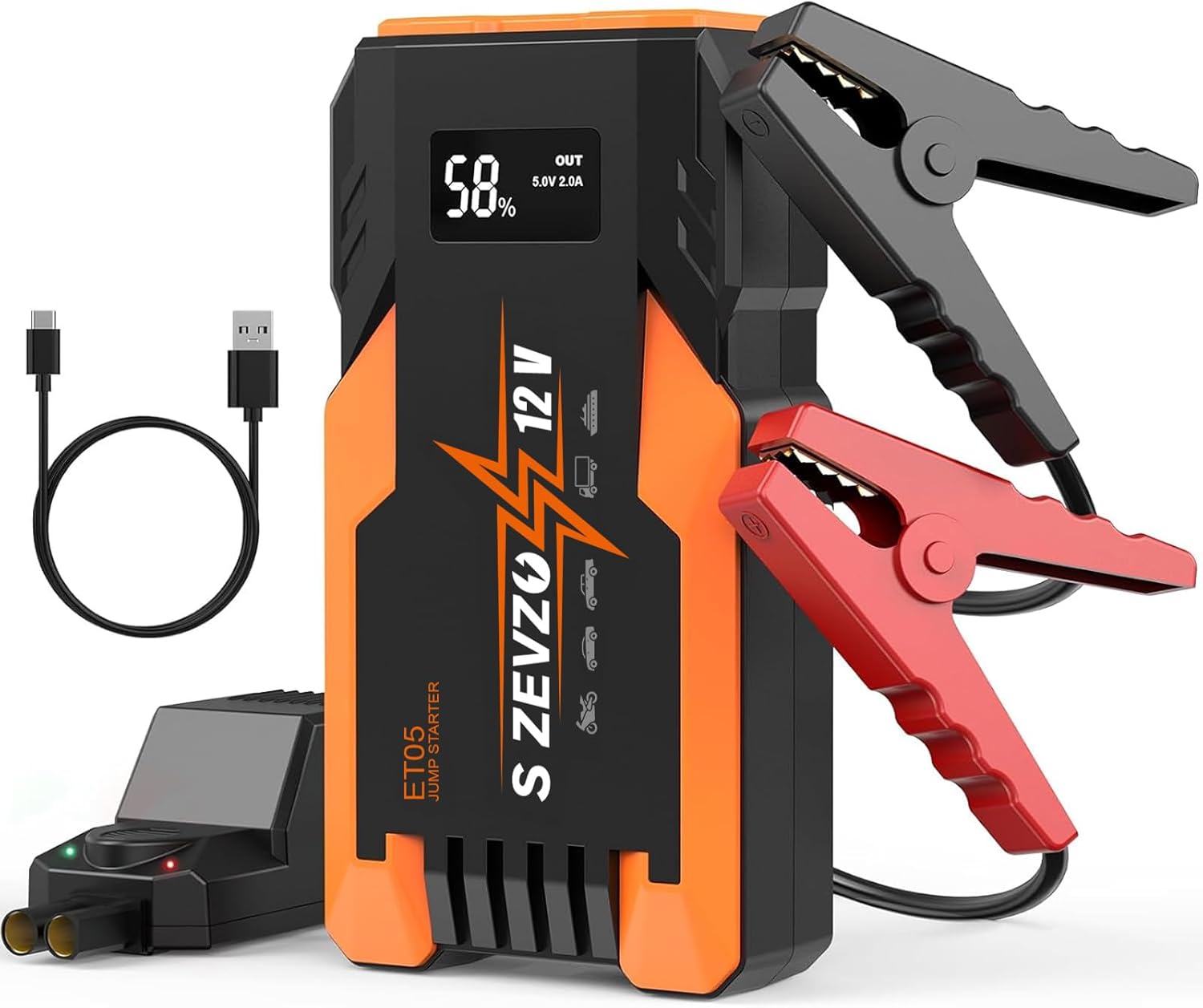
Image 1.1: The S ZEVZO ET05 Jump Starter unit with its smart jumper clamps and USB-C charging cable.

Image 1.2: The ET05 is compatible with 12V common vehicles, including lawnmowers (1.0L), motorcycles (1.5L), cars (2.5L), SUVs (4.5L), pick-up trucks (6.5L), and RVs (7.2L).
2. Safety Information
Your S ZEVZO ET05 Jump Starter is equipped with multiple intelligent safety protections to ensure safe operation. Please read and understand all safety warnings before use.
2.1 Safety Features
- 10 Intelligent Safety Protections: Includes safeguards against over-charge, over-current, short-circuit, reverse-polarity, low-temperature, high-temperature, over-voltage, over-load, spark-proof connections, and reverse-charge.
- Heavy-Duty Clamps and Cables: Designed for durability and to provide robust protection against incorrect connections or sparks.
- Error Detection: Smart jumper clamps provide visual (lights) and auditory (beep sound) feedback to indicate errors or correct connection status.

Image 2.1: Visual representation of the 10 smart protection features, including spark-proof, short-circuit, zero-damage, reverse polarity, low voltage, over voltage, -4°F/140°F bearing temperature, over-temperature, reverse charge, and jump starter time out protection.

Image 2.2: Comparison highlighting the safety of upgraded jumper clamps with 10 safety protections, thicker copper material, and informative status lights, versus traditional clamps that may have fewer protections and be prone to sparks.
3. Package Contents
Verify that all items are present in your package:
- S ZEVZO ET05 Jump Starter Unit (x1)
- Smart Jumper Clamps (x1)
- USB Type-C Charging Cable (x1)
- User Manual (x1)

Image 3.1: The package includes the S ZEVZO ET05 Jump Starter, Smart Jumper Clamps, a USB-C Cable, and a User Manual.
4. Product Overview and Features
Familiarize yourself with the components and features of your ET05 Jump Starter.
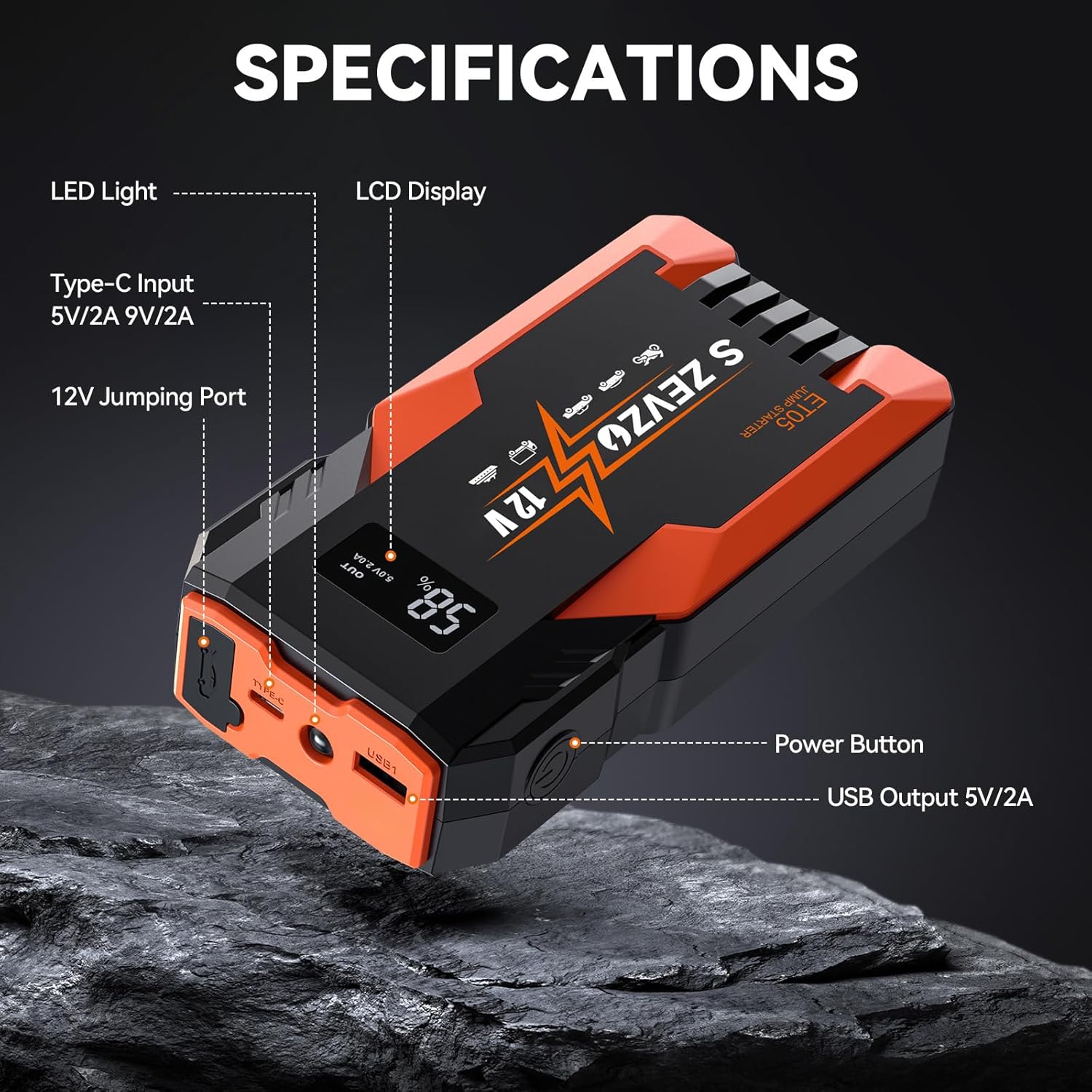
Image 4.1: Key components include the LED Light, LCD Display, Type-C Input (5V/2A, 9V/2A), 12V Jumping Port, Power Button, and USB Output (5V/2A).
4.1 Key Features
- LCD Digital Display: Shows battery status and output information.
- USB Output Port: 5V/2A for charging mobile devices.
- Type-C Input Port: 5V/2A, 9V/2A for fast charging the jump starter itself.
- Integrated LED Flashlight: Features Stable, Strobe, and SOS modes for emergency lighting.
- Compact and Portable Design: Similar in size to a smartphone for easy storage.
5. Charging the Jump Starter
Before first use, fully charge the S ZEVZO ET05 Jump Starter. It is recommended to recharge the unit every 3-6 months to maintain optimal battery health, even when not in use.
5.1 Charging Procedure
- Connect the provided USB Type-C charging cable to the Type-C Input port on the jump starter.
- Connect the other end of the USB cable to a compatible USB power adapter (not included) or a powered USB port.
- The LCD display will show the charging progress. The unit is fully charged when the display indicates 100%.
6. Operating Instructions
6.1 Jump Starting a Vehicle
The ET05 can jump-start 12V vehicles with up to 7.2L gas and 5.5L diesel engines. Ensure the jump starter is sufficiently charged before attempting to start a vehicle.
- Insert Jumper Cable: Plug the smart jumper cable connector firmly into the 12V Jumping Port on the jump starter unit.
- Connect Clamps: Connect the red (+) clamp to the positive terminal of the vehicle's battery and the black (-) clamp to the negative terminal. Ensure a secure connection.
- Check Indicator: Observe the indicator light on the smart clamps. A solid green light indicates a correct connection and readiness to start. If the light is red or beeping, check connections and refer to the troubleshooting section.
- Start Vehicle: Once the green light is solid, start your vehicle's engine.
- Remove Clamps: After the vehicle starts, immediately remove the smart clamps from the car battery, then disconnect the jumper cable from the jump starter unit.
Boost Mode for Severely Discharged Batteries
If the vehicle battery voltage is below 2V, the jump starter may not automatically detect the battery. In this case, use Boost Mode:
- Connect the smart clamps to the vehicle battery terminals as described above.
- Press and hold the 'BOOST' button on the smart clamp unit for 5 seconds.
- Wait for the clamp indicator light to turn solid green.
- Start the vehicle within 90 seconds.
- Immediately remove the clamps after the vehicle starts.

Image 6.1: Step-by-step guide: 1. Insert the jumper cable into the booster. 2. Connect the clamps to your car battery polarities. 3. Start your car engine.

Image 6.2: The jump starter automatically detects voltage for Regular Mode. For Boost Mode, press the 'BOOST' button if the battery is severely depleted.

Image 6.3: To activate the powerful boost function for fully drained batteries, press the 'BOOST' button on the smart clamp unit.
6.2 Using as a Power Bank
The ET05 features a 51.8Wh battery capacity and a USB output port (5V/2A) to charge various electronic devices.
- Connect your device's USB charging cable to the USB Output port on the jump starter.
- Connect the other end of the cable to your smartphone, tablet, or other USB-powered device.
- The jump starter will begin charging your device. The LCD display will show the remaining power of the jump starter.
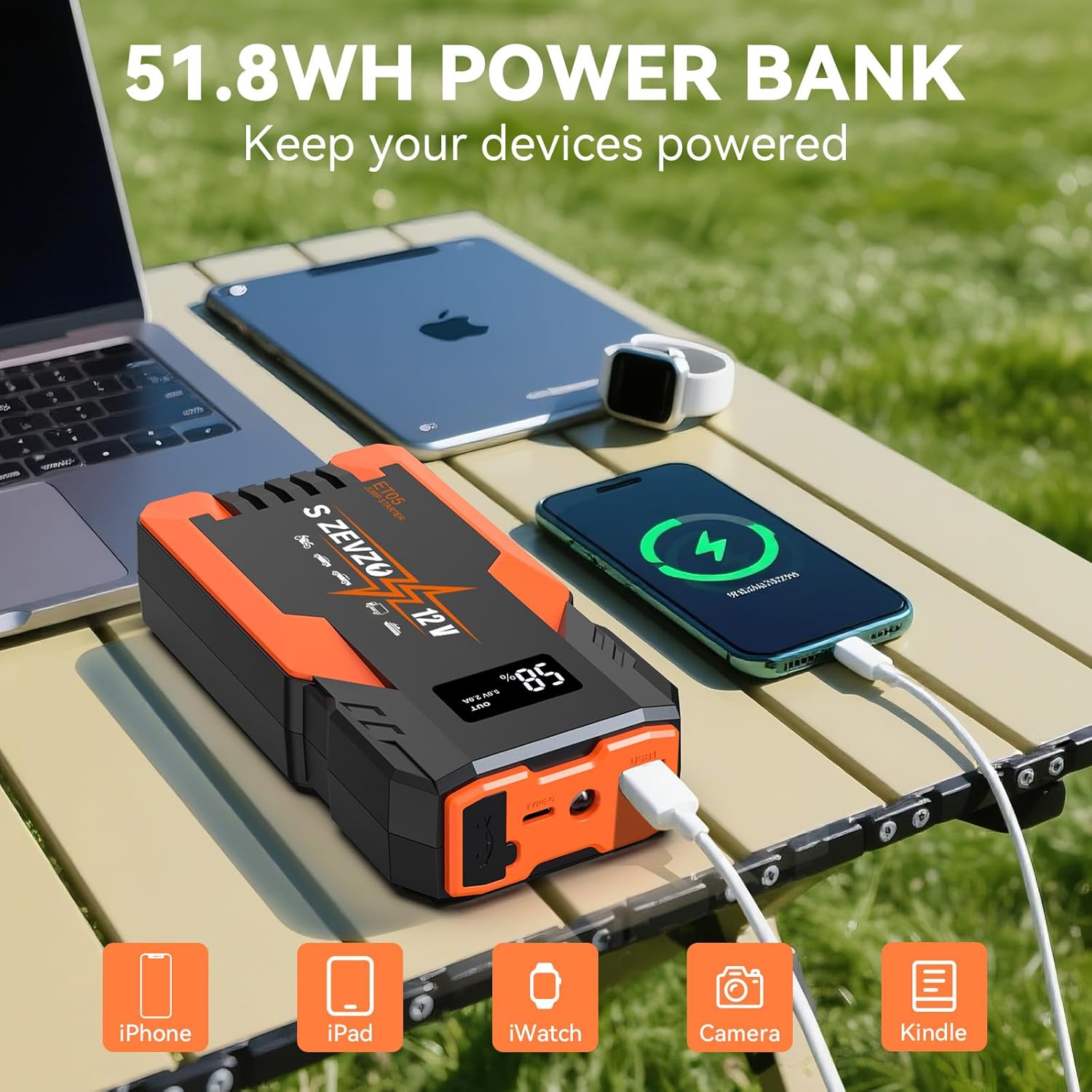
Image 6.4: The 51.8Wh power bank feature allows you to keep devices such as iPhones, iPads, iWatches, cameras, and Kindles powered.

Image 6.5: The large 51.8Wh battery capacity supports Type-C In (5V/2A, 9V/2A) and USB Out (5V/2A) for charging various devices.
6.3 Using the LED Flashlight
The built-in LED flashlight offers three modes for different emergency and utility needs.
- Press the Power Button once to turn on the flashlight (Stable Light mode).
- Press the Power Button again to cycle to Strobe mode.
- Press the Power Button a third time to activate SOS mode.
- Press the Power Button a fourth time to turn off the flashlight.

Image 6.6: The multifunctional emergency lights include Stable, SOS, and Strobe modes, useful for roadside assistance or other low-light situations.

Image 6.7: The 500 lumens LED flashlight offers Stable Light, Strobe Light, and SOS modes for various emergency and utility needs.
7. Maintenance and Storage
Proper care and storage will extend the lifespan of your S ZEVZO ET05 Jump Starter.
- Cleaning: Wipe the unit with a soft, dry cloth. Do not use harsh chemicals or abrasive cleaners.
- Storage: Store the jump starter in a cool, dry place away from direct sunlight and extreme temperatures.
- Recharging: Recharge the unit every 3-6 months to maintain battery health, especially if stored for extended periods.
- Durability: The unit is constructed from high-quality EVA material, providing resistance against bumps, dents, and scratches. Its waterproof and dustproof design enhances durability.

Image 7.1: The S ZEVZO ET05 is designed to be waterproof, dust-proof, and drop-resistant, making it suitable for various outdoor conditions.
8. Troubleshooting
If you encounter issues with your S ZEVZO ET05 Jump Starter, refer to the following common problems and solutions.
- Unit Does Not Turn On: Ensure the unit is charged. Connect it to a power source using the USB-C cable and allow it to charge.
- Vehicle Does Not Start:
- Check that the smart clamps are securely connected to the correct battery terminals (red to positive, black to negative).
- Ensure the smart clamp indicator light is solid green. If not, adjust connections.
- If the vehicle battery is severely discharged (below 2V), use the Boost Mode as described in Section 6.1.
- Ensure the jump starter has sufficient charge.
- Smart Clamp Indicator Light/Beep: The smart clamps provide error indications. A red light or continuous beeping typically indicates an incorrect connection (e.g., reverse polarity) or a fault. Disconnect and re-connect carefully.
- Device Not Charging from USB Output: Ensure the jump starter has sufficient power. Check the USB cable and the device's charging port for proper connection.
9. Technical Specifications
| Feature | Specification |
|---|---|
| Model | ET05 |
| Brand | S ZEVZO |
| Peak Current | 3000 Amps |
| Battery Capacity | 51.8Wh (Lithium Ion) |
| Start Voltage | 12V |
| Gas Engine Rating | Up to 7.2 Liters |
| Diesel Engine Rating | Up to 5.5 Liters |
| USB Output | 5V/2A |
| Type-C Input | 5V/2A, 9V/2A |
| Operating Temperature | -4°F to 140°F (-20°C to 60°C) |
| Product Dimensions | 1.6"D x 1.6"W x 3.1"H (Note: This dimension seems incorrect based on typical jump starter sizes and other images. Please refer to actual product for precise dimensions.) |
| Item Weight | 1.54 pounds |
10. Warranty and Support
S ZEVZO is committed to providing quality products and customer satisfaction.
10.1 Warranty Information
- Your S ZEVZO ET05 Jump Starter is covered by a 2-year full service warranty.
- A 30-day unconditional return guarantee is also provided.
- Enjoy 24 months of hassle-free warranty support.
10.2 Customer Support
For any questions, issues, or technical assistance, please contact S ZEVZO customer support.
- 24/7 Customer Support: Assistance is available around the clock.
- Lifetime Technical Support: Dedicated support for the lifespan of your product.

Image 10.1: S ZEVZO offers 24/7 customer support, a 30-day unconditional return guarantee, a 24-month hassle-free warranty, and lifetime customer and technical support.