
avigator GP6800
avigator 20 Bar Espresso Machine GP6800 Instruction Manual
Model: GP6800
Introduction
This manual provides detailed instructions for the safe and efficient operation and maintenance of your avigator 20 Bar Espresso Machine, Model GP6800. Please read all instructions carefully before first use and retain this manual for future reference.
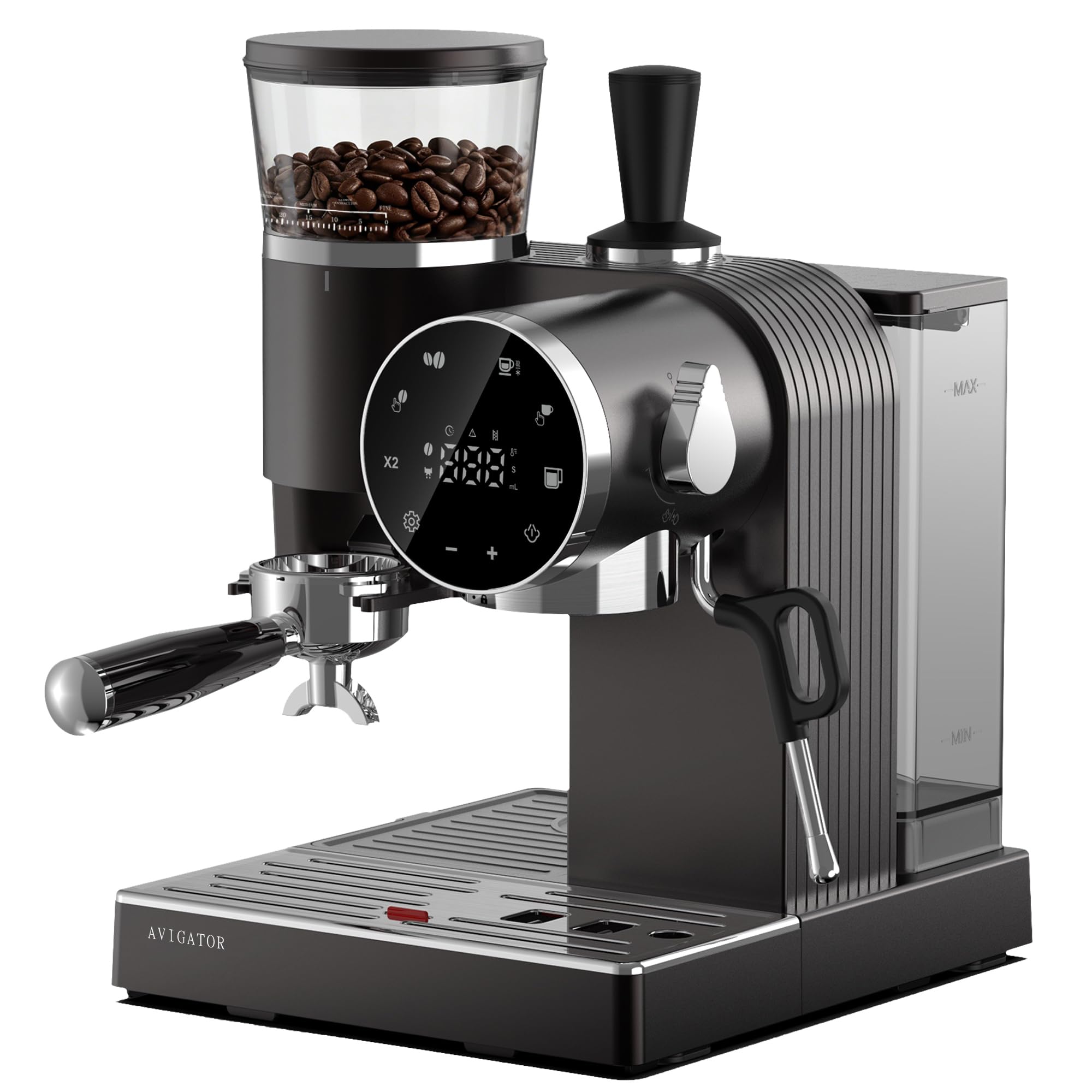
The avigator 20 Bar Espresso Machine GP6800, featuring a sleek design and integrated grinder.
Product Overview and Components
Familiarize yourself with the main components of your espresso machine.

Key components of the avigator espresso machine, including the detachable bean hopper, water tank, portafilter, and drip tray.
- Detachable Bean Hopper: For storing coffee beans.
- 1.5L Water Tank: Removable for easy refilling.
- 58mm Portafilter: Holds ground coffee for brewing.
- Single Cup Basket / Double Cup Basket: For different serving sizes.
- Drip Tray with Float Indicator: Collects excess liquid and indicates when full.
- Drip Plate: Sits on top of the drip tray.
- Tamper: For compacting coffee grounds in the portafilter.
- Clean Brush: For maintenance.
Setup
Follow these steps for initial setup of your espresso machine.

Visual guide for the 4-step setup process: Open Setting, Choose Function, Set Value, Save Setting.
- Unpacking: Carefully remove all packaging materials and ensure all components are present.
- Placement: Place the machine on a stable, level, and heat-resistant surface, away from water sources.
- Water Tank: Fill the 1.5L detachable water tank with fresh, cold water. Ensure it is securely placed back into the machine.
- Bean Hopper: Fill the detachable bean hopper with your preferred whole coffee beans.
- First Use / Priming: Before first use, or after a period of inactivity, run a cycle without coffee to prime the system and rinse internal components. Refer to the "Operating Instructions" for details on running a brew cycle.
Operating Instructions
LED Touch Control Interface
The intuitive LED touch panel allows for easy adjustment of various settings.
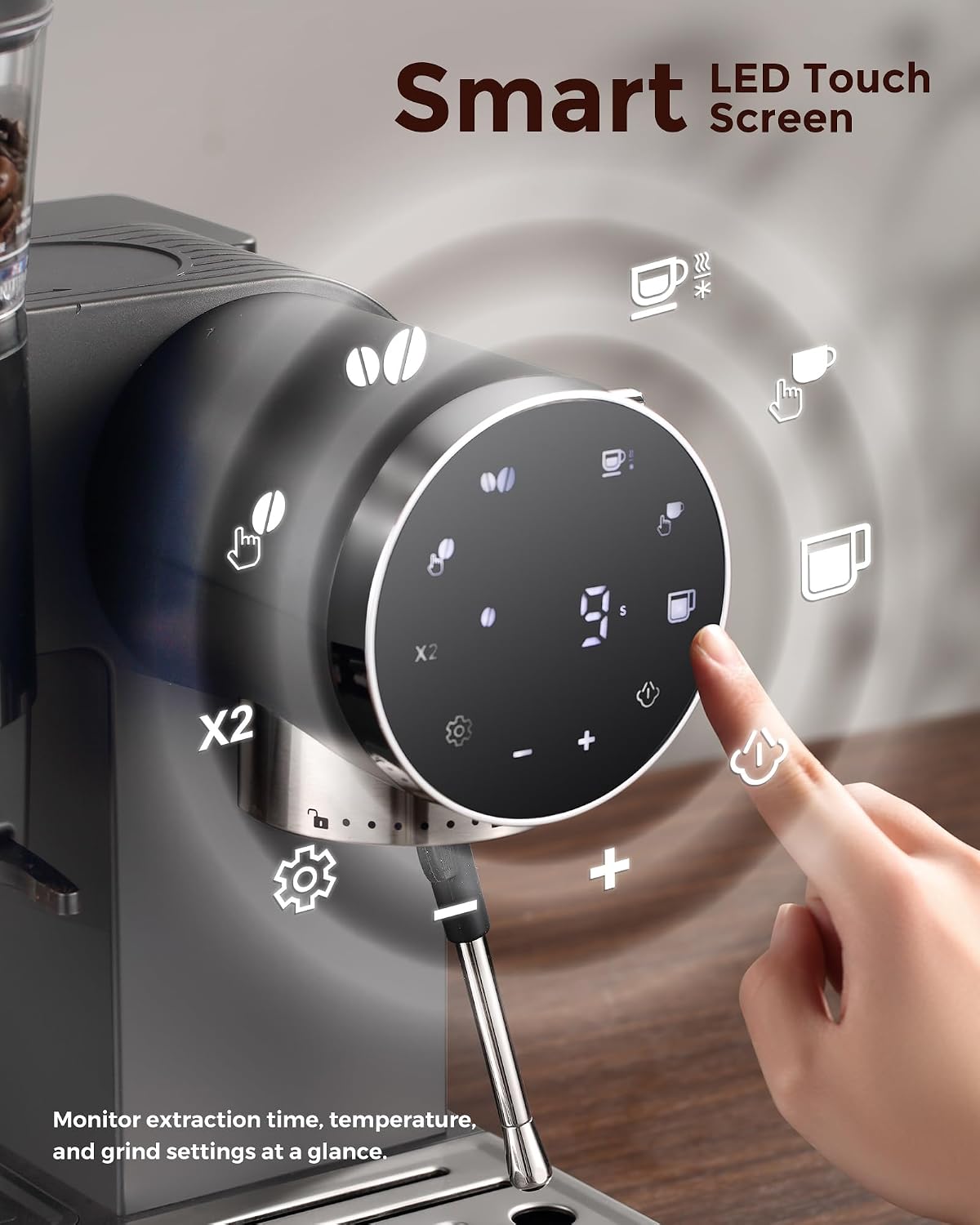
The LED touch screen displays real-time information and allows for easy control of settings.
- Standby Time: Adjust the auto-standby duration (4-180 minutes).
- Grinding Time: Set the duration for coffee grinding.
- Auto-Brew Value: Customize the volume for automatic brewing.
- Descaling Reminder: Indicates when descaling is required.
- Long Coffee Value: Adjust the volume for a longer coffee extraction.
- Coffee Temperature: Control the brewing temperature.
Grinding Coffee
The built-in conical burr grinder offers 6 levels of adjustment for optimal flavor.

The grinder allows for 6 levels of adjustment, from fine to coarse, to suit various coffee types.
- Adjust Grind Level: Rotate the grinder adjustment dial to select your desired fineness (1-10 for Fine, 10-20 for Medium, 20-30 for Coarse).
- Grind into Portafilter: Place the portafilter under the grinder outlet. Use the touch screen to initiate grinding.
- Tamping: Use the assisted tamper to apply consistent pressure to the ground coffee in the portafilter, creating a level and compact puck.
Espresso Extraction
The machine features a 20-bar Italian pump and PID control for precise extraction.

The pre-soaking function ensures full flavor extraction by saturating coffee grounds before high-pressure brewing.
- Insert Portafilter: Securely insert the prepared portafilter into the brew head.
- Select Brew: Choose your desired brew setting (single or double espresso) on the LED touch screen.
- Start Extraction: Press the brew button to begin the extraction process. The machine will pre-soak the coffee grounds before applying 20 bars of pressure.
- Monitor: Observe the extraction time and volume on the LED screen.
Milk Frothing (Steam Wand)
Create silky microfoam for lattes and cappuccinos using the integrated steam wand.

The built-in steam wand allows for manual milk frothing to create various coffee beverages.
- Prepare Milk: Fill a stainless steel frothing pitcher with cold milk (dairy or non-dairy).
- Activate Steam: Turn the steam knob or select the steam function on the touch screen. Wait for the steam wand to reach optimal temperature.
- Froth Milk: Submerge the tip of the steam wand just below the surface of the milk. Angle the pitcher to create a vortex. Once desired texture and temperature are reached, turn off the steam.
- Clean Wand: Immediately wipe the steam wand with a damp cloth and purge a small amount of steam to clear any milk residue.
Hot & Cold Brew Options
In addition to espresso, the machine can prepare drip coffee and cold brew.
- Drip Coffee: Select the drip coffee option on the LED touch screen. Ensure appropriate grind size and water volume are set.
- Cold Brew: Select the cold brew option. This function typically involves a longer extraction time at a lower temperature.
Official Product Video: Professional Barista Coffee, At home, By you | GP6800
This video demonstrates the key features and operation of the avigator GP6800 espresso machine, including grinding, tamping, and brewing espresso.
Maintenance
Regular cleaning and maintenance ensure optimal performance and longevity of your machine.

Visual guide for daily maintenance tasks, including cleaning the hopper, brushing grounds, rinsing the drip tray, draining water, and flushing the water outlet.
- Detachable Hopper and Burr: Detach the top hopper and clean the internal metal burr regularly using the provided brush.
- Brush Out Grounds: Use the included brush to sweep away any leftover coffee grounds from the grinder area regularly.
- Rinse Drip Tray: Rinse the removable drip tray daily to prevent residual odors and buildup. The float indicator will show when it needs emptying.
- Drain Leftover Water: Before daily use, run water through the knob to remove any leftover water from the system.
- Flush Remaining Grounds: Clean the water outlet daily to ensure smooth portafilter installation and prevent clogging.
- Descaling: The machine will provide a descaling reminder. Follow the descaling instructions in the full user manual (not provided here) to remove mineral buildup.
- Integrated Storage Box: Keep accessories organized in the built-in storage box.

The integrated storage box helps keep coffee essentials organized and the countertop tidy.
Troubleshooting
This section addresses common issues you might encounter. For more detailed troubleshooting, refer to the comprehensive user manual.
| Problem | Possible Cause | Solution |
|---|---|---|
| No coffee dispenses | Water tank empty; portafilter clogged; machine not primed. | Refill water tank; clean portafilter; prime the machine by running a water-only cycle. |
| Espresso flows too slowly or not at all | Coffee ground too fine; too much coffee in portafilter; coffee tamped too hard. | Adjust grinder to a coarser setting; use less coffee; tamp with less pressure. |
| Espresso flows too quickly | Coffee ground too coarse; too little coffee in portafilter; coffee tamped too lightly. | Adjust grinder to a finer setting; use more coffee; tamp with more pressure. |
| Milk not frothing properly | Steam wand clogged; insufficient steam pressure; milk not cold enough. | Clean steam wand thoroughly; allow machine to heat up fully; use fresh, cold milk. |
| Machine not turning on | Power cord not connected; power outlet issue. | Ensure power cord is securely plugged in; check power outlet with another appliance. |
Specifications
Technical details for the avigator 20 Bar Espresso Machine GP6800.
- Brand: avigator
- Model Number: GP6800
- Capacity: 1.5 Liters (Water Tank)
- Color: Light Black
- Product Dimensions: 12.2"D x 10.6"W x 15.74"H
- Special Features: Auto Shut-Off, Integrated Coffee Grinder, Manual Operation, Milk Frother, Programmable
- Coffee Maker Type: Espresso Machine
- Specific Uses: Americano, Cappuccino, Espresso, Iced Coffee, Latte
- Operation Mode: Semi-Automatic
- Wattage: 1350 watts
- Voltage: 120 Volts
- Output Pressure: 20 Bars
- Display Type: LED
- Coffee Input Type: Whole Bean
- Filter Type: PortaFilter
- Material: Plastic, Stainless Steel
- Item Weight: 17 Pounds
Warranty and Support
For warranty information and customer support, please refer to the documentation included with your purchase or visit the official avigator website. Keep your proof of purchase for warranty claims.
Contact Support: For technical assistance, troubleshooting not covered in this manual, or warranty service, please contact avigator customer support through their official channels.
Ask a question about this manual
Ask about setup, troubleshooting, compatibility, parts, safety, or missing instructions. Manuals+ will review the question and use this page’s manual context to help answer it.