
FEELWORLD FVM215-OF-US
Contents
FEELWORLD FVM215 Broadcast Studio Monitor User Manual
Model: FVM215-OF-US
1. Introduction
The FEELWORLD FVM215 is a 21.5-inch high-brightness production broadcast studio monitor designed for professional video applications. It features a 1000nit display, 8-bit color depth, 4K60Hz HDMI, and 3G-SDI inputs/outputs, along with advanced monitoring tools like Waveform, LUT, and False Color.
1.1 Package Contents
Verify that all items are present in the package:
- 1 × FVM215 FEELWORLD Monitor
- 1 × SDI Cable
- 1 × Micro HDMI Cable
- 1 × HDMI Cable
- 1 × 5A Power Adapter
- 1 × V-mount Battery Plate (pre-installed on the monitor)
- 1 × User Manual
- Saddle Foot (quantity not specified, but shown in image)
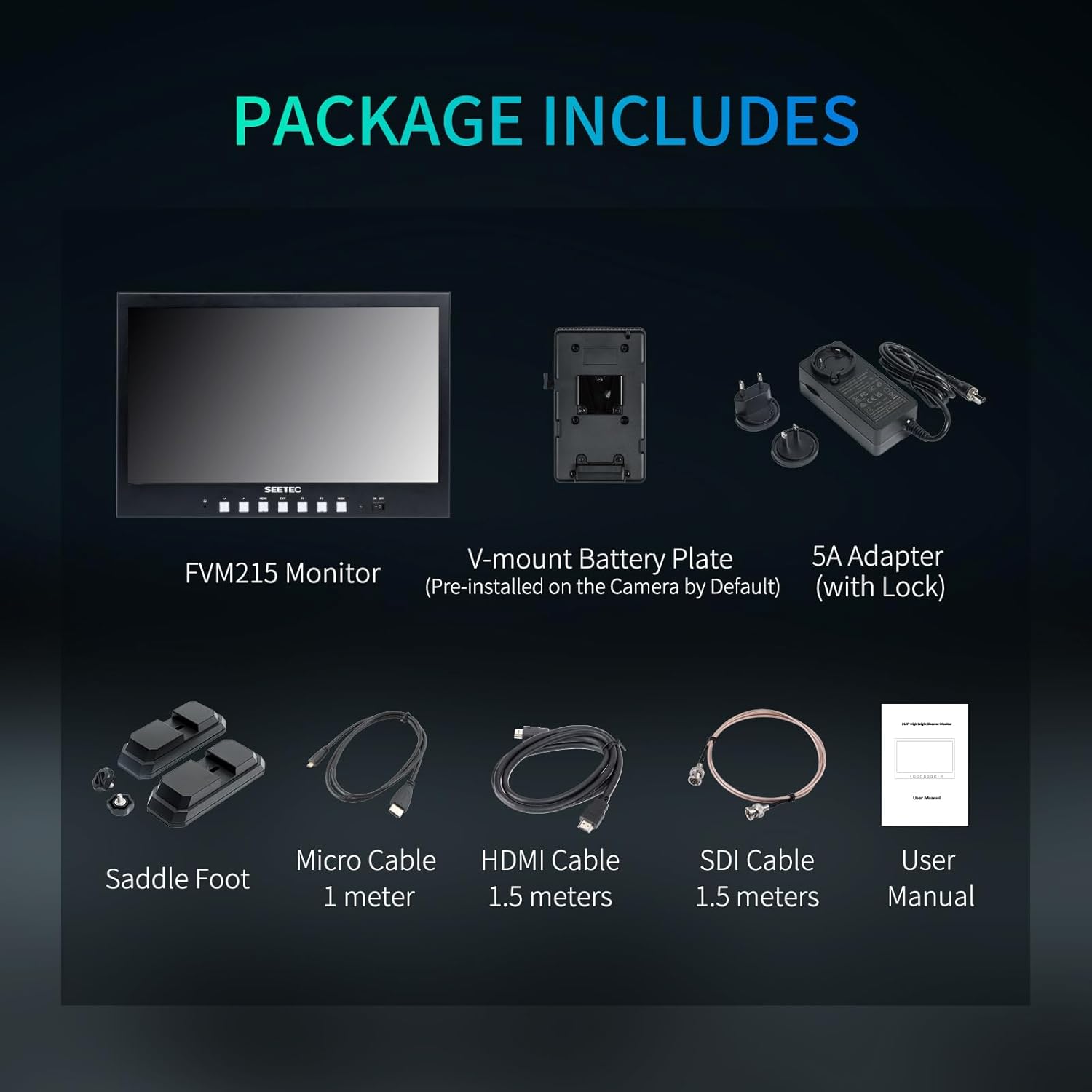
Figure 1.1: Contents included in the FVM215 monitor package.
2. Safety Information
Please read all safety warnings and instructions carefully before using this product to prevent injury or damage.
- Do not expose the monitor to rain or moisture.
- Avoid placing the monitor near heat sources or in direct sunlight for extended periods.
- Use only the specified power adapter.
- Do not attempt to disassemble or modify the monitor. Refer all servicing to qualified personnel.
- Clean the monitor with a soft, dry cloth. Avoid liquid cleaners.
3. Setup
3.1 Physical Connections and Interfaces
The FVM215 monitor offers multiple input and output options for versatile connectivity.
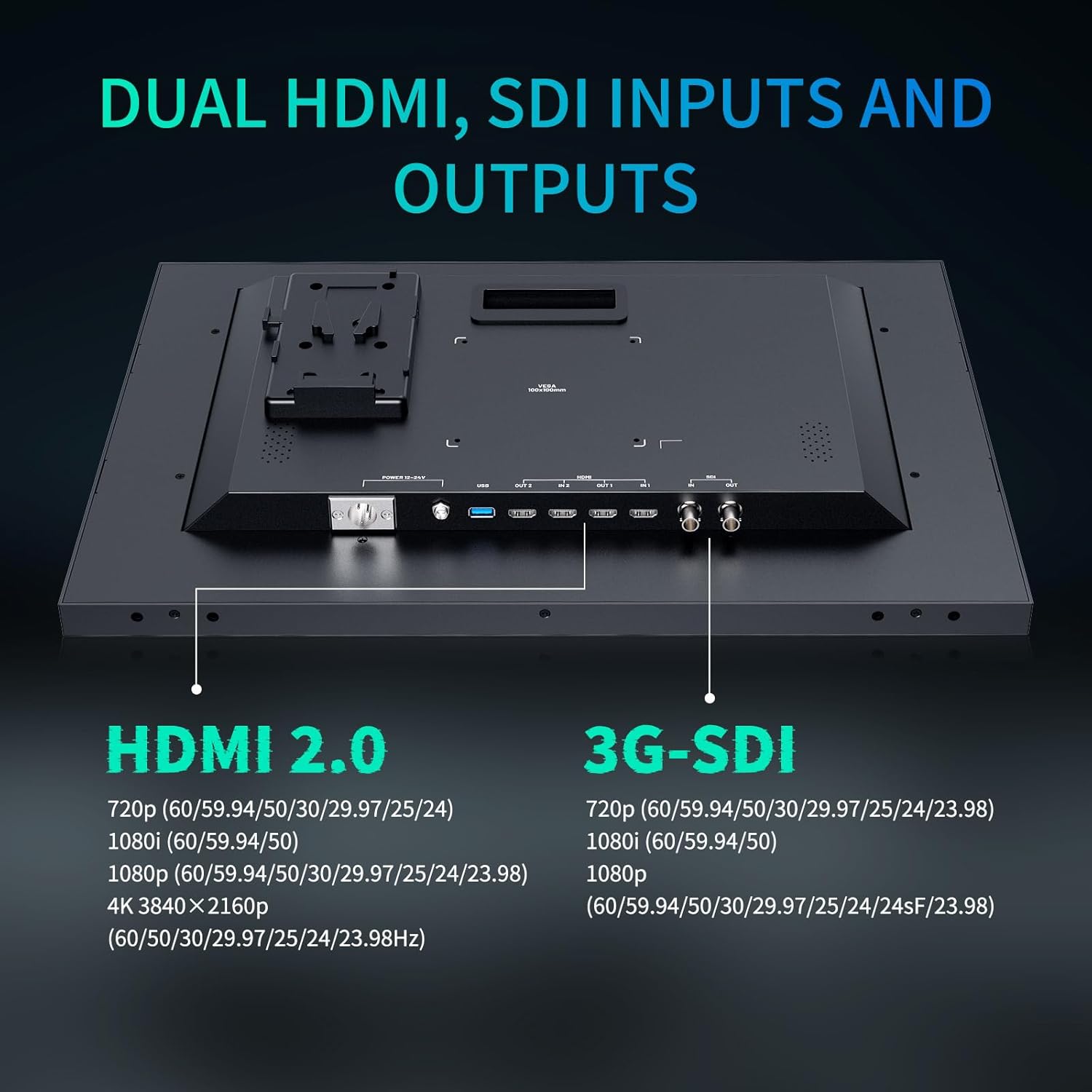
Figure 3.1: Rear panel showing HDMI, SDI, USB, and power connections.
- HDMI 2.0: Dual inputs (IN 1, IN 2) and outputs (OUT 1, OUT 2) supporting up to 4K 60Hz.
- 3G-SDI: Input (IN) and output (OUT) supporting up to 1080p 60Hz.
- USB: For firmware upgrades and 3D LUT loading.
- Power Input: Supports DC 12-24V via XLR connector or standard DC power jack.
3.2 Powering the Monitor
The FVM215 can be powered using various methods:
- AC Power Adapter: Connect the included 5A power adapter to the DC power input.
- V-mount Battery: Attach a compatible V-mount battery to the pre-installed V-mount battery plate.
- XLR Power: Use an XLR cable to connect to a 12-24V power source.

Figure 3.2: Overview of power input options including V-mount, DC, and XLR.
3.3 Mounting Options
The monitor offers flexible mounting solutions:
- VESA Mount: The monitor features VESA 100x100mm mounting points for attaching to compatible stands or arms.
- 1/4-inch Mounting Hole: Located on the side for additional accessory attachment.

Figure 3.3: Rear view highlighting VESA mounting points and other interfaces.
4. Operating Instructions
4.1 Basic Operation
The FVM215 features intuitive buttons for easy navigation and control.
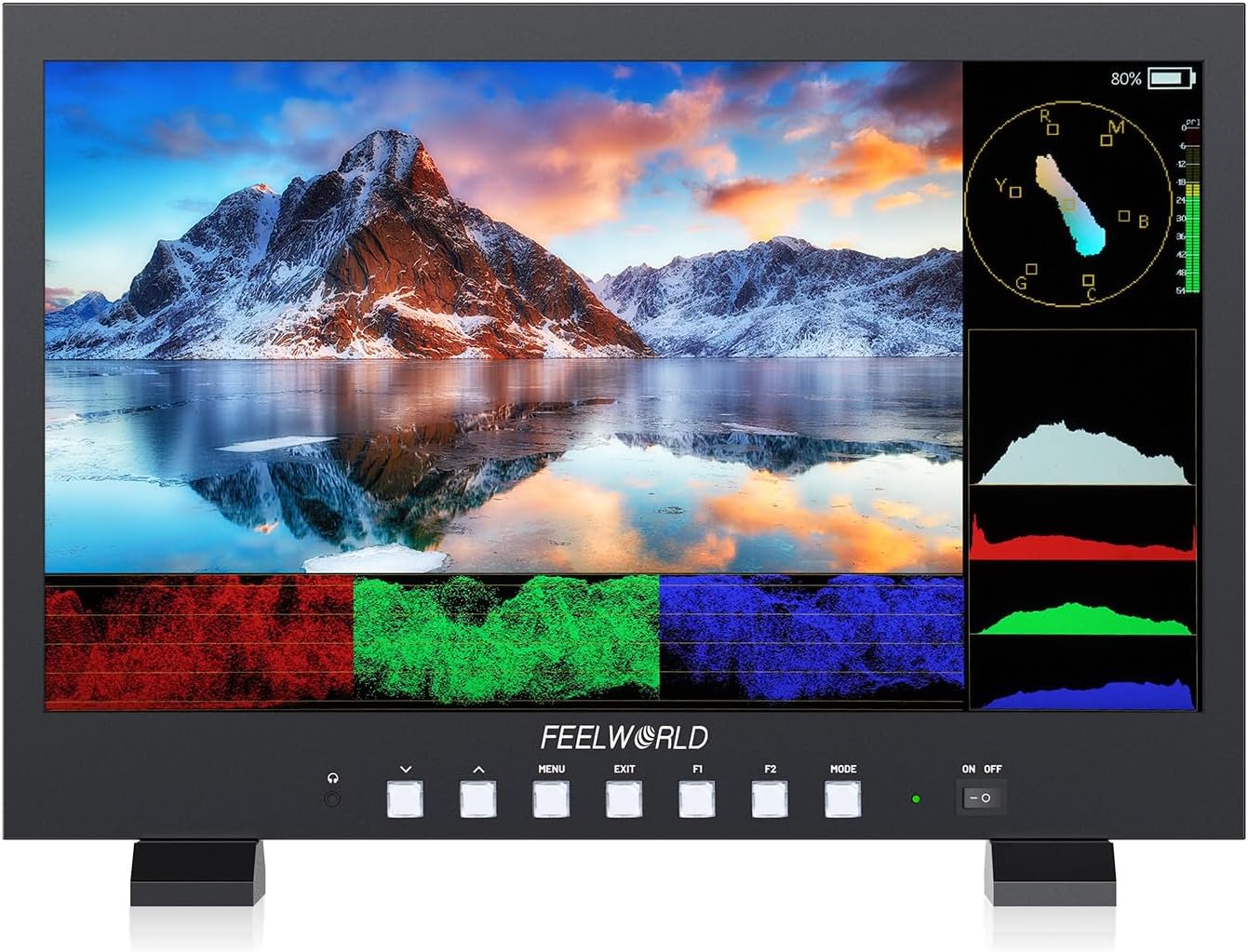
Figure 4.1: Front panel with control buttons and display.
- ON/OFF Switch: Located on the right side of the front panel to power the monitor on or off.
- MENU Button: Accesses the main menu for settings adjustment.
- EXIT Button: Exits the current menu or function.
- F1/F2 Buttons: Customizable function buttons for quick access to frequently used features.
- MODE Button: Cycles through different display modes or input sources.
- Arrow Buttons (Up/Down): Navigate through menu options and adjust values.
4.2 Advanced Monitoring Features
The FVM215 includes a comprehensive suite of professional monitoring tools:

Figure 4.2: Visual representation of various monitoring tools available on the FVM215.
- Waveform: Displays the luminance and chrominance levels of the video signal.
- Vector Scope: Shows the color saturation and hue of the video signal.
- RGB Parade: Separates the Red, Green, and Blue components of the video signal.
- False Color: Helps in setting proper exposure by displaying different exposure levels as distinct colors.
- Focus Assist (Peaking): Highlights sharp edges in the image to aid in achieving accurate focus.
- 3D LUT: Supports loading up to 32 custom 3D LUTs via USB for real-time color correction and previewing.
- Histogram: Graphical representation of the tonal distribution of the image.
- Embedded Audio: Displays audio levels.
- Time Code: Displays timecode information.
- Nine Grid: Assists in composition using the rule of thirds.
- Screen Marker / Center Marker / Ratio Marker: Various on-screen guides for framing.
- Overscan / Aspect Ratio / Anamorphic Mode: Adjusts display for different video formats.
- Image Flip / Image Freeze / Zoom-In / Pixel-to-Pixel: Image manipulation tools.

Figure 4.3: Demonstrates the process of loading custom 3D LUTs via USB.
4.3 High Brightness Display
The 1000nit high-brightness screen ensures clear visibility even in strong daylight conditions, making it suitable for outdoor shoots.

Figure 4.4: The FVM215 monitor displaying a clear image outdoors under daylight conditions.
4.4 Multi-Language Support
The FVM215 supports up to 11 languages for user interface navigation.

Figure 4.5: Icons representing the various languages supported by the monitor's interface.
4.5 Official Product Video
Video 4.1: An official product video from FEELWORLD showcasing the FVM215 21.5" 1000nit Broadcast Monitor's features and capabilities.
5. Maintenance
- Cleaning: Use a soft, lint-free cloth to clean the screen and body of the monitor. For stubborn marks, slightly dampen the cloth with water. Do not use alcohol, benzene, thinners, or other chemical cleaners.
- Storage: When not in use for extended periods, store the monitor in a cool, dry place, away from direct sunlight and extreme temperatures.
- Handling: Always handle the monitor with care to avoid drops or impacts.
6. Troubleshooting
| Problem | Possible Cause | Solution |
|---|---|---|
| No power | Power cable not connected; Power adapter faulty; Battery depleted. | Ensure power cable is securely connected. Try a different power outlet or adapter. Recharge or replace battery. |
| No signal | Input cable loose or faulty; Incorrect input source selected; Source device not outputting signal. | Check HDMI/SDI cable connections. Select correct input source using the MODE button. Verify source device is powered on and outputting video. |
| Image distorted or incorrect colors | Incorrect display settings; LUTs applied incorrectly; Cable issue. | Reset display settings to default. Check if any LUTs are active and disable them if necessary. Try a different HDMI/SDI cable. |
| Buttons unresponsive | Temporary software glitch. | Power off the monitor, wait a few seconds, then power it back on. |
7. Specifications
| Feature | Detail |
|---|---|
| Model | FVM215-OF-US |
| Screen Size | 21.5 Inches |
| Resolution | 1920 x 1080 Pixels (FHD 1080p) |
| Brightness | 1000 nits |
| Contrast Ratio | 1000:1 |
| Color Depth | 8-bit |
| Viewing Angle | 178° |
| Aspect Ratio | 16:9 |
| HDMI Inputs/Outputs | Dual HDMI 2.0 (up to 4K 60Hz) |
| SDI Inputs/Outputs | 3G-SDI (up to 1080p 60Hz) |
| Power Input | DC 12-24V (XLR, DC Jack), V-mount battery plate |
| Mounting | VESA 100x100mm, 1/4-inch mounting hole |
| Product Dimensions | 1.18 x 20.08 x 13.78 inches |
| Item Weight | 9.42 pounds |

Figure 7.1: Key display specifications of the FVM215 monitor.

Figure 7.2: Comparison illustrating the 1000nit high brightness IPS panel.
8. Warranty and Support
For warranty information and technical support, please refer to the official FEELWORLD website or contact their customer service directly. Keep your purchase receipt for warranty claims.
FEELWORLD Official Website: www.feelworld.cn
Customer Service Email: support@feelworld.cn
Ask a question about this manual
Ask about setup, troubleshooting, compatibility, parts, safety, or missing instructions. Manuals+ will review the question and use this page’s manual context to help answer it.