
Merax 1
Contents
Merax Foldable Treadmill User Manual
Model: 1
1. Important Safety Instructions
Please read all instructions carefully before using this treadmill. Keep this manual for future reference.
- Always place the treadmill on a solid, level surface.
- Keep children and pets away from the treadmill during operation.
- Ensure adequate clearance around the treadmill (at least 6 feet behind and 2 feet on each side).
- Do not operate the treadmill if it has a damaged cord or plug, or if it is not working properly.
- Wear appropriate athletic footwear and clothing.
- Use the safety key at all times. In case of emergency, the safety key will immediately stop the treadmill.
- Do not exceed the maximum user weight capacity of 300 pounds.
- Consult a physician before beginning any exercise program.
2. Product Overview
The Merax Foldable Treadmill is designed for home use, offering a comprehensive daily workout experience with its robust features and compact design.

Image: The Merax Foldable Treadmill, showcasing its compact design and a user exercising.
Key Features:
- Powerful Motor: Equipped with a 2.5HP quiet motor, providing a smooth and consistent workout.
- Weight Capacity: Supports users up to 300 LBS, ensuring durability and stability.
- Speed Range: Adjustable speed from 0.5 to 7.5 MPH, suitable for walking, jogging, and light running.
- Manual Incline: Features 3 levels of manual incline, allowing for varied workout intensity up to 6%.
- Preset Programs: Includes 12 pre-set workout programs for diverse training routines.
- Shock-Absorbing Belt: A multiple-layer shock-absorbing tread belt designed to reduce impact on joints.
- Heart Rate Sensors: Integrated hand pulse sensors on the handles for real-time heart rate monitoring.
- Built-in Speakers: Allows for audio playback during workouts.
- Compact & Foldable Design: Easy to store and set up, ideal for small home spaces.

Image: Detail of the treadmill's running deck, highlighting the 6 silicone shock-absorbers and 5-layer anti-slip running belt for joint comfort.

Image: The treadmill's running belt, emphasizing its anti-slip and elastic properties, along with the 300 LBS weight capacity.
Control Panel:
The intuitive LED display provides essential workout feedback, while convenient features enhance your exercise experience.

Image: Close-up of the treadmill's control panel, showing the LED display, speakers, cup holders, and hand pulse grips.
- LED Display: Shows time, distance, speed, calories burned, and heart rate.
- Heart Rate Sensors: Located on the handlebars for pulse monitoring.
- Cup Holders: Two integrated holders for water bottles.
- Device Holder: A smart device holder for phones or tablets.
- Safety Key Slot: For attaching the safety key.
3. Setup and Assembly
The Merax Treadmill requires some assembly. Follow these steps for quick and easy setup.
Unpacking:
- Carefully remove all components from the packaging.
- Verify all parts are present against the packing list (not provided in input, general instruction).
- Place the main frame on a clear, level surface.
Assembly Steps:
While specific assembly instructions are not detailed here, the treadmill is designed for straightforward setup. Typically, this involves attaching the uprights, console, and handlebars to the main base. Ensure all bolts are securely tightened.
Placement:
Choose a location with sufficient space, away from direct sunlight and moisture. Ensure the floor is level and stable to prevent wobbling during use.

Image: The treadmill demonstrating its compact folding design for easy storage and movement with wheels.
4. Operating Instructions
Getting Started:
- Plug the power cord into a grounded electrical outlet.
- Attach the safety key clip to your clothing and insert the safety key into its designated slot on the console. The treadmill will not operate without the safety key in place.
- Step onto the treadmill belt, placing your feet on the side rails.
Using the Control Panel:
- Start/Stop: Press the START button to begin your workout. Press the STOP button to pause or end your workout.
- Speed Adjustment: Use the SPEED + and - buttons to increase or decrease the belt speed. The speed ranges from 0.5 to 7.5 MPH.
- Program Selection: Press the PROGRAM button to cycle through the 12 pre-set workout programs. Each program offers varying speed profiles.
- Mode: Use the MODE button to switch between display modes (e.g., scan, time, distance, calories).
- Heart Rate Monitoring: Grip the hand pulse sensors on the handlebars to display your heart rate on the LED screen.
Manual Incline Adjustment:
The Merax Treadmill features a 3-level manual incline. To adjust the incline, you must stop the treadmill and manually adjust the incline pins located at the rear base of the treadmill. Ensure both sides are set to the same level before resuming your workout.
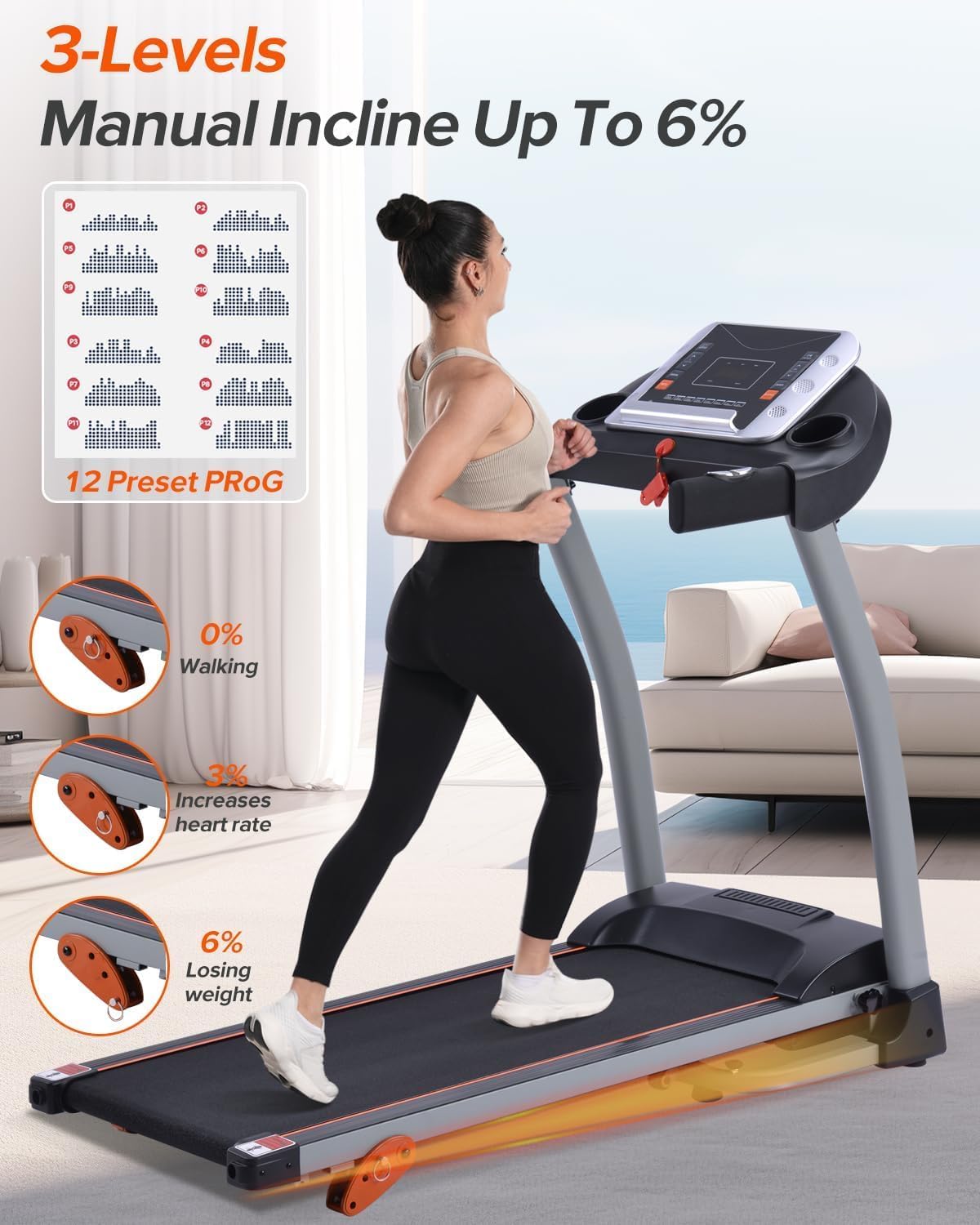
Image: Illustration showing the three manual incline levels (0%, 3%, 6%) and their effect on workout intensity.
The incline levels are designed to provide varied intensity for walking (0%), increased heart rate (3%), and weight loss (6%).
Using Audio Features:
Connect your smart device to the treadmill's audio input (if available, not explicitly stated but implied by "built-in speakers") or place it in the device holder to enjoy music or other entertainment through the built-in speakers during your workout.
5. Maintenance
Regular maintenance ensures the longevity and optimal performance of your Merax Treadmill.
- Cleaning: Wipe down the treadmill with a damp cloth after each use to remove sweat and dust. Do not use abrasive cleaners.
- Belt Lubrication: Periodically lubricate the running belt according to the instructions provided with your lubricant (lubricant not included, general advice). This typically involves applying silicone lubricant under the belt.
- Belt Tension and Alignment: Check the running belt tension and alignment regularly. If the belt slips or drifts to one side, refer to the troubleshooting section or contact customer support for adjustment instructions.
- Storage: When not in use, the treadmill can be easily folded for compact storage. Ensure it is stored in a dry, cool place away from direct sunlight.

Image: An illustration highlighting the 2.5HP powerful low-noise motor, emphasizing its quiet operation (less than 55 dB).
6. Troubleshooting
If you encounter any issues with your Merax Treadmill, refer to the common problems and solutions below. If the problem persists, contact customer support.
| Problem | Possible Cause | Solution |
|---|---|---|
| Treadmill does not power on. | Power cord not plugged in; safety key not inserted; circuit breaker tripped. | Ensure power cord is securely plugged in. Insert safety key fully. Check household circuit breaker. |
| Running belt slips or hesitates. | Belt tension too loose; belt needs lubrication. | Adjust belt tension (refer to specific instructions if available, or contact support). Lubricate the belt as per maintenance guidelines. |
| Unusual noise during operation. | Loose parts; motor issue; belt friction. | Check for any loose bolts or components and tighten them. If noise persists, discontinue use and contact customer support. |
| Heart rate monitor not working. | Hands not properly placed on sensors; dry hands. | Ensure both hands are firmly gripping the sensors. Slightly moisten hands if they are too dry. |
7. Specifications
Detailed specifications for the Merax Foldable Treadmill.
| Feature | Detail |
|---|---|
| Brand | Merax |
| Color | Black/Grey |
| Product Dimensions (Assembled) | 51"D x 24.2"W x 44.5"H |
| Folded Dimensions | 26" x 24.5" x 47" |
| Material | Alloy Steel |
| Maximum Speed | 7.5 Miles per Hour |
| Minimum Speed | 0.5 Miles per Hour |
| Special Feature | Compact Design |
| Recommended Uses | Indoor |
| Target Audience | Adult |
| Maximum Horsepower | 2.5 Horsepower |
| Manual Incline | Up to 6% (3 levels) |
| Assembly Required | Yes |
| Display Type | LCD |
| Power Source | Corded Electric |
| Number of Programs | 12 |
| Connectivity Technology | Power Cord |
| Included Components | Treadmill |
| Metrics Measured | Speed, Distance, Calories Burned, Pulse Rate, Time |
| Deck Length | 47 Inches |
| Belt Length | 41.7 Inches |
| Belt Width | 16.1 Inches |
8. Warranty and Support
Warranty: This Merax Treadmill comes with a 1-year manufacturer's warranty.
For any product inquiries, technical assistance, or warranty claims, please contact Merax Customer Support. Refer to your purchase documentation for specific contact details or visit the official Merax website.
You can also visit the Merax Store on Amazon for more information and support resources.
Documents and downloads
Ask a question about this manual
Ask about setup, troubleshooting, compatibility, parts, safety, or missing instructions. Manuals+ will review the question and use this page’s manual context to help answer it.