
1. Introduction
The Nuoxiange MIX-12 is a versatile 12-channel audio mixer designed for various applications including live performances, DJ sets, family gatherings, weddings, and music production. It integrates advanced features such as 99-bit DSP effects, a 7-segment equalizer, Bluetooth connectivity, and USB recording/playback capabilities to provide comprehensive sound control and flexibility.

Image 1: The Nuoxiange MIX-12 12-Channel Audio Mixer, highlighting its suitability for stage performance and professional audio applications.
2. Key Features
- 12 Input Channels: Supports XLR and 6.35mm inputs for microphones, instruments, and stereo devices.
- 99 Digital Reverb Effects: Integrated DSP for a wide range of sound effects.
- 7-Segment Equalizer: For precise overall sound control.
- 3-Segment Equalizers per Channel: Individual treble, midrange, and bass adjustment for each channel.
- 48V Phantom Power: Available on all 12 channels for condenser microphones.
- USB Playback/Recording: Direct playback from and recording to USB flash drives.
- Bluetooth Connectivity: Wireless music playback from compatible devices.
- Real-Time Monitoring: Dedicated headphone output and main output control for accurate audio level adjustment.

Image 2: A multi-panel image illustrating key features such as 3-band equalization, phantom power, LCD screen, USB playback, Bluetooth connectivity, and mono/stereo input options.
3. Setup
- Power Connection: Connect the provided power adapter to the mixer's power input and then to a suitable power outlet. Ensure the power switch is in the OFF position before connecting.
- Power On: Flip the power switch to the ON position. The mixer's display and indicators will illuminate.
- Main Output Connection: Connect your main speakers or amplifier to the L/R MAIN OUTPUT XLR or 6.35mm jacks.
- Input Connections: Connect microphones, instruments, or other audio sources to the desired input channels (XLR for microphones, 6.35mm for line-level instruments/devices).
- Headphone Connection: For monitoring, connect headphones to the PHONES output jack.
Video 1: An overview of the Nuoxiange MIX-12 12-channel audio mixer, demonstrating basic power-on and control adjustments.
4. Controls Overview
The MIX-12 features a comprehensive set of controls for each channel and master output. Familiarize yourself with the layout for optimal sound management.

Image 3: A detailed diagram labeling all controls and interfaces on the Nuoxiange MIX-12 mixer, including input jacks, gain knobs, EQ knobs, effect knobs, faders, and output ports.
Channel Controls (per channel):
- MIC/LINE Input: XLR for microphones, 6.35mm for line-level signals.
- GAIN Knob: Adjusts the input sensitivity for each channel.
- EQ Knobs (HIGH, MID, LOW): 3-segment equalizer for individual channel tone adjustment.
- AUX Knob: Controls the send level to the auxiliary output.
- FX Knob: Adjusts the send level to the internal DSP effects processor.
- PAN Knob: Positions the channel's sound in the stereo field (left to right).
- PEAK LED: Illuminates when the input signal is too high, indicating potential clipping.
- Channel Fader: Controls the volume level of the individual channel.
Master Section Controls:
- DSP Display & Controls: Digital display for effect selection (0-99) and program adjustment.
- 7-Segment Equalizer: Graphic equalizer for overall mix adjustment.
- MP3 Function Button (USB/BT, REP, REC): Controls for USB/Bluetooth playback and recording.
- PHANTOM Power Switch (+48V): Activates phantom power for condenser microphones.
- MAIN OUTPUT Fader: Controls the overall volume of the main mix.
- PHONES Knob: Adjusts the headphone monitoring volume.

Image 4: A detailed view of various control sections on the mixer, including microphone inputs, DSP effect selection, 3-segment channel EQ, 7-segment master EQ, USB/MP3 controls, 48V phantom power, and real-time monitoring features.
5. Operating Instructions
5.1 Basic Mixing
- Ensure all channel faders and the main output fader are at their lowest setting before starting.
- Connect your audio sources.
- Gradually raise the GAIN knob for each active channel until the PEAK LED flashes only occasionally.
- Adjust the 3-segment EQ (HIGH, MID, LOW) for each channel to shape the tone.
- Slowly raise individual channel faders to achieve a balanced mix.
- Adjust the main output fader to set the overall volume.
- Use the 7-segment equalizer in the master section for final tonal adjustments to the overall mix.
5.2 DSP Effects
The mixer includes 99 digital reverb effects. To apply effects:
- Turn the PROGRAM knob to select an effect number (0-99) on the DSP display.
- Adjust the FX knob on individual channels to send the desired amount of signal to the effects processor.
- The overall effect return level can be controlled via the dedicated FX return fader (if present, or through the main output).

Image 5: The DSP section of the mixer, displaying the range of 99 digital reverberation effects available, from reverb and delay to chorus and pitch shifter.
5.3 Bluetooth Playback
To play music wirelessly via Bluetooth:
- Press the MODE button on the MP3 section until 'BT' appears on the display.
- On your Bluetooth-enabled device, search for 'MIX-12' and pair with it.
- Once connected, you can play audio from your device through the mixer.
- Adjust the MP3/TAPE fader to control the Bluetooth playback volume.
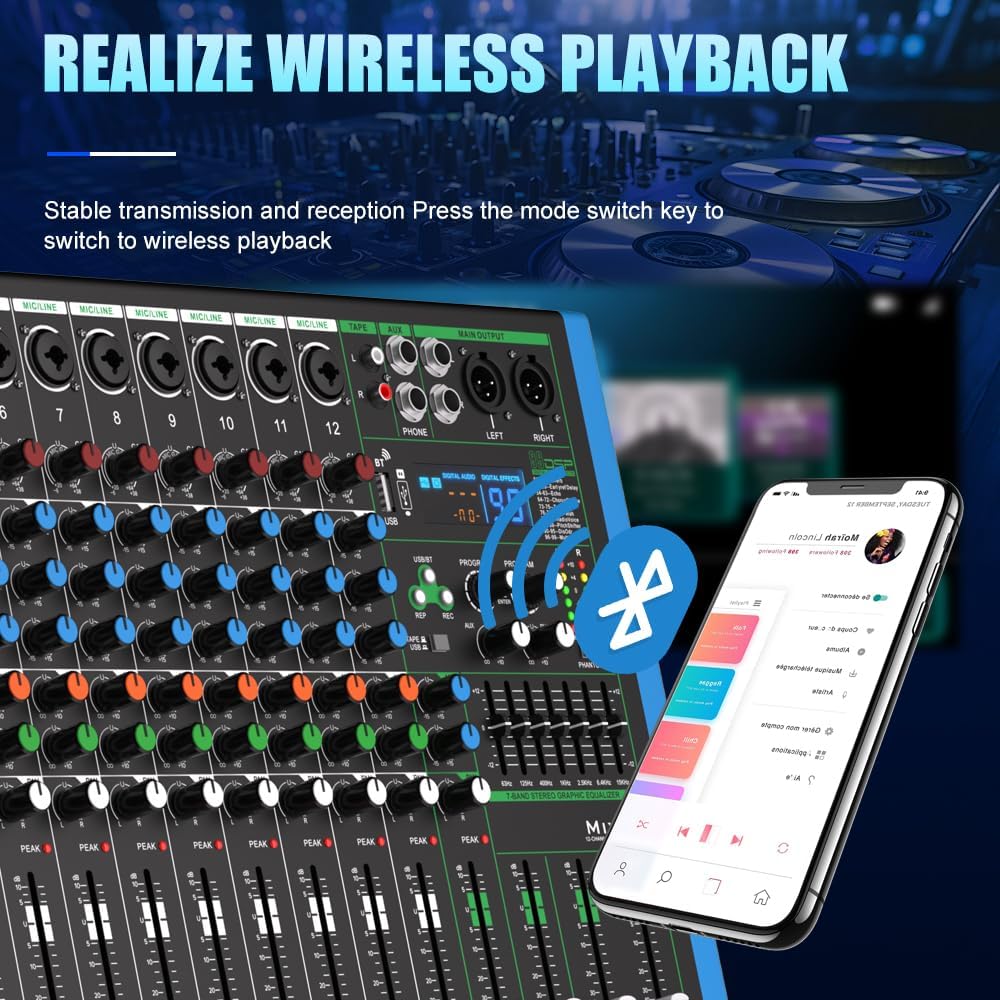
Image 6: The mixer demonstrating wireless music playback via Bluetooth, showing a smartphone connected to the device.
5.4 USB Playback and Recording
To use USB functionality:
- Insert a USB flash drive into the USB port.
- For Playback: The mixer will automatically detect the drive. Use the track navigation buttons (PREV, NEXT) and MODE button to select and play MP3 files.
- For Recording: Press the REC button to start recording the main mix to the USB drive. Press REC again to stop.
- Adjust the MP3/TAPE fader to control the USB playback volume.

Image 7: The mixer connected to a laptop, illustrating its one-click recording capability with digital noise reduction for smooth playback.

Image 8: The mixer with a USB flash drive inserted, highlighting its USB bidirectional transmission feature for lossless playback and internal recording.
6. Connectivity
The MIX-12 offers diverse connectivity options to integrate with various audio equipment:
- Microphone/Line Inputs: 12 channels with combination XLR/6.35mm jacks.
- Main Outputs: Balanced XLR and 6.35mm jacks for connecting to power amplifiers or powered speakers.
- Auxiliary Outputs: For sending signals to external effects processors or monitor systems.
- Headphone Output: 6.35mm stereo jack for monitoring.
- USB Interface: For direct recording and playback with USB flash drives, and connection to a computer.
- Bluetooth: Wireless audio input.
7. Maintenance
To ensure the longevity and optimal performance of your Nuoxiange MIX-12 mixer:
- Keep the unit clean by wiping it with a soft, dry cloth. Avoid using liquid cleaners or solvents.
- Protect the mixer from dust, moisture, and extreme temperatures.
- Avoid placing heavy objects on the mixer.
- Ensure proper ventilation to prevent overheating.
- Disconnect power when not in use for extended periods.
8. Troubleshooting
| Problem | Possible Cause | Solution |
|---|---|---|
| No power | Power cable not connected; power switch off; faulty power adapter. | Check power cable connection; ensure power switch is ON; try a different power outlet. |
| No sound output | Main fader down; channel fader down; incorrect input/output connections; mute engaged. | Raise main and channel faders; verify all cables are correctly connected; check for any mute buttons. |
| Distorted sound | Input GAIN too high; output level too high; faulty cable. | Reduce input GAIN; lower main output level; try different cables. |
| Microphone not working | Phantom power off (for condenser mics); incorrect cable; faulty microphone. | Activate +48V phantom power; ensure correct XLR cable is used; test with another microphone. |
| Bluetooth not connecting | Mixer not in Bluetooth mode; device too far; interference. | Ensure mixer is in BT mode; bring device closer; restart both devices. |
9. Specifications
- Brand: Nuoxiange
- Model: MIX-12
- Number of Channels: 12
- Item Weight: 12.2 pounds
- Product Dimensions: 2.17"D x 21.65"W x 11.81"H
- Power Source: Corded Electric
- Voltage: 110 Volts
- Connectivity Technology: Bluetooth, USB
- DSP Effects: 99-bit digital effects
- Equalizer: 7-segment master equalizer, 3-segment channel equalizers
- Phantom Power: +48V on all 12 channels
10. Warranty and Support
For warranty information and technical support, please refer to the documentation included with your purchase or contact Nuoxiange customer service directly. Keep your purchase receipt as proof of purchase.