
1. Introduction
Welcome to the user manual for your new Massive Audio GTX122H 12-inch subwoofer. This manual provides essential information for the proper installation, operation, and maintenance of your subwoofer to ensure optimal performance and longevity. Please read this manual thoroughly before attempting any installation or operation.
2. Product Overview
The Massive Audio GTX122H is a high-performance 12-inch subwoofer designed to deliver powerful and controlled deep bass. It features robust construction and advanced components for superior sound reproduction in various audio setups.

Figure 2.1: Front view of the GTX122H subwoofer, showcasing the black cone with red stitching and the Massive Audio logo.
3. Key Features
- Powerful Bass Performance: Delivers 800 Watts RMS and 1600 Watts MAX, built for high-output audio systems. Its dual 2-ohm impedance offers flexible wiring options, and an FS of 36Hz, making it ideal for custom installations and serious bass enthusiasts.
- Heavy-Duty Magnet System: Equipped with dual stacked high-flux Y30 120oz Strontium Ferrite magnets and a 10mm top plate, this subwoofer generates intense magnetic force for deep, accurate bass with minimal distortion.
- Durable Cone & Surround: Features a UV-treated non-pressed paper cone stitched with red threading and bonded to a pressed foam surround. This rugged design ensures long-lasting performance and consistent sound quality.
- Precision Suspension & Wiring: A springy poly-cotton spider and high-grade woven tinsel leads connect to spring-loaded 5-way nickel-plated terminals, ensuring reliable signal transfer and smooth cone movement under heavy loads.
- Compact Yet Powerful Design: With a 10.79" cutout diameter, 12.28" overall diameter, and just 6.69" mounting depth, the GTX122H fits a wide range of enclosures while delivering Massive Audio’s signature sound and build quality.
4. Installation and Setup
4.1 Unpacking
Carefully remove the subwoofer from its packaging. Inspect the unit for any signs of damage that may have occurred during shipping. Retain the original packaging for future transport or storage.
4.2 Mounting Considerations
Ensure the chosen enclosure or mounting location provides adequate space and structural integrity for the subwoofer. The GTX122H requires a mounting depth of 6.69 inches and a cutout diameter of 10.79 inches. Proper ventilation around the magnet structure is also recommended.

Figure 4.1: Side profile of the GTX122H, illustrating its compact mounting depth.
4.3 Wiring Configurations
The GTX122H features dual 2-ohm voice coils, offering flexibility in wiring to achieve desired impedance loads for your amplifier. Common configurations include:
- 1 Ohm Load: Wire both 2-ohm voice coils in parallel.
- 4 Ohm Load: Wire both 2-ohm voice coils in series.
Always ensure your amplifier is stable at the chosen impedance. Use high-grade speaker wire and ensure all connections are secure and free from shorts.
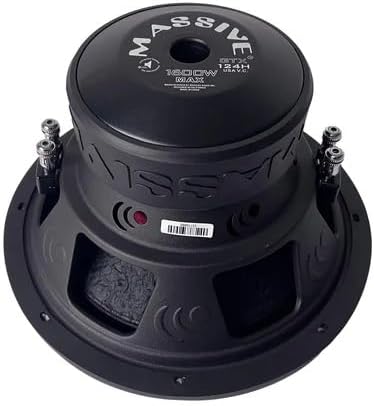
Figure 4.2: Rear view of the GTX122H, highlighting the dual voice coil terminals for wiring.
5. Operation
After successful installation, begin operation with low volume levels. Allow a break-in period of several hours of moderate use before pushing the subwoofer to its maximum capabilities. This allows the suspension components to loosen and perform optimally. Adjust amplifier gain and crossover settings according to your system's requirements and the subwoofer's specifications for balanced sound. The GTX122H is suitable for both indoor and outdoor applications.
6. Maintenance
The Massive Audio GTX122H requires minimal maintenance. Keep the cone and surround free from dust and debris. Use a soft, dry cloth for cleaning. Avoid exposing the subwoofer to extreme temperatures or moisture. Periodically check all wiring connections to ensure they remain secure.
7. Troubleshooting
If you experience issues with your subwoofer, consider the following common problems and solutions:
- No Sound: Check all wiring connections from the amplifier to the subwoofer. Verify amplifier is powered on and receiving a signal. Ensure correct impedance matching.
- Distorted Sound: Reduce amplifier gain. Check for proper enclosure volume. Ensure no physical damage to the cone or surround. Verify amplifier is not clipping.
- Weak Bass: Check amplifier settings, including gain and low-pass filter. Ensure correct polarity of wiring. Verify enclosure is sealed properly.
If problems persist, consult a professional audio technician.
8. Technical Specifications
| Specification | Value |
|---|---|
| Model Name | GTX122H |
| RMS Power Handling | 800 Watts |
| MAX Power Handling | 1600 Watts |
| Nominal Impedance | Dual 2 Ohm |
| Magnet Type | Dual Stacked High-Flux Y30 Strontium Ferrite (120oz) |
| Cone Material | UV-treated Non-Pressed Paper |
| Surround Material | Pressed Foam |
| Mounting Depth | 6.69 inches |
| Cutout Diameter | 10.79 inches |
| Overall Diameter | 12.28 inches |
| Item Weight | 18.59 pounds |
| UPC | 623169612084 |
| Manufacturer | Massive Audio |
| Recommended Uses | Indoor/Outdoor |
9. Warranty and Support
Massive Audio products are designed for durability and performance. For specific warranty information, please refer to the warranty card included with your product or visit the official Massive Audio website. For technical support or service inquiries, please contact Massive Audio customer service through their official channels.


