
Introduction
Thank you for choosing the Growell 4L Electric Composter. This manual provides essential information for the safe and efficient operation, maintenance, and care of your new appliance. Please read it thoroughly before first use and keep it for future reference.

Image: The Growell 4L Electric Composter efficiently processes food waste into nutrient-rich soil.
Safety Information
Always use appropriate protective gear when handling food waste and the composter. Keep the composter clean and dry to prevent the growth of harmful microorganisms. Do not compost sharp objects or materials that may attract pests. Always follow the manufacturer's guidelines for safe operation and maintenance.
Package Contents
Verify that all items are present in the package:
- Electric Composter x 1
- 4L Inner Barrel x 1
- Carbon Filter x 2
- Carbon Refill Bag (500g) x 1
- User Manual x 1
- Dos & Don'ts Guide x 1
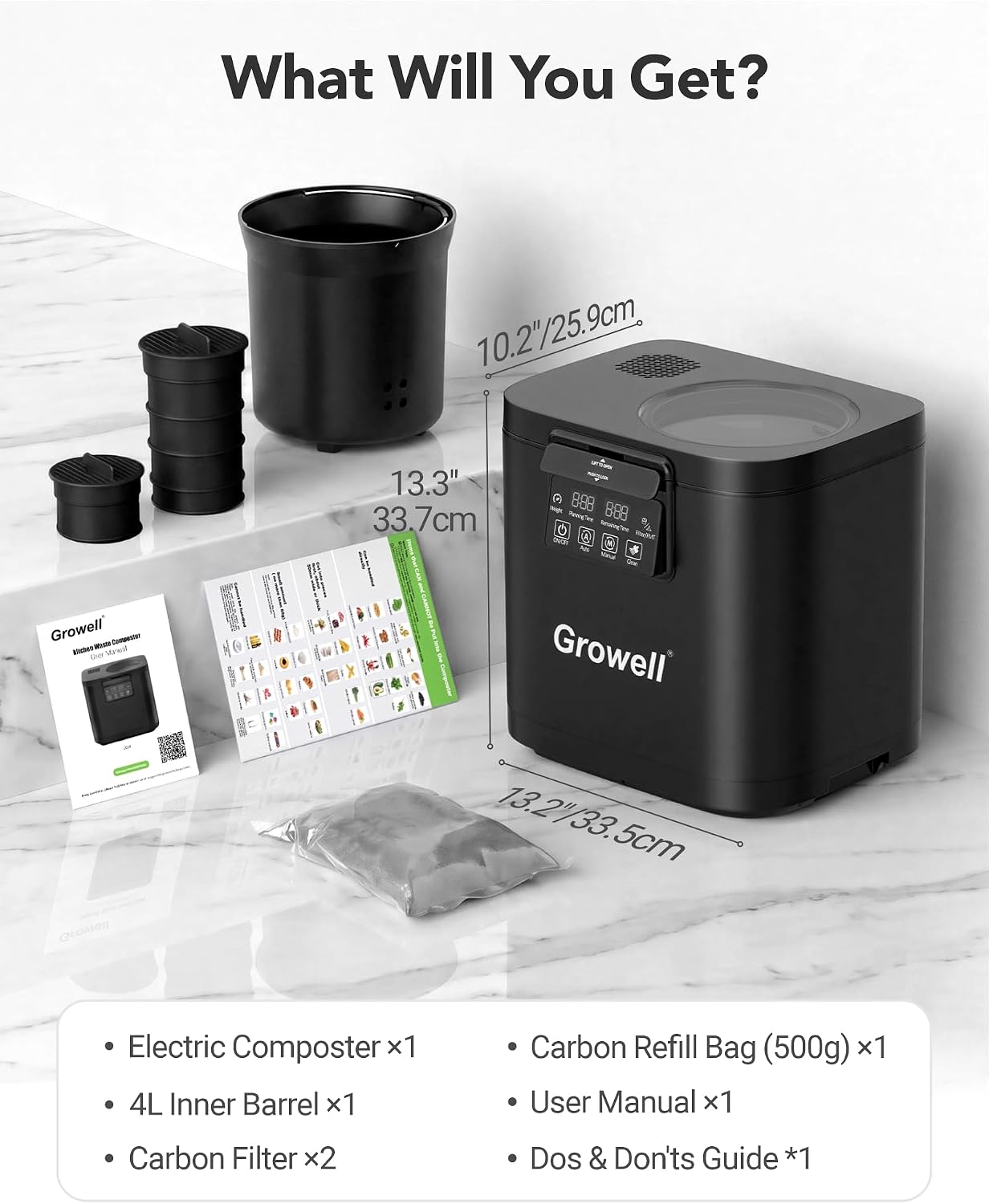
Image: All components included in the Growell Electric Composter package.
Product Overview
The Growell 4L Electric Composter is designed for efficient and odorless kitchen waste processing. Key features include:
- Capacity: 4 liters
- Motor: Upgraded brushless motor, 500W high-torque, ultra-quiet (<40dB), with a 30,000-hour lifespan.
- Blades: 4 reinforced blades capable of grinding various food waste, including soft bones.
- Filter System: Dual activated carbon filters for 99.7% odor elimination, with a replacement alert.
- Control: Smart LED touch panel with Auto, Manual, and FMT modes.
- Cleaning: 30-minute auto-clean function and removable, dishwasher-safe inner bucket.
- Dimensions: 13.2"L x 10.2"W x 13.3"H
- Weight: 22.7 pounds

Image: The composter features an upgraded brushless motor for quiet and efficient operation.

Image: The reinforced blades are designed for durability and effective grinding.
Setup
- Unpack: Carefully remove all components from the packaging.
- Install Carbon Filters: Open the filter compartments on the top of the unit. Insert the activated carbon filters. Ensure they are securely in place.
- Place Inner Barrel: Insert the 4L inner barrel into the main compartment of the composter.
- Position: Place the composter on a stable, flat surface in your kitchen or desired location.
- Connect Power: Plug the power cord into a suitable electrical outlet.
Video: Growell Composter Unboxing and Quick Start Guide. This video demonstrates the initial setup and first use of the composter.
Operation
What Can Be Composted
The Growell Electric Composter is designed to process a wide range of organic kitchen waste. Refer to the guide below:

Image: Guide for acceptable and unacceptable items for composting.
Adding Food Waste
- Open the lid of the composter.
- Place your food waste into the inner barrel. Ensure not to overfill beyond the maximum fill line.
- Close the lid securely.
Selecting a Composting Mode
The composter offers three operational modes:
- Auto Mode: The composter automatically detects the weight of the food waste and adjusts the processing time (typically 4-6 hours).
- Manual Mode: Allows you to manually select a processing time between 1 and 6 hours.
- FMT (Ferment) Mode: After a regular composting cycle, you can use this 10-hour mode to further ferment the dried output into nutrient-rich plant fertilizer. This requires adding approximately 50% water (e.g., 400g water for 800g treated waste) to the treated waste before starting the FMT cycle.

Image: The intuitive LED touch panel for mode selection and monitoring.
Starting a Cycle
- Press the ON/OFF button to power on the unit.
- Select your desired mode (Auto, Manual, or FMT) by pressing the corresponding button.
- The display will show the estimated processing time. The composter will begin its cycle of grinding, high-temperature drying, and cooling.
- Once the cycle is complete, the unit will signal, and the processed material will be ready for removal.
Video: Buyers Show of Growell 4L Electric Composter for Kitchen. This video demonstrates the composter in action, processing various food scraps.
Video: 4L Electric Composter for Kitchen. A brief overview of the composter's functionality.
Video: Growell Smart Electric Composter. This video highlights the smart features and ease of use.
Maintenance
Auto-Clean Function
The composter features a convenient 30-minute auto-clean cycle:
- Ensure the inner barrel is empty.
- Add water to the inner barrel (refer to the manual for recommended water level).
- Press the Clean button on the control panel to start the cycle.
Deep Cleaning
For a more thorough cleaning, the inner bucket is fully removable and top-rack dishwasher safe. Always ensure the unit is unplugged before removing the inner barrel for cleaning.

Image: The inner barrel features a durable 3-layer design for easy cleaning.
Carbon Filter Replacement
The dual activated carbon filters should be replaced approximately every 3 months to maintain optimal odor elimination. The unit features a filter replacement alert to remind you when it's time.

Image: The dual carbon filters provide effective odor control.
Video: How to Use & Clean Your Growell Composter. This video provides instructions on both operation and cleaning procedures.
Troubleshooting
If you encounter issues with your Growell Electric Composter, please refer to the following common solutions:
- Unit not powering on: Ensure the power cord is securely plugged into both the composter and a working electrical outlet.
- Unusual odors: Check if the carbon filters need replacement. Ensure the lid is properly sealed during operation.
- Composting cycle taking too long: Verify that the inner barrel is not overfilled. Ensure only recommended items are being composted.
- Processed material is still wet: This may indicate an issue with the drying cycle or too much moisture in the initial food waste. Try running another cycle or reducing the moisture content of the waste.
- Error codes on display: Consult the detailed troubleshooting section in the printed user manual for specific error code meanings and solutions.
For persistent issues or technical support, please contact Growell customer service.
Specifications
| Feature | Detail |
|---|---|
| Model Number | GWEC01BKD |
| Capacity | 4 Liters |
| Product Dimensions (L x W x H) | 13.2" x 10.2" x 13.3" |
| Item Weight | 22.7 pounds |
| Material | Aluminum Alloy, Stainless Steel, ABS |
| Motor Type | Brushless |
| Noise Level | <40dB |
| Power | 500W |
| Filter Type | Dual Activated Carbon Filters |
Warranty and Support
The Growell 4L Electric Composter comes with a 3-year manufacturer warranty from the date of purchase. This warranty covers defects in materials and workmanship under normal use. Please retain your proof of purchase for warranty claims.
For customer support, warranty inquiries, or to purchase replacement parts (such as carbon filters), please visit the official Growell website or contact our dedicated customer service team. Contact information can be found in the included 'Dos & Don'ts Guide' or on the Growell brand store page.

Image: The product includes a 3-year warranty for peace of mind.