
Introduction
The JBL Stage2 GEN2 965M are 6x9-inch (152x229mm) 3-way car speakers designed to deliver a rich and balanced audio experience. This system features a Plus One™ woofer, a dedicated midrange driver, and a tweeter, providing full-range sound reproduction. With a power handling of 70 watts RMS and 210 watts peak, these speakers are suitable for various car audio setups, offering a significant upgrade over factory-installed speakers.
This manual provides essential information for the proper installation, operation, and maintenance of your JBL Stage2 GEN2 965M speakers.
What's in the Box
Verify that all components are present before beginning installation:
- 2 x JBL Stage2 GEN2 965M Speakers
- 2 x Speaker Grilles
- 8 x Mounting Screws
- 8 x Speed Clips
- 2 x Foam Gaskets
- 1 x Instruction Manual (this document)
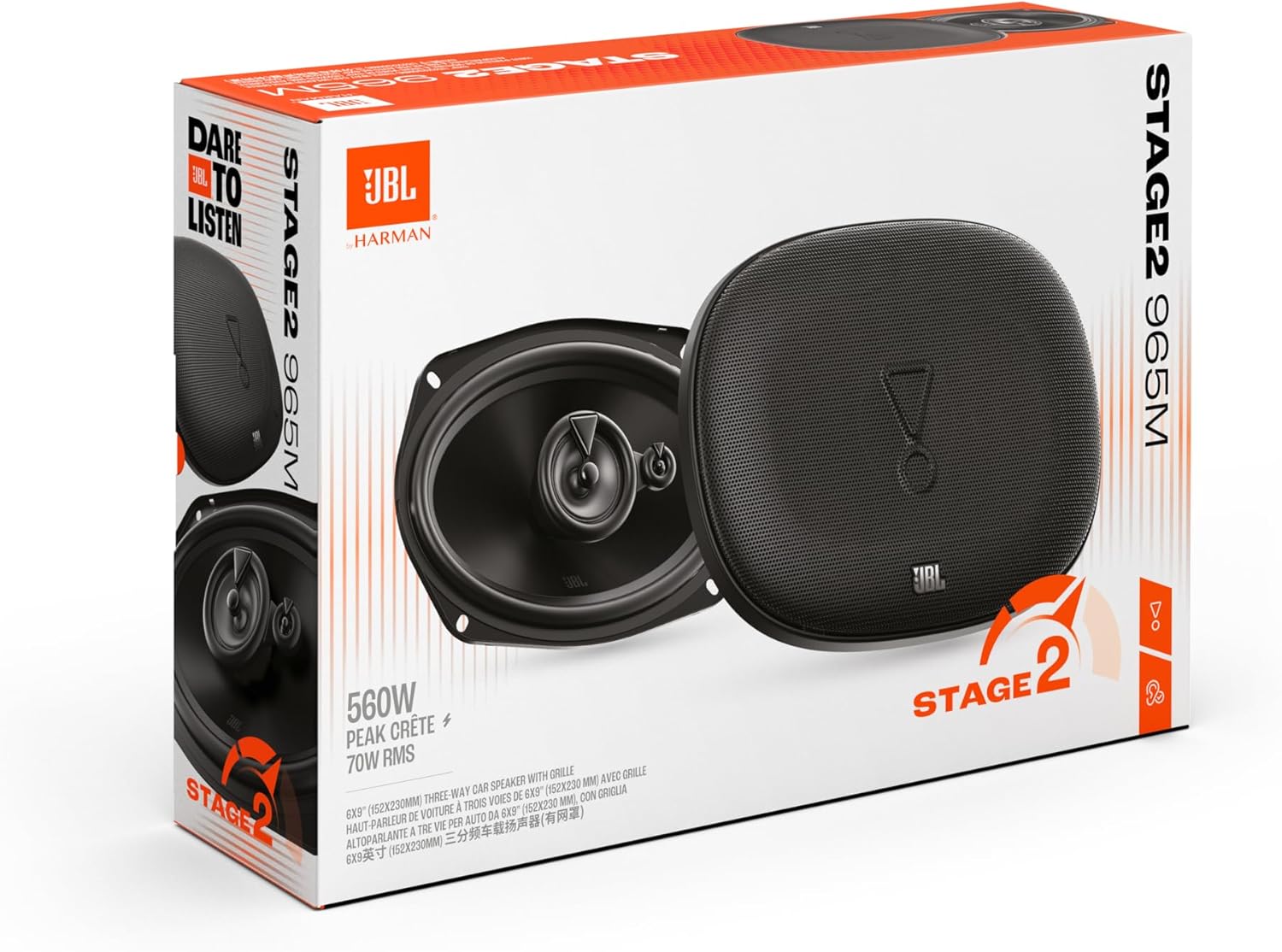
Image: Contents of the JBL Stage2 GEN2 965M speaker package, showing two speakers, two grilles, and mounting hardware.
Setup and Installation
Proper installation is crucial for optimal performance. If you are unsure about any steps, consult a professional car audio installer.
1. Planning and Preparation
- Safety First: Disconnect the vehicle's negative battery terminal before starting any electrical work.
- Speaker Location: These 6x9-inch speakers are designed for rear deck or door panel installations where a 6x9-inch opening is available.
- Check Fitment: Ensure the speakers will fit in your desired location. Refer to the dimensions diagram below.
- Tools Required: You will need basic hand tools such as screwdrivers, wire strippers, crimpers, and possibly a drill.
Image: Detailed technical drawing showing the dimensions of the JBL Stage2 GEN2 965M speaker, including mounting depth and overall size.
2. Removing Existing Speakers (if applicable)
- Carefully remove the grilles and mounting screws of your existing speakers.
- Disconnect the speaker wires, noting the positive (+) and negative (-) terminals.
3. Wiring the Speakers
- Connect the positive (+) speaker wire from your amplifier/head unit to the positive (+) terminal on the JBL speaker.
- Connect the negative (-) speaker wire from your amplifier/head unit to the negative (-) terminal on the JBL speaker.
- Ensure connections are secure and properly insulated to prevent short circuits.

Image: Front view of the JBL Stage2 GEN2 965M speaker without its grille, highlighting the speaker cone and connection terminals.
4. Mounting the Speakers
- Place the foam gasket (if desired for improved seal) around the speaker frame.
- Position the speaker into the mounting opening.
- Secure the speaker using the provided mounting screws and speed clips. Do not overtighten.
- Attach the speaker grilles (if desired) over the installed speakers.

Image: Front view of the JBL Stage2 GEN2 965M speaker with the protective grille in place.
5. Final Steps
- Reconnect the vehicle's negative battery terminal.
- Test the speakers with your car audio system.
Operating Instructions
Once installed, your JBL Stage2 GEN2 965M speakers operate as part of your car's audio system. They are designed to work with a car radio or amplifier.
- Power Handling: These speakers can handle up to 70W RMS (Root Mean Square) continuous power and 210W Peak power. Ensure your amplifier's output does not consistently exceed these limits to prevent damage.
- Impedance: The speakers have a 4-ohm impedance. Ensure your amplifier is stable at this impedance.
- Audio Source: Play audio from your car's head unit (radio, CD player, Bluetooth, AUX, RCA) or external amplifier.
- Volume Control: Adjust the volume gradually. Avoid playing audio at excessively high volumes for extended periods, which can cause distortion and speaker damage.
- Tone Controls: Use your head unit's or amplifier's tone controls (bass, treble, balance, fader) to fine-tune the sound to your preference.
Maintenance
To ensure the longevity and optimal performance of your JBL Stage2 GEN2 965M speakers, follow these simple maintenance guidelines:
- Cleaning: Gently wipe the speaker grilles and surrounds with a soft, dry cloth. Avoid using harsh chemicals or abrasive cleaners.
- Moisture: These speakers are not waterproof. Avoid exposing them to direct water, excessive humidity, or spills. If they get wet, allow them to dry completely before use.
- Physical Damage: Protect the speaker cones from physical impact or punctures. The grilles provide some protection, but care should still be taken.
- Environmental Conditions: While designed for automotive use, extreme temperatures (very hot or very cold) can affect speaker performance and lifespan.
Troubleshooting
If you experience issues with your speakers, refer to the following common troubleshooting steps:
| Problem | Possible Cause | Solution |
|---|---|---|
| No sound from speakers |
|
|
| Distorted or unclear sound |
|
|
| One speaker not working |
|
|
Specifications
| Feature | Detail |
|---|---|
| Model Name | JBL STAGE2 GEN2 965M |
| Speaker Type | 3-Way Coaxial |
| Speaker Size | 6x9 inches (152x229mm) |
| RMS Power Handling | 70 Watts |
| Peak Power Handling | 210 Watts (560 Watts Max Product Power) |
| Frequency Response | 50 Hz – 20 kHz (Note: Product specifications also list 19955 Hz) |
| Sensitivity | 91 dB (Note: Product specifications also list 92 dB) |
| Impedance | 4 Ohms |
| Material | Metal Plastic |
| Connectivity Technology | Coaxial |
| Audio Output Mode | Stereo |
| Input Voltage | 12 Volts |
| Mounting Type | Flush Mount |
| Product Dimensions (L x W x H) | 9.3 x 23.46 x 16.42 cm; 2.25 Kilograms |
| Recommended Uses | Car sound systems, upgrade, replacement, or extension |
| Water Resistance Level | Not waterproof |
Warranty and Support
Your JBL Stage2 GEN2 965M speakers come with a manufacturer's warranty and support options.
- Warranty: A 2-year manufacturer's warranty is provided for this product. Please retain your proof of purchase for warranty claims.
- Spare Parts: Spare parts are available for 2 years from the date of purchase.
- Customer Support: For technical assistance, warranty claims, or further inquiries, please visit the official JBL website or contact their customer support. Refer to the contact information provided on the JBL website or in your product packaging.


