
Introduction
Thank you for choosing the GLOWRIUM G462pro 24W Full Spectrum LED Grow Light. This manual provides essential information for the safe and efficient operation of your new grow light. Please read it thoroughly before use and retain it for future reference.
Safety Information
- Ensure the power supply matches the product's requirements (24V low-voltage system).
- Do not expose the device to water or high humidity. This product is designed for indoor use only.
- Avoid direct contact with the lamp head during operation as it may become warm.
- Keep out of reach of children and pets.
- Do not attempt to disassemble or modify the product. Contact customer support for assistance.
- Place the grow light on a stable, flat surface. For added stability, place a plant pot on the base.
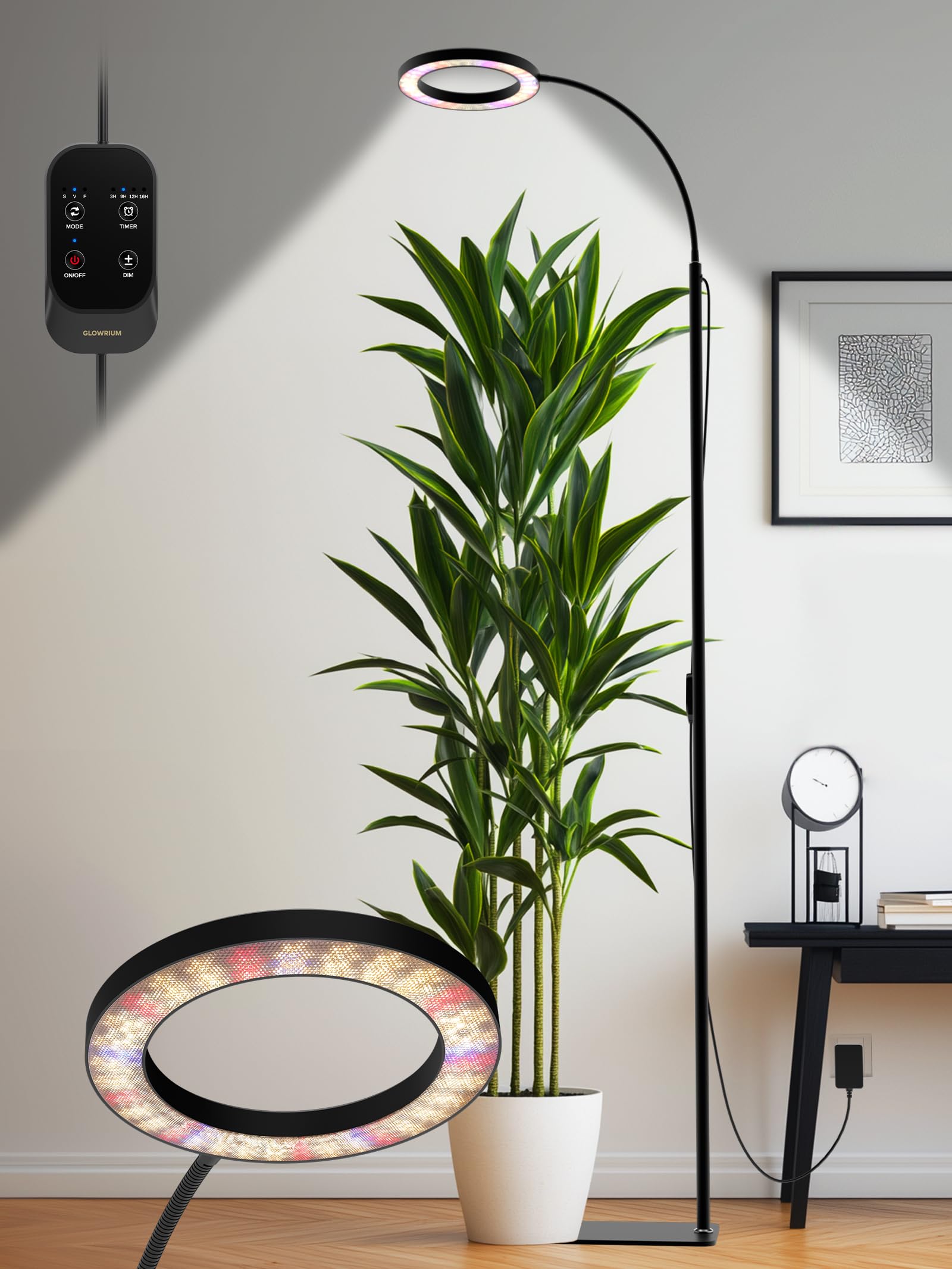
A GLOWRIUM 24W grow light with a black finish, illuminating an indoor plant.
What's in the Box
Verify that all components are present before assembly.
- Lamp Head (1)
- Pole Sections (4)
- Baseplate (1)
- Power Adapter (1)
- Inline Controller (1)
- User Manual (1)

An illustration showing the individual components of the GLOWRIUM grow light: the lamp head, four pole sections, and the baseplate.

Lamp Head

Baseplate

Power Adapter

Pole Sections
Setup Instructions
- Assemble the Pole: Connect the four pole sections by screwing them together clockwise.
- Attach the Baseplate: Screw the assembled pole into the baseplate firmly.
- Attach the Lamp Head: Insert the flexible gooseneck of the lamp head into the top of the assembled pole.
- Connect Power: Plug the inline controller into the power adapter, then plug the power adapter into a standard electrical outlet.
- Positioning: Place the grow light on a stable surface. For optimal stability, place a heavy plant pot on the baseplate. Adjust the height and angle of the lamp head using the flexible gooseneck to suit your plant's needs.

An illustration demonstrating the adjustable height feature using four pole sections and the flexible gooseneck for directing light.
Operating Instructions
The GLOWRIUM Grow Light is controlled via an inline controller. Familiarize yourself with its buttons:

A detailed view of the inline controller with buttons for Mode, Timer, ON/OFF, and Dimming.
Power On/Off
- Press the ON/OFF button once to turn the lamp on or off.
- Press and hold the ON/OFF button for 5 seconds to reset the device.
Adjusting Brightness (Stepless Dimming)
- Press the DIM button to cycle through preset brightness levels: 10%, 20%, 40%, 60%, 80%, 100%.
- Press and hold the DIM button for stepless dimming from 10% to 100%. Release at your desired brightness.

A visual representation of the grow light's brightness levels, adjustable from 10% to 100%.
Lighting Modes (Full Spectrum)
The grow light offers three spectrum modes tailored for different plant growth stages:
- Press the MODE button to switch between modes:
- S: Seedling Mode: Gentle red and blue spectrum to boost early growth and germination.
- V: Vegetative Mode: Full spectrum with enhanced blue tones to promote strong stems and lush foliage.
- F: Flowering Mode: Enhanced red spectrum to support flowering and fruiting for mature plants.

An image illustrating the three light spectrum modes (Seedling, Vegetative, Flowering) with corresponding spectral graphs and plant examples.
Timer Settings (Auto On/Off)
The built-in timer allows for automatic lighting cycles:
- Press the TIMER button to cycle through 4 automatic lighting cycles: 3H, 9H, 12H, or 16H.
- The light will turn on and off automatically at the set interval each day.
- Press and hold the TIMER button to cancel the timer function.
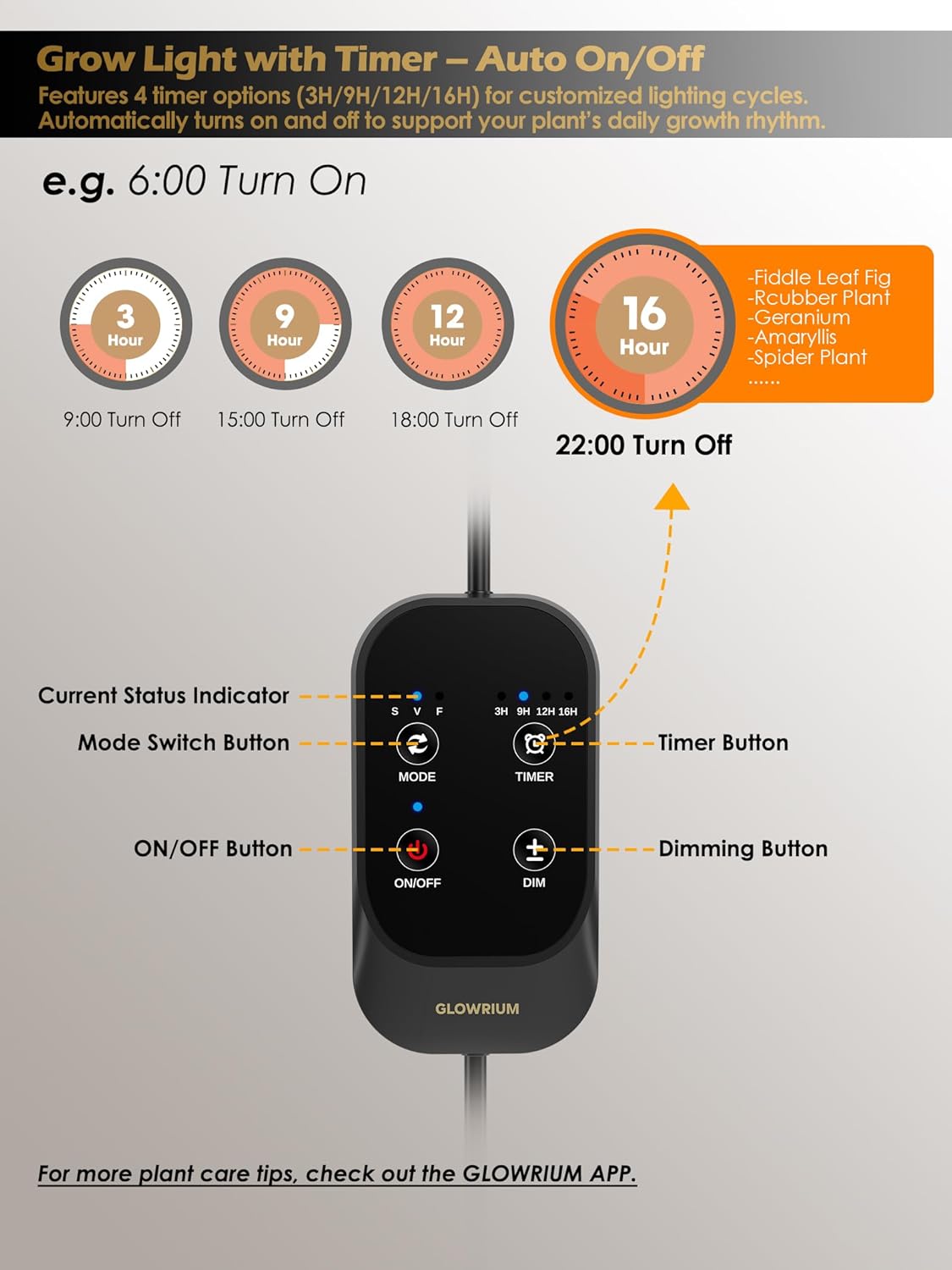
An image showing the timer options (3H, 9H, 12H, 16H) and how they automatically turn the light on and off.
Adjustable Height and Gooseneck
The grow light features a 4-section pole that extends up to 70.9 inches (180 cm) and a 360° flexible gooseneck. This allows for precise positioning and broad light coverage for plants of various sizes and growth stages.
An official product video demonstrating the GLOWRIUM Grow Light G2 Pro in use, showcasing its adjustable height, flexible gooseneck, power efficiency, timer settings, and various light spectrum modes.
Plant Care Assistant (Non-Smart Product)
While the product description mentions 'intelligent management features' and 'care recommendations', please note that this specific GLOWRIUM G462pro 24W model is a NON-SMART PRODUCT. It does not connect to an app for light measurement, watering/fertilizer reminders, or growth records. These features may be available on other GLOWRIUM smart grow light models.

An image highlighting "Plant Assistant Features" such as light measurement and watering reminders, with a clear label indicating "THIS IS A NON-SMART PRODUCT".
Specifications
| Feature | Description |
|---|---|
| Model Number | G462pro |
| Wattage | 24 watts |
| Light Source Type | LED (134 LEDs) |
| Spectrum | Full Spectrum (3 modes: Seedling, Vegetative, Flowering) |
| Dimming | Stepless (10%-100%) |
| Timer Settings | 3H, 9H, 12H, 16H (Automatic On/Off) |
| Adjustable Height | Up to 70.9 inches (4-section pole) |
| Gooseneck | 360° Flexible |
| Product Dimensions | 7.9"D x 5.9"W x 70.9"H |
| Base Material | Aluminum |
| Color | Black |
| Power Source | Corded Electric (24V Low-Voltage) |
| Indoor/Outdoor Use | Indoor Only |

A diagram showing the Photosynthetically Active Radiation (PAR) values at different distances from the grow light.

An illustration detailing the enlarged lamp head for wider coverage, the heavier base for stability, and the durable thicker pole design.
Maintenance
- Cleaning: Disconnect the power before cleaning. Use a soft, dry cloth to wipe the lamp head and pole. Do not use abrasive cleaners or solvents.
- Storage: If not in use for an extended period, store the grow light in a cool, dry place, away from direct sunlight and moisture.
- Inspection: Periodically check the power cord and connections for any signs of damage. If damage is found, discontinue use and contact customer support.
Troubleshooting
| Problem | Possible Cause | Solution |
|---|---|---|
| Light does not turn on. | No power, loose connection, faulty adapter. | Check power outlet, ensure all connections are secure, try a different outlet. |
| Timer function not working. | Timer not set correctly, power interruption. | Ensure timer is activated (indicator light on controller), reset timer if needed. |
| Brightness adjustment not working. | Controller issue. | Press and hold the DIM button for stepless adjustment. If unresponsive, try resetting the device by holding the ON/OFF button for 5 seconds. |
| Light flickers or dims unexpectedly. | Unstable power supply, loose connection. | Check power connections, ensure stable power source. |
Warranty and Support
The GLOWRIUM G462pro 24W Grow Light comes with a 2-year manufacturer's warranty from the date of purchase. This warranty covers defects in materials and workmanship under normal use.
For warranty claims, technical support, or any questions regarding your product, please contact GLOWRIUM customer service through the retailer where you purchased the product or visit the official GLOWRIUM website for contact information.