1. Product Overview
The VEVOR 3000W Sump Pump Battery Backup System (Model TPU3000W) is designed to provide continuous power to your sump pump during electrical outages. This pure sine wave inverter automatically switches to battery power, ensuring your basement remains protected. It features a 3000W rated power, 6000W peak power, and a 27.3A operating current, capable of supporting two sump pumps simultaneously. The integrated LCD display provides real-time monitoring of system status, including voltage, power, and battery level.
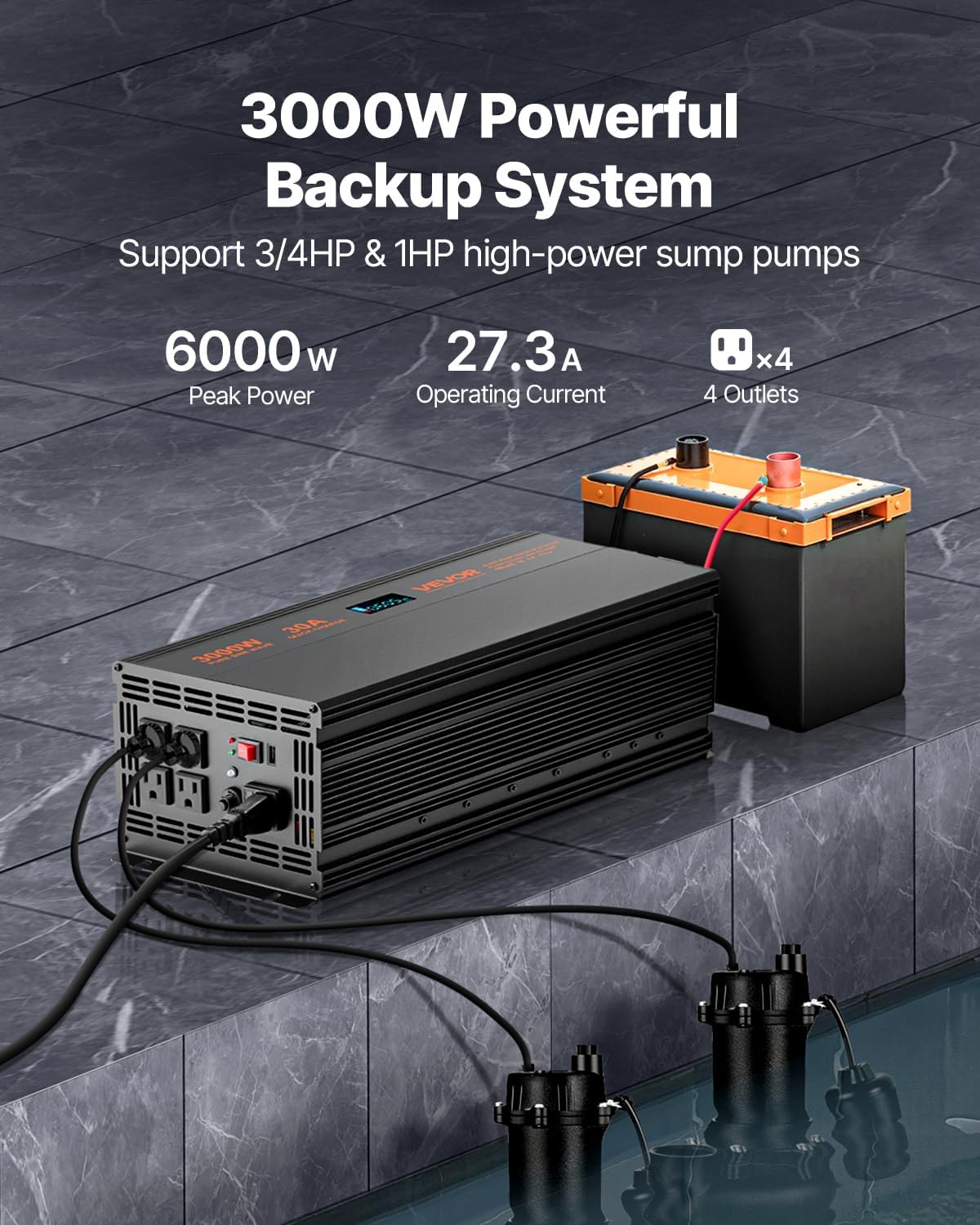
Figure 1: VEVOR 3000W Sump Pump Battery Backup System with connected battery and sump pumps.
2. Important Safety Instructions
Read all instructions carefully before installation and operation. Failure to follow these instructions may result in electric shock, fire, or serious injury.
- Electrical Safety: Ensure all connections are secure and correctly polarized. Do not operate the unit with damaged cords or plugs.
- Battery Safety: Use only deep cycle batteries recommended for inverter use. Ensure proper ventilation around the battery to prevent gas accumulation.
- Placement: Install the system in a dry, well-ventilated area, away from flammable materials and direct sunlight.
- Circuit Breaker: The unit is equipped with multiple protection mechanisms, including overcurrent, overvoltage, overheat, overload, and short circuit protection. Do not bypass these safety features.

Figure 2: System with circuit breaker and multiple protection mechanisms.
3. Package Contents
Verify that all items are present and undamaged upon unpacking:
- 1 x VEVOR Sump Pump Battery Backup System (TPU3000W)
- 2 x Battery Connection Cables
- 1 x Power Cable
- 9 x 50A Fuses (spare)
- 1 x User Manual
4. Setup Instructions
The VEVOR Sump Pump Battery Backup System is designed for straightforward, plug-and-go installation.
4.1 Connecting the Battery
- Ensure the inverter is turned off and disconnected from AC power.
- Connect the red battery cable to the positive (+) terminal of a 12V deep cycle battery and the positive (+) terminal on the inverter.
- Connect the black battery cable to the negative (-) terminal of the battery and the negative (-) terminal on the inverter.
- Ensure all connections are tight and secure.
4.2 Connecting to AC Power and Sump Pumps
- Plug the provided power cable into the AC input port on the inverter.
- Plug the other end of the power cable into a standard 120V AC wall outlet.
- Plug your sump pump(s) into the AC output outlets on the inverter. The system supports up to two pumps.
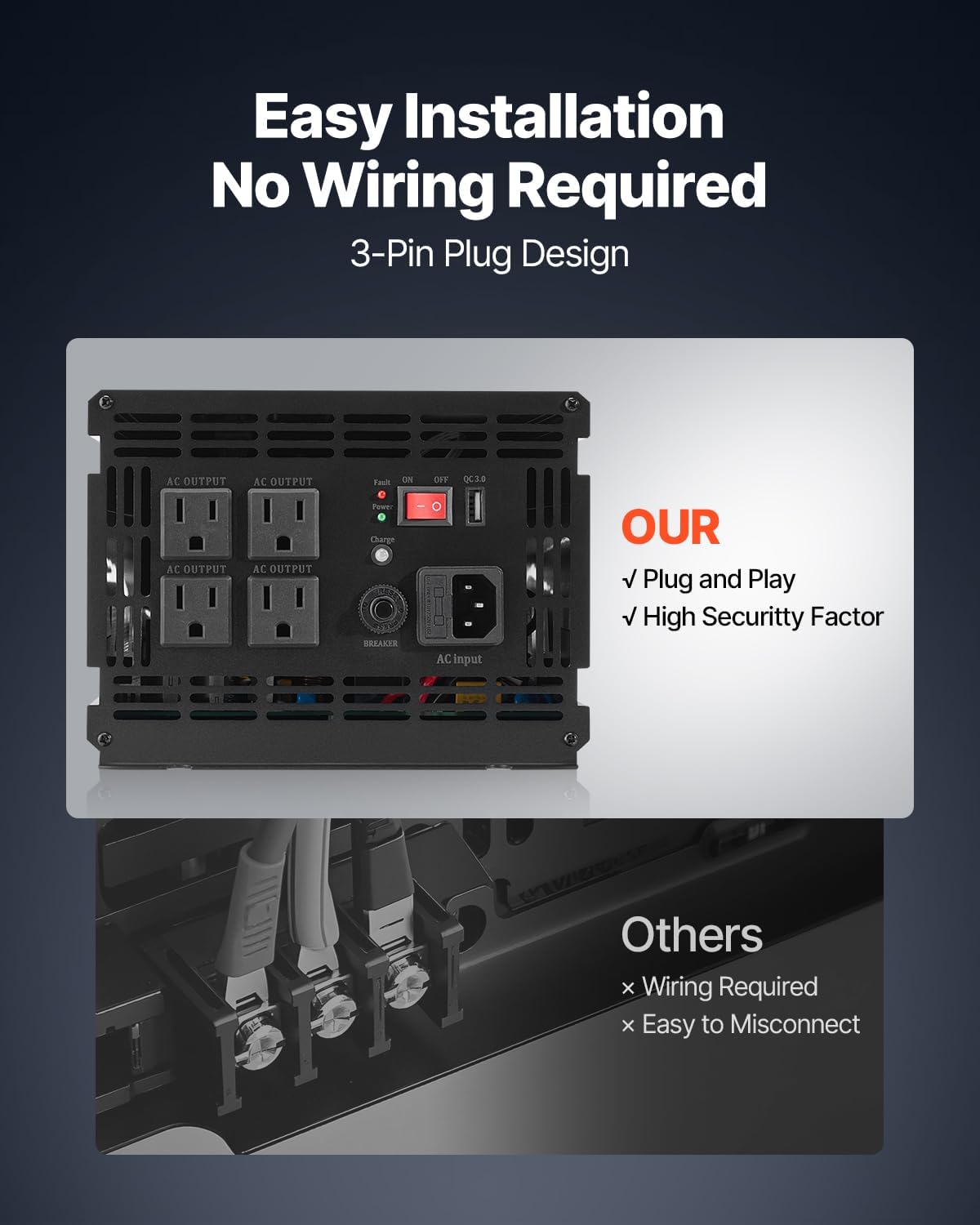
Figure 3: Simplified plug-and-play installation of the system.
The system includes a 3.94 ft (1.2 m) battery cable for flexible placement.

Figure 4: Example setup of the sump pump battery backup system.
5. Operating Instructions
5.1 Powering On/Off
- To power on the system, press and hold the power button until the LCD screen illuminates.
- To power off, press and hold the power button again until the LCD screen turns off.
5.2 Automatic Transfer Function
When connected to both AC power and a battery, the system operates in standby mode, charging the battery. In the event of a power outage, the system will automatically detect the loss of AC power and seamlessly switch to battery power, providing uninterrupted operation for your connected sump pump(s).
5.3 LCD Display Monitoring
The high-definition LCD display provides real-time information about the system's status:
- Input Voltage: Displays the incoming AC voltage.
- Output Voltage: Shows the AC output voltage supplied to the sump pumps.
- Power (Watts): Indicates the current power consumption of connected devices.
- Battery Level: Shows the remaining charge in the connected battery.
- Frequency: Displays the output frequency (e.g., 60Hz).
- Protection Indicators: Icons for Over Voltage (OV), Low Voltage (LV), Over Temperature (OT), Overload (OL), Short Circuit (SC), and Grid Input (GRD) will illuminate if a protection event occurs.

Figure 5: Detailed view of the LCD display and its indicators.
5.4 Fast Charging
The system features a maximum charging current of 30A, allowing for quick recharging of the connected battery once AC power is restored.

Figure 6: Pure Sine Wave output and 30A fast charging capability.
6. Maintenance
Regular maintenance ensures optimal performance and longevity of your battery backup system.
- Battery Inspection: Periodically check battery terminals for corrosion. Clean with a wire brush if necessary. Ensure battery fluid levels are adequate for flooded lead-acid batteries.
- System Cleaning: Keep the inverter's ventilation openings clear of dust and debris to prevent overheating. Use a dry cloth to wipe the exterior.
- Functionality Test: It is recommended to periodically test the system by simulating a power outage (e.g., by temporarily unplugging the AC input) to ensure the automatic transfer function is working correctly.
- Fuse Replacement: If a fuse blows, replace it with a fuse of the same rating (50A). Refer to the unit's labeling for fuse locations.
7. Troubleshooting
This section addresses common issues you might encounter with your VEVOR Sump Pump Battery Backup System.
| Problem | Possible Cause | Solution |
|---|---|---|
| No power output from inverter | Inverter is off; Battery discharged; Loose connections; Blown fuse | Turn on inverter; Charge battery; Check and tighten all cables; Replace fuse. |
| Sump pump not running during outage | Battery not connected or discharged; Overload; Sump pump issue | Check battery connections and charge; Reduce load; Test sump pump directly. |
| LCD display not working | No power to inverter; Display fault | Check power connections; Contact customer support if issue persists. |
| Overload/Protection indicator active | Connected load exceeds capacity; Short circuit | Reduce connected load; Check for short circuits in connected devices. |
If troubleshooting steps do not resolve the issue, please contact VEVOR customer support.
8. Specifications
| Feature | Detail |
|---|---|
| Item Model Number | TPU3000W |
| Battery System Voltage | 12V |
| Rated Power | 3000W |
| Peak Power | 6000W |
| Max Charging Current | 30A |
| Input Voltage | 90V-130V AC |
| Output Voltage | 120V AC |
| Net Weight | 15.87 lbs / 7.2 kg |
| Product Dimensions (L x W x H) | 14.88 x 7.6 x 3.78 inches / 378 x 193 x 96 mm |
| Color | Black |

Figure 7: Product dimensions and included accessories.
9. Instructional Videos
9.1 Product Overview and Features (2:17)
Video 1: A detailed overview of the VEVOR Sump Pump Battery Backup System, highlighting its key features and benefits.
9.2 Setup and Operation Guide (2:22)
Video 2: A step-by-step guide on how to set up and operate the sump pump battery backup system, including battery and pump connections.
10. Warranty and Support
For warranty information, please refer to the documentation included with your product or visit the official VEVOR website. If you require technical assistance, have questions about installation, operation, or maintenance, please contact VEVOR customer support.
VEVOR Customer Service:
- Visit the VEVOR official website for support resources and contact information.
- Refer to your purchase receipt for specific warranty terms and conditions.