
XTRONS PX74M211GS-UK
XTRONS 7 Inch Android 14 Car Stereo User Manual
Model: PX74M211GS-UK
Introduction
This manual provides comprehensive instructions for the installation, operation, and maintenance of your XTRONS 7 Inch Android 14 Car Stereo. This advanced head unit is designed to enhance your in-car entertainment and navigation experience with its powerful features and user-friendly interface. Please read this manual thoroughly before installation and use to ensure optimal performance and safety.

Image: Front view of the XTRONS 7 Inch Android 14 Car Stereo, showcasing its display and control buttons.
Applicable Models & Years
This car stereo unit is specifically designed for the following Mercedes-Benz vehicles:
- For Mercedes-Benz E-W211 (E299/E220/E240/E270/E280) (2002-2008)
- For Mercedes-Benz CLS Class W219 (CLS-350/CLS-500/CLS-55) (2005-2006)

Image: Comparison showing the car's dashboard before and after the installation of the XTRONS head unit, demonstrating its integrated fit.
Important Notes on Compatibility
Before proceeding with installation, please verify the following compatibility details:
- Ensure your car's central console is a trapezoidal central console with a trim strip above. This unit will NOT fit if your console does not match this description.
- Check if your vehicle's center console has a screen above it. If so, you may need a different model (XTRONS QLM2240M12EL for left-hand driving or QLM2240M12ER for right-hand driving).
- Your vehicle's original CD changer will NOT function after installing this unit.
- This unit does NOT support your vehicle's air conditioning information display.
- For Mercedes vehicles from 2003-2008 with COMAND APS NTG 1 system, an extra optical decoder box (XTRONS FOBB01) is required to retain your car's original COMAND system functionality.
- For Mercedes vehicles from 2009-2012 with original COMAND APS NTG (MOST Bus Based Systems) 2 or COMAND APS NTG 2.5 system, an extra optical decoder box (XTRONS FOBB03) is required.
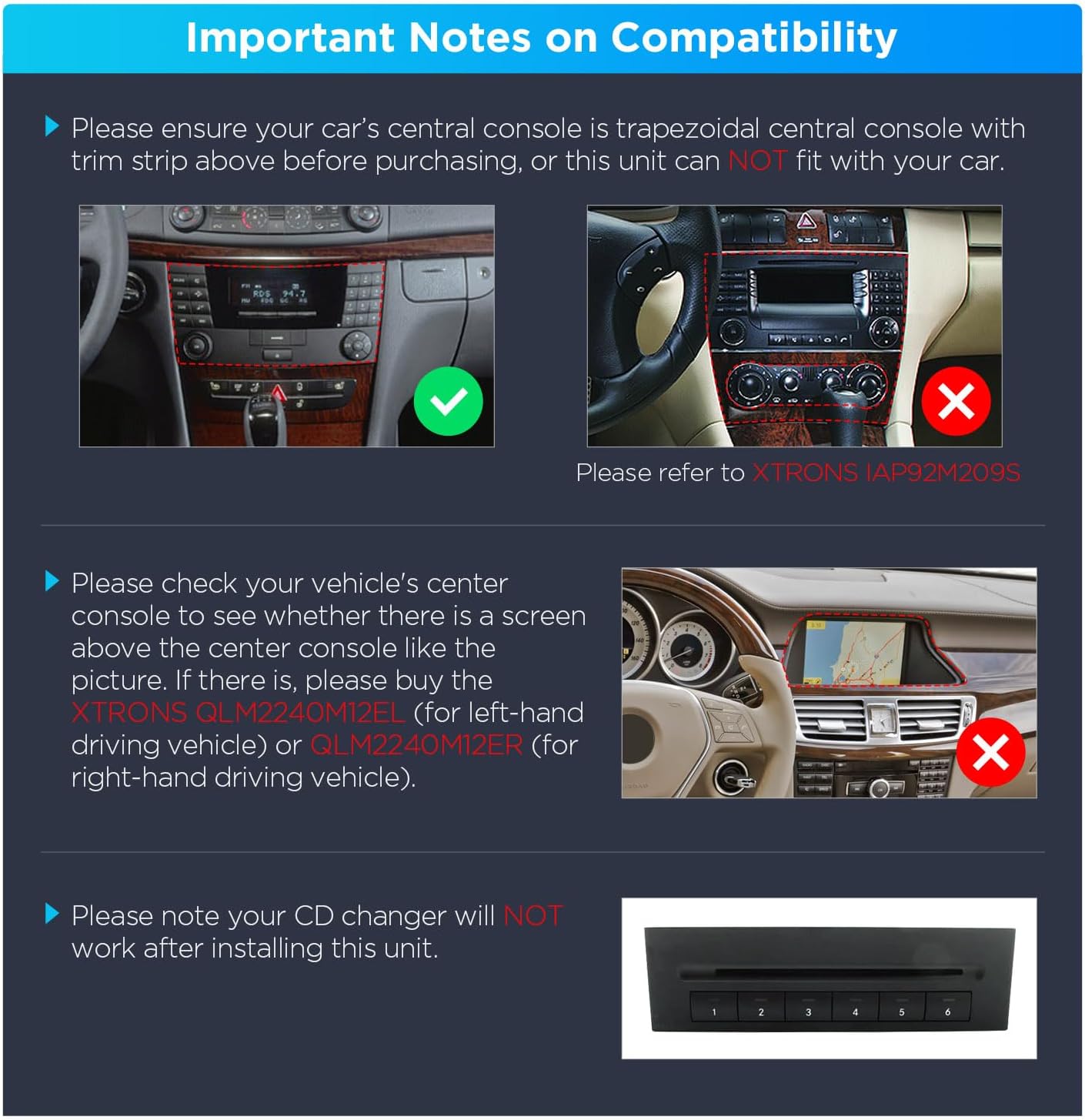
Image: Visual guide illustrating compatible and incompatible central console types, and the presence of an existing screen.
What's in the Box
The following items are included with your XTRONS Car Stereo:
- 1 x Car Stereo Unit
- 1 x Radio Antenna Cable
- 1 x 4G Antenna
- 1 x GPS Antenna
- 1 x SIM Card Slot Cable
- 2 x USB Cables
- 1 x Camera Cable
- 2 x ISO Wiring Harnesses
- 1 x CANbus Box
- 1 x Microphone
- 1 x User Manual (this document)
- 1 x Radio Cable Adapter

Image: Diagram showing the dimensions of the head unit and a layout of all included accessories and cables.
Setup and Installation
Cables You May Need
Depending on your vehicle's configuration, you may need additional cables. Please check your vehicle's power port. If it differs from the standard shown, or if there is no radio antenna port, you may need to order a power cable, an optical decoder, and a radio antenna to aid installation. Compatible XTRONS accessories include AK/PSP90M211/PWPC, AK/PF7M211A/FOBB01, and EC/ARL/RANT01.

Image: Examples of additional cables and adapters that might be required for specific vehicle setups.
Wiring Diagram
Refer to the following diagram for proper wiring connections. Ensure all connections are secure before powering on the unit.

Image: Comprehensive wiring diagram illustrating all input and output connections for the car stereo system.
Key to Wiring Diagram:
- 4G Antenna
- GPS Antenna
- Radio Antenna Adapter
- CVBS-IN-1, Video Input 1
- AUDIO OUT R, Audio Output Right
- AUX IN L, Audio Input Left
- AUDIO OUT L, Audio Output Left
- AUX IN R, Audio Input Right
- SUBWOOFER, Subwoofer Output
- CVBS-IN-2, Front Camera Input
- Microphone Port
- AMP-CONT, Amplifier Control Cable
- 4G SIM Card Slot
- USB Port 1
- USB Port 2
- USB Port 3
- BRAKE, Brake In Cable
- Wi-fi Antenna
- BT-ANT, Bluetooth Antenna
- Back, Reversing Control Cable
- CAM IN, Camera Video Input
- RR OUT, Rear Right Audio Output
- RL OUT, Rear Left Audio Output
- BRAKE, Brake In Cable
- Reversing Control Cable
- KEY1, Steering Wheel Control Wire Key 1
- KEY2, Steering Wheel Control Wire Key 2
- AMP-CON, Amplifier Control
- ISO Wiring Harness
- CANbus Box
Key Features and Specifications
The XTRONS 7 Inch Android 14 Car Stereo is equipped with advanced hardware and software to deliver a superior in-car experience:
- Operating System: Latest Android 14 OS for enhanced security and performance.
- Processor: Automotive-grade 12nm Octa-Core 2.2GHz processor, rigorously tested for stability in extreme temperatures (-30℃ to +80℃).
- Memory & Storage: 4GB RAM and 64GB ROM for effortless multitasking and ample storage.
- Display: 7-inch Premium HD IPS Screen (G+G high-resolution touch screen) with 178° viewing angle, ensuring impeccable image quality from wide angles.
- Connectivity:
- 4G LTE Modem: Globally compatible, supports ultra-fast data speeds with a Micro-SIM card (not included).
- Bluetooth 5.0: Stable audio transmission for hands-free calls and music streaming.
- Dual Band WiFi: Supports 5.0GHz for faster speeds and 2.4GHz for extended range.
- USB Tethering: Share your mobile network easily via USB.
- Audio:
- Built-in AKM DSP: Top-tier chip for rich bass, warm mids, and crisp highs, with customizable modes and EQ settings.
- Amplifier: STMicroelectronics TDA7388 Amplifier Chip (4x45W) for authentic sound quality.
- Navigation: Fast and accurate GPS navigation supported by multiple satellite systems.
- Special Features:
- Inclinometer Information: High-precision gyroscope sensors display vehicle's ride height, roll, and pitch angle, with a built-in compass. Ideal for off-road use.
- Wireless CarPlay & Android Auto: Transforms unit into a wireless display and controller for iOS and Android devices.
- 2K Video Playback: Supports various video formats at 260fps for smooth visuals.
- Personalised UI Themes: Three unique UI themes with distinct styles and widgets.
- Instant Reversing Mode: Compatible with AHD 720p/1080p cameras (optional) for wider vision.
- Optimised CAN Bus Decoding: Ensures original vehicle features remain functional post-upgrade.
- Screen Mirroring: Cast content from your smartphone to the large screen.
- Picture-in-Picture (PIP): Enjoy multiple content sources simultaneously.
- Media Support:
- Three High-Quality USB Cables for expanded connectivity.
- Built-in SD Port for Micro SD/TF cards (not included).
- Region-free DVD Playback compatible with most DVDs and CDs.
- STMicroelectronics SI4755 Radio with RDS for enhanced reception.
- DAB+ Tuner (Optional) for digital audio broadcasting.
- Cooling System: Premium all-aluminium heat sink, 20% thicker than standard, for optimal heat dissipation.
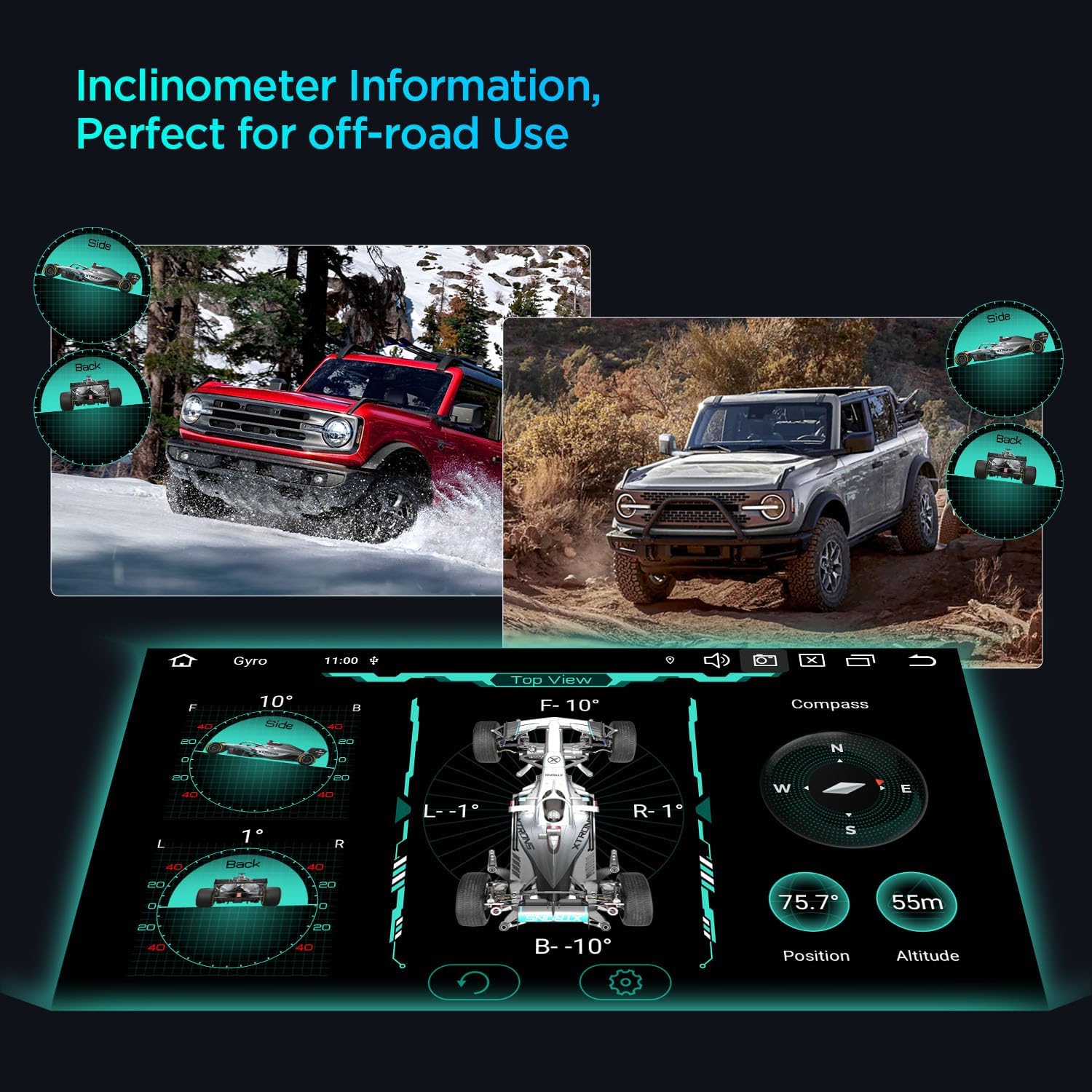
Image: Infographic detailing the core hardware components and key features of the XTRONS car stereo, such as Android 14, Octa-core processor, DSP, and connectivity options.
Operating Instructions
System Navigation and User Interface
The unit runs on Android 14. Navigate through applications and settings using the touch screen. You can customize your experience by selecting from three unique UI themes, each offering distinct styles and widgets. Simply touch the theme icon in settings to switch designs.
Wireless CarPlay & Android Auto
Connect your iOS or Android smartphone wirelessly to project your phone's interface onto the car stereo screen. This allows for smart voice interaction, navigation, music playback, and access to compatible apps directly from the head unit. Ensure Bluetooth and Wi-Fi are enabled on your phone for connection.
GPS Navigation
The built-in GPS module supports multiple satellite systems for quick and precise positioning. Access pre-installed navigation apps or download your preferred navigation software from the app store. Ensure the GPS antenna is properly installed for optimal signal reception.
Inclinometer Information
For off-road enthusiasts, the high-precision gyroscope sensors provide real-time data on your vehicle's ride height, roll, and pitch angle. A built-in compass further assists in navigation. Access this feature through the dedicated inclinometer application on the unit.

Image: Screenshot of the inclinometer display on the car stereo, showing real-time vehicle angles and compass information, useful for off-road driving.
Audio Settings (AKM DSP)
The integrated AKM DSP chip allows for advanced audio customization. Access the sound settings to adjust EQ, balance, fader, and select from various preset sound modes to tailor the audio output to your preference and musical genre.

Image: Visual representation of the AKM DSP audio interface within the car stereo, highlighting customizable sound settings and equalizer controls.
4G LTE Connectivity
Insert a Micro-SIM card (not included) into the designated slot to enable 4G mobile broadband. This allows for internet access, online navigation, and streaming services directly on the unit without relying on a phone hotspot.
Reversing Camera Display
When an optional AHD 720p/1080p camera is connected, the unit automatically switches to the reversing image display when the vehicle is put into reverse gear, providing a wider and clearer view for safer maneuvering.
Screen Mirroring
Use the screen mirroring function to cast content (movies, games, photos) from your smartphone to the larger display of the car stereo for an immersive viewing experience.
Bluetooth Functions
Pair your mobile phone via Bluetooth 5.0 for hands-free calling and audio streaming. Access your phone's contact list and call history directly from the unit. Enjoy high-quality music playback from your device.
Wi-Fi and USB Tethering
Connect to Wi-Fi networks using either the 2.4GHz band for extended range or the 5.0GHz band for faster internet speeds. Alternatively, share your mobile phone's internet connection with the unit via USB tethering.
Picture-in-Picture (PIP)
The PIP feature allows you to view two applications simultaneously, such as navigation while watching a video, ensuring a consistent and convenient user experience.
DVD/CD Playback
Insert a DVD or CD into the disc slot for region-free playback. The unit is compatible with most discs available on the market, providing a versatile entertainment option.
Radio Functions
The STMicroelectronics SI4755 Radio with RDS provides clear reception with low-noise amplifiers. Tune into your favorite FM/AM stations. An optional DAB+ tuner can be connected to access a wider range of digital audio broadcasting programs with superior sound quality.
Maintenance
To ensure the longevity and optimal performance of your XTRONS Car Stereo, follow these maintenance guidelines:
- Cleaning: Use a soft, dry cloth to clean the screen and exterior. For stubborn marks, slightly dampen the cloth with water. Avoid harsh chemicals or abrasive materials.
- Software Updates: Periodically check for software updates provided by XTRONS to ensure your unit has the latest features, bug fixes, and security enhancements. Follow the instructions provided with the update package.
- Heat Management: The unit features an efficient all-aluminium heat sink. Ensure proper ventilation around the unit to prevent overheating, especially during extended use or in hot climates.
- Disc Care: Handle DVDs and CDs by their edges to avoid fingerprints and scratches. Keep discs clean and store them in their cases when not in use.
- Environmental Conditions: Avoid exposing the unit to extreme temperatures, direct sunlight for prolonged periods, or excessive moisture.
Troubleshooting
If you encounter any issues with your XTRONS Car Stereo, consider the following basic troubleshooting steps:
- No Power: Check all power connections and fuses. Ensure the vehicle's ignition is on.
- No Sound: Verify speaker connections. Check volume levels and mute settings. Ensure the correct audio source is selected.
- GPS Signal Issues: Ensure the GPS antenna is installed correctly and has a clear view of the sky. Move the vehicle to an open area if necessary.
- Bluetooth Pairing Problems: Ensure Bluetooth is enabled on both the unit and your phone. Delete previous pairings and try reconnecting.
- Touch Screen Unresponsive: Try restarting the unit. If the issue persists, a factory reset might be necessary (note: this will erase all user data).
- System Freezes/Slow Performance: Close unnecessary applications. Clear cache or perform a system restart. Ensure sufficient storage space is available.
- Compatibility Issues: Re-verify all compatibility notes mentioned in this manual, especially regarding the central console and optical decoder boxes.
For persistent issues or problems not covered here, please refer to the comprehensive user manual provided with the product or contact XTRONS customer support.
Warranty and Support
XTRONS is committed to delivering high-quality products and exceptional customer service. Your XTRONS Car Stereo comes with a 1-year warranty from the date of purchase.
For any questions, technical assistance, or warranty claims, please contact XTRONS customer support. You can typically reach support through the Amazon messaging system or via the contact information provided on the official XTRONS website. Please have your product model number (PX74M211GS-UK) and purchase details ready when contacting support.
Related documentsPX74M211GS-UK


Ask a question about this manual
Ask about setup, troubleshooting, compatibility, parts, safety, or missing instructions. Manuals+ will review the question and use this page’s manual context to help answer it.