
1. Introduction
This manual provides instructions for the installation, operation, and maintenance of your YuanLey 6 Port 2.5G PoE Unmanaged Switch. This device is designed to expand your network capacity with high-speed 2.5 Gigabit Ethernet and Power over Ethernet (PoE) capabilities, along with 10 Gigabit SFP ports for uplink connections. It is suitable for various network environments, including home and office use, supporting devices such as IP cameras, wireless access points, and high-bandwidth computers.
2. Key Features
- 2.5G PoE Ports: Includes 4 x 2.5 Gigabit PoE ports (IEEE802.3bz compliant), supporting 10/100/1000Mbps/2.5G adaptive speeds with Auto MDI/MDIX.
- 10G SFP Ports: Features 2 x 10G SFP ports, compatible with 1G/2.5G SFP modules (module not included).
- Total PoE Power: Provides a total PoE power budget of 78W, with up to 30W per port, compliant with IEEE 802.3af/at standards.
- High Switching Capacity: Offers a 60Gbps switching capacity for efficient data transfer.
- One-Key VLAN: Simple VLAN functionality to isolate RJ45 ports, enhancing network security and reducing broadcast storms.
- Plug and Play: Unmanaged design requires no configuration for basic operation.
- Stable and Quiet Operation: Durable metal casing with fanless design for silent operation, 6KV lightning protection, and wide operating temperature range (-10~50°C).
- Flexible Installation: Supports both desktop and wall-mount placement.
3. Package Contents
Please verify the contents of your package. If any items are missing or damaged, contact your vendor.
- YuanLey 6 Port 2.5G PoE Unmanaged Switch (1 unit)
- Power Cord (1 unit)
- User Manual (1 unit)
- Mounting Accessories (e.g., screws, wall anchors)
4. Physical Overview
4.1 Front Panel
The front panel features the Ethernet ports, SFP ports, and LED indicators.

Image 1: Front view of the YuanLey 6 Port 2.5G PoE Switch. This image displays the four 2.5 Gigabit PoE ports, two 10 Gigabit SFP ports, and various LED indicators for power, link status, and PoE activity.
- PoE/2.5G Ports (1-4): RJ45 ports supporting 10/100/1000/2500Mbps and IEEE 802.3af/at PoE.
- SFP Ports (5-6): 10G SFP slots for fiber optic connections (SFP modules sold separately).
- LED Indicators:
- PWR (Power): Green indicates power on, off indicates no power.
- L1-L4 (Link/Act for RJ45 ports): Orange indicates 2.5Gbps link, Green indicates 10/100/1000Mbps link. Blinking indicates data activity.
- SFP (Link/Act for SFP ports): Green indicates link, blinking indicates data activity.
4.2 Rear Panel
The rear panel includes the power input and the VLAN dip switch.

Image 2: Rear view of the YuanLey 6 Port 2.5G PoE Switch. This image highlights the AC power input (100-240V, 50-80Hz) and the S&V Dip Switch, which controls the VLAN mode.
- AC IN (100-240V, 50-80Hz): Power input for the switch.
- S&V Dip Switch: Toggle switch for Standard (S) or VLAN (V) mode.
5. Setup Instructions
The YuanLey 6 Port 2.5G PoE Switch is designed for plug-and-play operation, requiring minimal setup.

Image 3: Simplified setup guide for the switch, illustrating connecting the power cable, then connecting network devices, and finally enjoying the network.
- Power Connection: Connect the provided power cord to the AC IN port on the rear panel of the switch and then to a standard electrical outlet. The PWR LED on the front panel should illuminate green.
- Network Device Connection:
- Connect your PoE-powered devices (e.g., IP cameras, wireless APs) to any of the 2.5G PoE ports (1-4) using standard Ethernet cables.
- Connect your non-PoE devices (e.g., computers, NAS) to any of the 2.5G PoE ports (1-4) or use the SFP ports for uplink.
- Uplink Connection (Optional): For connecting to your main network or router, use one of the 2.5G PoE ports or, for higher bandwidth, insert a compatible SFP module into one of the 10G SFP ports (5-6) and connect it to your network infrastructure.
- VLAN Mode Selection: Before powering on the device, set the S&V Dip Switch on the rear panel to your desired mode:
- 'S' (Standard Mode): All ports can communicate with each other. This is the default mode.
- 'V' (VLAN Mode): Ports 1-4 are isolated from each other but can communicate with the SFP uplink ports. This enhances network security and reduces broadcast traffic.
6. Operating Instructions
6.1 Basic Operation (Plug and Play)
Once the switch is powered on and devices are connected, it will automatically detect the link speed and provide power to PoE-compatible devices. No further configuration is typically required for basic network connectivity.
6.2 VLAN Mode
When the S&V Dip Switch is set to 'V' (VLAN Mode), the switch operates with port isolation. This means:
- Devices connected to ports 1, 2, 3, and 4 cannot communicate directly with each other.
- All devices connected to ports 1-4 can communicate with devices connected to the SFP uplink ports (5-6).

Image 4: Illustration of the One-Key VLAN feature. It depicts four IP cameras connected to ports 1-4, showing that they are isolated from each other (Vlan1, Vlan2, Vlan3, Vlan4) but all connect to an uplink device via the SFP port.
This mode is beneficial for security-sensitive applications, such as surveillance systems, where you want to prevent direct communication between client devices while allowing them access to a central server or the internet via the uplink.
6.3 Power over Ethernet (PoE)
The switch automatically detects and supplies power to IEEE 802.3af/at compliant devices connected to ports 1-4. If a connected device is not PoE-compatible, the switch will only provide data connectivity without power, preventing damage to non-PoE equipment.
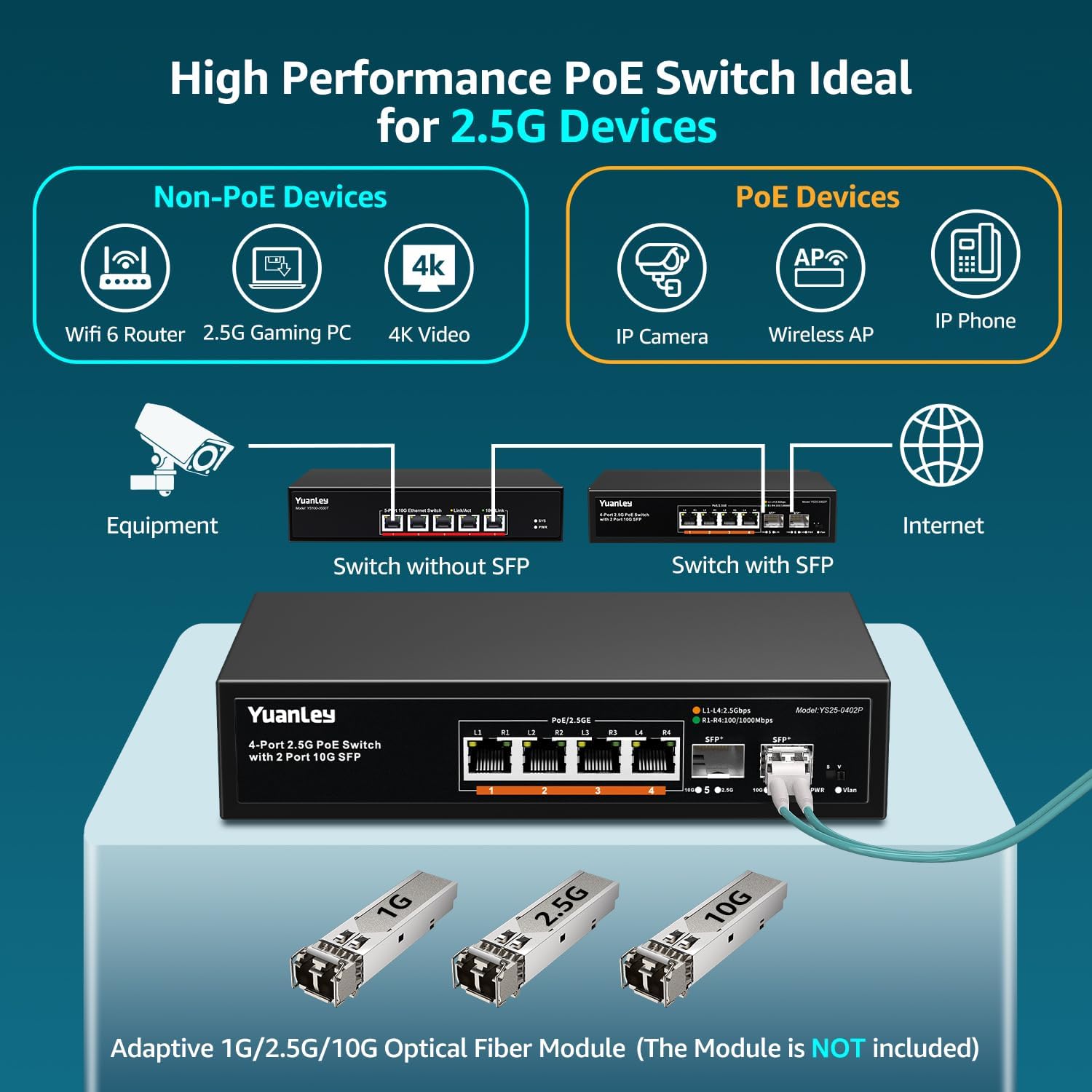
Image 5: Diagram illustrating how both Non-PoE devices (like WiFi 6 Router, 2.5G Gaming PC, 4K Video devices) and PoE devices (like IP Camera, Wireless AP, IP Phone) can be connected to the switch, with the switch providing power to PoE devices.
7. Specifications
| Feature | Specification |
|---|---|
| Model Number | YS25-0402P-NEW-JP |
| Brand | YuanLey |
| Number of Ports | 6 (4 x 2.5G PoE, 2 x 10G SFP) |
| PoE Standard | IEEE 802.3af/at |
| Total PoE Power Budget | 78W |
| Max Power Per Port | 30W |
| Ethernet Port Speed | 10/100/1000/2500Mbps Adaptive |
| SFP Port Speed | 1G/2.5G/10G (Module Dependent) |
| Switching Capacity | 60Gbps |
| Switch Type | Unmanaged |
| VLAN Support | One-Key VLAN (Port Isolation) |
| Fanless Design | Yes |
| Operating Temperature | -10°C to 50°C |
| Lightning Protection | 6KV |
| Housing | Metal |
| Installation | Desktop / Wall Mount |
| Power Input | AC 100-240V, 50-80Hz (Internal Power Supply) |
8. Troubleshooting
- No Power:
- Ensure the power cord is securely connected to the switch and a working electrical outlet.
- Check if the power outlet is functional by plugging in another device.
- Verify the PWR LED on the front panel is illuminated.
- No Link/Connectivity:
- Check if the Ethernet cable is properly connected to both the switch port and the network device.
- Ensure the network device is powered on and functioning correctly.
- Try a different Ethernet cable or switch port.
- If using SFP ports, ensure the SFP module is correctly inserted and compatible, and the fiber optic cable is connected properly.
- Verify the Link/Act LED for the respective port is illuminated and blinking with activity.
- PoE Device Not Receiving Power:
- Ensure the connected device is IEEE 802.3af/at compliant.
- Check the PoE power budget. The total power consumption of all PoE devices should not exceed 78W.
- Try connecting the PoE device to a different PoE port.
- Ensure the Ethernet cable is of good quality and suitable for PoE (e.g., Cat5e or higher).
- Devices Cannot Communicate in VLAN Mode:
- In VLAN mode, ports 1-4 are isolated from each other. This is expected behavior. If you need direct communication between these ports, switch to Standard mode ('S').
- Ensure devices needing to communicate with the broader network are connected to the SFP uplink ports (or via a device connected to SFP).
9. Maintenance
- Cleaning: Use a soft, dry cloth to clean the exterior of the switch. Do not use liquid or aerosol cleaners.
- Ventilation: Ensure adequate airflow around the switch. Do not block ventilation openings.
- Environment: Operate the switch within the specified temperature and humidity ranges. Avoid direct sunlight, heat sources, and excessive moisture.
- Firmware: As this is an unmanaged switch, firmware updates are generally not applicable.
10. Safety Information
- Read all instructions carefully before operating the device.
- Do not open the device casing. There are no user-serviceable parts inside.
- Keep the device away from water, fire, humidity, or hot environments.
- Use only the power adapter provided with the device.
- Ensure the power cord is routed safely to prevent tripping hazards or damage.
- Disconnect power during lightning storms or when unused for long periods.
11. Warranty and Support
YuanLey products typically come with a standard manufacturer's warranty. For specific warranty terms and conditions, please refer to the warranty card included with your product or visit the official YuanLey website.
For technical support, product inquiries, or warranty claims, please contact YuanLey customer service through the following channels:
- Website: Visit the YuanLey Official Store on Amazon for contact information and FAQs.
- Email: Refer to your product packaging or the official website for the support email address.
When contacting support, please have your product model number (YS25-0402P-NEW-JP) and purchase information readily available.