
1. Introduction
This manual provides instructions for the installation, operation, and maintenance of your YuanLey YS25-0502-JP 7-Port 2.5G Unmanaged Ethernet Switch. This device is designed to enhance your network with high-speed connectivity, offering 5x 2.5 Gigabit Ethernet ports and 2x 10 Gigabit SFP ports. It is an unmanaged switch, meaning it requires no configuration for basic plug-and-play operation.
2. Product Features
- 7-Port High-Speed Connectivity: Includes 5x 2.5G Base-T Ethernet ports and 2x 10G SFP ports.
- Adaptive Port Speeds: Ports 1-5 support 10/100/1000Mbps/2.5G adaptive speeds.
- Auto MDI/MDIX: Automatically detects and adjusts for straight-through or crossover cables.
- High Switching Capacity: Up to 60Gbps switching capacity for efficient data handling.
- One-Key VLAN: Isolates RJ45 ports for enhanced network security and reduced traffic.
- Fanless Design: Ensures silent operation and energy efficiency.
- Durable Construction: Metal case with 6KV lightning protection.
- Wide Operating Temperature: Functions reliably from -10°C to 50°C.
- Flexible Installation: Supports both desktop placement and wall mounting.
3. Package Contents
Verify that your package contains the following items:
- 1x YuanLey 2.5G Unmanaged Ethernet Switch (Model: YS25-0502-JP)
- 1x Power Cable
- 1x User Manual
4. Hardware Overview
Familiarize yourself with the ports and indicators on your switch.

Figure 4.1: Front and Rear Panel Layout
This image displays the front and rear panels of the YuanLey 7-Port 2.5G Unmanaged Ethernet Switch. The front panel shows the Power LED, five 2.5Gbps RJ45 ports (labeled L1-L5), two SFP ports (labeled 6 and 7), and a VLAN dipswitch. The rear panel shows the DC 12V 1.0A input port.
LED Indicators
| Indicator | Status | Description |
|---|---|---|
| PWR (Power) | Green | Device is powered on. |
| Off | Device is powered off. | |
| L1-L5 (RJ45 Ports) | Orange | Link established at 2.5Gbps. |
| Green | Link established at 10/100/1000Mbps. | |
| Off | No link or device is powered off. | |
| SFP (Ports 6-7) | Green | Link established (1G/2.5G/10G). |
| Off | No link or device is powered off. |
5. Setup Instructions
The YuanLey YS25-0502-JP switch is designed for plug-and-play operation, requiring no software configuration.
- Power Connection: Connect the provided power cable to the DC 12V 1.0A input port on the rear of the switch and then to a power outlet. The PWR LED will illuminate green.
- Network Device Connection: Connect your network devices (e.g., computers, NAS, Wi-Fi 6 APs, routers) to the RJ45 ports (L1-L5) using standard Ethernet cables. The corresponding port LED will light up, indicating a successful connection.
- SFP Module Installation (Optional): If using SFP modules for 1G, 2.5G, or 10G fiber connections, insert the compatible SFP module into one of the SFP ports (6 or 7). Then, connect the fiber optic cable to the SFP module. The SFP LED will illuminate green upon successful link establishment. Note: SFP modules are not included.

Figure 5.1: Basic Network Setup
This image illustrates a typical setup where the YuanLey 2.5G Switch is connected to a laptop via an Ethernet cable and to a router, demonstrating its plug-and-play functionality.
6. Operating Instructions
The switch operates automatically once connected. No manual configuration is required for basic data forwarding.
VLAN Functionality
The switch features a 'One-Key VLAN' dipswitch. When enabled, this function isolates communication between the RJ45 ports (L1-L5) while allowing them to communicate with the SFP uplink ports (6 and 7). This can enhance network security and reduce unnecessary broadcast traffic.
- Standard Mode (S): All ports can communicate with each other. This is the default setting.
- VLAN Mode (V): RJ45 ports (L1-L5) are isolated from each other but can communicate with the SFP uplink ports (6 and 7).
To change the mode, simply toggle the dipswitch located near the SFP ports. It is recommended to power cycle the switch after changing the VLAN setting for the change to take effect.

Figure 6.1: One-Key VLAN Operation
This diagram illustrates the VLAN mode where RJ45 ports 1-5 are isolated from each other (indicated by red crosses) but can communicate with the SFP uplink ports (indicated by green arrows), typically connected to a router.
7. Mounting Options
The YuanLey YS25-0502-JP switch supports both desktop and wall-mount installations.
Desktop Placement
Simply place the switch on a flat, stable surface. Ensure adequate ventilation around the device to prevent overheating.
Wall Mounting
The switch features mounting holes on its underside for secure wall installation.
- Marking: Use the switch as a template to mark the positions for two screws on the wall. Ensure the marks are level.
- Drilling: Drill pilot holes at the marked positions. Insert wall anchors if necessary.
- Screws: Insert screws into the wall, leaving a small gap (approximately 2-3mm) between the screw head and the wall.
- Mounting: Align the mounting holes on the switch with the screw heads and slide the switch downwards to secure it.
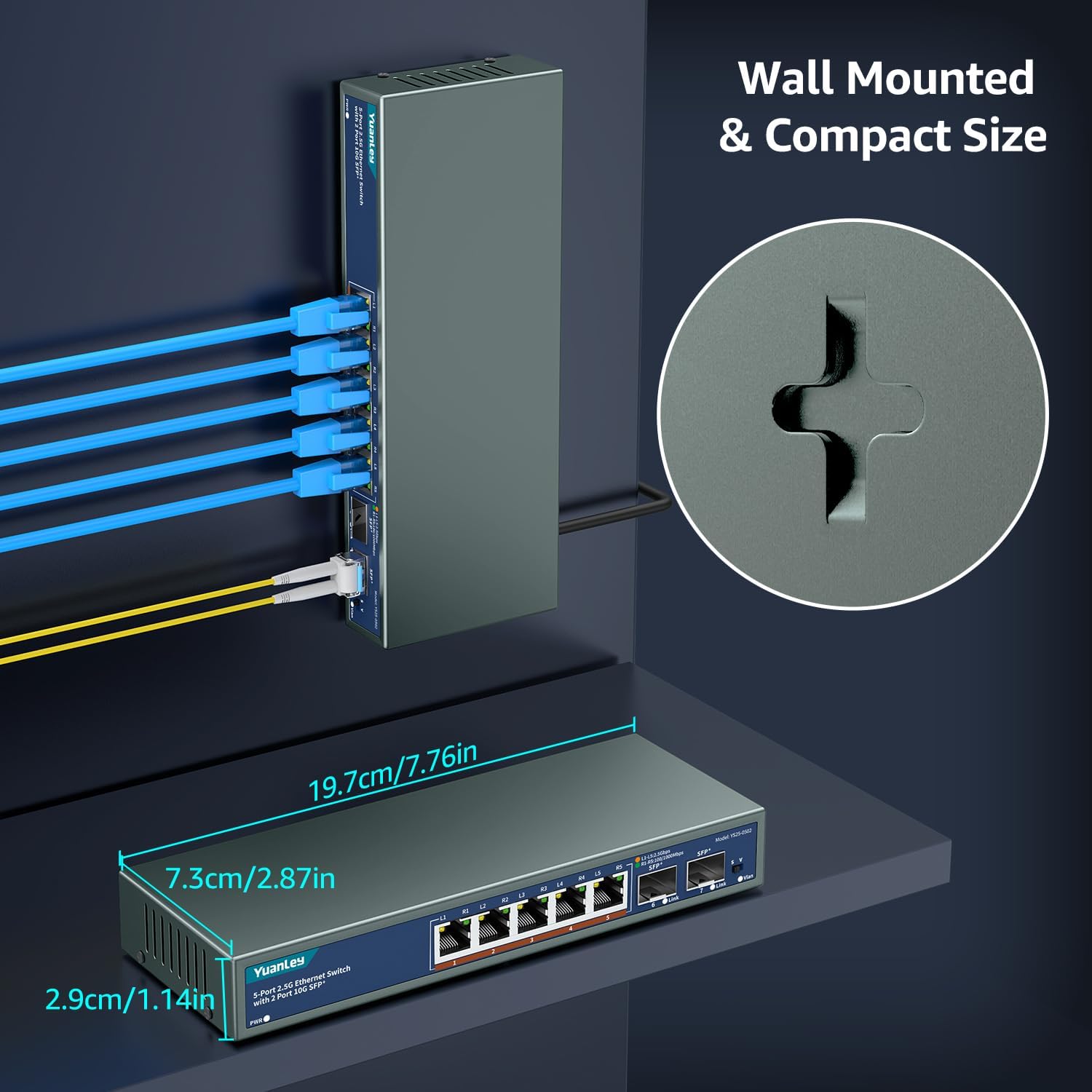
Figure 7.1: Wall Mounting Example
This image shows the YuanLey 2.5G Switch mounted vertically on a wall, demonstrating its compact size and wall-mount capability. Cables are neatly connected to the ports.
8. Maintenance
To ensure optimal performance and longevity of your switch, follow these maintenance guidelines:
- Ventilation: Ensure the switch has adequate airflow. Do not block the ventilation holes.
- Cleaning: Use a soft, dry cloth to clean the exterior of the switch. Do not use liquid or aerosol cleaners.
- Temperature: Operate the switch within the specified temperature range (-10°C to 50°C). Avoid placing it in direct sunlight or near heat sources.
- Cable Management: Keep network cables organized and free from kinks or excessive bends.
- Power Supply: Use only the provided power adapter.

Figure 8.1: Design for Stability and Efficiency
This image highlights key design features: low power consumption (less than 2W standby), plug-and-play simplicity, fanless operation for silence, and a wide operating temperature range (-10°C to 50°C) for stable performance.
9. Troubleshooting
If you encounter issues with your YuanLey switch, refer to the following common problems and solutions:
| Problem | Possible Cause | Solution |
|---|---|---|
| No Power (PWR LED Off) | Power cable not connected or power outlet is faulty. | Ensure the power cable is securely connected to the switch and a working power outlet. Test the outlet with another device. |
| No Link Light (RJ45/SFP LED Off) | Cable not connected, faulty cable, or connected device is off/faulty. | Check cable connections. Try a different Ethernet or fiber cable. Ensure the connected device is powered on and functioning correctly. |
| Slow Network Speed | Cable quality, connected device speed limitation, or network congestion. | Ensure you are using Cat5e/Cat6/Cat6a/Cat7 cables for 2.5G/10G speeds. Verify that your connected devices support 2.5G or 10G. Check for other network activity. |
| Intermittent Connection | Loose cable, faulty cable, or device driver issues (for adapters). | Secure all cable connections. Replace suspected faulty cables. If using a USB-to-Ethernet adapter, ensure drivers are up-to-date or try a different adapter. |
| VLAN not working as expected | Dipswitch set incorrectly or switch not power cycled. | Verify the VLAN dipswitch is in the desired position (S for Standard, V for VLAN). Power cycle the switch after changing the setting. |
10. Specifications
| Attribute | Value |
|---|---|
| Brand | YuanLey |
| Model Number | YS25-0502-JP |
| Number of Ports | 7 (5x 2.5G Base-T, 2x 10G SFP) |
| Interface | RJ45, SFP |
| Data Transfer Rate | 60 Gigabits per second (Switching Capacity) |
| Compatible Devices | Desktop, Gaming Console, Laptop, Printer, NAS, Wireless AP |
| Switch Type | Unmanaged |
| Operating Temperature | -10 °C to 50 °C |
| Color | Black |
| UPC | 790885828850 |
11. Warranty and Support
This YuanLey product comes with a 1-year warranty from the date of purchase.
For technical support, warranty claims, or further assistance, please contact YuanLey customer service through the retailer where the product was purchased or visit the official YuanLey website for contact information.
Please retain your proof of purchase for warranty service.


