
1. Product Overview
The Ieejdn 59-inch Home Office Desk is designed to provide a functional and spacious workspace for various tasks, including work, study, and writing. This executive-style desk features a robust construction with ample storage and integrated power solutions.
Key Features:
- Spacious Desktop: A 59-inch wide surface accommodates computers, monitors, and other essentials.
- Seven Drawers: Provides organized storage for office supplies and documents, including a file drawer.
- Built-in Charging Station: Equipped with 4 AC outlets, 1 USB port, and 1 Type-C port for convenient device charging.
- Durable Construction: Made from engineered wood with a distressed finish, offering a rustic farmhouse aesthetic.

Image 1.1: The spacious desktop provides ample room for your work setup.
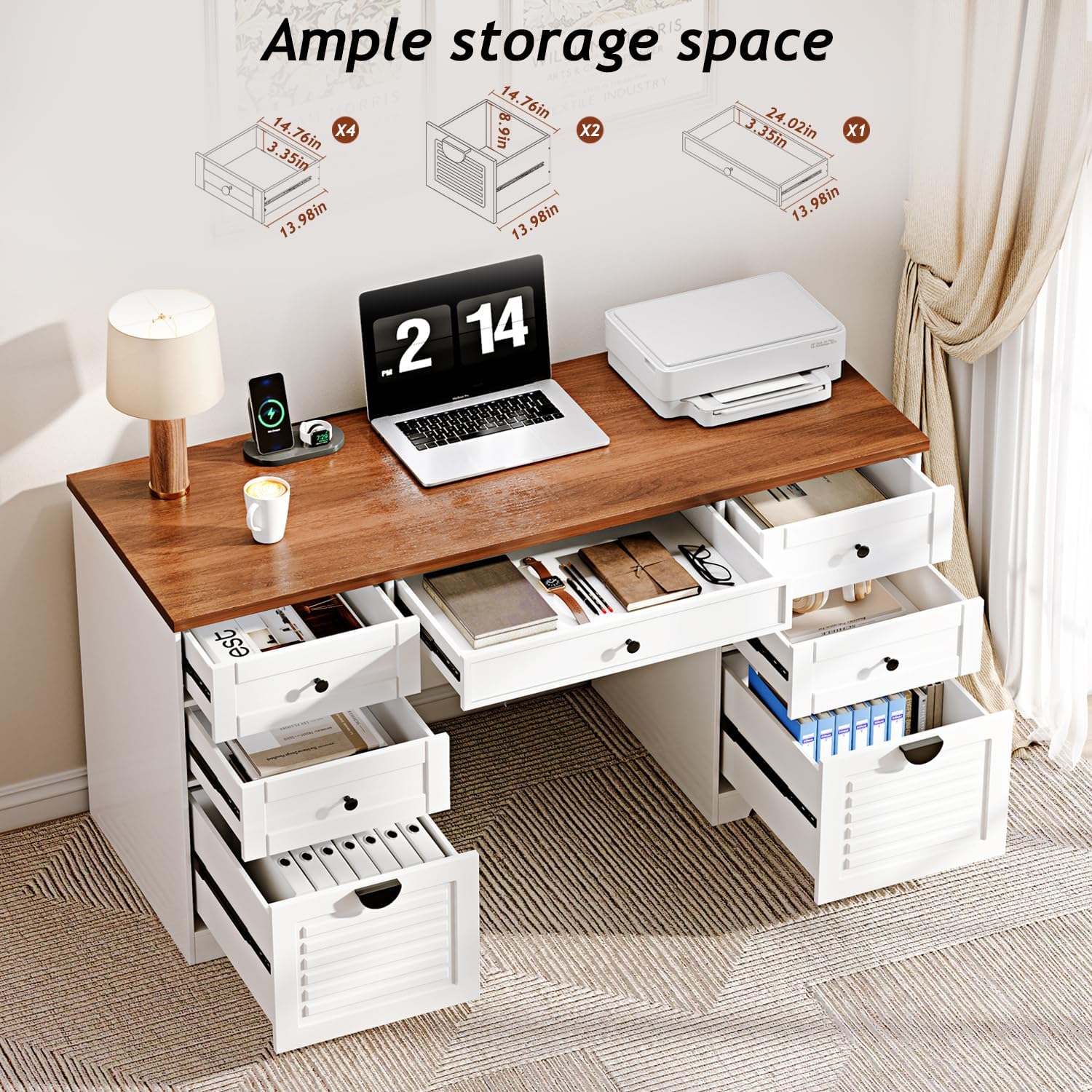
Image 1.2: Seven drawers offer diverse storage options for office essentials.
2. Safety Information
Please read and understand all safety instructions before assembly and use to prevent injury or damage.
- Always assemble the desk according to the provided instructions.
- Ensure the desk is properly anchored to the floor to prevent tipping, especially when using the top drawers.
- Do not place heavy objects on the desk that could cause it to tip over.
- Keep small parts away from children during assembly to avoid choking hazards.
- Do not overload drawers; distribute weight evenly.
3. Assembly Instructions
This product requires self-assembly. The process is designed to be straightforward with clear instructions. Please allow sufficient time for assembly and follow each step carefully.
Before You Begin:
- Unpack All Parts: Carefully remove all components from the packaging. Verify that all parts are present according to the parts list in your separate assembly guide.
- Required Tools: A Phillips head screwdriver is required for assembly. This tool is not included.
- Work Area: Choose a clean, flat, and spacious area for assembly to prevent scratching or damaging components.
- Assistance: While one person can assemble the desk, it is recommended to have two people for lifting the desktop into place due to its weight.
Assembly Steps:
- Refer to the detailed step-by-step assembly guide included in your product packaging.
- Identify each component using the labels provided.
- Follow the diagrams and written instructions precisely for each step.
- Ensure all screws and fasteners are tightened securely, but do not overtighten.
- Pay close attention to the orientation of parts, especially drawer slides and panels.
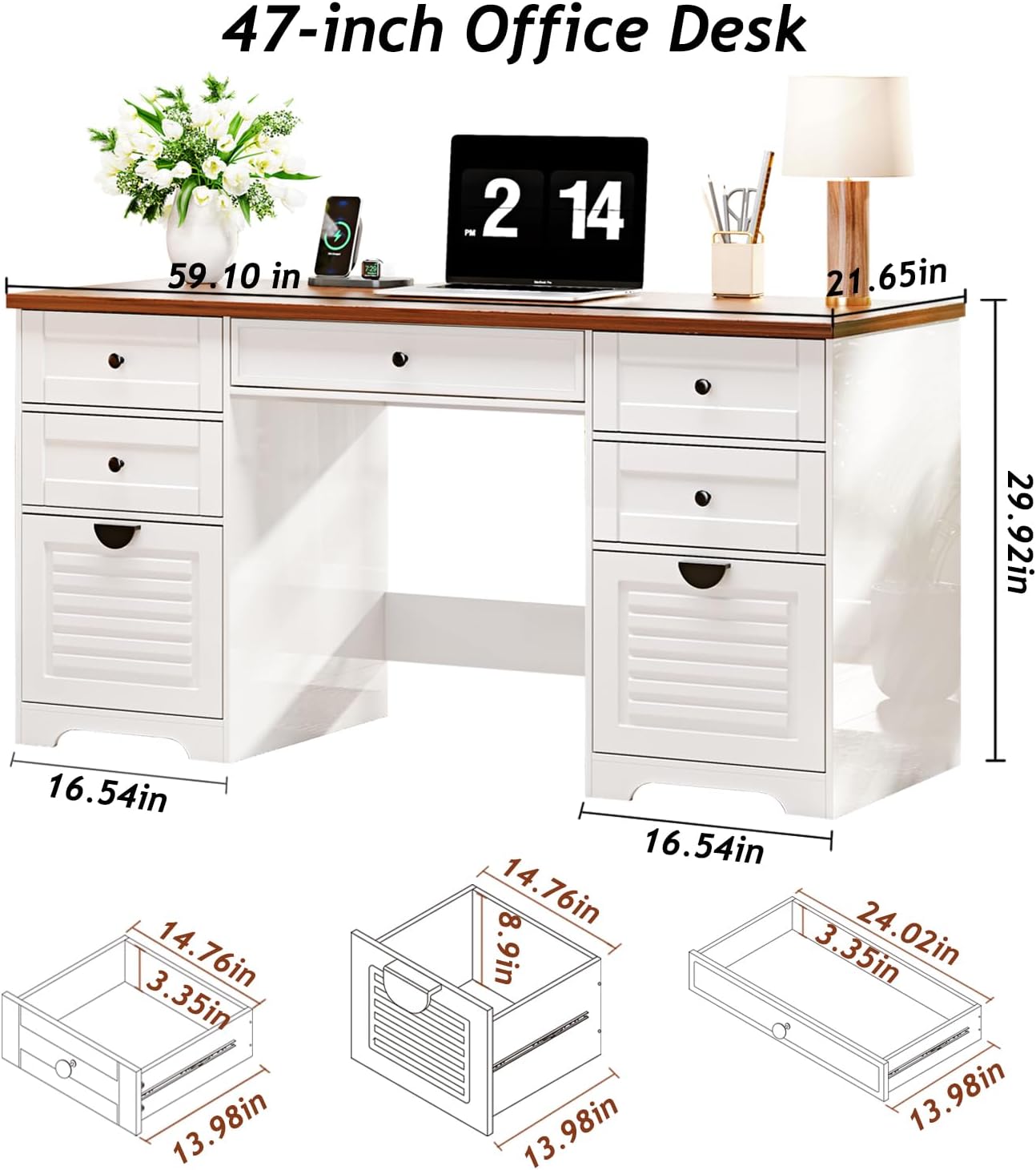
Image 3.1: Desk dimensions for reference during assembly. (59.10in W x 21.65in D x 29.92in H)
4. Operating Instructions
4.1 Built-in Charging Station
The desk includes a built-in power strip for convenient access to power and charging. This feature helps keep your workspace tidy by reducing cable clutter.
- Power Outlets: Features 4 standard 125V/12A AC outlets for computers, printers, and other electronics.
- USB Ports: Includes 1 USB port (5V/2A) and 1 Type-C port (PD20W) for charging mobile devices, tablets, and other USB-powered accessories.
- Power Cord: The charging station is connected via a 4.9-foot power cord. Ensure it is plugged into a grounded electrical outlet.

Image 4.1: The integrated charging station with AC, USB, and Type-C ports.
4.2 Drawer Usage
The desk is equipped with seven drawers designed for various storage needs. The drawers feature smooth sliding rails for easy access.
- Organization: Utilize the different drawer sizes to categorize and store office supplies, documents, and personal items.
- File Drawer: The larger bottom drawers are suitable for file storage.
- Smooth Operation: Drawers are designed to open and close smoothly. If a drawer feels stiff, ensure it is properly aligned on its rails.

Image 4.2: Smooth sliding rails ensure effortless drawer operation.
5. Maintenance
Proper care and maintenance will extend the life and appearance of your Ieejdn Home Office Desk.
- Cleaning: Wipe surfaces with a soft, damp cloth. Avoid harsh chemicals or abrasive cleaners, which can damage the finish.
- Spills: Clean up spills immediately to prevent staining or water damage to the engineered wood.
- Heat Protection: Use coasters or protective pads under hot items to prevent heat marks.
- Sunlight Exposure: Avoid prolonged direct sunlight exposure to prevent fading or discoloration of the finish.
- Hardware: Periodically check and tighten all screws and fasteners to ensure stability.
6. Troubleshooting
6.1 Desk Stability Issues
If the desk feels unstable after assembly, review the following:
- Re-check Assembly: Ensure all components are correctly installed and all fasteners are fully tightened according to the assembly instructions. Instability often results from incorrect assembly.
- Level Surface: Verify that the desk is placed on a flat, level surface. Use furniture pads or shims if necessary to compensate for uneven flooring.
6.2 Drawer Operation Issues
If drawers are not sliding smoothly or are difficult to open/close:
- Check Rails: Ensure the drawer rails are correctly installed and aligned on both the drawer and the desk frame.
- Lubrication: A small amount of silicone lubricant can be applied to the drawer slides if they remain stiff after alignment.
- Obstructions: Check for any objects or debris obstructing the drawer's path.
7. Specifications
| Feature | Detail |
|---|---|
| Brand | Ieejdn |
| Model Number | 301 |
| Product Dimensions (D x W x H) | 21.65" x 59.1" x 29.92" |
| Color | Cream |
| Material Type | Engineered Wood |
| Number of Drawers | 7 |
| Included Components | Power Strip (4 AC, 1 USB, 1 Type-C) |
| Item Weight | 65 Pounds |
| Required Assembly | Yes |
| Includes All Assembly Tools | No |
8. Warranty and Support
Ieejdn is committed to providing high-quality products and excellent customer service. While specific warranty details are not provided in this manual, we offer comprehensive after-sales support for any product-related issues.
If you encounter any problems with your Ieejdn 59-inch Home Office Desk, or if you have questions regarding assembly, parts, or functionality, please do not hesitate to contact our customer service team. We are here to assist you.
Contact Information: Please refer to the contact details provided on your purchase receipt or the official Ieejdn website for support.