
Introduction
This manual provides detailed instructions for the operation and maintenance of your HOTPEAK NV01 Night Vision Goggles. Designed for optimal performance in low-light conditions, these goggles offer advanced features for various outdoor activities such as hunting, camping, wildlife observation, and surveillance.

Image: The HOTPEAK NV01 Night Vision Goggles are versatile for activities such as climbing, cycling, farm monitoring, wildlife observation, sports events, hunting, outdoor camping, and bird watching.
What's in the Box
Verify that all items are present in the package:
- 1x HOTPEAK NV01 Night Vision Goggles
- 1x 64GB TF Card
- 1x Cleaning Cloth
- 1x User Manual
- 1x Type-C Data Cable
- 1x Neck Strap
Product Overview
The HOTPEAK NV01 Night Vision Goggles feature a robust design with intuitive controls for ease of use. Key components include the objective lens, eyepiece with LCD screen, control buttons, IR illuminator, and various ports.
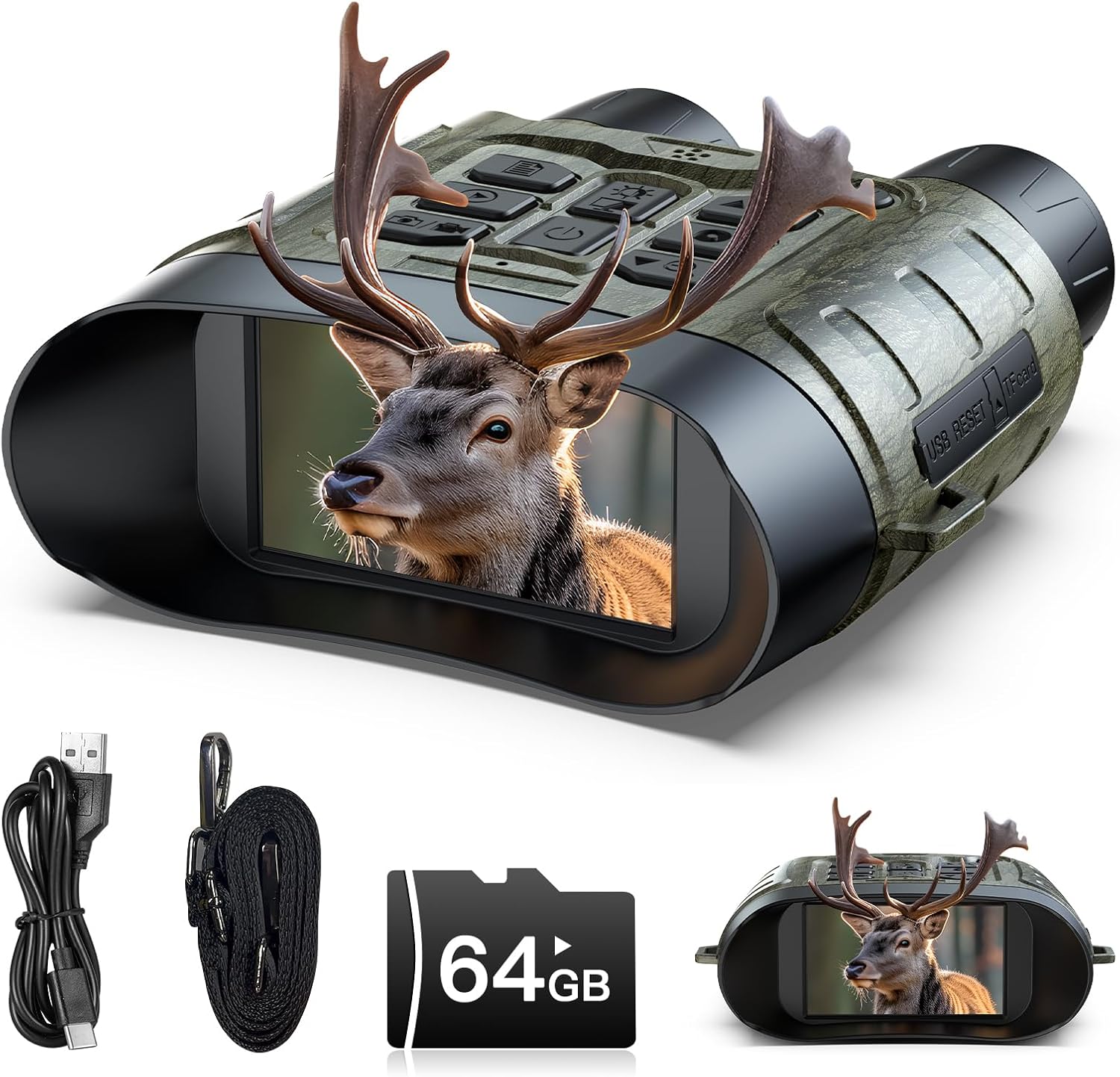
Image: The HOTPEAK NV01 Night Vision Goggles displaying a deer, highlighting its compact design and integrated screen.
Key Features:
- 112MP Image Quality: Capture high-resolution still images.
- 4K Video Recording: Record ultra-high-definition video footage.
- 12x Digital Zoom: Magnify distant subjects for detailed observation.
- 10 Levels IR Illumination: Adjustable infrared for varying light conditions.
- Day/Night Use: Versatile for both daytime and nighttime viewing.
- Playback Function: Review captured photos and videos directly on the device.
- 5000mAh Battery: Long-lasting rechargeable battery for extended use.
- 64GB TF Card: Included for ample storage of media.

Image: An infographic detailing the main features of the NV01 goggles, including image and video resolution, zoom, IR levels, and battery/storage capacity.
Setup
1. Charging the Battery
The device is equipped with a 5000mAh rechargeable battery. Before first use, fully charge the device using the provided Type-C data cable and a compatible USB power adapter (not included). The charging indicator will show the charging status.
2. Inserting the TF Card
Locate the TF card slot on the device. Gently insert the included 64GB TF card into the slot until it clicks into place. Ensure the card is inserted in the correct orientation. To remove, press the card inward until it springs out.
3. Attaching the Neck Strap
Attach the provided neck strap to the designated attachment points on the goggles. This allows for secure, hands-free carrying and quick access during outdoor activities.
Operating Instructions
1. Power On/Off
To power on the device, press and hold the Power button until the screen illuminates. To power off, press and hold the Power button again until the screen shuts down.
2. Focus Adjustment
Rotate the manual focal length adjustment ring on the objective lens to achieve a clear image. Adjust until the subject appears sharp on the display.

Image: Illustration demonstrating the manual focal length adjustment and the 12x digital zoom capability of the goggles.
3. Day and Night Use
The NV01 goggles are designed for both day and night operation. In daylight, the device captures full-color images. In low-light or complete darkness, the infrared illuminator activates for clear black-and-white night vision. The detection range extends up to 1500 feet (457.2 meters) in total darkness.

Image: A split image showing the clear view during the day and the effective night vision capability with a 1500ft detection range.
4. Digital Zoom
Use the zoom buttons (typically marked with '+' and '-') to adjust the digital magnification up to 12x. This allows you to observe distant subjects with greater detail.
5. IR Illumination
Press the IR button to activate the infrared illuminator. Cycle through 10 levels of IR intensity to optimize visibility based on ambient light conditions and distance to the subject. Higher IR levels provide greater visibility in darker environments.
6. Flashlight Modes
The device includes a built-in flashlight with 5 modes: Max Bright, Half Bright, Low Bright, Strobe (Tactical Light), and SOS. Use the dedicated flashlight button to cycle through these modes as needed.

Image: Visual representation of the 10 IR illumination levels and the 5 flashlight modes, showing how IR intensity affects visibility.
7. Capturing Photos and Videos
Press the Photo button to take a 112MP still image. Press the Video button to start and stop 4K video recording. All captured media is saved to the inserted 64GB TF card.

Image: A visual comparison highlighting the high-resolution 112MP photography and 4K UHD video recording features.
8. Playback
Enter playback mode via the menu to review your captured photos and videos directly on the device's LCD screen. You can navigate through your media using the control buttons.
9. Smart Sport Mode
Activate Smart Sport Mode through the menu. In this mode, the goggles automatically detect movement and begin video recording, ensuring you capture unexpected wildlife encounters or critical surveillance moments without manual intervention.
Maintenance
Cleaning
- Use the provided cleaning cloth to gently wipe the lenses and display. Avoid using abrasive materials or harsh chemicals.
- For the device body, use a soft, dry cloth to remove dust and dirt.
Battery Care
- Charge the battery regularly, even if the device is not in use, to maintain battery health.
- Avoid exposing the device to extreme temperatures, which can affect battery performance and lifespan.
Storage
When not in use, store the goggles in a cool, dry place, away from direct sunlight and moisture. It is recommended to use a protective case to prevent scratches and damage.
Troubleshooting
Device Not Powering On
- Ensure the battery is sufficiently charged. Connect the device to a power source using the Type-C cable.
- Press and hold the Power button for several seconds.
Poor Image Quality
- Adjust the manual focus ring on the objective lens.
- Clean the objective lens and eyepiece with the provided cleaning cloth.
- For night vision, increase the IR illumination level.
Battery Not Charging
- Verify that the Type-C cable is securely connected to both the device and the power adapter.
- Try using a different Type-C cable or power adapter.
TF Card Error
- Ensure the TF card is correctly inserted into the slot.
- Try reformatting the TF card through the device's menu (this will erase all data).
- Test with a different compatible TF card.
Specifications
| Feature | Specification |
|---|---|
| Model Number | NV01 |
| Image Resolution | 112 MP |
| Video Resolution | 4K UHD |
| Digital Zoom | 12x |
| IR Illumination | 10 Levels, 850nm Infrared |
| Detection Range | Up to 1500 feet (457.2 meters) in total darkness |
| Battery Capacity | 5000mAh rechargeable |
| Battery Life | Up to 16 hours (day), 10 hours (night) |
| Memory Card | 64GB TF Card (included) |
| Objective Lens Diameter | 25 mm |
| Field of View | 6 Degrees |
| Focus Type | Manual, Central Focus |
| Diopter Adjustment | +/- 5 diopters |
| Material | Metal |
| Water Resistance | Not waterproof |
| Dimensions | 20.7 x 16.69 x 6.91 cm |
| Weight | 481 grams |
Warranty and Support
Your satisfaction is a top priority. The HOTPEAK NV01 Night Vision Goggles come with:
- 1-Year Warranty: Against manufacturing defects.
- 30-Day Hassle-Free Returns: For your peace of mind.
- Lifetime Technical Support: Assistance is available for the lifespan of your product.
- Global Guarantee: Ensuring support wherever you are.
For any missing accessories, damaged parts, or technical inquiries, please contact customer support. We are committed to resolving any issues you may encounter.