
Introduction
The TiFFCOFiO Digital Outdoor Timer is designed for convenient and reliable control of outdoor electrical devices. Featuring a waterproof design, a large display, and an intuitive dial programming method, this timer allows you to set up to 6 distinct programs for automated operation of lights, pumps, and other outdoor equipment. It includes a 2-foot extension cord and two grounded electrical outlets, making it suitable for various outdoor applications.
Key Features:
- Simplified Programming: Rotate the dial to the desired setting for easy program configuration.
- Large Display Screen: A display three times larger than traditional timers for enhanced readability.
- Quick Program Review: Easily view all set programs by rotating the dial.
- Outdoor Waterproof Design: Equipped with a waterproof cover to withstand various weather conditions.
- Integrated 2ft Cord: Provides extended reach to outlets without additional cords.
- Dual Grounded Outlets: Two outlets for connecting multiple devices.
- Safety Certified: ETL Listed for safe and reliable operation.

Image: The TiFFCOFiO Digital Outdoor Timer shown in an outdoor environment, highlighting its heavy-duty and outdoor-ready design.
Setup
- Unpack the Timer: Carefully remove the timer from its packaging.
- Initial Power-Up: Plug the timer into a standard 120V AC grounded outdoor outlet. The display should illuminate.
- Reset the Timer: Use a small pointed object (like a pen tip) to press the 'Reset' button located above the 'OK' button. This clears any previous settings.
- Mounting (Optional): The timer features a wall mount hole on the back for secure installation. Use appropriate hardware (not included) to mount it in a desired outdoor location, ensuring the outlets face downwards to prevent water ingress.

Image: The timer unit displaying its large screen, control dial, and buttons. Insets show the two grounded outlets and the wall mount hole, along with a guide for dial settings.
Operating Instructions
The timer utilizes a rotary dial for selecting different modes and programming functions. The large LCD screen provides clear feedback during operation.

Image: Close-up of the timer's large LCD screen and control dial, highlighting the display size, current program information, and easy programming features.
Setting the Clock:
- Rotate the dial to the "SET CLOCK" position.
- Use the '+' and '-' buttons to adjust the hour. Press 'OK' to confirm.
- Use the '+' and '-' buttons to adjust the minute. Press 'OK' to confirm.
- Press the 'DAY' button to select the current day of the week. Press 'OK' to confirm.
- Rotate the dial back to "AUTO" mode to save the settings.
Programming ON/OFF Times (Programs 1-6):
- Rotate the dial to "1 PROG" to set the first program.
- The screen will show "ON". Use '+' and '-' to set the desired ON time (hour and minute). Press 'OK' to confirm.
- Press 'DAY' to select the days of the week for this program to be active (e.g., Mo-Fr, Sa-Su, every day, etc.). Press 'OK' to confirm.
- The screen will then show "OFF". Use '+' and '-' to set the desired OFF time (hour and minute). Press 'OK' to confirm.
- Press 'DAY' to select the days of the week for this OFF time. Press 'OK' to confirm.
- Repeat steps 1-5 for programs 2 through 6 as needed.
- After setting all desired programs, rotate the dial to "AUTO" for the timer to operate according to your schedule.
Countdown Function:
- Rotate the dial to "COUNT DOWN".
- Use '+' and '-' to set the desired countdown duration (hours and minutes). Press 'OK' to confirm.
- The timer will turn ON for the set duration and then turn OFF.
Manual ON/OFF:
- Rotate the dial to "MANUAL".
- Press 'OK' to toggle the power ON or OFF manually.
- To return to programmed operation, rotate the dial back to "AUTO".
Reviewing Programs:
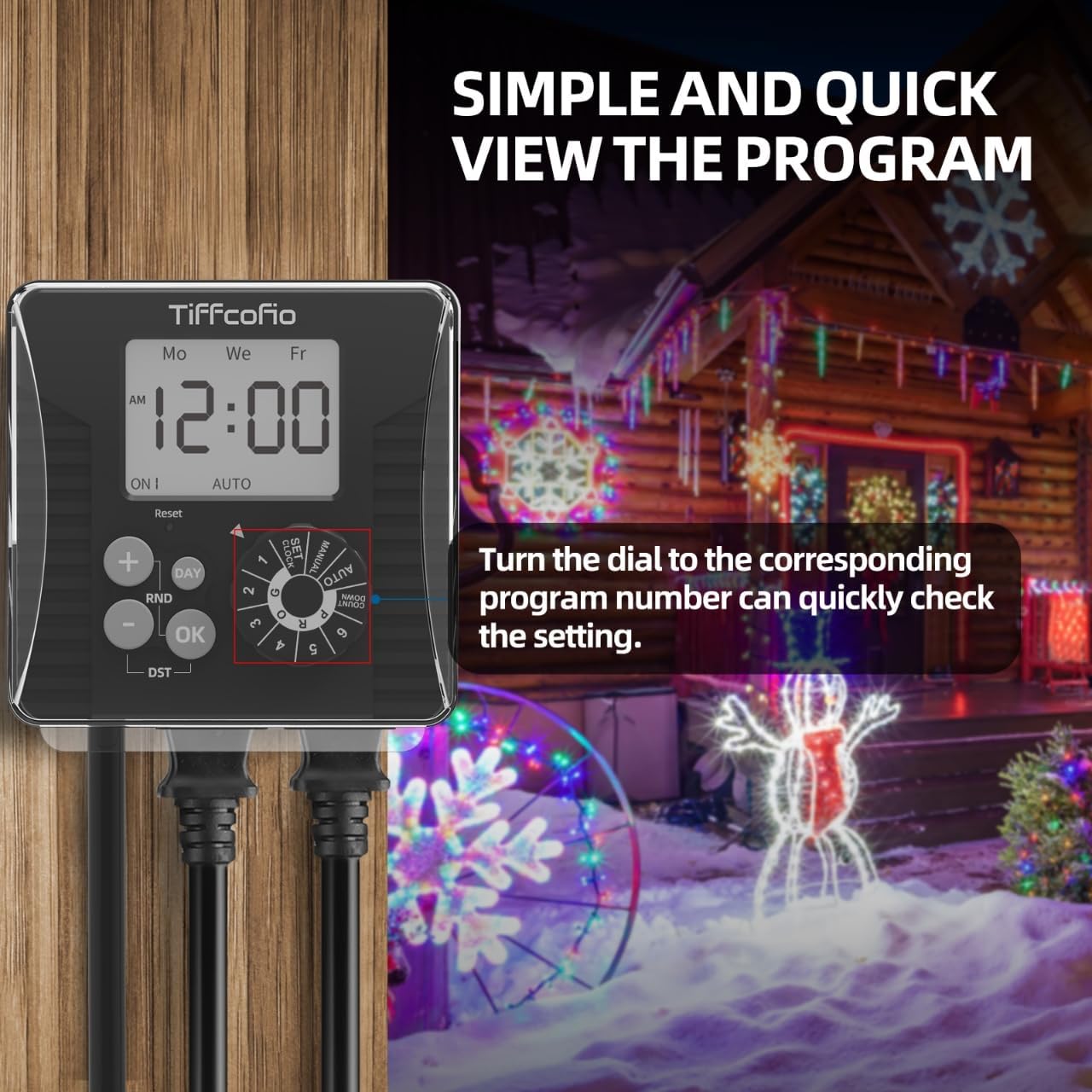
Image: The timer displaying a set program, illustrating how to quickly review settings by rotating the dial to the corresponding program number.
To quickly review any set program, simply rotate the dial to the corresponding program number (1 through 6 PROG). The screen will display the ON/OFF times and selected days for that program. You can then rotate the dial back to "AUTO" to resume normal operation.
Daylight Saving Time (DST):
Press the 'DST' button to activate or deactivate Daylight Saving Time. The display will show 'DST' when active.
Random Function (RND):
Press the 'RND' button to activate or deactivate the random ON/OFF function. When active, the timer will randomly turn ON and OFF within a set window, providing a security feature for lights when you are away.
Note: Ensure the dial is set to "AUTO" for the timer to execute programmed schedules. If the dial is in any other position, the timer will not follow the set programs.
Maintenance
The TiFFCOFiO Digital Outdoor Timer is designed for durability and minimal maintenance. Its waterproof structure protects internal components from outdoor elements.

Image: The timer unit shown with a simulated rain effect, emphasizing its waterproof construction for outdoor use.
- Cleaning: Periodically wipe the timer's exterior with a soft, damp cloth. Do not use abrasive cleaners or immerse the unit in water.
- Inspection: Regularly check the power cord and outlets for any signs of damage or wear. If damage is observed, discontinue use and replace the unit.
- Storage: If storing the timer for an extended period, ensure it is clean and dry. Store in a cool, dry place away from direct sunlight.
Troubleshooting
- Timer not turning ON/OFF as programmed:
- Ensure the dial is set to "AUTO" mode.
- Verify that the ON/OFF times and days of the week are correctly set for each program.
- Check if the timer is receiving power from the wall outlet.
- Display is blank or dim:
- Ensure the timer is securely plugged into a working power outlet.
- If the issue persists after checking power, the unit may require replacement.
- Connected device not receiving power:
- Confirm the connected device is properly plugged into one of the timer's outlets.
- Test the connected device by plugging it directly into a wall outlet to ensure it is functional.
- Check the timer's current mode (e.g., if in "MANUAL" mode, ensure it is set to ON).
If you encounter issues not covered here, please contact customer support.
Specifications
| Feature | Detail |
|---|---|
| Brand | Tiffcofio |
| Model Number | TF-261A (Manufacturer Part Number: Ot-001) |
| Color | Black |
| Material | Plastic |
| Item Weight | 0.4 Kilograms |
| Number of Settings | 6 Programmable Programs |
| Outlets | 2 Grounded Electrical Outlets |
| Cord Length | 2 Feet |
| Power Rating | 15A/1875W (implied from product title) |
| Certifications | ETL Listed |
Official Product Video
Video: An overview of the TiFFCOFiO outdoor waterproof electrical timer, demonstrating its digital display and functionality.
Warranty and Support
The TiFFCOFiO Digital Outdoor Timer is ETL Listed, ensuring safety and reliability. For any questions or assistance, our professional customer service team is available to help. Please refer to your purchase documentation for specific warranty details and contact information.
If you have any questions, our professional and reliable after-sales service will help you within 6 hours.