
1. Product Overview
The THREEKEY TK-CW303 is an MFI and Qi2 certified 4-in-1 wireless charging station designed for Apple devices. It provides fast and efficient charging for your iPhone, Apple Watch, AirPods, and an additional device via its retractable USB-C cable. Featuring advanced AI intelligent chips for comprehensive protection and a relaxing ambient light, this station offers a sleek and functional solution for your charging needs.
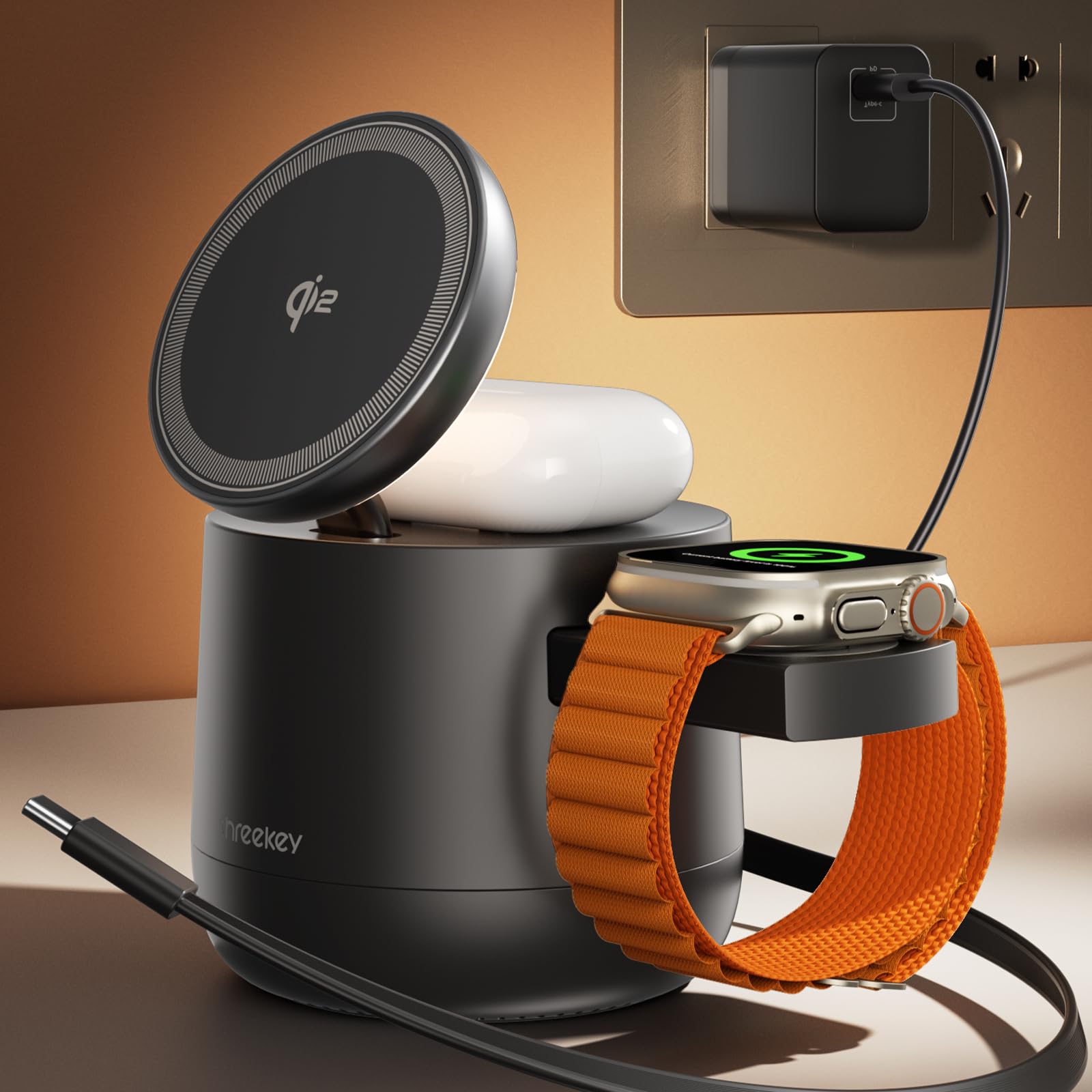
Image: The THREEKEY 4-in-1 MagSafe Wireless Charging Station in black.
2. What's in the Box
- 1x 4-in-1 MagSafe Charger Dock with Built-in 3ft Retractable USB-C Cable
- 1x 65W PD Charger with 5ft Braided Charging Cord
- 1x User Manual
- 36 Month Warranty Card
3. Setup Instructions
- Connect Power: Plug the included 65W PD charger into a wall outlet. Connect the 5ft braided charging cord to the 65W adapter and then to the Type-C input port on the back of the charging station.
- Positioning: Place the charging station on a flat, stable surface such as a desk or nightstand.

Image: The charging station connected to the 65W power adapter, with an iPhone charging on the MagSafe pad.
4. Operating Instructions
4.1 Charging Your iPhone
Place your MagSafe-compatible iPhone (iPhone 12 series or newer) onto the magnetic charging pad. The phone will snap into place, and charging will begin automatically. The station supports 15W fast charging for compatible iPhones.

Image: An iPhone charging vertically on the MagSafe pad, displaying StandBy Mode.
4.2 Charging Your Apple Watch
Gently press the side of the charging station to extend the Apple Watch charging module. Place your Apple Watch onto the module, ensuring it aligns magnetically. Charging will start automatically.

Image: An Apple Watch charging on the pull-out module, showing the charging indicator.
4.3 Charging Your AirPods
Place your AirPods charging case (with wireless charging capability) onto the designated charging area on top of the station, below the iPhone MagSafe pad. Ensure the case is centered for optimal charging efficiency. Remove thick covers to maximize charging efficiency.

Image: AirPods charging case placed on the top charging pad.
4.4 Using the Retractable USB-C Cable
The charging station includes a built-in 3ft retractable USB-C cable. This cable can be used for two purposes:
- Output: Pull out the cable to charge a fourth device, such as an iPad or an Android device. It provides up to 30W of power when used as an output.
- Input: In situations where the 65W PD adapter is not available, this cable can be connected to another adapter to power the charging station. Note: When used as an input, the Type-C port on the back is not functional.
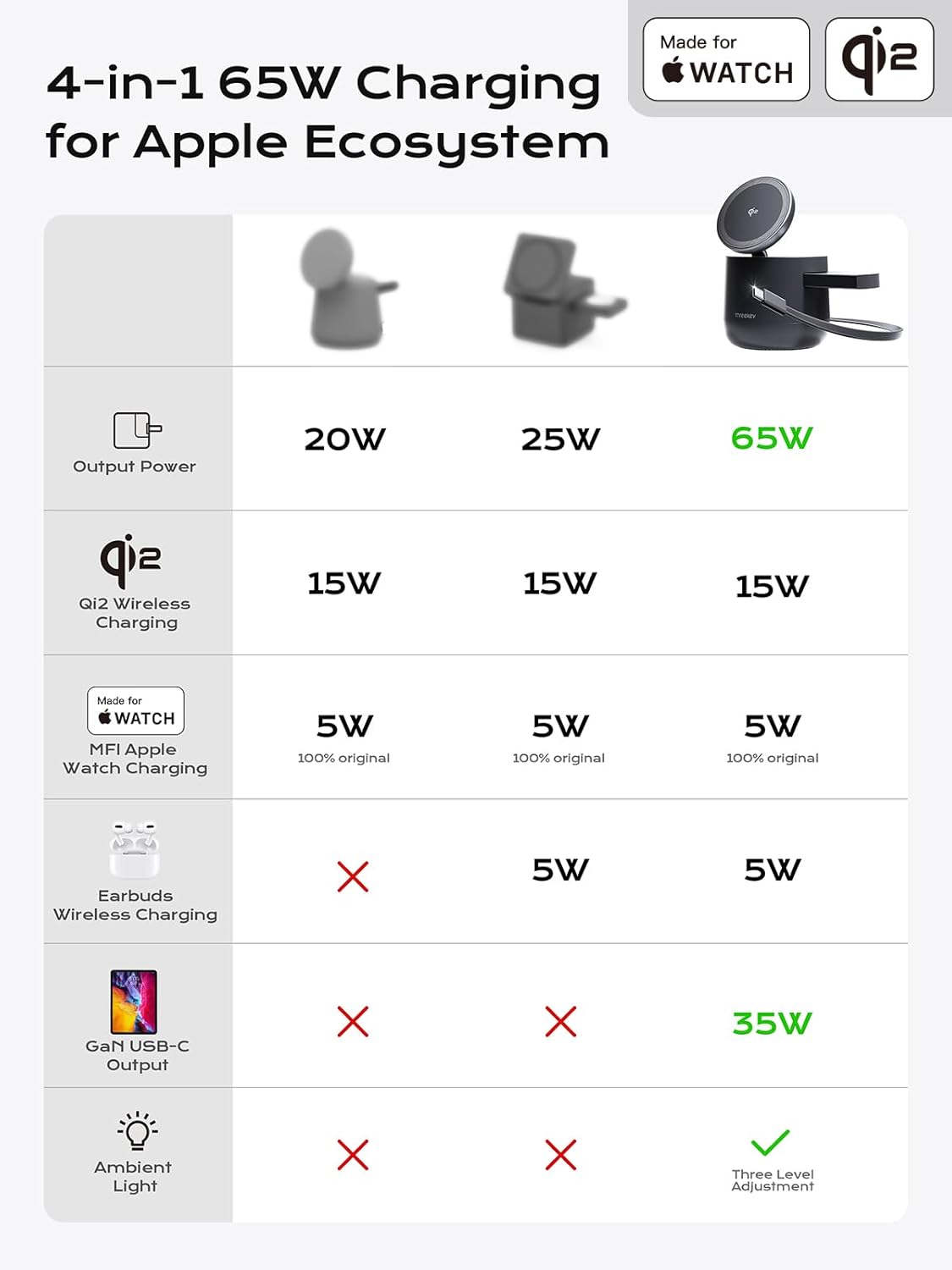
Image: A user demonstrating the retractable USB-C cable being pulled out from the charging station.
4.5 Ambient Light Control
The charging station features a warm white ambient light. To control the light:
- Turn On/Off: Double-click the light button located on the back of the station.
- Adjust Brightness: After turning on, single-click the light button to cycle through four preset brightness levels: 0%, 25%, 50%, and 100%.

Image: The ambient light feature with different brightness settings illustrated.
4.6 StandBy Mode
When your iPhone is placed horizontally on the MagSafe charging pad, it automatically enters StandBy Mode, turning your device into a smart display for clocks, photos, or widgets. The flexible positioning allows for optimal viewing comfort.
4.7 Official Product Video: THREEKEY 4 in 1 Qi2 Wireless Charging Station Cube for Apple
Video: An official product video from THREEKEY-Direct demonstrating the setup and charging capabilities of the 4-in-1 wireless charging station for iPhone, Apple Watch, and AirPods, including the retractable cable.
5. Safety Features
The THREEKEY charging station is equipped with 5 exclusive TK-AI Chips that optimize power delivery and provide 360° protection. These chips safeguard your devices against:
- Overheating
- Overvoltage
- Overcurrent
- Overcharge
- Short-circuit
This advanced technology ensures the longevity and battery health of your connected devices.

Image: Diagram illustrating the AI Intelligent Multi-Device Control Core and its protective features.
6. Maintenance
To ensure optimal performance and longevity of your charging station:
- Cleaning: Use a soft, dry cloth to wipe down the surface of the charging station. Avoid using abrasive cleaners or solvents.
- Storage: When not in use, ensure the retractable cable is fully retracted and the Apple Watch module is closed to protect components.
- Environment: Keep the device away from water, excessive heat, and direct sunlight.
7. Troubleshooting
- Device not charging:
- Ensure the charging station is properly connected to the 65W PD adapter and a working power outlet.
- Verify that your device is correctly placed on the charging area (MagSafe for iPhone, module for Apple Watch, center for AirPods).
- Remove any thick phone cases (exceeding 3.5mm) that might interfere with wireless charging.
- Check if the retractable cable is being used as an input; if so, the main Type-C input port will not function.
- Ambient light not working:
- Double-click the light button on the back to toggle the light on/off.
- Ensure the charging station is powered on.
- Slow charging:
- Ensure you are using the included 65W PD adapter and cable for optimal charging speeds.
- Verify that your devices are compatible with fast wireless charging (e.g., Qi2 for 15W iPhone charging).
8. Specifications
| Feature | Detail |
|---|---|
| Model Number | TK-CW303 |
| Dimensions | 5.83 x 4.37 x 3.31 inches |
| Item Weight | 1.6 pounds |
| Input Voltage | 240 Volts |
| Amperage | 20 Amps |
| Total USB Ports | 1 (retractable USB-C) |
| Included Adapter | 65W PD Charger |
| iPhone Wireless Charging | Qi2 Certified 15W |
| Apple Watch Charging | MFI Certified |
| AirPods Charging | Wireless Charging |
| Retractable Cable Output | 30W (for iPad/other Type-C devices) |
| Ambient Light | Warm white, 4 adjustable levels |
9. Warranty and Support
THREEKEY offers a 36-month warranty for this product. If you encounter any issues or have questions, please do not hesitate to contact our customer support team. We are committed to providing excellent service and support.
Manufacturer: Shenzhen Suiqi Innovation Technology Co.,Ltd.
Support Email: hello@threekey.com
