
Motorola XT2313-3
Motorola Moto G 5G (2023) User Manual
Model: XT2313-3
Introduction
Welcome to the user manual for your new Motorola Moto G 5G (2023). This guide provides essential information to help you set up, operate, and maintain your device, ensuring you get the most out of its advanced features and capabilities.
What's in the Box
- Motorola Moto G 5G (2023) Smartphone
- Charger
- USB Cable
- SIM Tool
Product Overview
Familiarize yourself with the key components and design of your Moto G 5G (2023).

This image displays the Motorola Moto G 5G (2023) from both the front and back, highlighting its sleek design and camera module.

A clear view of the phone's front, showcasing the 6.5-inch display and front camera.
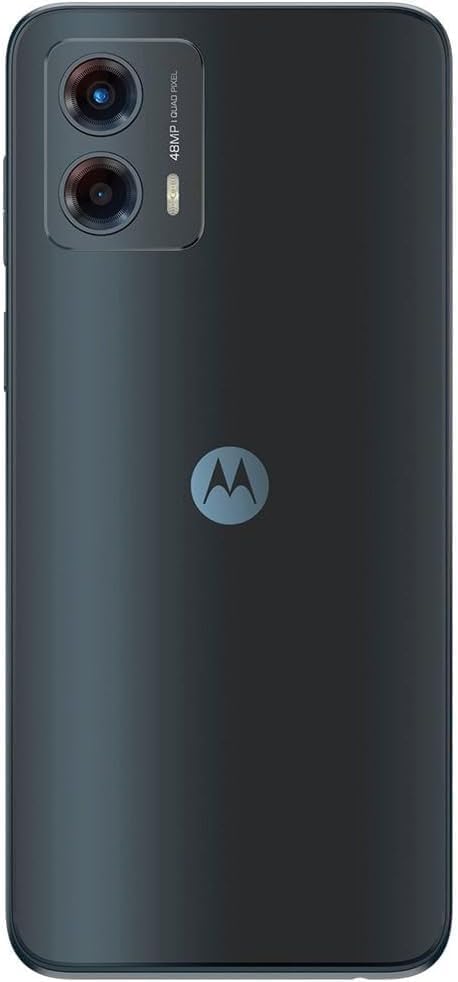
The rear of the device, featuring the 48MP camera system and Motorola logo.

A side profile of the phone, showing the power and volume buttons.
Setup
- Insert SIM Card: Use the provided SIM tool to open the SIM tray. Insert your Nano-SIM card and microSD card (if applicable) into the tray, ensuring correct orientation. Close the tray securely.
- Charge the Battery: Connect the USB cable to the phone's charging port and the other end to the power adapter. Plug the adapter into a wall outlet. Allow the phone to charge fully before first use.
- Power On: Press and hold the Power button (usually on the right side) until the Motorola logo appears.
- Initial Setup: Follow the on-screen prompts to select your language, connect to Wi-Fi, sign in to your Google account, and set up security features like fingerprint or PIN.
Operating Instructions
Basic Navigation
- Home Screen: Swipe left or right to access different home screens.
- App Drawer: Swipe up from the bottom of the screen to view all installed applications.
- Notifications & Quick Settings: Swipe down from the top of the screen to access notifications and quick settings toggles.
Making Calls
Open the Phone app, dial the number, and press the call button.
Sending Messages
Open the Messages app, tap "Start chat," enter the recipient's number or contact, and type your message.
Internet Connectivity
Connect to Wi-Fi via Settings > Network & internet > Wi-Fi. Ensure mobile data is enabled for 5G connectivity via Settings > Network & internet > Mobile network.
Camera Features
The Moto G 5G (2023) features an advanced 48MP camera system designed for capturing detailed photos day or night.
- 48MP Main Camera: Utilizes Quad Pixel technology for enhanced low-light performance and sharp images.
- Macro Vision Lens: Explore subjects up close with the dedicated Macro Vision camera, revealing tiny details often missed by standard lenses.
- Camera Modes: Access various modes like Portrait, Night Vision, Panorama, and Pro mode for creative control.
Display Features
Experience smooth visuals and seamless scrolling on the phone's 6.5-inch 120Hz display.
- 120Hz Refresh Rate: Provides a highly fluid and responsive viewing experience, ideal for gaming and scrolling.
- 6.5-inch Display: A large screen size that offers an immersive viewing experience while remaining comfortable to hold.
Audio Features
Immerse yourself in rich, multidimensional sound with Dolby Atmos and stereo speakers.
- Dolby Atmos: Enhances audio quality, providing improved bass, cleaner vocals, and greater clarity for a cinematic sound experience.
- Stereo Speakers: Delivers balanced and powerful audio output for media consumption and calls.
Battery Life
The Moto G 5G (2023) is equipped with a massive 5000mAh battery, designed to provide more than a full day of usage on a single charge.
- 5000mAh Capacity: Ensures extended usage without frequent recharging.
- Charging: Use the provided charger and cable for optimal charging performance. Avoid using uncertified accessories.
Performance
Powered by the Snapdragon 480+ 5G processor, the Moto G 5G (2023) delivers superfast performance for 5G networks, ensuring smooth multitasking and gaming.
- Snapdragon 480+ 5G Processor: Enables fast and efficient processing for demanding applications and seamless 5G connectivity.
- 4GB/64GB Configuration: Provides ample memory and storage for apps, photos, and media.
Maintenance
- Software Updates: Regularly check for and install system updates to ensure optimal performance and security. Go to Settings > System > System updates.
- Cleaning: Use a soft, lint-free cloth to clean the screen and body of the phone. Avoid harsh chemicals.
- Storage Management: Periodically clear unnecessary files and apps to free up storage space.
- Battery Care: Avoid extreme temperatures. Do not let the battery drain completely often.
Troubleshooting
| Problem | Solution |
|---|---|
| Phone not turning on | Ensure battery is charged. Press and hold the power button for at least 10-15 seconds. |
| Apps crashing | Clear app cache (Settings > Apps > [App Name] > Storage & cache > Clear cache). Restart the phone. |
| Poor network signal | Check SIM card insertion. Toggle Airplane mode on/off. Restart the phone. Contact your carrier. |
| Battery draining fast | Reduce screen brightness. Close background apps. Limit location services. Check battery usage in settings. |
Specifications
| Feature | Detail |
|---|---|
| Model | XT2313-3 |
| Display | 6.5" 120Hz |
| Processor | Snapdragon 480+ 5G |
| Camera | 48MP Advanced System |
| Battery | 5000 mAh |
| Memory/Storage | 4GB RAM / 64GB Internal (expandable) |
| Audio | Dolby Atmos, Stereo Speakers |
| Connectivity | 5G, Wi-Fi, Bluetooth |
| Package Dimensions | 7 x 4 x 2 inches |
| Item Weight | 8 ounces |
Warranty and Support
For detailed warranty information and customer support, please refer to the warranty card included with your product or visit the official Motorola support website.
Online Support: www.motorola.com/us/support
Related documentsXT2313-3


Ask a question about this manual
Ask about setup, troubleshooting, compatibility, parts, safety, or missing instructions. Manuals+ will review the question and use this page’s manual context to help answer it.