
1. Introduction
The Yahboom V1 Smart Car Chassis Kit with Motor Driver Board is a versatile platform designed for DIY robotics enthusiasts, educational projects, and electronics competitions. This kit features an aluminum alloy frame and is compatible with various development boards such as Raspberry Pi, UNO R3, Jetson, and MSPM0. It provides a robust foundation for building mini desktop racing robots and other intelligent vehicles, supporting a wide range of applications from basic movement to advanced visual recognition and autonomous navigation.
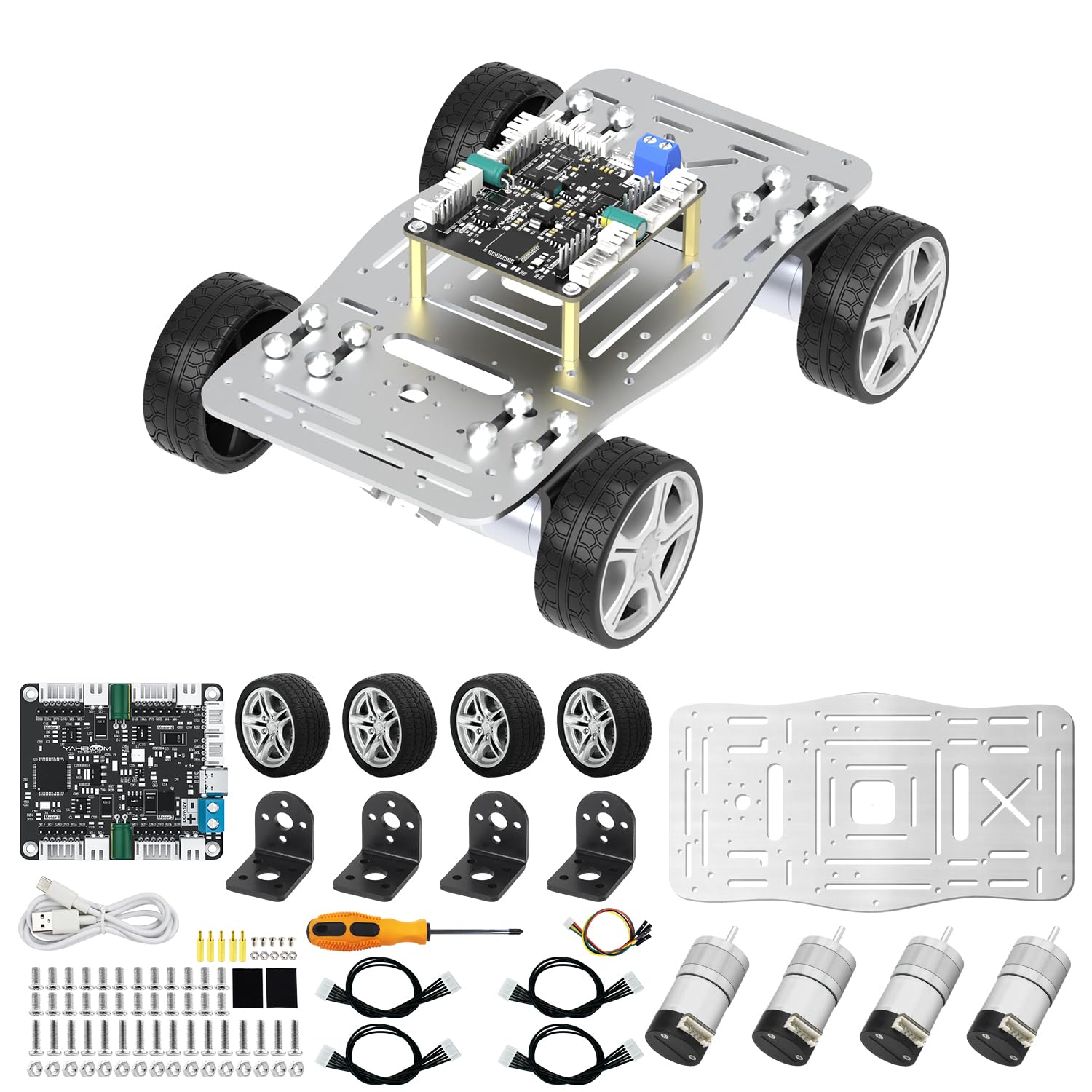
Image: The Yahboom V1 Smart Car Chassis Kit with Motor Driver Board, fully assembled.
2. What's in the Box
The following components are included in your Yahboom V1 Smart Car Chassis Kit with Motor Driver Board:
- 1 x Aluminum alloy chassis
- 4 x 310 encoder motor
- 4 x 310 motor bracket
- 4 x 48mm rubber tire
- 4 x PH2.0-6Pin to DuPont line (20cm)
- 1 x Screwdriver
- 1 x Velcro strap
- Several screws
- 1 x 4-channel motor drive module
- 1 x PH2.0-4Pin to DuPont line (20cm)
- 1 x Type-C data cable (100cm)

Image: Overview of the car chassis kit components.
3. Setup and Assembly
Assembly of the Yahboom V1 Smart Car Chassis Kit requires careful attention to detail. Detailed installation videos and 3D model files are available to guide you through the process. Follow these general steps:
- Attach the 310 encoder motors to the aluminum alloy chassis using the provided motor brackets and screws.
- Mount the 48mm rubber tires onto the motor shafts.
- Connect the 4-channel motor drive module to the motors using the PH2.0-6Pin to DuPont lines.
- Secure the motor drive module to the chassis using appropriate mounting points and screws.
- Connect the Type-C data cable to the motor drive module for power and communication with your chosen development board (e.g., Raspberry Pi, UNO R3, Jetson, MSPM0).
- Ensure all electrical and mechanical connections are secure before powering on the device.

Image: Visual guide illustrating the assembly steps for the chassis.
Assembly Video Tutorial
Video: Official product video demonstrating the assembly and various functionalities of the Yahboom Mini Car Chassis.
4. Operating Instructions
The Yahboom V1 Smart Car Chassis Kit supports various control methods and autonomous functions, depending on the integrated development board and programming.
4.1 Control Methods
APP Control
The kit supports Bluetooth 5.0 for remote control via a dedicated mobile application. Refer to the product information for Android APK download. For iOS, search for 'YahBoomRobot' in the App Store.

Image: Example interface of the Yahboom mobile application for robot control.
PS2 Handle Control
The chassis can be controlled using a PS2 handle for manual navigation. Ensure the PS2 receiver is correctly connected to your development board.
Voice Control
With appropriate programming and a microphone module (not included in this base kit), voice commands can be used to control the robot's movement.
4.2 Autonomous Functions
Obstacle Avoidance
When equipped with ultrasonic sensors and programmed, the robot supports ultrasonic obstacle avoidance, allowing it to navigate environments without collisions.
Line Tracking
Utilizing a 4-channel tracking module (compatible with the chassis), the robot can follow predefined lines on a surface.
Light Seeking
With an infrared light sensor, the robot can be programmed to detect and move towards infrared light sources.
Visual Module Support (K210)
The chassis supports K210 visual modules for advanced functions such as reverse warehousing, object recognition, and other visual processing tasks, depending on the programming.
5. Maintenance
To ensure the longevity and optimal performance of your Yahboom V1 Smart Car Chassis Kit, regular maintenance is recommended:
- Keep the chassis clean and free from dust and debris. Use a soft, dry cloth for cleaning.
- Periodically check all screw connections for tightness. Loose screws can affect stability and performance.
- Inspect motor and wheel assemblies for any wear, damage, or obstructions. Ensure wheels spin freely.
- If using a battery (not included), ensure it is charged according to its specifications and properly secured.
- Store the kit in a dry, cool environment away from direct sunlight and extreme temperatures.
6. Troubleshooting
If you encounter issues with your Yahboom V1 Smart Car Chassis Kit, refer to the following troubleshooting tips:
- Robot not moving: Verify all power connections are secure. Ensure the motors are properly connected to the motor driver board. Check if the control signals are being sent correctly from your chosen control method (APP, PS2 controller, or code).
- Erratic movement: Inspect wheel alignment and ensure the motors are functioning correctly. Confirm the chassis is operating on a flat, unobstructed surface. For autonomous modes, check sensor calibration and environmental conditions.
- Connection issues (APP/Controller): For APP control, ensure Bluetooth is enabled on your device and the robot, and that they are correctly paired. For PS2 control, verify the receiver is properly connected and powered.
- Visual module not functioning: Check the K210 module's power and data connections. Ensure the correct software or firmware is loaded and configured for the module.
- Line tracking problems: Clean the tracking sensors to remove any dust or dirt. Ensure the line on the surface is clearly visible and has sufficient contrast with the background.
For more detailed troubleshooting or specific technical support, refer to the official Yahboom documentation and community forums.
7. Specifications
Detailed specifications for the Yahboom V1 Smart Car Chassis Kit with Motor Driver Board:
| Feature | Detail |
|---|---|
| Brand | Yahboom |
| Model | V1 Chassis+Motor driver board |
| ASIN | B0F5QNJD3W |
| Material | Aluminum alloy |
| Chassis Weight | 472.2g (single layer) |
| Chassis Dimensions (L x W x H) | 19.5cm x 14.2cm x 4.5cm |
| Maximum Load | 4.5KG |
| Motor Type | 310 encoder DC reduction motor |
| Motor Driver | 4-channel encoder motor driver module |
| Wheel Diameter | 48mm |
| Compatibility | Raspberry Pi, UNO R3, Jetson, MSPM0 development boards |

Image: Chassis dimensions and key features.

Image: Pinout and features of the 4-channel encoder motor driver module.
8. Warranty
The Yahboom V1 Smart Car Chassis Kit is covered by a warranty for 90 days after product delivery.
For warranty claims or further details regarding the terms and conditions, please contact Yahboom customer support directly through their official channels.
9. Support
For additional support, comprehensive tutorials, and community resources, please visit the official Yahboom website. The kit includes detailed opening dimensions, installation videos, 3D model files, ROS robot expansion practice cases, and open app codes for beginners.
Yahboom is dedicated to providing solutions for AI & Robotics Programming Education, offering extensive documentation and support for their products.

Image: Example of available development tutorials and documentation.

Image: Screenshot showing various detailed tutorials provided by Yahboom.