
Introduction
This manual provides detailed instructions for the installation, operation, and maintenance of your JOYING JY-UTS07N8-R Single Din 9-Inch Android 13 Car Stereo. Please read this manual thoroughly before using the product to ensure proper function and safety.

Image: Overview of the JOYING 9-Inch Android 13 Car Stereo, highlighting its Qualcomm Snapdragon 6125 processor, Octa Core 2.0GHz, and 1280x800P IPS screen.
What's in the Box
Verify that all items listed below are included in your package:
- 9" radio x1
- Single Din Cage x1
- Mounting Sleeve x1
- Left & Right Bracket x1
- Plastic Trim Out x1
- Extraction Keys x1
- Installation Manual x1
- WiFi Antenna x1
- GPS Antenna x1
- 4G Antenna x2
- External Mic x1
- USB Cable x2
- AR Cable x1
- Screen Ribbon Cable x1
- ISO Cable x1
- User Manual x1

Image: A visual representation of all components and accessories included in the product package.
Key Features
- Fast Boot: Starts up and enters the user interface in 2 seconds after the car key is inserted (initial boot takes 30-40 seconds).
- Optical Fiber and Coaxial Digital Output: Connects to external amplifiers with Optical Fiber or Coaxial Digital Input for ultimate sound quality.
- Built-in 4G Module: Insert a SIM card for internet access (does not support phone calls or SMS). Supports FDD-LTE: B2/B4/B5/B7/B12/B13/B14/B17/B25/B26/B38/B66/B71 and TDD-LTE: B41.
- GPS Navigation: Precise GPS engines with included GPS antenna for accurate real-time navigation. Supports offline maps and synchronization with mobile phone maps via CarPlay/Android Auto.
- Built-in CarPlay & Android Auto: Connect your mobile phone via USB cable or Bluetooth to use phone apps on the larger screen for navigation, calls, and music.
- Steering Wheel Control: Supports steering wheel controls for easy song switching, radio channel changes, and volume adjustment. (Requires an extra CANbus cable for cars with CAN system).
- Split-screen Multitasking: Use two applications simultaneously on the car stereo display.
- HDMI Output: Full digital image and sound-sending interface for uncompressed audio and video signals. Supports projection screen display for passengers and on-screen display for the main screen (HDMI cable not included).
- Upgraded Cooling: Dual heat sink design for superior heat dissipation and enhanced performance stability. Automatic fan activation based on CPU temperature or volume.
- Upgraded WiFi Signal: Independent WiFi antenna for stable signal quality and fast, smooth internet access (Standard: 802.11a/b/g/n/AC, Spectral band: 2.4GHz/5GHz).
- Personalized Settings: Customizable car boot logo, wallpapers, and changeable button colors.

Image: Icons representing various features such as Fast Boot, GPS Navigation, AM/FM Radio, Hands-free Call, Picture-in-Picture, 3 USB ports, Micro SD Card Slot, and 4G SIM Card Slot.
Setup
For installation, you may need an installation frame kit, special ISO harness, amplifier adapter, or CANbus decoder depending on your car's situation. The unit does not support factory car GPS antenna, backup rear camera, Bluetooth, USB, and microphone etc. Only JOYING accessories are supported.
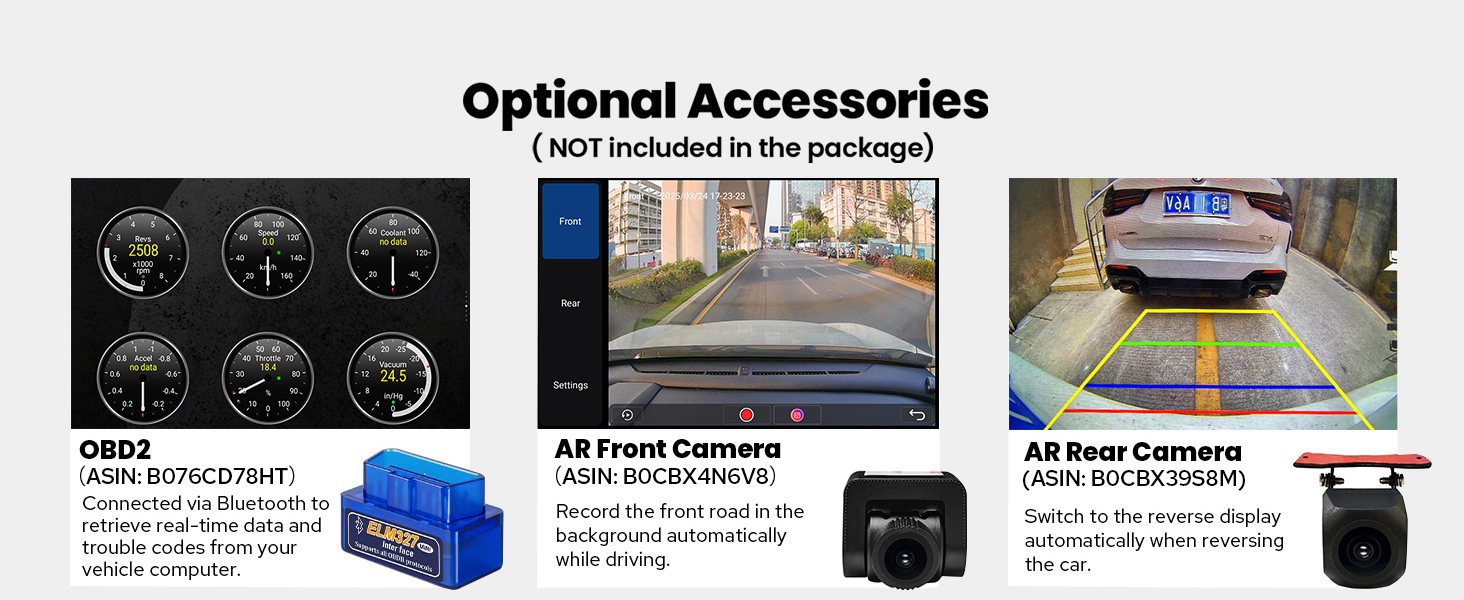
Image: Visuals demonstrating the upgraded installation structure with adjustable left and right brackets (34mm, 52mm, MAX: 88mm), an upgraded cooling system with dual heat sinks and temperature warnings, and an independent WiFi antenna for improved signal.
Operating Instructions
CarPlay & Android Auto
Connect your smartphone to the car stereo via USB or Bluetooth to access navigation, make calls, and play music directly on the 9-inch display. This unit supports both wired and wireless CarPlay and Android Auto.

Image: The car stereo displaying Apple CarPlay and Android Auto interfaces, demonstrating phone app integration for navigation, music, and communication.
Split-screen Multitasking
To use split-screen, tap the recent apps icon, find the app you want to split, and tap the split-screen button. Select a second app from recent apps to display both simultaneously.

Image: A visual guide to enabling split-screen mode, allowing two applications to be viewed concurrently on the display.
Audio Settings (DSP)
The built-in Digital Signal Processor (DSP) allows you to fine-tune your audio experience. Adjust the 48-band graphic equalizer with 8 EQ presets (Rock, Soft, Classical, Pop, Hall, Jazz, Cinema, Custom) and utilize time alignment technology for optimal sound delivery to each ear.

Image: The car stereo's DSP settings, including a 48-band graphic equalizer, time alignment for precise sound delivery, and adjustable crossover settings for audio customization.
Steering Wheel Control
Customize the functions of your steering wheel buttons to control the car stereo, enhancing safety and convenience while driving. This feature requires an additional CANbus cable for compatible vehicles.

Image: The car stereo's interface for customizing steering wheel controls, allowing users to assign various functions to physical buttons for convenient operation.
Maintenance
System Updates (OTA)
The device supports Over-The-Air (OTA) updates to address software issues and improve performance. Ensure your system is consistently updated for optimal functionality and security.
Troubleshooting
OBDII Diagnostics
Utilize the Bluetooth OBD II (AC-4450 is included) to scan and clear fault codes in your vehicle's Electronic Control Unit (ECU). This allows you to view the vehicle's condition in real-time, aiding in diagnosing potential issues.
Specifications
| Product Dimensions | 5.91 x 7.99 x 4.72 inches |
| Item Weight | 2.65 pounds |
| Item Model Number | JY-UTS07N8-R |
| Brand | JOYING |
| Connectivity Technology | Bluetooth, Ethernet, HDMI, USB, Wi-Fi |
| Controller Type | Android |
| Special Feature | Android Auto, Apple CarPlay, DSP, RCA, RDS |
| Compatible Devices | Amplifier, Speaker |
| Total HDMI Ports | 1 |
| Connector Type | Coaxial, Optical |
| Audio Output Mode | Stereo |
| Surround Sound Channel Configuration | 5.1 |
| Video Encoding | Supports H264/H265/MP4/AVI/MKV/FLV. |

Image: The rear panel of the car stereo, detailing the various input and output ports for connectivity.
Warranty and Support
For warranty information, technical support, or service inquiries, please refer to the contact information provided in your product packaging or visit the official JOYING website. Please note that the product supports JOYING accessories only.

