
1. Introduction
This manual provides instructions for the installation, operation, and maintenance of your Camcamp SC44 Add-on-Cam Wireless Solar Security Camera. This camera is designed for outdoor surveillance, featuring solar power, 2K resolution, Pan-Tilt-Zoom (PTZ) functionality, color night vision, PIR motion detection, and two-way audio communication. It is IP66 waterproof for reliable outdoor performance.
2. Package Contents
Verify that all items are present in your package:
- 1 x Camcamp SC44 Add-on-Cam Wireless Solar Security Camera
- Mounting accessories (screws, wall anchors)
- User Manual (this document)
3. Safety Information
Please read and follow these safety guidelines to ensure proper operation and prevent damage:
- Install the camera in a location where it is not easily accessible to unauthorized individuals.
- Ensure the solar panel receives adequate sunlight for optimal charging.
- Do not attempt to disassemble or modify the camera. This will void the warranty.
- Use only manufacturer-approved accessories.
- Keep the camera away from strong magnetic fields or corrosive environments.
- Operating temperature range: -13°F (-25°C) to 122°F (50°C).
4. Setup
4.1 Camera Overview
The Camcamp SC44 camera integrates a solar panel for continuous power and features two antennas for wireless connectivity. The camera head includes the lens, infrared LEDs, and spotlights for night vision, along with a microphone and speaker for two-way audio.

Image: Front view of the Camcamp SC44 camera with its integrated solar panel and dual antennas.
4.2 Mounting the Camera
The camera is designed for wall mounting. Choose a location that provides the desired viewing angle and ensures the solar panel receives direct sunlight for several hours daily.
- Mark the drilling points on the wall using the mounting bracket as a template.
- Drill holes and insert wall anchors if mounting on masonry.
- Secure the mounting bracket to the wall using the provided screws.
- Attach the camera to the mounting bracket. Adjust the angle of the solar panel to maximize sun exposure.

Image: The Camcamp SC44 camera mounted on an outdoor wall, illustrating its wireless and solar-powered design.
4.3 Powering the Camera
The camera is powered by an internal 8000mAh rechargeable battery, continuously charged by the integrated solar panel. Ensure the solar panel is positioned to receive maximum sunlight.
4.4 Initial Connection and Pairing
The Camcamp SC44 Add-on-Cam is designed for automatic pairing with a compatible Camcamp security system monitor. Power on the camera and the monitor; they should connect automatically. For app control, download the designated mobile application (e.g., EseeCloud or Cloudeye 365 as per product information) and follow the in-app instructions to add the camera to your system.

Image: Diagram showing the Camcamp SC44 camera wirelessly connecting to a central monitor, indicating automatic pairing.
5. Operating the Camera
5.1 Mobile Application Control
The camera is primarily controlled via a mobile application (e.g., EseeCloud or Cloudeye 365). Through the app, you can:
- View live video feed.
- Control Pan-Tilt-Zoom (PTZ) functions.
- Access recorded footage.
- Configure motion detection settings.
- Engage in two-way audio communication.

Image: A smartphone screen displaying the live feed from the Camcamp SC44 camera, with controls for pan and tilt functions.
5.2 Pan-Tilt-Zoom (PTZ) Functionality
The camera offers a 355° horizontal pan and 90° vertical tilt, allowing for comprehensive coverage of your property. Use the controls within the mobile application to adjust the camera's viewing angle remotely.
5.3 Motion Detection
The camera utilizes Passive Infrared (PIR) motion detection to identify human movement, reducing false alarms from animals or environmental factors. When motion is detected, the camera can:
- Flash spotlights.
- Activate a siren alarm.
- Send instant alerts to your mobile application.
- Begin recording video.
You can define custom monitoring zones within the app to focus detection on specific areas and ignore others, enhancing privacy and reducing unnecessary alerts.

Image: Illustration of the camera detecting motion, triggering a spotlight, siren, and sending an app notification to a smartphone.
5.4 Night Vision
The camera features 2K 4MP resolution with full-color night vision, providing clear and detailed images up to 65 feet in low-light conditions. It also supports traditional IR night vision.
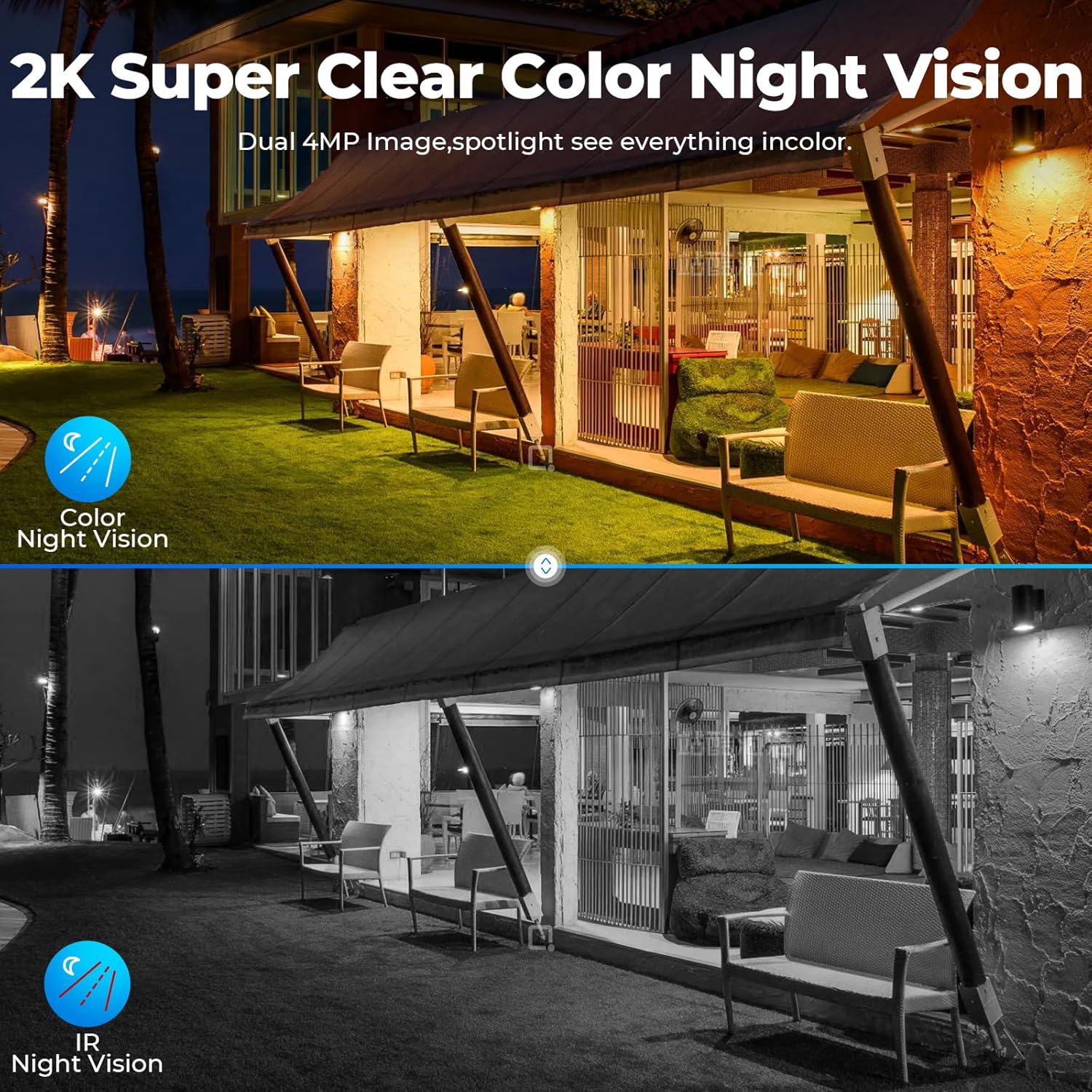
Image: A split image demonstrating the difference between standard IR night vision (black and white) and the camera's 2K full-color night vision.
5.5 Two-Way Audio
The integrated microphone and speaker enable two-way communication. Use the mobile app to speak through the camera and hear responses from the monitored area.

Image: A person interacting with a delivery driver via the camera's two-way audio feature, shown on a smartphone.
5.6 Video Recording and Storage
The camera records video upon motion detection. It includes a 64GB TF card for local storage. Smart encoding technology is used to maximize storage efficiency.
6. Maintenance
6.1 Cleaning
Periodically clean the camera lens and solar panel with a soft, damp cloth to ensure optimal performance. Avoid using abrasive cleaners or solvents.
6.2 Battery and Solar Panel Care
Ensure the solar panel remains free of obstructions (e.g., leaves, dirt) to maintain charging efficiency. The internal battery is designed for long-term use and does not require user replacement.
6.3 Firmware Updates
Check the mobile application regularly for available firmware updates. Keeping the camera's firmware updated ensures optimal performance, security, and access to new features.
7. Troubleshooting
- No Power/Not Charging: Ensure the solar panel is clean and receiving direct sunlight. Verify the camera is within its operating temperature range.
- No Video/Offline: Check Wi-Fi connectivity. Ensure the camera is within range of your Wi-Fi router or the main monitoring unit. Restart the camera and the monitoring unit/app.
- Poor Image Quality: Clean the camera lens. Ensure there are no obstructions in the camera's field of view. Check network signal strength.
- Motion Detection Issues: Adjust PIR sensitivity settings in the app. Review and refine custom detection zones. Ensure no objects are constantly triggering false alarms.
- App Crashing/Unresponsive: Ensure your mobile app is updated to the latest version. Clear the app's cache or reinstall it. Check your phone's internet connection.
- Alexa Connectivity Issues: Ensure the correct app (e.g., EseeCloud) is linked to Alexa. Re-link the camera skill in the Alexa app. Check network stability.
- Two-Way Audio Problems: Check volume settings on your phone and within the app. Ensure there are no obstructions blocking the camera's microphone or speaker.
8. Specifications
| Feature | Specification |
|---|---|
| Model Name | SC44 |
| Indoor/Outdoor Usage | Outdoor |
| Power Source | Solar Powered |
| Connectivity Technology | Wireless (Wi-Fi) |
| Video Capture Resolution | 2K |
| Viewing Angle | 360 Degrees (PTZ) |
| Night Vision Range | 65 Feet |
| Low Light Technology | Color Night |
| Waterproof Rating | IP66 |
| Item Dimensions (L x W x H) | 6.3 x 5.51 x 8.66 inches |
| Item Weight | 1.98 pounds |
| Included Components | 1 x security camera |
| Batteries | 3 Nonstandard Battery batteries (included) |
| Control Method | App, Remote |
| Compatible Devices | Solar Camera, Smartphone, iPad, Tablet, Laptop, PC, Smart TV |
| Controller Type | Amazon Alexa |
9. Warranty and Support
For warranty information and technical support, please refer to the official Camcamp website or contact Camcamp customer service directly. Details are typically provided with your purchase documentation or on the manufacturer's website.


