
Introduction
This manual provides detailed instructions for the proper setup, operation, and maintenance of your PHOTOOLEX FK300G Camera Flash Speedlite with Flash Trigger. Please read this manual thoroughly before using the product to ensure safe and effective operation.
The PHOTOOLEX FK300G is a versatile camera flash speedlite designed for use with a wide range of SLR digital cameras equipped with a standard single-contact hot shoe, including models from Canon, Nikon, Sony, Panasonic, Olympus, Fujifilm, Pentax, Sigma, Minolta, and Leica.
What's in the Box

Image: The PHOTOOLEX FK300G Speedlite, wireless flash trigger, color filters, protective pouch, and mini stand laid out from the box.
- PHOTOOLEX FK300G Speedlite
- Wireless Flash Trigger
- Color Filter Set
- Protective Pouch
- Mini Stand
- Instruction Manual
Product Overview

Image: A detailed diagram highlighting the various buttons and features of the PHOTOOLEX FK300G Speedlite, including the mode button, test button, power switch, battery cover, and synchronous interface.
Familiarize yourself with the main components of the PHOTOOLEX FK300G Speedlite:
- Mode Button: Cycles through flash modes (M, S1, S2).
- Test Button (PILOT): Fires a test flash or wakes the flash from sleep mode.
- CH+ / CH- Buttons: Adjust channel settings for wireless triggering.
- Power Switch: Turns the unit on/off.
- Battery Cover: Access for AA battery installation.
- Synchronous Interface: For connecting external power packs or sync cables.
- Built-in Diffuser & White Card: Pull-out elements for light modification.
Setup
1. Battery Installation
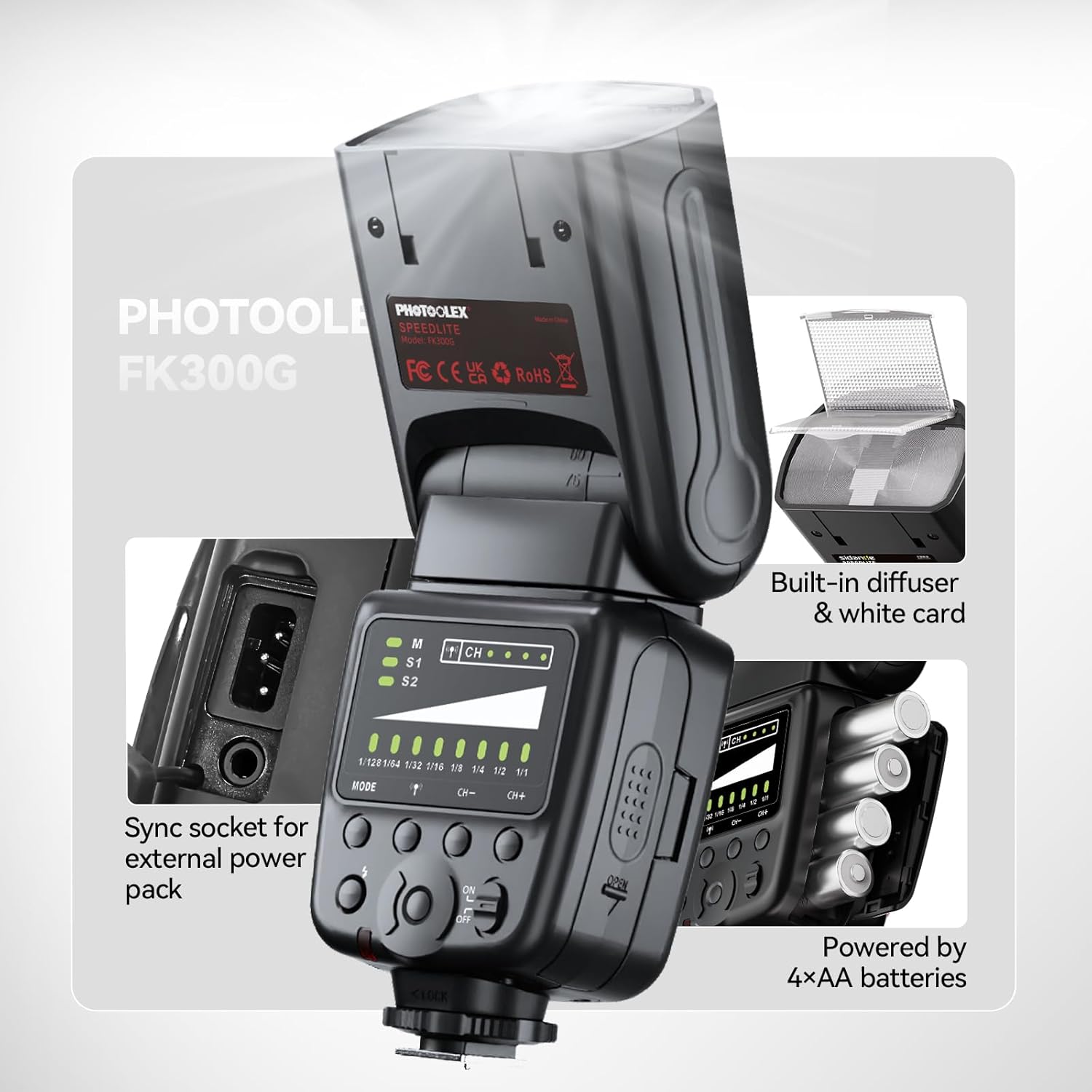
Image: The battery compartment of the FK300G Speedlite, showing four AA batteries inserted, alongside the built-in diffuser and white card.
- Open the battery cover located on the side of the flash unit.
- Insert four (4) AA batteries, ensuring correct polarity (+/-).
- Close the battery cover securely.
2. Mounting to Camera

Image: Visual guide illustrating various camera hot shoe types, indicating compatibility of the FK300G with standard single-contact hot shoes and incompatibility with certain Canon, Sony, and Fujifilm models.
- Ensure your camera is powered off.
- Slide the flash unit's hot shoe onto your camera's hot shoe mount.
- Secure the flash by tightening the locking ring or lever on the flash unit.
- Note: The FK300G is compatible with cameras featuring a standard hot shoe with a central contact. It is not compatible with Canon EOS Rebel SL3/250D, Rebel T7/1500D 2000D, Rebel T100/3000D 400D.
3. Using the Wireless Flash Trigger

Image: A photographer utilizing the PHOTOOLEX FK300G Speedlite off-camera with a wireless trigger, demonstrating flexible lighting setups.
- Attach the wireless flash trigger to your camera's hot shoe.
- Ensure both the flash unit and the trigger are powered on.
- Set the flash unit to a wireless mode (S1 or S2) if using it as a slave, or ensure it's set to Manual (M) if triggered directly by the included trigger.
- Adjust the channel settings on both the flash and the trigger to match for stable 2.4G wireless communication (15 channels available, up to 15m range).
Operating Instructions
Flash Modes

Image: A visual representation of the three flash modes (Manual, S1 Master/Slave, S2 Slave) and their typical use cases in photography.
- Manual Mode (M): Provides precise control over flash output. Adjust power levels from 1/128 to 1/1.
- S1 Wireless Flash Trigger Mode: When used as an auxiliary flash, it will fire simultaneously with the main flash.
- S2 Wireless Flash Trigger Mode: When used as an auxiliary flash, it will ignore the main flash's pre-flash and synchronize with the second flash, ideal for TTL master flash systems.
Adjusting Flash Power

Image: The PHOTOOLEX FK300G's LCD screen displaying the 8-step power output control, ranging from 1/128 to full power (1/1), with corresponding example photos.
The flash unit offers 8 steps of power output control. Use the CH+ and CH- buttons to adjust the power from 1/128 (lowest) to 1/1 (full power). The current setting is indicated on the LCD display.
Flexible Head Adjustment

Image: Illustrations demonstrating the speedlite's head rotation (0° to 270°) and tilt (0° to 90°) capabilities for bounce flash and creative lighting angles.
The flash head can be rotated 0° to 270° horizontally and tilted 0° to 90° vertically. This flexibility allows for bounce flash techniques and creative lighting angles to achieve desired effects.
Test Flash and Reset
- To fire a test flash or wake the unit from sleep mode, press the Test button.
- To reset the flash to factory settings, press and hold the Mode and Test buttons simultaneously.
Maintenance
- Keep the flash unit clean by wiping it with a soft, dry cloth. Avoid using harsh chemicals or solvents.
- Remove batteries if the unit will not be used for an extended period to prevent leakage.
- Store the flash in its protective pouch in a cool, dry place away from direct sunlight and extreme temperatures.
- Do not attempt to disassemble or repair the unit yourself. Refer to qualified service personnel.
Troubleshooting
| Problem | Possible Cause | Solution |
|---|---|---|
| Flash does not fire. |
|
|
| Flash output is too bright/dark. |
|
|
| Flash recycle time is slow. |
|
|
Specifications
| Feature | Detail |
|---|---|
| Model | FK300G |
| Guide Number | GN33 (ISO100, 35mm) |
| Flash Modes | M, S1, S2 |
| Bounce Position | Up/Down 0°/90°, Left/Right 0°/270° |
| Flash Power Output | 8 steps (1/128, 1/64, 1/32, 1/16, 1/8, 1/4, 1/2, 1/1) |
| Power Source | 4x AA Batteries |
| Recycling Time | 0.1-5 seconds |
| Color Temperature | 5600K ± 200K |
| Flash Duration | 1/300s - 1/20000s |
| Wireless Frequency | 2.4G |
| Channel | 15 |
| Wireless Transmission Distance | 15-30m |
| Item Weight | 1.46 pounds |
| Package Dimensions | 9.72 x 4.8 x 4.17 inches |
Warranty and Support
The PHOTOOLEX FK300G Speedlite comes with a 24-month warranty from the date of purchase. This warranty covers manufacturing defects and ensures reliable performance of your product.
For technical support, troubleshooting assistance, or warranty claims, please contact PHOTOOLEX customer service. Our friendly customer service team is available to assist you with any questions or concerns.
Please refer to the official PHOTOOLEX website or your purchase documentation for the most current contact information.