
1. Introduction
The TANALAZ K71Pro Karaoke Machine is a portable and versatile entertainment system designed to bring joy to users of all ages. It features a powerful speaker, two wireless microphones with fun voice-changing effects, and dynamic LED party lights to create an immersive singing experience. With its compact design and multiple connectivity options, it's perfect for home use, parties, and family gatherings.

2. Package Contents
Please check the package carefully to ensure all items are present and in good condition:
- 1 x Karaoke Speaker Unit
- 2 x Wireless Microphones
- 1 x Microphone Holder Base
- 1 x USB Type-C Charging Cable
- 1 x User Manual (this document)

3. Setup Guide
3.1 Charging the Devices
Before first use, it is recommended to fully charge the karaoke speaker and both wireless microphones. Use the provided USB Type-C charging cable.
- Connect the USB Type-C cable to the charging port on the speaker unit.
- Connect the other end of the USB cable to a compatible USB power adapter (5V/1A recommended, not included) or a computer USB port.
- The charging indicator light on the speaker will show charging status (refer to LED indicator section for details).
- Repeat the process for each wireless microphone.
A full charge typically takes 2-3 hours for the speaker and microphones.
3.2 Microphone Holder Base Assembly
The microphone holder base provides a convenient and stable place to store your microphones when not in use. Simply place the microphones into the designated slots on the base. Note that the base is for organization and does not provide charging functionality.
4. Operating Instructions
4.1 Power On/Off
- Speaker: Press and hold the power button (⏻) on the top panel of the speaker for approximately 3 seconds to turn it on or off.
- Microphones: Press and hold the power button (⏻) on each microphone for approximately 3 seconds to turn it on or off. The microphones will automatically connect to the speaker when both are powered on.
4.2 Bluetooth Pairing
The K71Pro uses Bluetooth 5.3 for stable and fast wireless connection to your devices.
- Ensure the speaker is powered on. It will automatically enter Bluetooth pairing mode, indicated by a flashing light or voice prompt.
- On your smartphone, tablet, PC, or other Bluetooth-enabled device, open the Bluetooth settings.
- Search for available devices and select "K71Pro" from the list.
- Once connected, you will hear a confirmation sound from the speaker. You can now play music from your device through the karaoke machine.

4.3 AUX and TF Card Playback
- TF Card: Insert a TF (MicroSD) card loaded with MP3 music files into the TF card slot on the speaker. The speaker will automatically switch to TF card mode and begin playing music.
- AUX Input: Connect an external audio device (e.g., MP3 player, computer) to the AUX port on the speaker using a 3.5mm audio cable (not included). The speaker will automatically switch to AUX mode.
4.4 Voice Changer Effects
Each wireless microphone is equipped with a voice changer function for added fun.
- While using the microphone, press the 'M' button (Mode/Voice Changer) on the microphone handle to cycle through the available voice effects.
- The 5 magic voice effects include: Original, Female, Male, Monster, and Baby voice.

4.5 LED Party Lights
The speaker features dynamic LED lights that enhance the party atmosphere.
- Press the light button on the speaker's top panel to cycle through different lighting modes.
- Available modes include: Colored running water, Monochrome alternation, Gradient, Color breathing, and Monochromatic breathing.
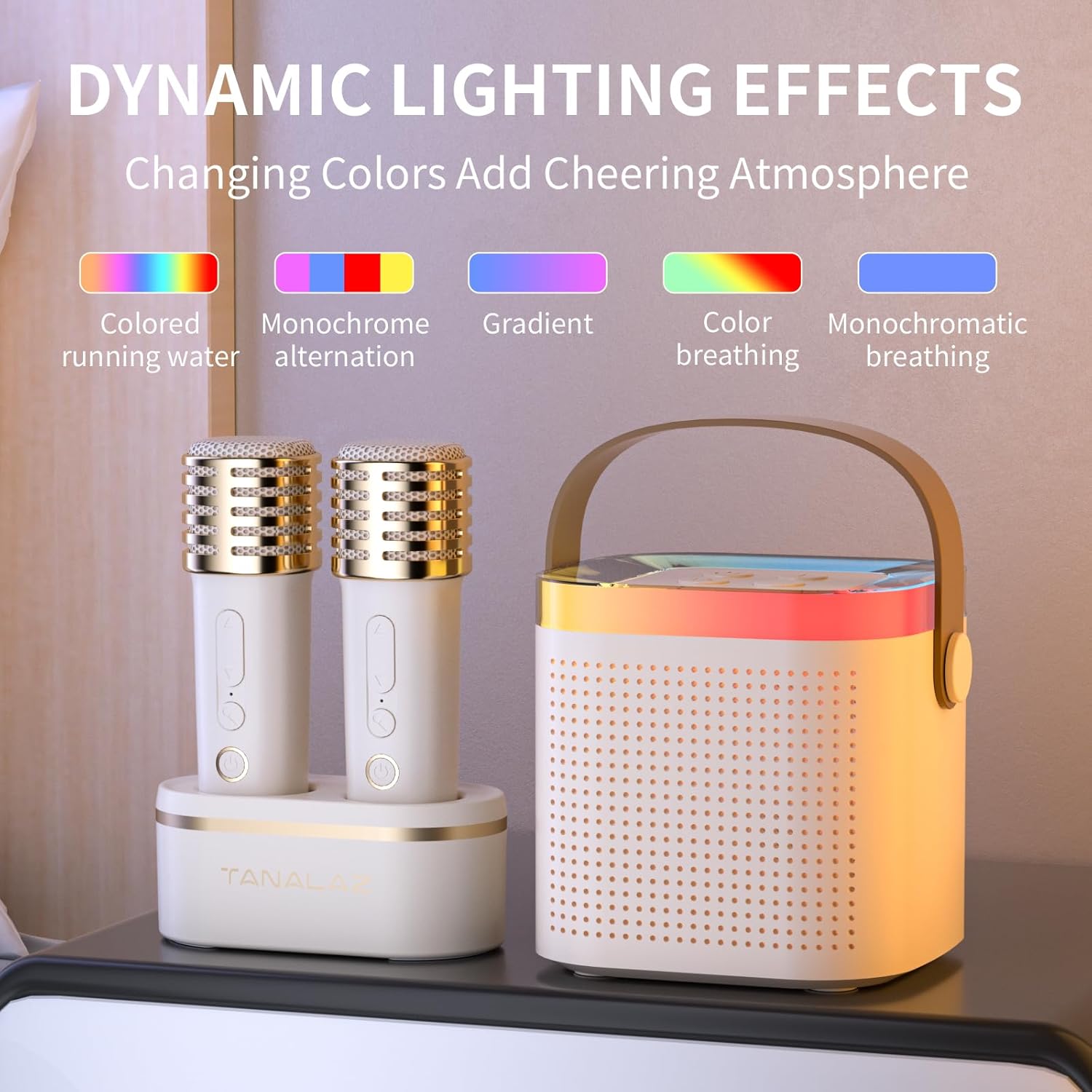
Video 1: Demonstration of the outdoor Bluetooth speaker with party LED lights, showcasing its portability and dynamic lighting.
4.6 Volume Control
- Speaker Volume: Use the '+' and '-' buttons on the speaker's top panel to adjust the overall music playback volume.
- Microphone Volume: Use the volume up/down buttons on each microphone to adjust its individual volume.
5. Maintenance
5.1 Cleaning
To maintain the appearance and functionality of your karaoke machine:
- Wipe the surfaces of the speaker and microphones with a soft, dry cloth.
- Do not use abrasive cleaners, waxes, or solvents as they may damage the finish.
- Avoid getting moisture into any openings.
5.2 Storage
When not in use for extended periods, store the device in a cool, dry place away from direct sunlight and extreme temperatures. It is recommended to fully charge the batteries every 3 months to prolong their lifespan.
6. Troubleshooting
| Problem | Possible Cause | Solution |
|---|---|---|
| No power / Device won't turn on. | Low battery. | Charge the speaker and microphones fully using the USB Type-C cable. |
| No sound from speaker. | Volume too low; Incorrect input mode; Device not paired. | Increase speaker volume. Ensure correct mode (Bluetooth, AUX, TF). Re-pair Bluetooth device. |
| Microphone not working. | Microphone off; Low battery; Not paired to speaker. | Turn on microphone. Charge microphone. Power cycle both speaker and microphones to re-establish connection. |
| Bluetooth connection unstable or drops. | Device too far; Obstructions; Interference. | Move the connected device closer to the speaker (within 10m). Remove obstructions. Avoid strong electromagnetic interference. |
| Voice changer not working. | Incorrect button press. | Ensure you are pressing the 'M' button on the microphone. |
7. Specifications
Video 2: An animated overview of the portable microphone and speaker, highlighting the DSP smart chip and sound quality.
| Feature | Detail |
|---|---|
| Model Number | K71Pro |
| Brand | TANALAZ |
| Product Dimensions | 3.66 x 6.33 x 5.62 inches (Speaker) |
| Item Weight | 1.1 pounds |
| Connectivity Technology | Bluetooth 5.3, AUX, TF Card |
| Speaker Size | 57mm Large Horn |
| Microphones | 2 Wireless Microphones |
| Speaker Battery | 1200mAh Lithium Battery (Built-in) |
| Speaker Battery Life | 4-6 hours (up to 10 hours at medium volume) |
| Charging Port | USB Type-C |
| Input Voltage | 5 Volts |
| Special Features | Portable, LED Party Lights, Voice Changer |


8. Warranty and Support
For detailed warranty information, product registration, or technical support, please refer to the documentation included with your purchase or contact TANALAZ customer service directly through the platform where you purchased the product. Please have your model number (K71Pro) and purchase date ready when contacting support.
You can also visit the official TANALAZ store on Amazon for more information: TANALAZ Store