1. Product Overview
Thank you for choosing the Ayybboo Kids Digital Watch MR-2207B. This watch is designed for children, offering a range of practical functions and a durable, water-resistant design.
Key Features:
- 7-Color LED Backlight: Provides clear visibility in low-light conditions.
- Practical Functions: Includes alarm, stopwatch, date display, day of the week, and 12/24 hour mode.
- 30M Water Resistance: Suitable for daily use like hand washing and rain exposure. Note: Do not press buttons underwater.
- Durable Construction: Features a sturdy case, scratch-resistant surface, and a soft TPU band for comfort and longevity.
Watch Components:
Familiarize yourself with the watch's buttons and display areas:
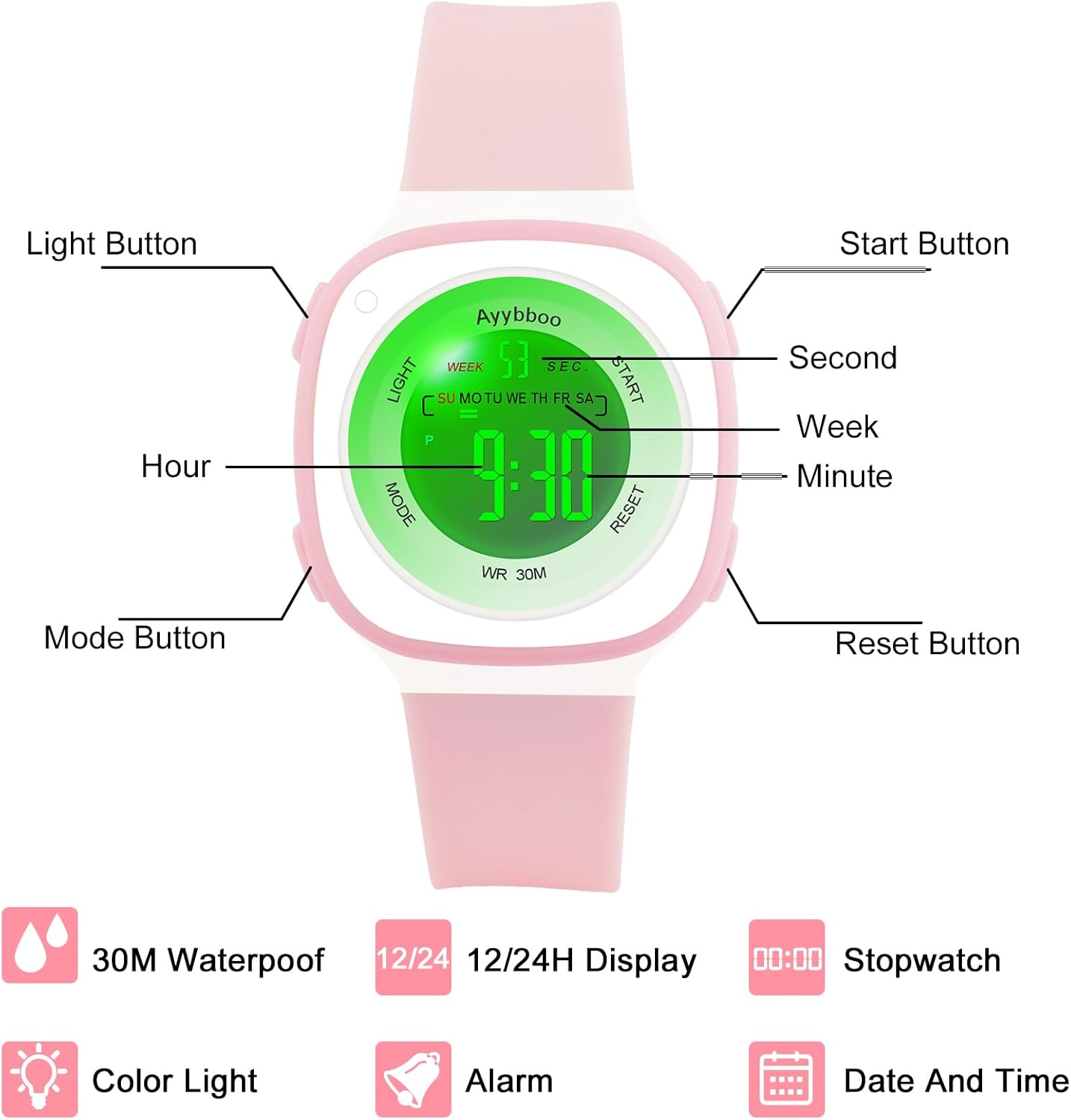
Image 1.1: Watch Components. This diagram illustrates the location of the 'Light', 'Mode', 'Start', and 'Reset' buttons, along with the display segments for seconds, day of the week, hours, and minutes.
- LIGHT Button: Activates the backlight and changes backlight color.
- MODE Button: Cycles through different modes (Time, Stopwatch, Alarm, Time Setting).
- START Button: Used to start/stop stopwatch, adjust values during setting.
- RESET Button: Used to reset stopwatch, confirm settings, or switch between 12/24 hour format.
2. Setup
Setting Time and Date:
- From the normal time display, press the MODE button three times. The seconds display will begin to flash, indicating you are in time setting mode.
- Press the RESET button to cycle through the settings: Seconds → Hours → Minutes → Month → Date → Day of the Week.
- While a value is flashing, press the START button to adjust it.
- Once all settings are correct, press the MODE button to exit the setting mode and return to the normal time display.
12/24 Hour Format:
From the normal time display, press the RESET button once to toggle between 12-hour (AM/PM indicator) and 24-hour formats.
3. Operating Instructions
Using the Stopwatch:
- From the normal time display, press the MODE button once to enter stopwatch mode. The display will show "00:00:00".
- Press the START button to begin timing.
- Press the START button again to pause timing.
- Press the RESET button while paused to reset the stopwatch to "00:00:00".
- Press the MODE button to exit stopwatch mode.
Setting the Alarm:
- From the normal time display, press the MODE button twice to enter alarm setting mode. The hour digits will flash.
- Press the START button to adjust the hour.
- Press the RESET button to switch to minute setting. The minute digits will flash.
- Press the START button to adjust the minutes.
- Press the MODE button to exit alarm setting mode.
- To turn the alarm ON/OFF, press and hold the RESET button, then press the START button. An alarm icon will appear/disappear.
Changing LED Backlight Colors:
The watch features 7 different LED backlight colors.

Image 3.1: 7 Backlight Colors. This image demonstrates the watch's display in normal mode and when the EL backlight is active, showcasing the variety of available colors.
To activate the backlight, press the LIGHT button. To change the backlight color, press and hold the LIGHT button for approximately 3 seconds. The color will cycle through the available options.
4. Maintenance
Water Resistance:
The Ayybboo Kids Digital Watch MR-2207B is rated for 3 ATM (30 meters) water resistance. This means it is suitable for:
- Daily splashes
- Rain exposure
- Hand washing
Important:
- Do NOT press any buttons while the watch is submerged in water.
- The watch is NOT suitable for showering, bathing, swimming, or diving.
- Avoid exposing the watch to hot water or steam, as this can compromise the water seals.

Image 4.1: Water Resistance Guidelines. This image visually represents activities compatible with the watch's 30M water resistance, such as hand washing and light water play, while emphasizing limitations.
Cleaning:
To clean your watch, wipe it gently with a soft, damp cloth. Avoid using harsh chemicals or abrasive materials, which can damage the watch's finish or seals.
Battery Replacement:
The watch uses a button cell battery. When the display becomes dim or functions are erratic, it may be time to replace the battery. Battery replacement should ideally be performed by a qualified watch technician to ensure water resistance is maintained.
5. Troubleshooting
- Watch not displaying time / Display is dim: The battery may be low or depleted. Replace the battery.
- Buttons not responding: Ensure the watch is not in a locked mode (if applicable, though this model does not have a specific lock). If issues persist, try removing and reinserting the battery (professional assistance recommended).
- Time is incorrect: Follow the 'Setting Time and Date' instructions in Section 2 to reset the time.
- Water inside the watch: Immediately stop using the watch and seek professional repair. Water damage is typically not covered under warranty.
6. Specifications

Image 6.1: Product Dimensions. This image provides a detailed overview of the watch's physical dimensions, including case thickness, case diameter, and strap measurements for wrist fit.
| Feature | Specification |
|---|---|
| Model Number | MR-2207B |
| Brand | Ayybboo |
| Water Resistance | 3 ATM (30 meters) |
| Display Type | Digital LED |
| Backlight | 7-Color LED |
| Functions | Time, Date, Day of Week, Alarm, Stopwatch, 12/24 Hour Mode |
| Case Material | Durable Plastic |
| Band Material | Soft TPU |
| Case Diameter | 36mm / 1.41 inches |
| Case Thickness | 10mm / 0.39 inches |
| Min Fit Wrist | 155mm / 6.1 inches |
| Max Fit Wrist | 210mm / 8.26 inches |
| Band Width | 16mm / 0.63 inches |
| Battery | 1 button cell battery required |
| Manufacturer | Ayybboo |
| Country of Origin | China |
7. Warranty and Support
For warranty information or technical support regarding your Ayybboo Kids Digital Watch MR-2207B, please refer to the documentation provided with your purchase or contact the retailer. You may also visit the official Ayybboo website for further assistance.


