1. Introduction
This manual provides detailed instructions for the setup, operation, maintenance, and troubleshooting of your Yealink WH68 Hybrid ANC DECT & Bluetooth Wireless Headset. Designed for professional use, this headset offers advanced connectivity and audio features to enhance your communication experience.
Key features include:
- Dual-Mode Connectivity: DECT and Bluetooth for extended range and multi-device support.
- Active Noise Cancellation (ANC): Multiple modes for focused work environments.
- Passive Noise Cancellation (PNC): Ergonomic design for physical noise blocking.
- Crystal-Clear Audio: 6-microphone system with AI Acoustic Shield Tech 3.0.
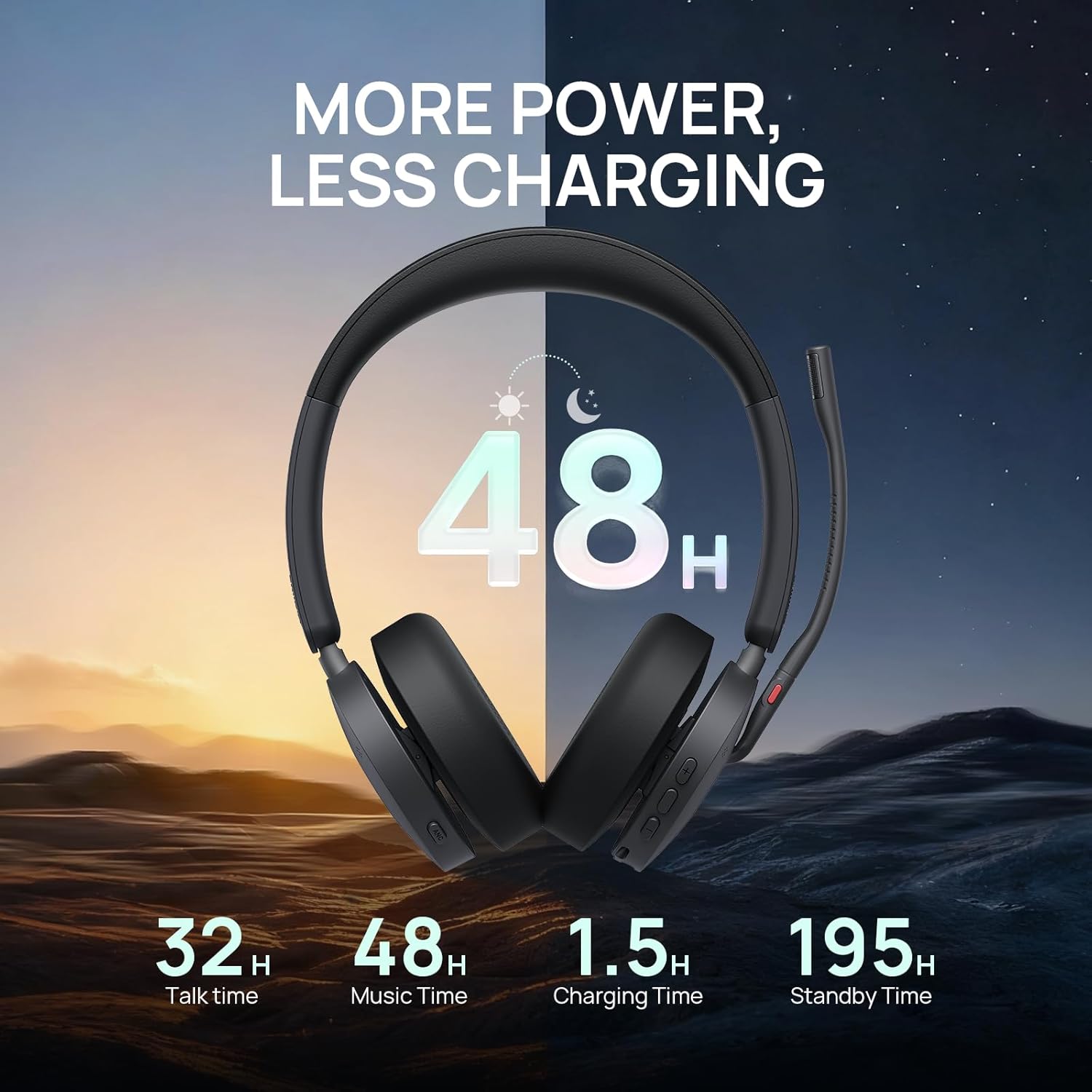
- Long Battery Life: Up to 32 hours talk time and 48 hours music time.
- Universal Compatibility: Certified for Microsoft Teams and Zoom, compatible with over 100 platforms.
2. What's in the Box
Please verify that all items are present in your package:
- Yealink WH68 Dual Headset
- WDD60 DECT Dongle
- USB-C to USB-A Adapter
- 1.2m USB-C to USB-A Cable
- Protective Carrying Case
- User Manual (this document)
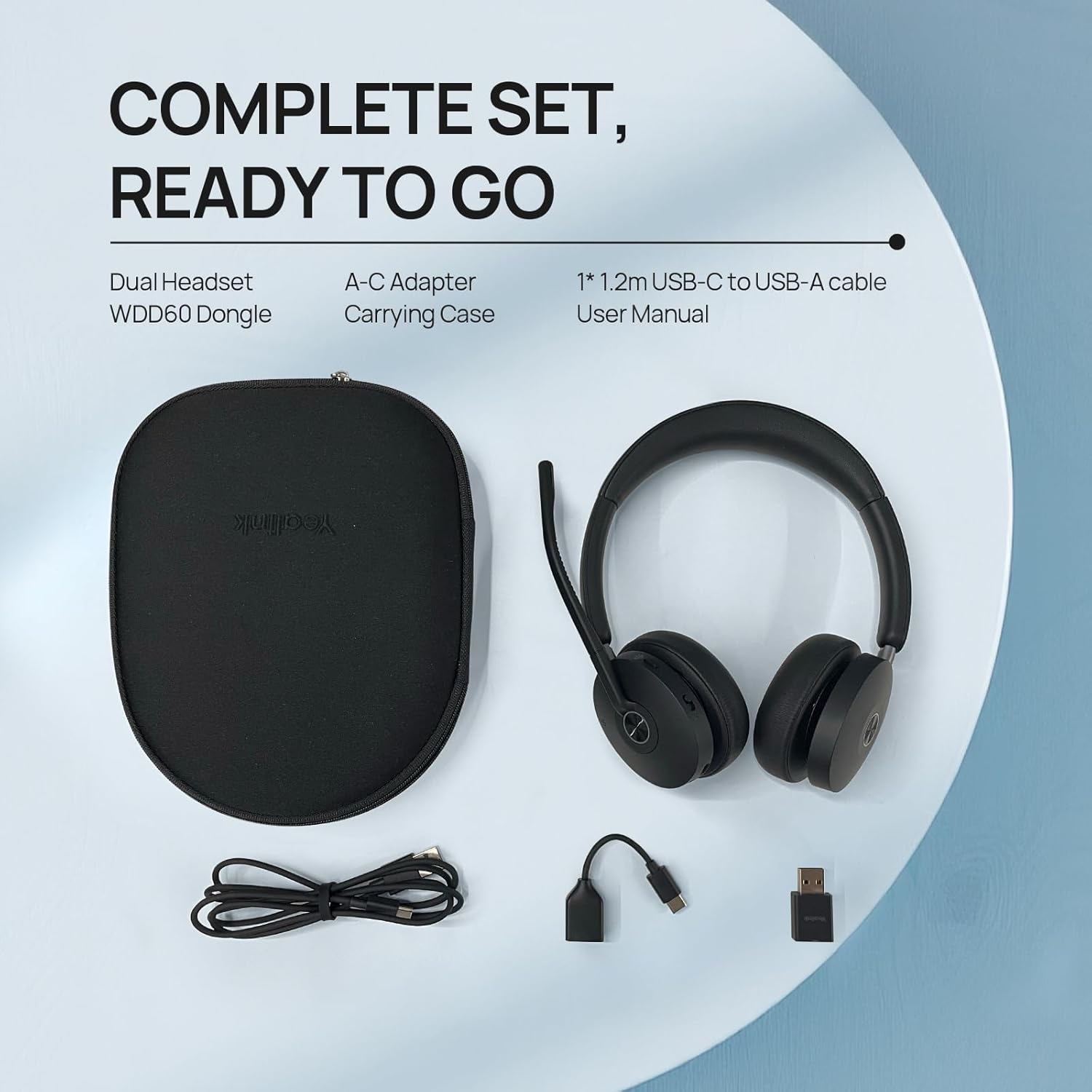
The image above displays the complete set of items you should find in your product packaging, ensuring you have everything needed for setup and use.
3. Setup
3.1 Connecting the DECT Dongle
- Locate the WDD60 DECT Dongle.
- Plug the DECT Dongle into an available USB-A port on your PC or laptop. If your device only has USB-C ports, use the provided USB-C to USB-A adapter.
- The headset and dongle are pre-paired from the factory. Once connected, the headset should automatically establish a connection with the dongle.
- Ensure your computer's audio settings are configured to use the Yealink WH68 as the default input and output device.
3.2 Bluetooth Pairing
To connect your headset to a mobile phone or Bluetooth-enabled desk phone:
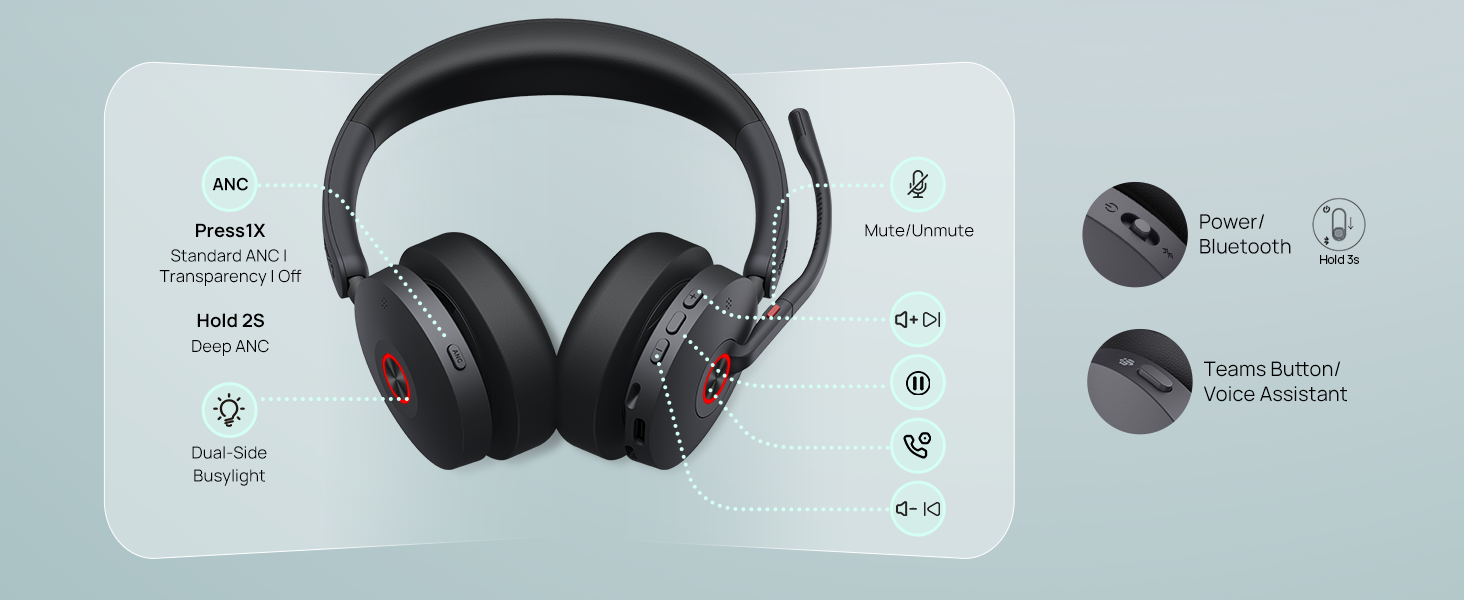
- On the headset, slide and hold the Power/Bluetooth switch (usually marked with a Bluetooth icon) for approximately 3 seconds until the LED indicator flashes blue and red, indicating pairing mode.
- On your mobile device or Bluetooth desk phone, enable Bluetooth and search for available devices.
- Select "Yealink WH68" from the list of found devices.
- Once paired, the LED indicator on the headset will turn solid blue.
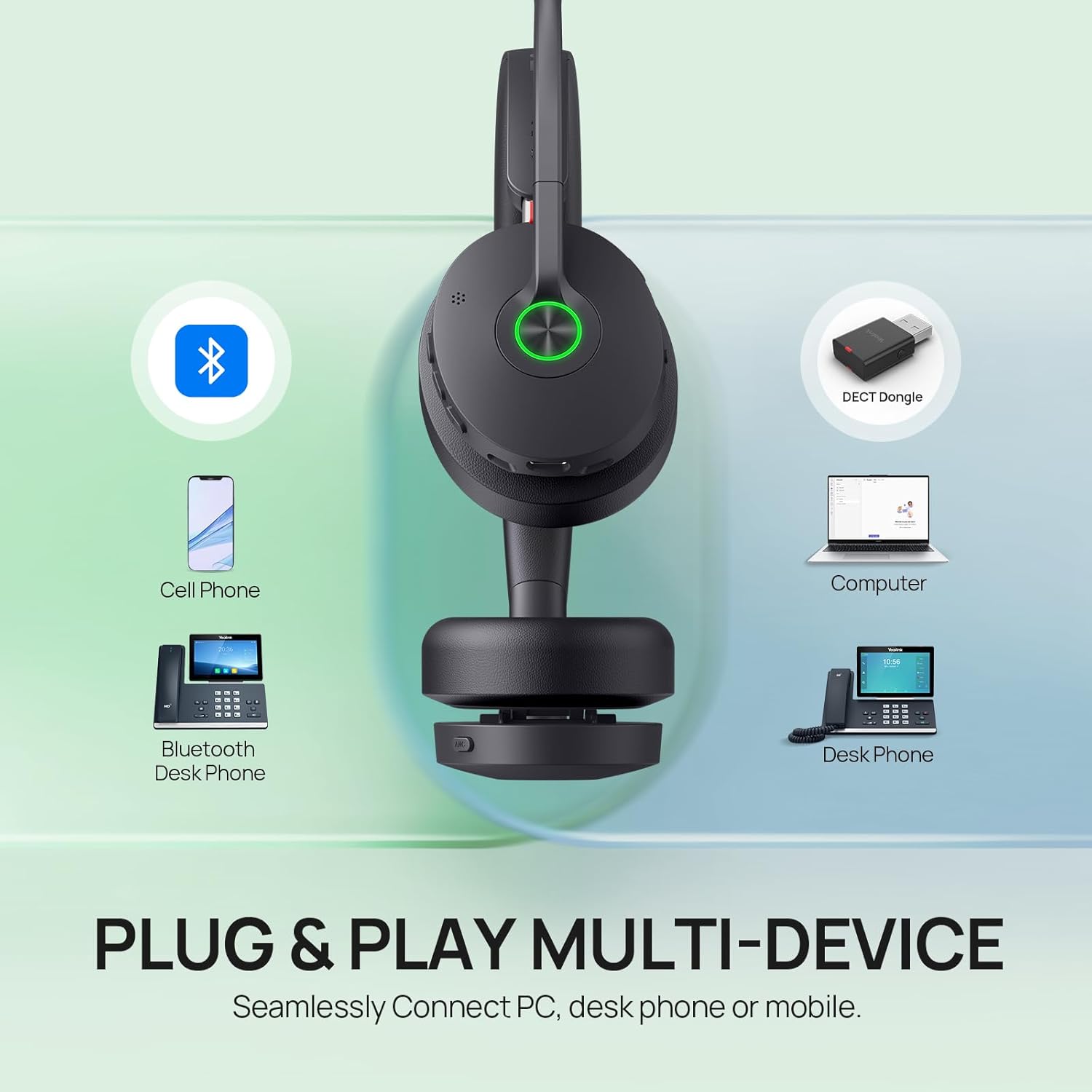
The headset's dual-mode DECT and Bluetooth technology provides a wireless range of up to 492 feet, ensuring stable and secure connections across various devices and environments.
4. Operating Instructions
4.1 Power On/Off
- To power on, slide the Power/Bluetooth switch to the 'on' position.
- To power off, slide the Power/Bluetooth switch to the 'off' position.
4.2 Call Management
- Answer/End Call: Press the Call Control button (phone icon) on the earcup.
- Mute/Unmute Microphone: Lower the microphone boom to unmute. Raise the microphone boom to mute. Alternatively, press the dedicated Mute button on the microphone boom.
- Ringtone Alerts: The headset provides audible ringtone alerts for incoming calls.
- Dual Busy Lights: Integrated busy lights on both earcups indicate when you are on a call, preventing interruptions.
4.3 Active Noise Cancellation (ANC)
The WH68 Hybrid offers four smart ANC modes:
- Deep ANC: Provides maximum noise reduction for highly distracting environments.
- Standard ANC: Suitable for general office or moderate noise levels.
- Transparency: Allows you to hear your surroundings without removing the headset.
- Off: Disables ANC.
Press the ANC button on the earcup to cycle through Standard ANC, Transparency, and Off. Hold the ANC button for 2 seconds to activate Deep ANC.
4.4 Volume Control
Use the volume up (+) and volume down (-) buttons on the earcup to adjust the listening volume.
4.5 Teams/UC Button
The dedicated Teams/UC button provides quick access to Microsoft Teams functions or your preferred Unified Communications platform, such as answering calls or launching the application.
5. Comfort and Design
The Yealink WH68 headset is engineered for all-day comfort and effective noise isolation:
- Slanted Oval Earcups: Designed to match the natural ear structure, ensuring even pressure distribution and a comfortable fit.
- Sound-Isolating Memory Foam: Cushions conform to the ears, physically blocking ambient mid- and high-frequency noise.
- Adjustable Headband: Ergonomically curved and generously padded for a pressure-free, secure fit.
- 135mm Extended Microphone Boom: Positions the microphone closer to your mouth for accurate voice pickup.

The headset's lightweight design (approximately 15.8 ounces) further contributes to comfort during extended use.
6. Battery Life
The Yealink WH68 headset provides robust battery performance:
- Talk Time: Up to 32 hours (Bluetooth) / 16 hours (DECT).
- Music Time: Up to 48 hours (Bluetooth) / 19 hours (DECT).
- Standby Time: Up to 195 hours.
- Charging Time: Approximately 1.5 hours via USB 2.0 cable.
7. Compatibility
The Yealink WH68 headset is designed for broad compatibility with various communication platforms and devices:
- Compatible with over 100 platforms and operating systems, including Microsoft Teams, Zoom, Google, Vonage, Webex, 8x8, Broadsoft, Avaya, RingCentral, Mitel, and GoTo.
- Compatible Devices: PC/laptop, Bluetooth desk phone, mobile phone.
7.1 Desk Phone Compatibility
The headset supports various desk phones:
- Yealink USB Phones: T4XU, T53, T5XW, T58(w)
- Teams Phones: MP54/56/58
- 3rd-Party Desk Phones: VVX350/401/450/411/250/600, E220/350; CCX600; V64/65/67, X7C, X7A; D385, etc.

8. Specifications
| Feature | Specification |
|---|---|
| Model Name | WH68 Hybrid |
| Connectivity Technology | Wireless (DECT & Bluetooth) |
| Wireless Range | 492 ft (DECT), 50 Meters (Bluetooth) |
| Noise Control | Active Noise Cancellation, Passive Noise Cancellation |
| Microphone System | 6-Mic Noise Cancellation Solution & Acoustic Shield Tech 3.0 |
| Battery Life (Talk) | 32 Hours (Bluetooth) / 16 Hours (DECT) |
| Battery Life (Music) | 48 Hours (Bluetooth) / 19 Hours (DECT) |
| Charging Time | 1.5 Hours |
| Earpiece Shape | Slanted oval |
| Material | Hydrolysis-resistant leather, sound-isolating memory foam |
| Item Weight | 15.8 ounces |
| Control Method | Touch, Button |
| Compatible Devices | PC/laptop/Bluetooth desk phone/mobile phone |
9. Maintenance
To ensure the longevity and optimal performance of your Yealink WH68 headset, follow these maintenance guidelines:
- Cleaning: Use a soft, dry cloth to clean the headset. Avoid using harsh chemicals or abrasive materials. For ear cushions, gently wipe with a damp cloth and allow to air dry completely before use.
- Storage: When not in use, store the headset in its protective carrying case to prevent dust accumulation and physical damage. Avoid exposing the headset to extreme temperatures or direct sunlight.
- Battery Care: For optimal battery life, avoid fully discharging the headset frequently. Charge the headset regularly, even if not used daily.
- Cable Management: Handle the USB cable and dongle with care. Avoid sharp bends or excessive pulling that could damage the connectors.
10. Troubleshooting
If you encounter issues with your Yealink WH68 headset, please refer to the following common troubleshooting steps:
- No Sound/Microphone Not Working:
- Ensure the headset is powered on and properly connected (DECT dongle plugged in, Bluetooth paired).
- Check your computer's or device's audio settings to confirm the Yealink WH68 is selected as the default input and output device.
- Verify the microphone boom is lowered and not muted (check the mute button/LED indicator).
- Restart your computer or device.
- Connection Drops/Poor Range:
- Ensure the DECT dongle is not obstructed and is within the specified range (up to 492 ft).
- Minimize physical barriers (walls, large metal objects) between the headset and the dongle.
- Avoid areas with high electromagnetic interference.
- For Bluetooth connections, ensure your device is within the 50-meter range.
- Headset Not Charging:
- Ensure the USB-C cable is securely connected to both the headset and a power source (e.g., computer USB port, wall adapter).
- Try a different USB port or charging cable.
- ANC Not Functioning:
- Press the ANC button to cycle through the different modes and ensure it is not set to 'Off' or 'Transparency' if you desire noise cancellation.
If these steps do not resolve your issue, please contact customer support.
11. Warranty and Support
The Yealink WH68 Hybrid ANC DECT & Bluetooth Wireless Headset comes with a 2-year warranty. This warranty covers manufacturing defects and ensures peace of mind regarding your product's quality and performance.
For technical assistance, product inquiries, or warranty claims, please contact the Yealink customer service team. Our dedicated support staff is available to provide comprehensive assistance and ensure your satisfaction.
Please visit the official Yealink website or refer to the contact information provided in your product packaging for specific support channels.


