
1. Introduction
The THINKSCALE 88lb Digital Shipping Scale (Model TK-S2-BLK) is designed for accurate and efficient weighing of various items, from small letters to large packages. It offers high capacity and precision, multiple measurement units, and convenient features to streamline your weighing tasks. This manual provides detailed instructions for setup, operation, and maintenance to ensure optimal performance.
2. Package Contents
Please verify that all items listed below are included in your package:
- THINKSCALE Digital Shipping Scale
- AC Power Adapter
- 2 x AAA Batteries
- Soft Measuring Tape
- User Manual (this document)

Figure 2.1: The THINKSCALE 88lb Digital Shipping Scale, shown with its included AC adapter, two AAA batteries, and a soft measuring tape.
3. Setup
3.1 Power Options
The THINKSCALE Digital Shipping Scale can be powered in two ways:
- AC Adapter: Connect the provided AC adapter to the scale's power input port and then to a standard electrical outlet.
- Batteries: Insert the two included AAA batteries into the battery compartment located on the underside of the scale. Ensure correct polarity.
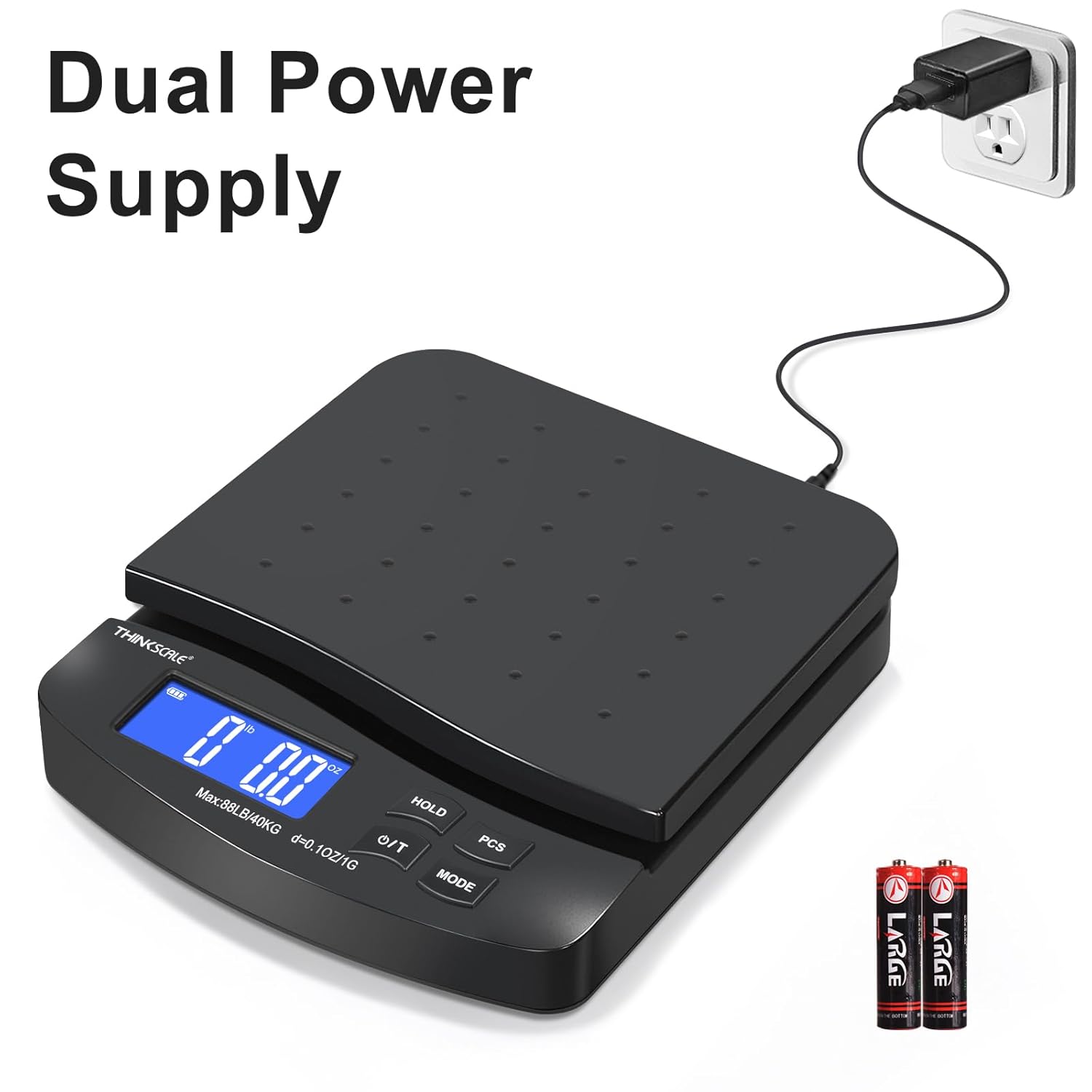
Figure 3.1: The THINKSCALE Digital Shipping Scale connected to an AC power outlet, demonstrating its dual power capability.

Figure 3.2: An image showing the underside of the scale with the battery compartment, along with the included 2 AAA batteries and AC power adapter, emphasizing versatile power options.
3.2 Initial Use
The scale is pre-calibrated from the factory. Place the scale on a flat, stable surface before use to ensure accurate readings.
Video 3.1: An official seller video providing a comprehensive overview of the THINKSCALE Digital Shipping Scale, including its features, setup, and operational modes.
4. Operating Instructions
4.1 Power On/Off
Press the ON/T button to turn the scale on. Press and hold the ON/T button to turn the scale off.
4.2 Unit Conversion
Press the MODE button to cycle through the available measurement units: pounds (lb), pounds:ounces (lb:oz), ounces (oz), grams (g), and kilograms (kg).

Figure 4.1: The scale's display cycling through its five measurement units: lb:oz, lb, oz, g, and kg, highlighting the unit conversion feature.
4.3 Tare Function
The Tare function allows you to zero out the weight of a container before adding items to be weighed. Place an empty container on the scale, then press the O/T button. The display will reset to zero, and you can then add items to the container to weigh only their contents.
4.4 Hold Function
For large or awkward packages that might obscure the display, use the Hold function. Once the item is on the scale and the weight stabilizes, press the HOLD button. The displayed weight will lock, allowing you to remove the item and still view the measurement.
4.5 Piece Counting (PCS) Function
The PCS function allows you to count multiple small, identical items. To use this feature:
- With the scale on and empty, press the PCS button.
- Select a sample size (e.g., 25, 50, 75, or 100 pieces) by pressing the MODE button.
- Place the selected number of sample pieces on the scale.
- Press the PCS button again to confirm the sample.
- You can now add more identical pieces, and the scale will display the count.

Figure 4.2: Two panels illustrating the Tare function (resetting the scale to zero with a container) and the Hold function (locking the weight display for large or awkward packages).

Figure 4.3: An illustration detailing the THINKSCALE Digital Shipping Scale's maximum capacity of 88 lbs (40 kg), minimum weight of 2g, and 0.1 oz/1g accuracy, along with its physical dimensions (9 inches length, 8.2 inches width, 2 inches height).
Video 4.1: An official seller video reviewing the THINKSCALE Digital Shipping Scale, showcasing its accuracy, ease of use, and various functions for shipping.
5. Specifications
| Feature | Description |
|---|---|
| Maximum Capacity | 88 lb (40 kg) |
| Minimum Weight | 2 g |
| Precision | 0.1 oz / 1 g |
| Measurement Units | lb, lb:oz, oz, g, kg |
| Display Type | Large LCD |
| Power Source | AC Adapter (included), 2 x AAA Batteries (included) |
| Item Model Number | TK-S2-BLK |
| Color | Black |
| Recommended Uses | Packages, Parcels, Mail, Letters |
6. Maintenance
6.1 Cleaning
Wipe the scale surface with a soft, damp cloth. Do not use abrasive cleaners or immerse the scale in water.
6.2 Battery Replacement
If the battery indicator on the LCD shows low power, replace the 2 AAA batteries located in the compartment on the underside of the scale. Ensure proper polarity when inserting new batteries.
7. Troubleshooting
- Inaccurate Readings: Ensure the scale is placed on a flat, stable, and level surface. Avoid placing it near vibrating machinery or in direct drafts.
- Display Not Turning On: Check if the AC adapter is securely connected or if the batteries are correctly inserted and not depleted.
- 'OVERLOAD' Error: The item being weighed exceeds the maximum capacity of 88 lb (40 kg). Remove the item immediately to prevent damage to the scale.
- 'UNST' Error: The scale is unstable. Ensure it is on a firm, level surface and that the item being weighed is centered and not moving.
8. Warranty and Support
The THINKSCALE Digital Shipping Scale comes with a 2-Year Warranty. THINKSCALE is committed to 100% customer satisfaction. For any questions, issues, or support needs, please contact our dedicated support team. Our experts are ready to assist you.
Please refer to the contact information provided on the product packaging or the official THINKSCALE website for support details.