
MOOER GE150 Plus
Contents
MOOER GE150 Plus Li Multi-Effects Pedal User Manual
Comprehensive guide for setup, operation, and features.
Introduction
This manual provides detailed instructions for the MOOER GE150 Plus Li Portable Multi Effects Pedal. It covers essential information for setting up, operating, and maintaining your device, ensuring you can fully utilize its capabilities for guitar and bass.
The MOOER GE150 Plus Li is a versatile, all-in-one guitar multi-effects pedal designed for musicians seeking portability and extensive tonal options. It features a built-in battery for extended use, a wide array of amp models and effects, and integrated tools like a looper and drum machine.
Package Contents
Ensure all the following items are included in your package:
- MOOER GE150 Plus Li Multi-Effects Pedal
- Power adapter
- USB-C cable
- User Manual (this document)
Key Features
- Portable Design: Fully portable, all-in-one guitar multi-effects pedal with a built-in 9-hour battery, ideal for musicians on the move.
- Extensive Tone Library: Features 198 factory preset tones, 55 classic amp preamps utilizing MOOER's MNRS modeling technology, and 26 high-quality cabinet simulations.
- Realistic Tones: Accurately reproduces unique tonal characteristics and dynamic responses of classic amplifiers. AMP and CAB modules support MOOER MNRS sample files, and cabinet simulations support third-party Impulse Responses (IRs).
- Seamless Effect Transitions: Includes a "spill-over" function for delay and reverb effects to fade naturally when switching presets, ensuring smooth performance.
- Integrated Looper & Drum Machine: Features an 80-second stereo looper, 40 integrated drum patterns, and 10 metronome modes, all controllable via three multi-purpose footswitches.
- Expression Pedal: Built-in expression pedal for dynamic control over effect parameters.
- USB-C Connectivity: Easy integration with MOOER's PC software for preset editing, data management, firmware updates, and mobile device audio recording via OTG cable.
- Auxiliary Input: An aux input port allows connecting external audio sources like smartphones or other hardware for backing tracks.
Setup
Powering On
- Connect the provided power adapter to the 9V DC IN port on the rear panel of the GE150 Plus Li.
- Flip the Power Switch to the ON position. The device will power on and display the main interface.
- Alternatively, the built-in lithium battery provides up to 9 hours of usage, allowing for portable operation without the power adapter.
Connecting Your Instrument and Audio Output
- Connect your guitar or bass to the INPUT jack on the rear panel.
- For stereo output, connect the OUTPUT L (MONO) and OUTPUT R jacks to your amplifier, mixer, or audio interface. For mono output, use only the OUTPUT L (MONO) jack.
- For silent practice, connect headphones to the PHONES jack.
- To play along with external audio, connect your device (e.g., smartphone) to the AUX IN jack using a 3.5mm stereo cable.
Interface Overview
Front Panel Controls
The front panel features a 2.8-inch display and various controls for navigation and effect adjustment.
- Master Knob: Controls the main output volume.
- Select Knob: Used to adjust settings across various interfaces and navigate menus.
- Mode Knob: Toggles effect modules on/off and selects them for editing.
- Play Button: Returns to the main interface.
- Save Button: Executes the save function for presets.
- EXP Button: Enters the expression pedal settings menu.
- Tap Button: Sets the tempo for time-based effects and the drum machine.
- Rhythm Button: Activates the drum machine function.
- System Button: Enters the system settings menu.
- Footswitches (A, B, C): Multi-purpose switches for preset selection, tuner, looper, and other functions.
- Effect Module Indicators: A row of LEDs below the screen displays the on/off status of each effect module (FX, DS, AMP, CAB, NS, EQ, MOD, DLY, REV).
- Expression Pedal: Integrated pedal for dynamic control over parameters.

Figure 1: Front view of the MOOER GE150 Plus Li, showing the display, knobs, buttons, footswitches, and expression pedal.
Rear Panel Ports
The rear panel provides all necessary input and output connections.
- AUX IN: 3.5mm stereo audio input for connecting external audio devices.
- INPUT: 1/4-inch instrument input jack for guitar or bass.
- OUTPUT L (MONO) / OUTPUT R: 1/4-inch output jacks for external amplification (stereo or mono).
- PHONES: 3.5mm stereo headphone output.
- OTG: USB Type-C port for PC connection (tone editing, data management, firmware updates) and OTG recording.
- Power Switch: On/off switch for the unit.
- 9V === 1.5A: 9V DC power input for external power supply.
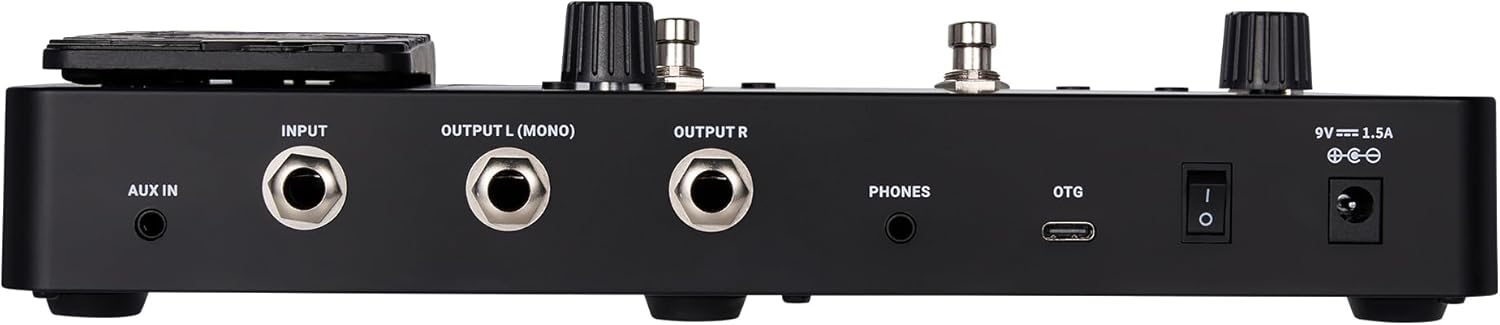
Figure 2: Rear view of the MOOER GE150 Plus Li, showing all input and output ports.
Official Tutorial Video: Interface Overview
Video 1: Official tutorial from MOOER demonstrating the interface layout and basic controls of the GE150 Pro series. This segment specifically covers the rear panel connections and front panel buttons/knobs.
Operating Modes
Preset Navigation
Upon powering on, the device boots directly to the main interface, displaying the current preset (e.g., "1A 65 Deluxe").
- Using Select Knob: Rotate the SELECT knob to quickly switch between presets.
- Using Footswitches: Press footswitches A, B, or C to toggle between tunes within the same bank. Pressing A+B simultaneously scrolls forward through preset banks. Pressing C+D simultaneously scrolls backward through preset banks.
Effect Editing
The effect module indicators below the screen show the on/off status of each effect. An illuminated indicator means the module is active.
- Rotate the MODE knob to select the effect module you wish to adjust (e.g., FX, DS, AMP, CAB, NS, EQ, MOD, DLY, REV). The corresponding indicator will blink.
- Press the MODE knob to toggle the selected module on or off.
- To adjust module parameters (e.g., gain, tone, level), press the SELECT knob. Rotate the SELECT knob to highlight the parameter, then press the knob to enter the setting. Rotate the knob again to adjust the value.
- After making adjustments, press the SAVE button to store the changes. You can choose a preset slot and rename it using the SELECT knob. Press SAVE again to confirm.
Looper and Drum Machine
- Drum Machine: Press the RHYTHM button to activate the drum machine. Use the SELECT knob to choose between rhythm or metronome modes, adjust the drum style, tempo (BPM), and volume. The TAP button can also be used to set the tempo.
- Looper: Press and hold footswitches B+C to enter the looper interface.
- Adjust playback volume by rotating the SELECT knob.
- Press footswitch A to start recording. Press A again to overdub.
- Press footswitch B to stop recording. Holding B will delete all recordings.
Official Tutorial Video: Effect Chain, Looper, and Drum Machine Usage
Video 2: Official tutorial from MOOER demonstrating how to use the effect chain, looper, and drum machine functions of the GE150 Pro series.
Expression Pedal
The integrated expression pedal can be configured as a volume pedal, wah pedal, or to control specific effect parameters. Calibration is required before use.
Calibration
- Press the EXP button to enter the pedal settings page.
- Rotate the SELECT knob to highlight the "Calibrate" option, then press the knob.
- Follow the on-screen instructions:
- Fully lift the pedal, then press the SELECT knob to proceed.
- Press the pedal fully down, then press the SELECT knob again.
- In the final step, press down on the pedal with your preferred force. This pressure determines the threshold for activating the expression pedal's function.
- Once set, press SELECT to complete the calibration. A confirmation message will appear if successful.
Functionality
- After calibration, enter the pedal settings page (EXP button) and select "EXP VOL". Turn it ON.
- In the lower section of the screen, you can set the minimum and maximum values for the pedal's range.
- When the "EXP" item is illuminated on the main display, the pedal is in expression mode. When the light is off, the pedal is in volume mode.
- You can switch between expression and volume modes by pressing down firmly on the pedal.
Official Tutorial Video: Expression Pedal Logic
Video 3: Official tutorial from MOOER demonstrating the logic and calibration of the expression pedal on the GE150 Pro series.
Specifications
- Item Weight: 1.26 Kilograms (2.77 pounds)
- Product Dimensions: 5.7"L x 2.1"W x 10"H (14.5 x 5.3 x 25.4 cm)
- Model Number: GE150 Plus Li
- Color: GE150 Plus Li (Black)
- Style: Amp Modelling & Multi Effects
- Connector Type: USB-C
- Signal Format: Stereo
- Power Source: Battery Powered (Built-in lithium battery)
- Voltage: 9 Volts
- Battery Life: Up to 9 hours
- Looper: 80-second stereo looper
- Drum Patterns: 40 integrated drum patterns
- Metronome Modes: 10 metronome modes
- Amp Models: 55 (based on MOOER's MNRS modeling technology)
- Cabinet Simulations: 26 (supports third-party IRs)
- Preset Tones: 198 factory presets
Troubleshooting
- No Sound:
- Check all cable connections (instrument, output, headphones).
- Ensure the Master volume knob is turned up.
- Verify that the selected effect modules are active (indicators illuminated).
- Check the volume levels within the active preset's effect chain.
- Device Not Powering On:
- Ensure the power adapter is correctly connected and the power switch is ON.
- If operating on battery, ensure the battery is charged.
- Expression Pedal Not Responding:
- Recalibrate the expression pedal as described in the "Expression Pedal" section.
- Ensure the pedal is in the correct mode (volume or expression) for the desired function.
- Difficulty with Software Connection:
- Ensure the USB-C cable is securely connected to both the pedal and your computer/mobile device.
- Download and install the latest MOOER software/drivers from the official MOOER website.
Maintenance
- Keep the device clean by wiping it with a soft, dry cloth.
- Avoid exposing the device to extreme temperatures, humidity, or direct sunlight.
- Do not attempt to disassemble or repair the unit yourself, as this will void the warranty.
- Store the pedal in a safe place when not in use to prevent damage.
Warranty and Support
The MOOER GE150 Plus Li comes with a standard manufacturer's warranty. For detailed warranty information, product support, or service inquiries, please refer to the official MOOER website or contact your local distributor.
Always ensure you have your proof of purchase when seeking warranty service.
Ask a question about this manual
Ask about setup, troubleshooting, compatibility, parts, safety, or missing instructions. Manuals+ will review the question and use this page’s manual context to help answer it.