
Introduction
Thank you for choosing the IOWODO Z30-4G Kids Smartwatch. This device is designed to provide communication, safety, and entertainment for children aged 4-13. It features 4G video calling, GPS tracking, an SOS function, and a dedicated school mode. Please read this manual carefully to ensure proper use and maintenance of the smartwatch.
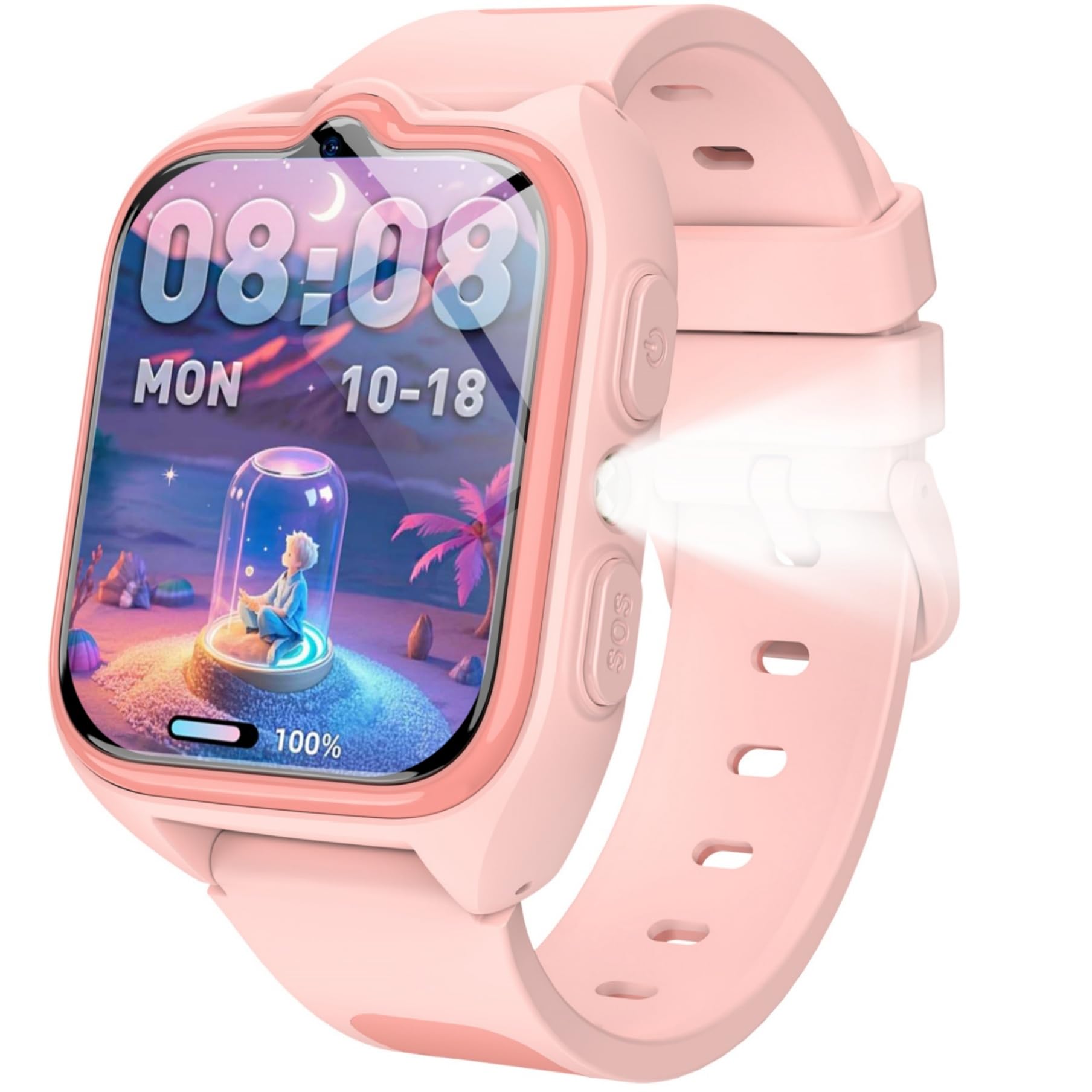
Image: The IOWODO Z30-4G Kids Smartwatch, showcasing its design and display.
What's in the Box
Upon unboxing, please verify that all the following items are included:
- 1* Smartwatch
- 1* Charging Cable
- 1* Watch Strap
- 1* User Manual

Image: Diagram illustrating the smartwatch, charging cable, strap, and manual included in the package.
Setup
1. SIM Card Installation
The IOWODO Z30-4G smartwatch requires a Nano SIM card (purchased separately) to enable 4G connectivity for calls, video calls, and messages. Ensure the SIM card is compatible with 4G networks from providers like Movistar, Orange, Vodafone, or Yoigo.
- Power off the smartwatch completely.
- Locate the SIM card slot on the side of the watch.
- Carefully insert the Nano SIM card into the slot, ensuring correct orientation. Do not use standard or micro SIM cards, even if cut, as this may damage the device.
- Close the SIM card slot cover securely.
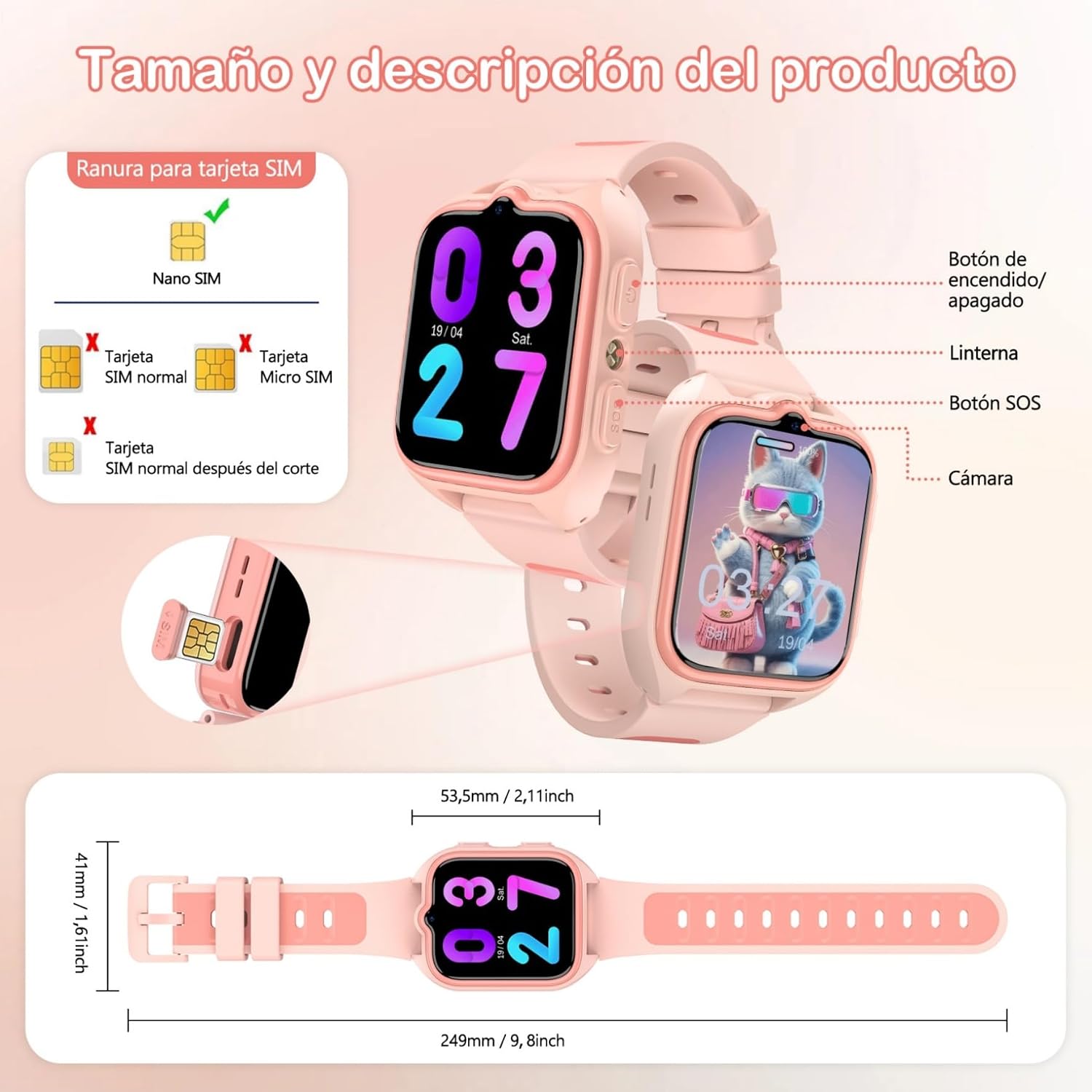
Image: A detailed view of the smartwatch's SIM card slot and the correct Nano SIM card type for insertion.
2. App Installation and Pairing
To manage the smartwatch features and communicate with your child, download the "SeTracker2" app on your smartphone (compatible with Android and iOS devices).
- Scan the QR code provided in the manual or on the watch packaging, or search for "SeTracker2" in your phone's app store.
- Install and open the app.
- Register a new account and follow the on-screen instructions to bind the smartwatch to your account. This typically involves scanning a QR code displayed on the watch or entering its unique ID.
3. Charging the Smartwatch
Before first use, fully charge the smartwatch.
- Connect the magnetic charging cable to the charging port on the back of the smartwatch.
- Connect the USB end of the cable to a standard USB power adapter (not included) or a computer's USB port.
- The watch screen will indicate charging status. A full charge takes approximately 2 hours.
The 800 mAh battery provides up to 2 days of active use and 4 days in standby mode.

Image: The smartwatch screen displaying a full battery indicator and the 800mAh battery capacity, highlighting its long-lasting power.
Operating Instructions
1. Basic Functions
- Power Button: Press and hold for 3 seconds to power on/off. A short press returns to the previous screen.
- Touch Screen: Navigate through menus and select options by swiping and tapping the 1.75-inch HD touch screen.

Image: An illustration detailing the location and function of the smartwatch's buttons, including the power button, SOS button, and flashlight button.
2. Communication
- 4G Video Calls: Once a SIM card is inserted, the watch supports clear 4G video calls. Initiate video calls directly from the watch or through the app.
- Two-Way Calls: Make and receive standard phone calls with pre-approved contacts.
- Voice/Text/Emoticon Chat: Engage in group chats with family members via voice messages, text, and emoticons through the app.
- SOS Emergency Call: In an emergency, press and hold the SOS button for 2 seconds. The watch will automatically call up to 3 pre-set emergency contacts in a loop until one answers.
- Safe Communication: Manage up to 30 contacts via the "SeTracker2" app. The smart lock feature automatically rejects unwanted calls from numbers not in the contact list.

Image: The smartwatch screen displaying an active HD video call, alongside icons for voice chat and standard calls.

Image: The smartwatch interface for SOS calls, showing how to set up and activate emergency contacts.
3. Location Tracking
The smartwatch combines GPS, LBS (Location Based Service), and WiFi for comprehensive real-time location tracking and 24-hour route monitoring.
- Real-time Tracking: View your child's current location on a map via the "SeTracker2" app.
- Historical Route: Review past routes taken by the smartwatch.
- Safe Zones: Set up virtual safe zones (geofences) through the app. You will receive immediate alerts if your child enters or exits these designated areas.

Image: A smartphone screen showing the smartwatch's location on a map, illustrating GPS, WiFi, and LBS tracking capabilities, along with safe zone and historical route features.
4. Special Features
- School Mode: Program silent periods for class times via the app. When activated, the watch automatically blocks all calls and messages, helping the child concentrate without distractions.
- LED Flashlight: An integrated LED flashlight provides convenience and safety in low-light conditions. Activate it with a dedicated button.
- HD Camera: The watch includes a camera for capturing photos.
- Educational Games: Enjoy 7 pre-installed educational games designed to entertain and inspire.
- Other Functions: Calendar, stopwatch, calculator, pedometer, and alarm clock.

Image: The smartwatch display showing the 'Forbidden in class' message, indicating that school mode is active, alongside icons for class mode, time display, and network shutdown.

Image: The smartwatch with its bright LED flashlight activated, illuminating a path in a dark, outdoor setting.

Image: The smartwatch interface showing a selection of educational and entertaining games, with colorful icons and a purple device screen.
Maintenance
1. Water Resistance
The IOWODO Z30-4G smartwatch has an IP68 water resistance rating, meaning it is suitable for daily splashes and rain. However, it is not recommended for bathing, swimming, or prolonged submersion in water. Exposure to hot water or steam should also be avoided.

Image: The smartwatch being splashed with water, illustrating its IP68 water resistance, alongside other features like the 1.75-inch screen, pedometer, alarm, flashlight, and HD camera.
2. Cleaning
To clean the smartwatch, gently wipe it with a soft, dry, or slightly damp cloth. Avoid using harsh chemicals, abrasive cleaners, or solvents, as these can damage the device's finish and components.
3. Battery Care
To prolong battery life, avoid exposing the smartwatch to extreme temperatures (very hot or very cold). Charge the device regularly, but avoid leaving it fully discharged for extended periods.
Troubleshooting
- Watch not turning on: Ensure the watch is fully charged. If it still doesn't turn on, try a different charging cable or power adapter.
- No signal/Cannot make calls: Verify that a Nano SIM card is correctly inserted and activated with a 4G plan. Check network coverage in your area. Restart the watch.
- Inaccurate location: GPS accuracy can be affected by environmental factors (e.g., indoors, dense buildings). Ensure the watch has a clear view of the sky for optimal GPS performance. LBS and WiFi positioning provide supplementary location data.
- App connection issues: Ensure both the smartwatch and your smartphone have a stable internet connection. Restart both devices and try pairing again. Update the "SeTracker2" app to the latest version.
- Screen unresponsive: Try restarting the watch. If the issue persists, contact customer support.
Specifications
| Model Name | Z30-4G |
| Brand | IOWODO |
| Screen Size | 1.75 Inches |
| Screen Resolution | 320 x 320 |
| Screen Type | LCD or OLED |
| Connectivity Technology | 4G, WiFi |
| GPS | Integrated GPS |
| Battery Capacity | 800 mAh |
| Average Battery Life | 2 Days (active use) |
| Water Resistance Level | IP68 (Resistant to water splashes and rain) |
| Compatible Operating Systems | Android & iOS |
| Strap Material | Silicone |
| Target Audience | Unisex Children |
| Dimensions | 16.2 x 10.2 x 2.4 cm; 170 g (Package) |
Warranty and Support
The IOWODO Z30-4G Smartwatch comes with an extended 2-year warranty. For any technical assistance, product inquiries, or warranty claims, please contact IOWODO customer support. Lifetime technical support is also provided.

Image: A graphic outlining IOWODO's commitment to superior quality, user-centric design, value for money, ecological responsibility, 24/7 customer support, a 2-year extended warranty, and lifetime technical support.


