
1. Product Overview
The YITAHOME Queen Size Floating Bed Frame is designed to provide a modern and functional sleeping solution. This metal platform bed frame features a unique floating design with concealed legs, creating an elevated aesthetic. It includes a storage headboard equipped with a USB charging station and integrated LED strip lights for customizable ambiance.
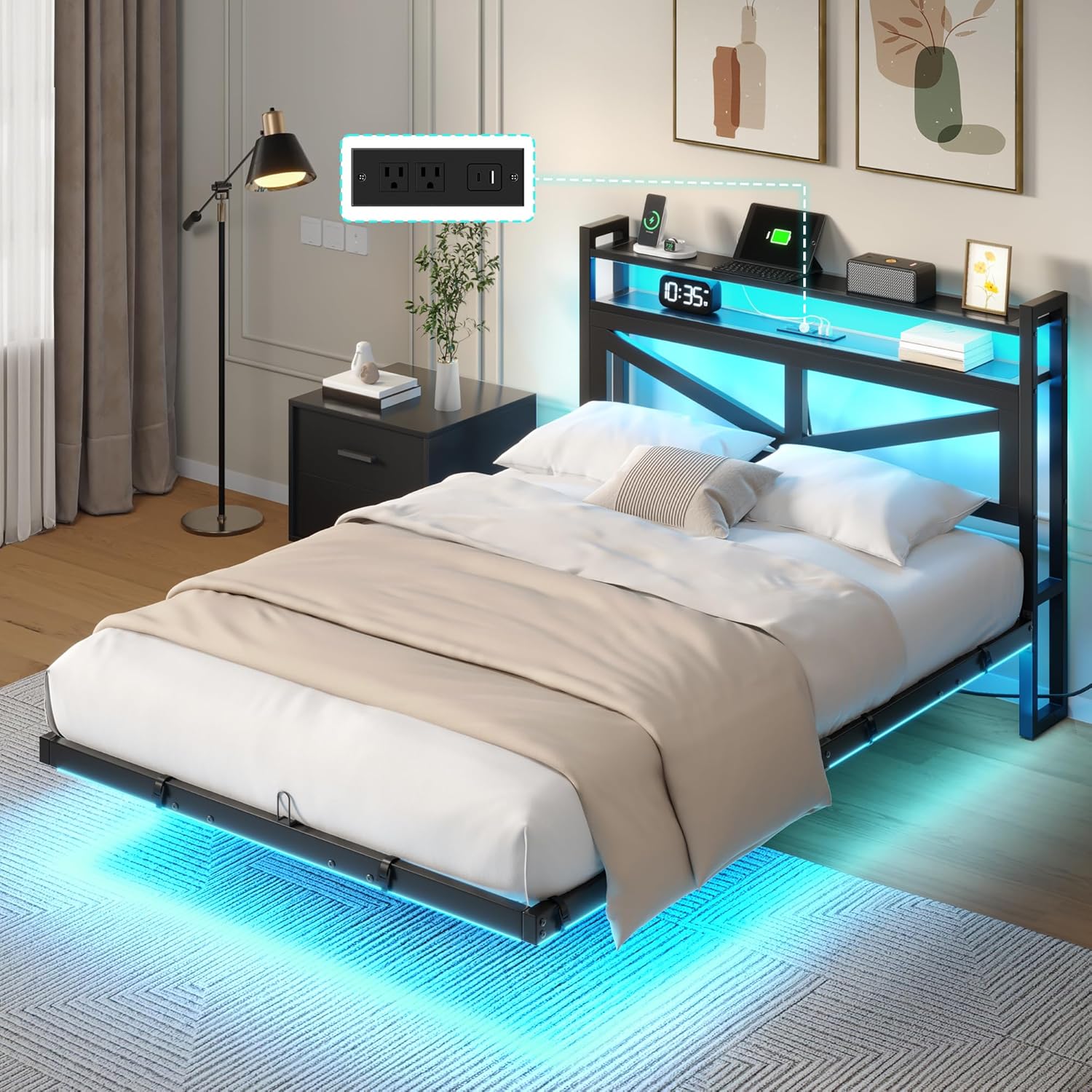
Image 1.1: YITAHOME Queen Size Floating Bed Frame with LED lights and charging station.
Key Features:
- Floating Bed Design: Concealed legs create a modern, elevated look and prevent accidental collisions.
- Integrated Charging Station: Headboard includes 2 standard AC outlets, 1 USB port, and 1 Type-C port for convenient device charging.
- Adjustable LED Lighting: Built-in LED strip lights with remote and smartphone app control for customizable colors and modes.
- Sturdy Construction: Made from premium-grade metal with reinforced legs, supporting up to 1000 pounds.

Image 1.2: Diagram illustrating the hidden leg design for a floating effect.
2. Safety Information
Please read and understand all safety warnings and instructions before assembly and use. Failure to follow these instructions may result in injury or damage to the product.
- Weight Limit: Do not load more than 1000 pounds on the bed frame. Exceeding this limit may compromise structural integrity.
- Sharp Edges: Be careful around sharp edges during assembly and use to prevent injury.
- Assembly: Assembly should ideally be performed by two adults. Keep children and pets away from the assembly area.
- Tools: Use only the tools provided or recommended in the assembly guide. Do not overtighten screws.
- Stability: Ensure all connections are securely fastened before using the bed frame. Periodically check and tighten all bolts and screws.
- Electrical Safety: Do not overload the charging station. Ensure cables are not pinched or damaged.
3. Package Contents
Before beginning assembly, verify that all parts listed below are present and undamaged. If any parts are missing or damaged, do not proceed with assembly. Contact customer support for assistance.
- Headboard components
- Side rails and support beams
- Metal slats
- Support legs
- USB Charging Station with power cord
- LED strip lights with remote control
- Hardware pack (screws, bolts, washers, Allen wrench)
- Installation Manual
Video 3.1: Unboxing and showing the various components of the bed frame before assembly.
4. Assembly Instructions
Assembly is required for this bed frame. It is highly recommended that two people work together for easier and safer assembly. Please follow the steps carefully.
Step-by-Step Assembly:
- Prepare the Area: Clear a spacious area for assembly. Lay out all components and hardware.
- Assemble the Headboard: Attach the headboard components according to the detailed diagrams in your included manual. Ensure the charging station is correctly positioned and secured.
- Connect Side Rails: Attach the side rails to the headboard and footboard (if applicable), ensuring all bolts are finger-tightened initially.
- Install Support Legs: Securely attach all support legs to the frame. Ensure they are perpendicular to the side rails and level with the top edge to prevent bulging.
- Place Metal Slats: Lay the metal slats across the frame. Secure them using the provided fasteners or clips.
- Final Tightening: Once all components are in place, fully tighten all bolts and screws using the Allen wrench. Do not overtighten.
- Install LED Lights: Attach the LED strip lights to the designated areas, typically along the underside of the frame, using the adhesive backing or clips. Connect the power cable.

Image 4.1: Important installation method for the middle T-shaped support slat. Ensure it is perpendicular to the side rails and level with their top edge to prevent frame bulging.
Video 4.2: Official YITAHOME video demonstrating the assembly process for a floating bed frame.
5. Operating Instructions
5.1. LED Lighting System
The integrated LED strip lights can be controlled via a remote control or a smartphone application.
- Remote Control: Use the provided remote to power the lights on/off, change colors, adjust brightness, and select various lighting modes (e.g., static, flash, fade).
- Smartphone App: Download the compatible app (refer to your manual for QR code or app name) to access advanced features, including a wider range of colors, music sync mode, timing functions, and dynamic modes.

Image 5.1: Illustration of LED light control options via remote and smartphone app.
5.2. USB Charging Station
The headboard features a built-in charging station for your electronic devices.
- AC Outlets: Plug in standard electronic devices into the two 125V/12A AC outlets.
- USB Ports: Use the 1 USB port and 1 Type-C port to charge smartphones, tablets, and other USB-powered devices.
- Power Cord: Ensure the 6.5-foot power cord is securely plugged into a wall outlet.

Image 5.2: Detailed view of the charging station with AC outlets, USB, and Type-C ports.
6. Maintenance
Proper maintenance will ensure the longevity and optimal performance of your bed frame.
- Cleaning: Wipe the metal surfaces with a dry cloth. Avoid using abrasive cleaners or harsh chemicals that could damage the finish.
- Hardware Check: Periodically inspect all bolts, screws, and connections. Tighten any loose hardware to maintain stability and prevent squeaking.
- LED Lights: Ensure the LED strips are securely attached. If any part becomes loose, re-secure it to prevent damage.
- Charging Station: Keep the charging ports free from dust and debris. Do not force plugs into the outlets.
7. Troubleshooting
If you encounter any issues with your YITAHOME bed frame, refer to the following troubleshooting guide:
7.1. LED Lights Not Working
- Check Power: Ensure the LED light power cable is securely plugged into the charging station and the wall outlet.
- Remote/App: Verify that the remote control has working batteries or that the smartphone app is correctly connected via Bluetooth.
- Connections: Inspect the connection points of the LED strip to the power source for any disconnections.
7.2. Charging Station Not Functioning
- Power Source: Confirm the bed frame's main power cord is plugged into a live wall outlet.
- Device Compatibility: Ensure your device is compatible with the USB/Type-C ports and that the charging cable is not faulty.
- Overload: Avoid plugging in too many high-power devices simultaneously, which could trip a circuit.
7.3. Bed Frame Squeaking or Wobbling
- Tighten Hardware: Re-check and tighten all bolts and screws throughout the frame.
- Level Surface: Ensure the bed frame is on a flat, level surface. Adjust the feet if necessary.
- Slat Placement: Verify that all metal slats are correctly seated and secured.
8. Specifications
| Feature | Detail |
|---|---|
| Size | Queen (U.S. Standard) |
| Material | Metal |
| Product Dimensions (L x W x H) | 80.3"L x 53.9"W x 43.3"H |
| Item Weight | 52.6 Pounds |
| Maximum Weight Recommendation | 1000 Pounds |
| Style | With LED Light |
| Special Features | Charging Station, Ergonomic, Fade Resistant, LED Lighting, USB Port |
| Included Components | Bookcase, Headboard, Installation Manual |
| Color | Black |
| Model Number | MAYIHrkcPJ |
| UPC | 197839940253 |

Image 8.1: Dimensions of the YITAHOME Queen Size Floating Bed Frame.
9. Warranty and Support
Your YITAHOME Queen Size Floating Bed Frame is covered by a return policy. For specific warranty details, please refer to the documentation included with your purchase or contact the manufacturer directly.
Return Policy:
- Duration: 90 days from the date of purchase.
- Type: Refund/Replacement.
- Seller: Amazon.
Customer Support:
For any questions, missing parts, or assistance with assembly or operation, please contact YITAHOME customer support. Contact information can typically be found in your product packaging or on the official YITAHOME website.


