
Introduction
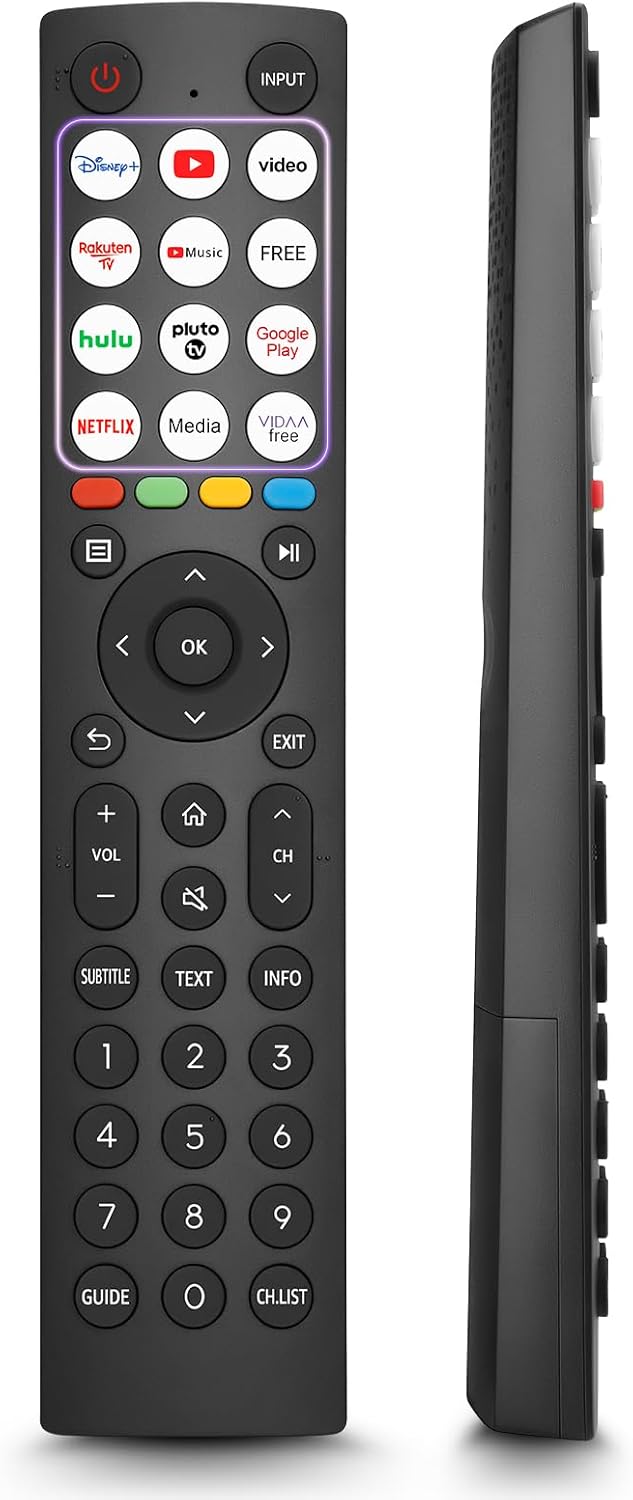
This manual provides comprehensive instructions for the OMAIC EN2Q36H replacement remote control, designed for Hisense Smart TVs. It covers essential information regarding setup, operation, and maintenance to ensure optimal performance and user experience. This remote offers a direct replacement solution without the need for complex programming.
Setup
The OMAIC EN2Q36H remote control is designed for immediate use with compatible Hisense Smart TVs. No programming or pairing is required.
Battery Installation
- Locate the battery compartment on the back of the remote control.
- Slide the battery cover downwards or in the direction indicated by the arrow to open it.
- Insert two AAA alkaline batteries (not included), ensuring the positive (+) and negative (-) terminals align correctly with the markings inside the compartment.
- Replace the battery cover by sliding it back into position until it clicks securely.
Once batteries are installed, the remote is ready to operate your Hisense Smart TV.

Operating Instructions
This remote control utilizes infrared (IR) technology for communication with your Hisense Smart TV. Ensure a clear line of sight between the remote and the TV's IR receiver for optimal performance.
Key Features
- 12 Shortcut Buttons: Quickly access popular streaming services and applications with dedicated buttons.
- Strong IR Signal: Provides a longer transmission distance and quick response without noticeable delay.
- Durable Construction: Made from high-quality ABS and silicone materials for extended lifespan.

Button Functions
Familiarize yourself with the functions of each button on your OMAIC EN2Q36H remote control:
| Button | Function |
|---|---|
| POWER | Switches the TV on or into standby mode. |
| INPUT | Selects input sources (HDMI, AV, etc.). |
| APP Buttons | Quick access buttons for specific applications (e.g., Disney+, Netflix, YouTube). |
| MENU | Displays the Quick Setup menu. |
| MEDIA Control | Buttons for Play, Pause, Stop, Fast Forward, Rewind. |
| Navigation (Up/Down/Left/Right) | Navigates on-screen menus and adjusts system settings. |
| OK | Confirms selection in on-screen menus. |
| BACK | Returns to the previous menu. |
| EXIT | Exits the current menu. |
| VOL +/- | Adjusts the volume level. |
| HOME | Enters the Home screen. |
| MUTE | Mutes or restores the TV sound. |
| CH ^/v | Switches channels. |
| SUBTITLE | Activates or deactivates subtitle mode. |
| TEXT | Turns teletext function on and off. |
| INFO | Displays current program information. |
| NUMBER Buttons (0-9) | Direct channel selection or number input. |
| GUIDE | Displays the Electronic Programme Guide (DTV input). |
| CH.LIST | Displays the Channel List on the screen. |

Compatible Hisense TV Models
The OMAIC EN2Q36H replacement remote control is compatible with the following Hisense VIDAA 4K HDTV Smart TV series:
- 32A4K, 40A4K, 43A4K
- 32A5KQ, 40A5KQ
- 43A6K, 50A6K, 55A6K, 58A6K, 65A6K, 70A6K, 75A6K, 85A6K
- 55U6KQ, 65U6KQ
- 43A7KQ, 50A7KQ, 55A7KQ, 65A7KQ, 75A7KQ
- 43E7KQ, 50E7KQ, 55E7KQ, 65E7KQ, 75E7KQ
Maintenance
To ensure the longevity and proper functioning of your remote control, follow these maintenance guidelines:
- Cleaning: Use a soft, dry cloth to clean the remote. Avoid using liquid cleaners or abrasive materials, as they may damage the surface or internal components.
- Battery Replacement: Replace batteries when the remote's response becomes sluggish or stops working. Always replace both batteries at the same time with new ones of the same type (AAA alkaline).
- Storage: Store the remote in a cool, dry place away from direct sunlight, extreme temperatures, and high humidity.
- Avoid Drops: Protect the remote from physical impact, as drops can damage internal circuitry.
Troubleshooting
If you encounter issues with your remote control, refer to the following troubleshooting steps:
| Problem | Possible Cause | Solution |
|---|---|---|
| Remote not responding | Dead or incorrectly inserted batteries. | Replace batteries with new AAA alkaline batteries, ensuring correct polarity. |
| Remote not responding | Obstruction between remote and TV. | Ensure a clear line of sight to the TV's IR receiver. Remove any objects blocking the path. |
| Remote not responding | Remote is too far from the TV. | Move closer to the TV. The remote has an extended range, but extreme distances may affect performance. |
| Buttons are sticky or unresponsive | Dirt or debris under buttons. | Gently clean around the buttons with a soft, dry cloth. Avoid liquids. |
| Specific functions not working | TV model incompatibility (rare). | Verify your Hisense TV model is listed in the 'Compatible Hisense TV Models' section. |
Specifications
| Feature | Detail |
|---|---|
| Model Name | EN2Q36H |
| Brand | OMAIC |
| Compatible Devices | Hisense Smart TVs |
| Connectivity Technology | Infrared (IR) |
| Number of Buttons | 48 |
| Control Type | Button Control |
| Special Features | Universal, Comfortable |
| Color | Black |
| Battery Description | AAA (Alkaline) |
| Supported Devices (Max) | 1 |
| Product Dimensions (Approx.) | 34.7 x 24.7 x 2.2 cm |
| Product Weight (Approx.) | 80 grams |

Warranty and Support
OMAIC is committed to the quality and compatibility of its replacement remote controls. We provide professional after-sales support to ensure customer satisfaction.
If you have any questions or concerns regarding your OMAIC EN2Q36H remote control or your order, please contact us directly. Our support team aims to respond to inquiries within 12 working hours.