
1. Introduction
Thank you for choosing the TELESIN C03 Magnetic Phone Selfie Light. This device is designed to enhance your photography and videography with adjustable lighting and convenient features. Please read this manual carefully to ensure proper use and maintenance.
2. Package Contents
- TELESIN C03 Magnetic Phone Selfie Light
- USB Type-C Charging Cable
- Metal Ring Adhesive Adapter (for non-MagSafe devices)
- User Manual
3. Product Overview
The TELESIN C03 features a compact, foldable design with a magnetic attachment for easy use. It includes a built-in mirror and offers multiple lighting modes.
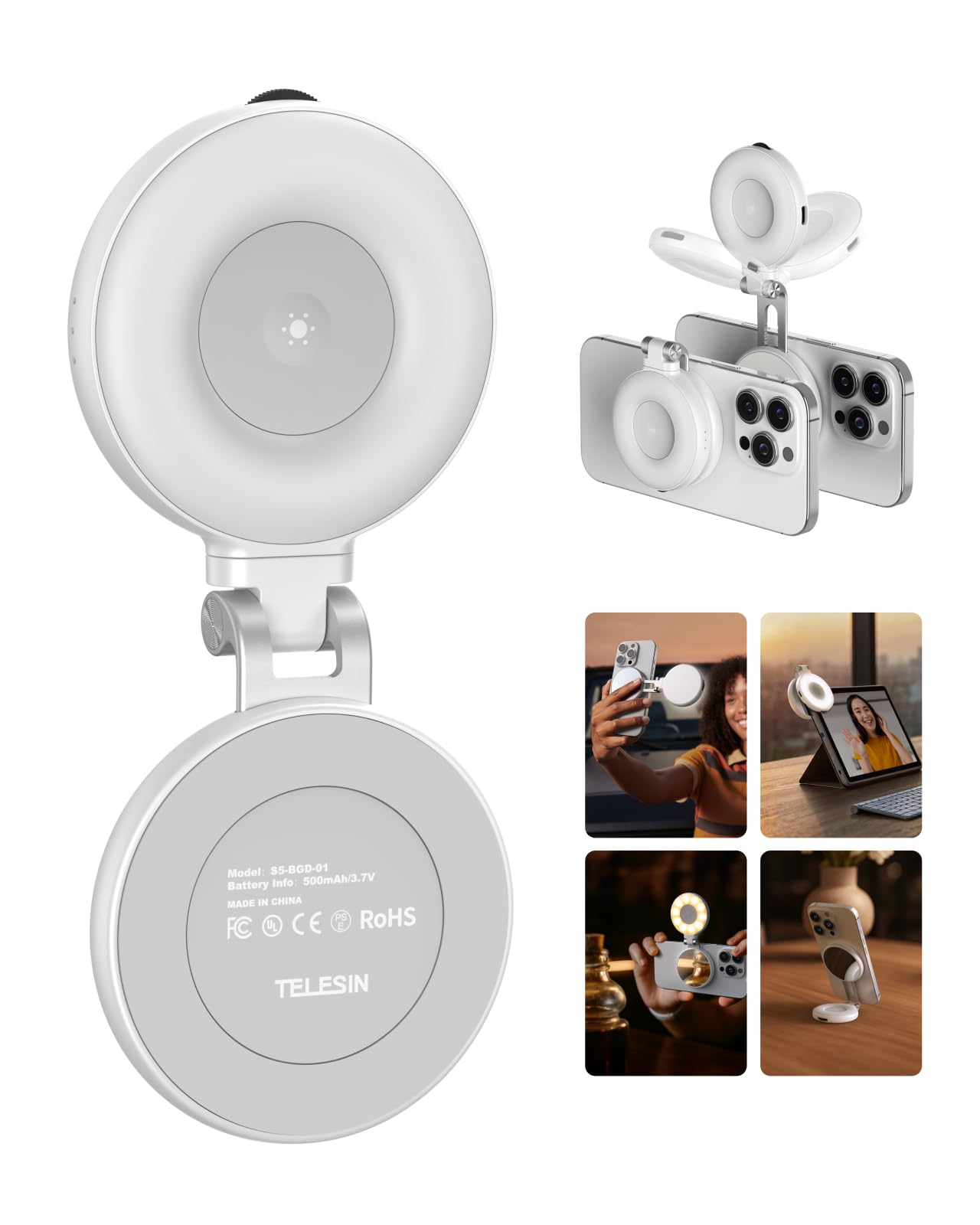
Figure 1: TELESIN C03 Magnetic Phone Selfie Light (folded)
4. Setup and Installation
4.1 Charging the Device
Before first use, fully charge the selfie light. Connect the provided USB Type-C cable to the charging port on the device and to a compatible USB power source. The indicator light will show charging status.

Figure 2: Charging the Selfie Light
4.2 Attaching to Your Phone
The TELESIN C03 is designed for magnetic attachment. For MagSafe compatible iPhones (iPhone 12 series and newer), simply align the selfie light with the MagSafe area on the back of your phone until it snaps into place securely.

Figure 3: Magnetic Attachment
For non-MagSafe phones, laptops, or other devices, use the included metal ring adhesive adapter. Peel off the protective film from the adhesive side of the metal ring and firmly attach it to the desired location on your device. Ensure the surface is clean and dry for optimal adhesion. Once the ring is attached, the selfie light can be magnetically connected to it.
5. Operating Instructions
5.1 Power On/Off and Brightness Adjustment
Press and hold the power button to turn the light on or off. Once on, rotate the wave wheel on the side of the device to adjust the brightness from 10% to 100% steplessly.
5.2 Color Temperature Selection
Short press the power button to cycle through the three available color temperatures:
- Warm Light (2700K): For a cozy ambiance.
- Natural Light (5600K): For a balanced, natural glow.
- Cool Light (7500K): For a chic, bright illumination.

Figure 4: Light Modes and Brightness Control
5.3 360° Rotation and 180° Flip
The selfie light features a hinge that allows for 360° rotation and a 180° flip. This enables you to direct the light from various angles, whether for front-facing selfies, rear-camera photography, or as a small desktop stand.

Figure 5: Rotatable and Flippable Design
5.4 Using the Built-in Mirror
The device includes a 56mm high-definition makeup mirror. This mirror can be used for quick touch-ups or to assist with framing shots when using your phone's rear camera.
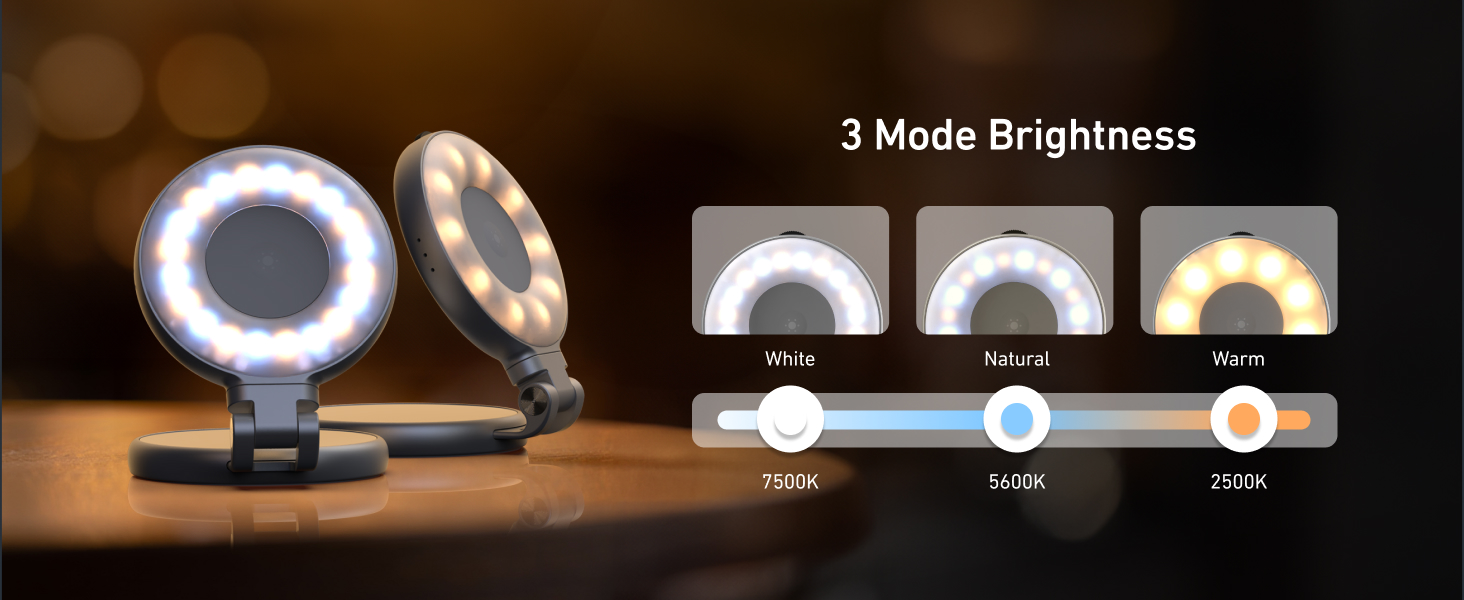
Figure 6: Built-in Makeup Mirror
6. Features
- Magnetic Attachment: Compatible with MagSafe iPhones and other devices via adhesive metal ring.
- Adjustable Lighting: 3 color temperatures (2700K, 5600K, 7500K) and 10-100% stepless brightness adjustment.
- 360° Rotation & 180° Flip: Flexible positioning for various shooting angles and use as a stand.
- Built-in Mirror: 56mm high-definition mirror for convenience.
- Rechargeable & Portable: Compact pocket size with a built-in 500mAh battery, charged via USB Type-C.
7. Maintenance
- Keep the device clean by wiping it with a soft, dry cloth.
- Avoid exposing the device to extreme temperatures, moisture, or direct sunlight.
- Do not attempt to disassemble or repair the device yourself, as this may void the warranty.
- Store in a cool, dry place when not in use.
8. Troubleshooting
- Light not turning on: Ensure the device is fully charged. Connect it to a power source using the USB Type-C cable.
- Light flickering or dim: Recharge the device. If the issue persists, contact customer support.
- Magnetic attachment is weak: Ensure the device is properly aligned with the MagSafe area or the metal ring adapter. Clean the surfaces to remove any debris.
- Device not responding: Try resetting the device by fully discharging and then recharging it.
9. Specifications
| Attribute | Detail |
|---|---|
| Brand | TELESIN |
| Model Name | TELESIN-SL-MAG-WHT-001 |
| Item Weight | 80 Grams |
| Connectivity Technology | USB |
| Hardware Interface | USB Type C |
| Battery Average Life | 272.5 minutes |
| Flash Modes Description | Adjustable brightness and color temperature (cold, natural, warm) for constant illumination |
| Water Resistance Level | Not Water Resistant |
| Compatible Devices | iPhone, Android phones, laptops, magnetic selfie stick tripod |
10. Official Product Videos
TELESIN C03 Magnetic Selfie Light Overview
This video provides a brief overview of the TELESIN C03 Magnetic Selfie Light, demonstrating its magnetic attachment and basic lighting functions.
TELESIN C03 Mirror Selfie Light Demonstration
This video showcases the mirror feature of the TELESIN C03 Selfie Light, highlighting its utility for self-monitoring during content creation.
TELESIN C03 Magnetic Phone Light Features
This video demonstrates various features of the TELESIN C03 Magnetic Phone Light, including its magnetic attachment and adjustable lighting.
11. Warranty and Support
The TELESIN C03 Magnetic Phone Selfie Light comes with a 2-year warranty. For warranty claims, technical support, or any product-related inquiries, please contact TELESIN customer service through their official website or the retailer where the product was purchased.
For further assistance, please visit the TELESIN Store on Amazon.

