
BAOFENG UV-32
Contents
BAOFENG UV-32 GPS 10W Ham Radio User Manual
Model: UV-32
1. Introduction
The BAOFENG UV-32 is an advanced 10W handheld two-way radio designed for reliable long-range communication. It features a 2-inch large color screen, built-in GPS, NOAA weather reception, and convenient mobile application programming. This manual provides essential information for setting up, operating, maintaining, and troubleshooting your UV-32 radio to ensure optimal performance and user safety.
Key features include:
- 10W maximum output power with Tri-power selectable levels.
- Integrated GPS functionality for positioning.
- NOAA Weather Receiver and Alarm function for real-time weather alerts.
- Multiple frequency modification methods, including One Key Frequency Match and APP programming.
- AM Aviation Band reception.
- 2500mAh USB-C rechargeable battery with multiple charging options.
- Support for DTMF, VOX, CTCSS, and DCS.
2. Product Overview and Components
Familiarize yourself with the components included with your BAOFENG UV-32 radio and its main parts.
2.1 What's in the Box
- 1x BAOFENG UV-32 GPS Radio
- 1x High Gain Original Antenna
- 1x 2500mAh USB-C Battery
- 1x Desktop Charger
- 1x Belt Clip
- 1x Hand Strap
- 1x User Manual

Figure 2.1: BAOFENG UV-32 radio and its complete set of accessories.
2.2 Radio Parts Identification

Figure 2.2: Labeled components of the BAOFENG UV-32 radio.
- Power & Volume Switch: Rotates to turn the radio on/off and adjust volume.
- Frequency Switch: Used for channel or frequency selection.
- Microphone: For voice input during transmission.
- Speaker: For audio output.
- PTT (Push-to-Talk) Button: Press and hold to transmit, release to receive.
- Customizable SK1 Button: A programmable shortcut key.
- K Port: For connecting external audio accessories like headsets or programming cables.
3. Setup
3.1 Battery Installation
To install the 2500mAh USB-C battery:
- Align the battery with the grooves on the back of the radio.
- Slide the battery upwards until it clicks securely into place.
- Ensure the battery release latch is engaged to prevent accidental detachment.
3.2 Antenna Attachment
Screw the high-gain original antenna clockwise onto the antenna connector at the top of the radio until it is finger-tight. Do not overtighten.
3.3 Charging the Battery
The BAOFENG UV-32 offers multiple charging methods for convenience.

Figure 3.1: Available charging methods for the UV-32 radio.
- Desktop Charger: Place the radio into the provided desktop charging cradle. Connect the AC adapter to the cradle and a power outlet. The indicator light will show charging status.
- USB-C Direct Charging: The 2500mAh battery supports direct USB-C charging. Connect a standard USB-C cable to the port on the battery and to a USB power source (e.g., laptop, car USB charger, power bank).
A full charge typically provides up to 30 hours of battery life.
4. Operating Instructions
4.1 Power On/Off and Volume Control
Rotate the Power & Volume Switch (1) clockwise to turn the radio on and increase volume. Rotate counter-clockwise to decrease volume and turn the radio off.
4.2 Frequency Range and Multi-Band Operation
The BAOFENG UV-32 supports a wide range of frequencies:
- Transmit (TX): 144-148MHz, 420-450MHz
- Receive (RX): FM 76-108MHz, AM 108-136MHz (Aviation Band), VHF 136-174MHz, 220-260MHz, UHF 350-390MHz, 400-520MHz

Figure 4.1: Multi-band frequency capabilities of the UV-32.
4.3 Channel Management and Programming
The radio supports up to 1000 channels (10 Zones x 100 Channels).
4.3.1 Mobile APP Programming
The UV-32 can be programmed wirelessly via a mobile application, offering flexible frequency modification.

Figure 4.2: Wireless programming via mobile application.
To download the APP:
- iOS: Search for "Radio Frequency Programmer" or "Walkie-talkie Tool" in the App Store.
- Android: Visit walkietalkiesoftware.com, navigate to Software → BAOFENG → UV-32.
4.3.2 One Key Frequency Match
This feature allows for quick frequency copying from another radio.
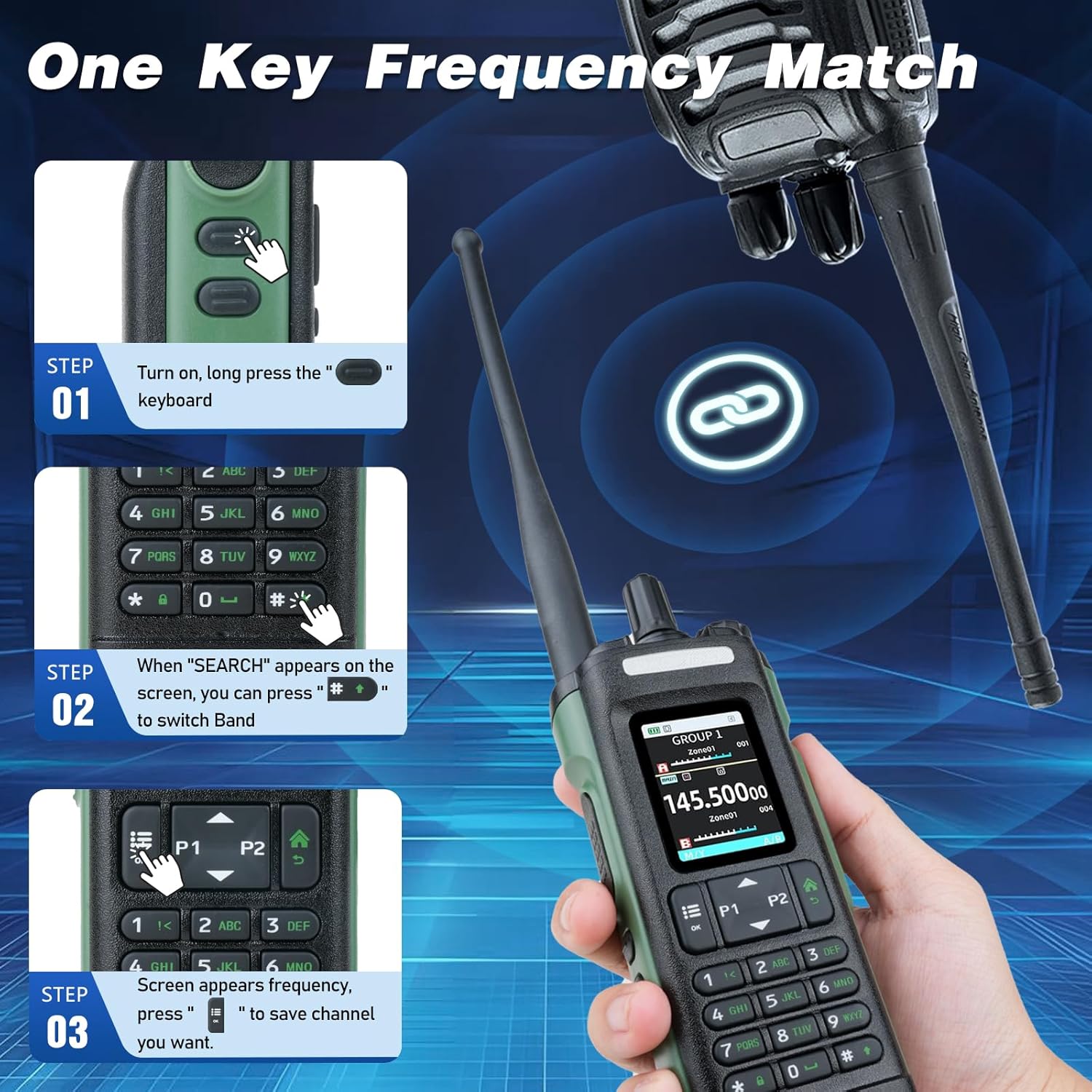
Figure 4.3: Steps for One Key Frequency Match.
- Turn on the radio. Long press the "OK" button on the keyboard.
- When "SEARCH" appears on the screen, press the "SEARCH" button to switch bands.
- Once the desired frequency appears, press "OK" to save the channel.
4.4 GPS Functionality
The built-in GPS function provides positioning capabilities, which can be crucial for outdoor activities, search, and rescue operations.

Figure 4.4: GPS positioning feature.
4.5 NOAA Weather Receiver & Alarm
The UV-32 can receive NOAA weather forecasts and emergency alerts, providing critical information during severe weather conditions.
4.6 Display and Interface
The 2-inch color large screen display enhances visibility and user experience, especially in low-light conditions.

Figure 4.5: 2-inch color large screen display.
4.7 Power Output Selection
The radio offers 10W max output with Tri-power selectable levels (High/Medium/Low) to optimize battery life and transmission range based on your needs.
4.8 Additional Features
- DTMF: Dual-Tone Multi-Frequency signaling for various control functions.
- VOX: Voice Operated Exchange allows hands-free transmission.
- CTCSS/DCS: Continuous Tone-Coded Squelch System / Digital Coded Squelch for filtering unwanted signals.
5. Maintenance
5.1 Battery Care
- Avoid fully discharging the battery frequently to prolong its lifespan.
- Store the battery in a cool, dry place when not in use for extended periods.
- Do not expose the battery to extreme temperatures or direct sunlight.
5.2 Cleaning
Wipe the radio's exterior with a soft, damp cloth. Do not use harsh chemicals or abrasive cleaners. Ensure all ports are dry before charging or connecting accessories.
5.3 Storage
When storing the radio for a long time, remove the battery and store both components separately in a dry, temperature-controlled environment.
6. Troubleshooting
| Problem | Possible Cause | Solution |
|---|---|---|
| Radio does not power on. | Battery is not installed correctly or is discharged. | Ensure battery is securely attached. Charge the battery fully. |
| Cannot transmit or receive. | Incorrect frequency/channel, antenna not connected, or low battery. | Verify frequency/channel settings. Check antenna connection. Recharge battery. |
| Poor audio quality. | Volume too low, speaker/microphone obstructed, or interference. | Adjust volume. Clear obstructions. Move away from sources of interference. |
| APP programming issues. | Incorrect APP version, Bluetooth not enabled, or radio not in programming mode. | Ensure correct APP is installed. Enable Bluetooth on device. Follow APP instructions for programming mode. |
7. Specifications
| Feature | Specification |
|---|---|
| Model Number | BAOFENG UV-32 |
| Item Weight | 1.78 pounds |
| Package Dimensions | 10.55 x 8.47 x 2.44 inches |
| Battery Life | Up to 30 Hours |
| Frequency Range (TX) | 144-148MHz, 420-450MHz |
| Frequency Range (RX) | FM 76-108MHz, AM 108-136MHz, VHF 136-174MHz, 220-260MHz, UHF 350-390MHz, 400-520MHz |
| Special Features | One Key Frequency Copy, 2-inch TFT large color screen, Advanced GPS technology, 1000 Channels, AM/FM/VHF/1.25M/UHF, NOAA Weather Receiver |
| Tuner Technology | VHF/1.25M/UHF |
| Water Resistance Level | Water Resistant |
| Country of Origin | China |
8. Warranty and Support
8.1 Warranty Information
The BAOFENG UV-32 comes with a 30-day warranty from the date of purchase. Please retain your proof of purchase for any warranty claims.
8.2 Customer Support
For further assistance, technical support, or warranty inquiries, please refer to the official BAOFENG website or contact their customer service channels as provided on their packaging or product documentation.
Documents and downloads
Ask a question about this manual
Ask about setup, troubleshooting, compatibility, parts, safety, or missing instructions. Manuals+ will review the question and use this page’s manual context to help answer it.