
Introduction
Welcome to your new VECHTEL 9-inch Android Car Stereo. This manual provides detailed instructions for the installation, operation, and maintenance of your device. Please read it thoroughly before use to ensure proper functionality and safety.
This car stereo is designed for VW Beetle models from 2012 to 2018 and features an Android 15 operating system, 4GB RAM, 64GB ROM, and a 9-inch IPS HD touchscreen with 1280x720 resolution. Key functionalities include wireless CarPlay, Android Auto, Bluetooth connectivity, RDS/FM radio, Digital Sound Processing (DSP), GPS navigation, Wi-Fi, Mirrorlink, and support for an AHD backup camera and steering wheel controls.
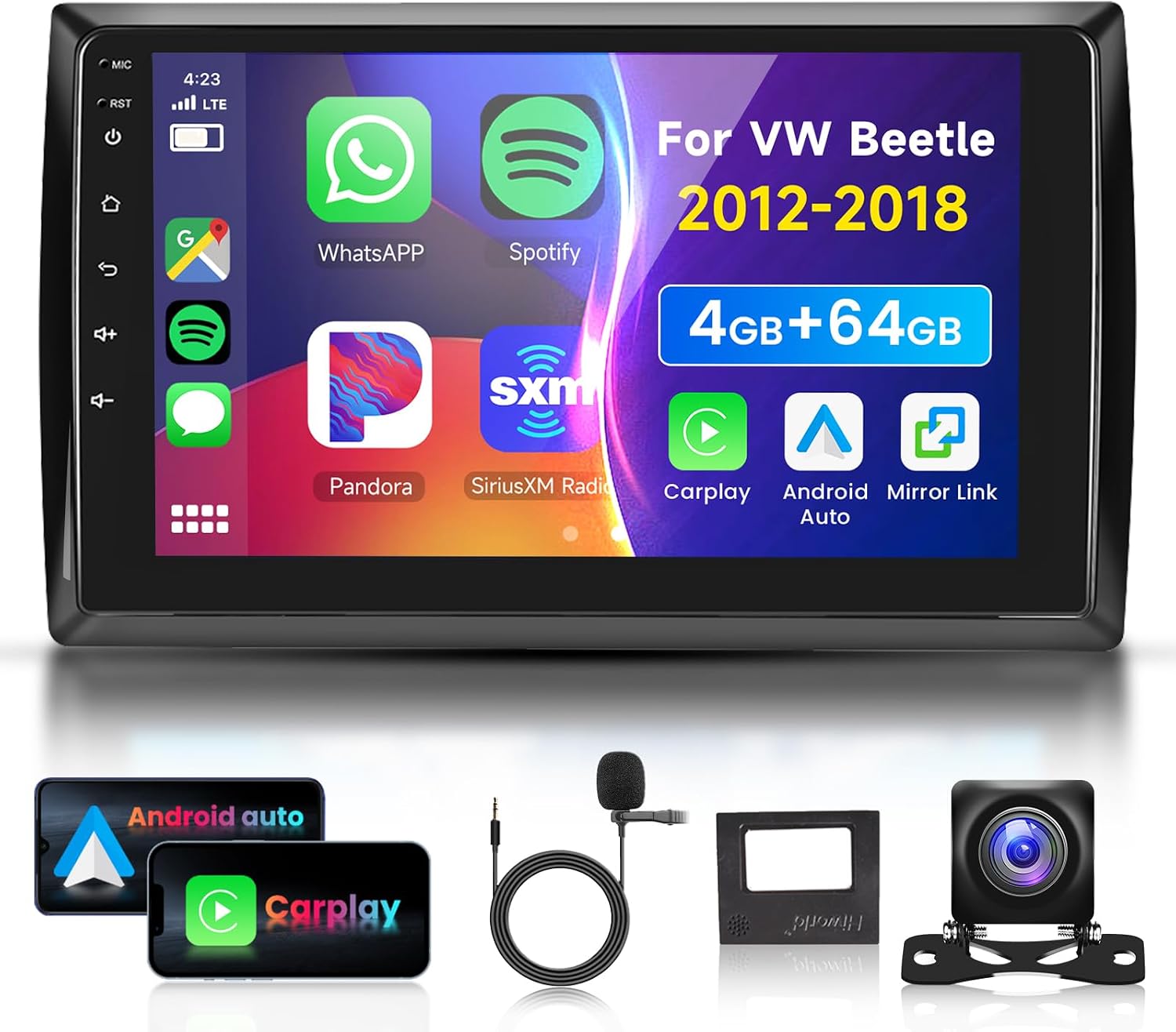
Image: The VECHTEL 9-inch Android Car Stereo unit displayed with its primary accessories, including Android Auto and CarPlay icons, a microphone, and a backup camera.
Product Specifications
| Operating System | Android 15 |
| Chipset | 8227L-DEMO |
| Screen Size | 9 inches |
| Memory | 4GB RAM + 64GB ROM |
| Screen Resolution | 1280 x 720 (IPS HD) |
| Radio Chip | MT6625 |
| Output Power | 4 x 45W |
| Operating Temperature | -20 °C to 75 °C |
| Steering Wheel Control | Supported |
| Power Amplifier Chip | TDA7388 |
| Radio Band | FM/RDS |
| Video Output | Supported |
| Reverse Input | AHD/CVBS |
| External Microphone | Supported |
| Split Screen | Supported |
| Maps | Built-in offline maps (Internet connection required for data download) |
| Wi-Fi | Supported |
| USB | Dual USB interface |
| Audio Formats | APE/FLAC/WAV/MP3/WMA, etc. |
| Video Formats | MKV/RMVB/AVI/MP4/MDV etc. |
| Image Formats | PNG/JPEG/JPG/GIF/WBMP/BNP etc. |
| Default Keyword | 8888 |
| Languages | Chinese/English/French/Italian/Korean/Japanese/Arabic/Spanish/Portuguese/Russian/Turkish/Vietnamese/Hebrew/Polish/German |
| Connectivity Technology | Bluetooth, USB, Wi-Fi |
| Compatible Devices | Smartphone |
| Manufacturer Reference | A7084A3662H1MI2 |
| Item Weight | 1 Kilogram |
Package Contents
Verify that all items listed below are included in your package:
- 1 x 9-inch Car Radio Unit
- 1 x Power Cable
- 1 x GPS Antenna
- 1 x Rear Camera Input Cable
- 1 x RCA Cable
- 2 x USB Cables
- 2 x Mounting Brackets
- 4 x Screws
- 1 x User Manual
- 1 x External Microphone
- 1 x AHD Rear Camera

Image: A visual representation of the VECHTEL 9-inch car stereo's dimensions and all included accessories, such as cables, brackets, and the backup camera.
Installation Guide
Professional installation is recommended. If you choose to install the unit yourself, please follow these general steps:
- Safety First: Disconnect the vehicle's negative battery terminal before starting any electrical work.
- Remove Old Unit: Carefully remove the existing car stereo and trim panels from your VW Beetle (2012-2018).
- Connect Wiring: Connect the provided power cable, speaker wires, GPS antenna, USB cables, and RCA cables to the corresponding ports on the new VECHTEL unit and your vehicle's harness. Ensure all connections are secure.
- Rear Camera Installation: If installing the AHD rear camera, route the camera cable from the rear of the vehicle to the stereo unit and connect it to the 'Rear Camera Input' port.
- Mount the Unit: Use the provided mounting brackets and screws to secure the new car stereo into the dashboard opening. Reattach any removed trim panels.
- Reconnect Battery: Reconnect the vehicle's negative battery terminal.
- Test Functionality: Turn on the vehicle and the car stereo to test all functions, including audio, touch screen, radio, GPS, Bluetooth, and the backup camera.

Image: A comparison showing the original VW Beetle dashboard setup versus the dashboard after the VECHTEL 9-inch car stereo has been installed, highlighting the integrated appearance.
Operating Instructions
Power On/Off
To power on the unit, press and hold the power button located on the front panel. To power off, press and hold the same button until the unit shuts down.
Touchscreen Operation
The 9-inch IPS HD touchscreen supports standard touch gestures such as tap, swipe, and pinch-to-zoom for navigation and control of applications.
Wireless CarPlay & Android Auto
This unit supports both wireless CarPlay and Android Auto. Connect your compatible smartphone via Bluetooth and Wi-Fi to access your phone's applications, navigation, music, and make hands-free calls directly from the car stereo display.
- Ensure Bluetooth is enabled on your phone and the car stereo.
- Pair your phone with the car stereo via Bluetooth settings.
- Follow the on-screen prompts to enable CarPlay or Android Auto.

Image: The VECHTEL car stereo displaying the CarPlay and Android Auto interfaces, highlighting the 9-inch IPS HD touchscreen and wireless connectivity features.
Bluetooth Connectivity
Pair your smartphone or other Bluetooth-enabled devices to the car stereo for hands-free calling and audio streaming.
- Go to the Bluetooth settings on the car stereo.
- Enable Bluetooth on your device and search for the car stereo (e.g., "VECHTEL Car Stereo").
- Select the device and confirm the pairing code.
- Once paired, you can make calls and play music wirelessly.
Radio (FM/RDS)
Access the radio application to listen to FM stations. The RDS (Radio Data System) feature displays station information where available.
- Open the "Radio" app from the main menu.
- Use the scan function to find available stations or manually tune to a frequency.
- Save your favorite stations as presets for quick access.

Image: The car stereo screen showing Bluetooth hands-free calling, music playback, the FM/RDS radio interface with frequency display, and a detailed equalizer (EQ) adjustment screen.
GPS Navigation
The unit comes with built-in offline maps. An internet connection is required to download map data initially or for online navigation services.
- Open the "Navigation" or "Maps" app.
- Ensure the GPS antenna is properly connected and has a clear view of the sky.
- Download necessary map data for offline use via Wi-Fi.
- Enter your destination to start navigation.
Wi-Fi & Hotspot
Connect the car stereo to a Wi-Fi network or your mobile hotspot to access online features, download apps, and update software.
- Go to "Settings" and select "Wi-Fi".
- Turn on Wi-Fi and select your desired network. Enter the password if required.
- Alternatively, enable your phone's mobile hotspot and connect the stereo to it.

Image: The car stereo screen displaying online navigation with route information and a separate image illustrating Wi-Fi connectivity for internet access and app downloads, alongside the 4GB RAM and 64GB ROM specifications.
DSP & EQ Adjustment
The Digital Sound Processing (DSP) technology allows for advanced audio customization. Access the EQ settings to fine-tune your sound experience.
- Open the "EQ" or "Sound Settings" app.
- Adjust the 36-band or 10-band equalizer, frequency, and tonal patterns to achieve your preferred sound quality.
Backup Camera
When the vehicle is shifted into reverse, the car stereo automatically displays the feed from the connected AHD rear camera, providing a clear view of the area behind your vehicle. The camera features IP69 waterproof rating, night vision, and a wide-angle lens.
Steering Wheel Control
The unit supports existing steering wheel controls, allowing you to manage audio playback (volume, track skip) and answer calls without taking your hands off the wheel. This enhances driving safety and convenience.

Image: The car stereo screen displaying the backup camera view with parking guidelines, alongside an illustration of how steering wheel controls can be used to operate the unit.
Maintenance
To ensure the longevity and optimal performance of your VECHTEL car stereo, follow these maintenance guidelines:
- Screen Cleaning: Use a soft, lint-free cloth slightly dampened with water or a screen cleaner specifically designed for electronics. Avoid harsh chemicals or abrasive materials.
- Software Updates: Periodically check for software updates through the system settings or the manufacturer's website. Keeping the software updated can improve performance and add new features.
- General Care: Avoid exposing the unit to extreme temperatures, direct sunlight for prolonged periods, or excessive moisture. Ensure proper ventilation around the unit.
Troubleshooting
If you encounter issues with your car stereo, refer to the following common problems and solutions:
- No Power:
Possible Cause: Loose power connection or blown fuse.
Solution: Check all power cables and connections. Inspect the vehicle's fuse box and the stereo's inline fuse for any blown fuses and replace if necessary. - No Sound:
Possible Cause: Incorrect wiring, volume too low, or mute function activated.
Solution: Verify speaker wire connections. Increase volume. Check if the mute function is active and deactivate it. - GPS Signal Loss:
Possible Cause: GPS antenna obstruction or poor placement.
Solution: Ensure the GPS antenna is securely connected and placed in a location with a clear view of the sky, away from metal obstructions. - Bluetooth Connection Issues:
Possible Cause: Device not paired, Bluetooth off, or interference.
Solution: Ensure Bluetooth is enabled on both the stereo and your device. Delete previous pairings and re-pair. Move closer to the unit to reduce interference. - Backup Camera Not Displaying:
Possible Cause: Camera cable loose or incorrect connection.
Solution: Check the rear camera input cable connection at both the camera and the stereo unit. Ensure the vehicle is in reverse. - Touchscreen Unresponsive:
Possible Cause: Software glitch or temporary freeze.
Solution: Perform a soft reset by pressing the reset button (if available) or by turning the vehicle off and on again. If the issue persists, consult customer support.
Warranty and Support
Your VECHTEL 9-inch Android Car Stereo comes with a three-year manufacturer's warranty, covering defects in materials and workmanship under normal use.
For technical support, warranty claims, or further assistance, please refer to the contact information provided with your purchase documentation or visit the official VECHTEL support website. When contacting support, please have your model number (A7084A3662H1MI2) and purchase details ready.