
OTTOCAST OTTOCAST Mini Edge
OTTOCAST Mini 2-in-1 Wireless Carplay & Android Auto Adapter User Manual
Model: OTTOCAST Mini Edge
1. Introduction
The OTTOCAST Mini 2-in-1 Wireless Carplay & Android Auto Adapter is designed to convert your car's existing wired CarPlay or Android Auto system into a wireless connection. This device allows for seamless integration of your smartphone with your vehicle's infotainment system, providing access to navigation, music, calls, and more without the need for cables.

Image: The OTTOCAST Mini 2-in-1 Wireless Carplay and Android Auto Adapter, shown with its product packaging and included USB adapters.
2. Product Features
- 2-in-1 Wireless Connectivity: Supports both Wireless CarPlay for Apple iPhones and Wireless Android Auto for Samsung and other Android phones, eliminating the need for physical cables.
- Stable Connection: Utilizes dual Bluetooth 4.2 and 5Ghz Wi-Fi for reliable and uninterrupted connectivity, ensuring a smooth user experience.
- Automatic Reconnection: After the initial setup, the adapter automatically connects to your phone when you start your car, typically within 5-10 seconds.
- Compact Design: The mini-sized adapter is designed to be discreet and unobtrusive in your car's interior.
- Multiple Control Modes: Supports control via steering wheel buttons, rotary knobs, touchpads, touchscreens, and voice assistants (Siri and Google Assistant).
- Seamless Switching: Allows for easy switching between Wireless CarPlay and Wireless Android Auto, recognizing the connected phone model automatically.
- Wide Compatibility: Compatible with over 800 car models that feature wired CarPlay or Android Auto, including popular brands like Toyota, Volkswagen, Ford, and Honda. (Note: Not compatible with BMW or Tesla.)
- Plug and Play: Simple USB plug-and-play installation with no additional software or plugins required.

Image: The OTTOCAST Mini 2 adapter connected in a car, demonstrating its wireless CarPlay and Android Auto capabilities on the vehicle's infotainment screen.

Image: A visual comparison illustrating the compact size of the OTTOCAST Mini adapter relative to a modern smartphone, emphasizing its small footprint.
3. What's in the Box
Upon opening the product packaging, you will find the following items:
- 1 x OTTOCAST Mini 2 Wireless Adapter
- 1 x USB-A to Type-C Adapter
- 1 x USB-A to Type-A 90° Adapter
- 1 x User Manual
- 1 x Product Packaging Box

Image: An illustration detailing the items included in the OTTOCAST Mini 2 package: the main adapter unit, a USB-A to Type-C adapter, a USB-A to Type-A 90-degree adapter, the user manual, and the product box.
4. Setup Guide
Setting up your OTTOCAST Mini 2 adapter is a simple three-step process:
- Step 1: Insert the Device
Insert the OTTOCAST Mini 2 adapter into your car's USB port. Use the appropriate USB adapter (Type-C or 90° Type-A) if needed for your car's port type. - Step 2: Wait for Screen Display
Wait until the connection UI interface appears on your car's infotainment screen. (Note: Android Auto may connect without displaying a specific UI.) - Step 3: Pair Your Smartphone
On your smartphone, turn on Wi-Fi and Bluetooth. Search for and pair with the Bluetooth name "CAR2-xxxx" (where xxxx represents a unique identifier for your device).

Image: A visual guide demonstrating the three steps for connecting the OTTOCAST Mini adapter: plugging it into the car's USB port, waiting for the car screen to display the connection interface, and pairing the smartphone via Bluetooth.
5. Operating Instructions
Once the initial setup is complete, the OTTOCAST Mini 2 adapter will automatically connect to your smartphone each time you start your vehicle. This allows for immediate access to your preferred navigation, music, and communication apps through your car's display.
5.1 Using Wireless CarPlay / Android Auto
- After automatic connection, your car's screen will display the CarPlay or Android Auto interface.
- Navigate through applications using your car's native controls (touchscreen, knob, touchpad) or steering wheel buttons.
- Utilize voice commands (Siri for CarPlay, Google Assistant for Android Auto) for hands-free operation, such as making calls, sending messages, playing music, or getting directions.
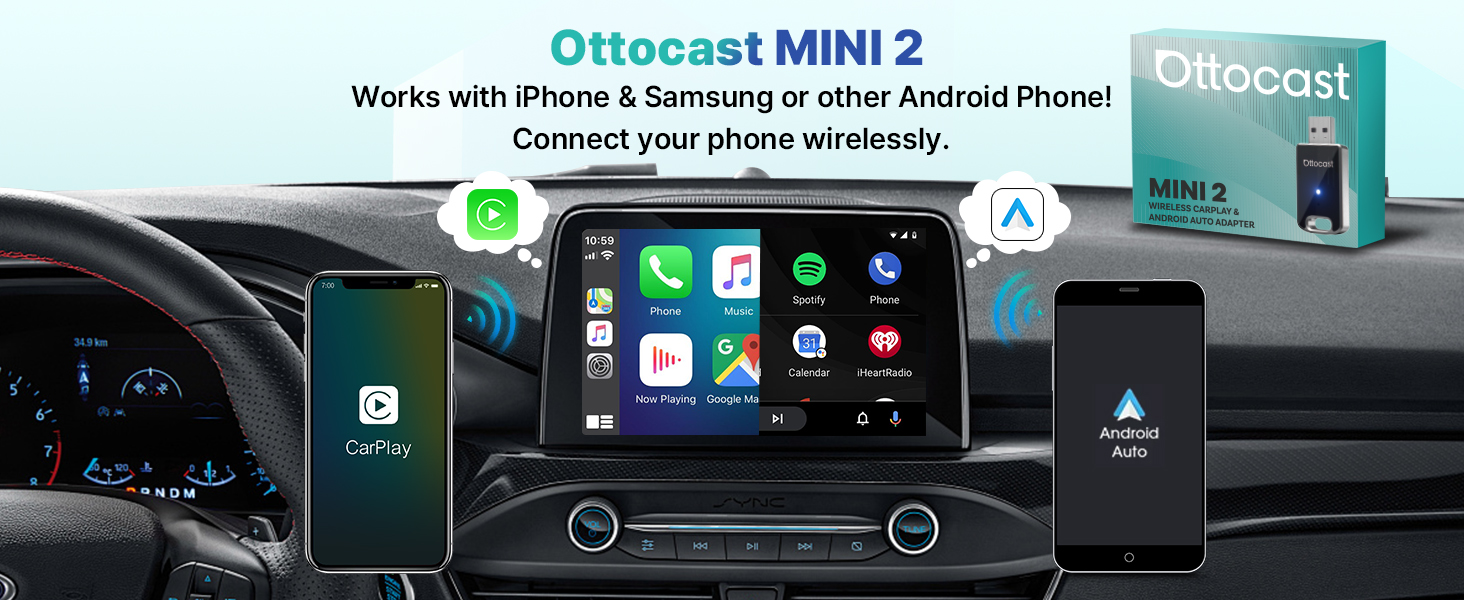
Image: The OTTOCAST Mini 2 adapter facilitating wireless connection for both iPhone (CarPlay) and Android phones (Android Auto) to a car's central display.

Image: A driver interacting with the car's system using voice commands, touchscreen, knobs, and steering wheel controls, enabled by the OTTOCAST Mini 2 adapter.
6. Maintenance
The OTTOCAST Mini 2 adapter requires minimal maintenance. To ensure optimal performance and longevity:
- Keep the device clean and free from dust and debris. Use a soft, dry cloth for cleaning.
- Avoid exposing the adapter to extreme temperatures, direct sunlight for prolonged periods, or excessive moisture.
- Handle the device and its connectors with care to prevent damage.
6.1 Firmware Updates (OTA)
The OTTOCAST Mini 2 supports Over-The-Air (OTA) firmware updates. Periodically check for updates to ensure your device has the latest features and performance improvements. Instructions for checking and applying updates will typically be available through a dedicated app or a web interface accessible via your smartphone when connected to the device's Wi-Fi.

Image: The OTTOCAST Mini 2 adapter depicted alongside a smartphone screen showing an interface for online firmware updates, indicating its OTA upgrade capability.
7. Troubleshooting
If you encounter issues with your OTTOCAST Mini 2 adapter, please refer to the following common solutions:
- Device Not Connecting Automatically: Ensure your phone's Bluetooth and Wi-Fi are enabled. Verify that the initial pairing process was completed successfully. If issues persist, try re-pairing the device. The adapter is designed to automatically connect within 5-10 seconds after the car starts.
- No Display on Car Screen: Confirm that your car's infotainment system supports wired CarPlay or Android Auto. Ensure the adapter is securely plugged into the correct USB port. Try a different USB port if available.
- Intermittent Connection: Check for any potential interference from other wireless devices. Ensure your phone's software is up to date. Consider performing a firmware update on the OTTOCAST Mini 2 if available.
- Audio Issues: Verify that your car's audio input is set to the correct source (e.g., CarPlay/Android Auto). Check your phone's volume settings.
- Compatibility Concerns: The adapter is compatible with cars that have factory-wired CarPlay or Android Auto. It is not compatible with BMW or Tesla vehicles. Ensure your car model is supported.
- Cannot Watch Videos (YouTube/Netflix): This adapter is designed to convert wired CarPlay/Android Auto to wireless for navigation, music, and communication apps. It does not support video streaming services like YouTube, Netflix, or Prime Video on your car's screen.

Image: A visual explanation confirming that the OTTOCAST Mini 2 adapter connects automatically within 5-10 seconds after the car starts, eliminating the need for manual connection each time.

Image: A clear statement indicating that the OTTOCAST Mini 2 wireless adapter is for converting wired CarPlay/Android Auto to wireless functionality and does not support streaming video applications such as YouTube or Netflix on the car's display.
8. Specifications
| Feature | Detail |
|---|---|
| Model Number | OTTOCAST Mini Edge |
| Product Dimensions (L x W x H) | 2.03 x 0.94 x 0.32 inches (5.16 x 2.39 x 0.81 cm) |
| Item Weight | 0.282 ounces (8 grams) |
| Connectivity | Bluetooth 4.2, 5Ghz Wi-Fi |
| Compatible Devices | Smartphones (Apple iPhone, Samsung, other Android phones) |
| Car Compatibility | Vehicles with factory-wired CarPlay or Android Auto (excluding BMW, Tesla) |
| Number of Ports | 2 (USB-A input, USB-A output for pass-through) |
| First Available Date | January 13, 2022 |

Image: A visual representation of the types of cars (with wired CarPlay/Android Auto) and smartphones (iPhone, Samsung, other Android) compatible with the OTTOCAST Mini 2 adapter, along with its USB-A/Type-C compatibility.
9. Warranty and Support
OTTOCAST is committed to providing excellent customer service and support for the Mini 2 adapter.
- After-Sale Service: Enjoy 24 months of after-sale service.
- Customer Support: Friendly customer service is available, with email support typically responding within 24 hours for troubleshooting assistance.
- Technical Support: OTTOCAST provides lifetime technical support for the Mini 2 adapter.
- Replacement Policy: In case of fitting or usage issues, OTTOCAST offers product replacement. Please contact customer service for assistance.
For any inquiries or support needs, please reach out to OTTOCAST customer service through the contact information provided in your product packaging or on the official OTTOCAST website.
Related Documents - OTTOCAST Mini Edge
 |
Ottocast U2AIR Pro Wireless CarPlay Adapter User Manual This user manual provides instructions for setting up and using the Ottocast U2AIR Pro Wireless CarPlay Adapter, enabling wireless CarPlay connectivity for compatible iPhone models with factory-installed wired CarPlay systems. |
 |
Ottocast Mini Slim Car Adapter User Manual User manual for the Ottocast Mini Slim Car Adapter, providing instructions for installation, usage, firmware updates, and troubleshooting for wireless CarPlay and Android Auto connectivity. |
 |
User Manual: Wireless AA & CP Adapter This user manual provides instructions for the Wireless AA & CP Adapter, detailing how to check for CarPlay compatibility, setup, usage for Android Auto and CarPlay, firmware updates, and troubleshooting. |
 |
OTTOCAST CA361 TV Box User Guide: Connection, Firmware, and Troubleshooting A comprehensive guide for the OTTOCAST CA361 TV Box, detailing connection procedures, firmware updates, system reset, key functions, and frequently asked questions for users. |
 |
Ottocast AA & CP Wireless Adapter Gebruikershandleiding: Draadloze CarPlay en Android Auto Installatie en Gebruik Gedetailleerde gebruikershandleiding voor de Ottocast AA & CP Wireless Adapter (2-in-1 Wireless CarPlay CP Dongle). Leer hoe u draadloze Apple CarPlay en Android Auto instelt, firmware bijwerkt en problemen oplost met uw auto's infotainmentsysteem. |
 |
User Manual: All-in-One Multimedia Adapter User manual for the All-in-One Multimedia Adapter, detailing specifications, contents, interfaces, connection diagrams, user interface, quick settings, and firmware updates. This adapter allows for online and offline video playback, Bluetooth connectivity, and wireless CarPlay/Android Auto on stock car monitors. |
Ask a question about this manual
Ask about setup, troubleshooting, compatibility, parts, safety, or missing instructions. Manuals+ will review the question and use this page’s manual context to help answer it.