
1. Introduction
The TOOLTOP MH13 is a digital insulation resistance tester, also known as a megohmmeter, designed for measuring insulation resistance. It is an essential instrument for evaluating the insulation integrity of large transformers, generators, high-voltage motors, power capacitors, power cables, and arresters. This manual provides detailed instructions for the safe and effective use of the MH13.

Image 1.1: The TOOLTOP MH13 Digital Insulation Megohmmeter, highlighting its capabilities for Polarization Index (PI) and Absorption Ratio (DAR) measurements, and 100 sets of data storage.
2. Safety Information
Always adhere to the following safety precautions to prevent personal injury and damage to the instrument:
- Read and understand all instructions before using the instrument.
- Do not use the instrument if it appears damaged or operates abnormally.
- Ensure the test leads are in good condition, without cracks or damaged insulation.
- Do not touch the test leads or the circuit under test during measurement, especially during high-voltage output.
- Always disconnect power from the circuit under test before connecting or disconnecting test leads.
- Verify the instrument's voltage rating matches the circuit being tested.
- Replace batteries promptly when the low battery indicator appears.
- Do not operate the instrument in explosive atmospheres or near flammable materials.
- Service should only be performed by qualified personnel.
3. Product Features
- Digital Megohmmeter with 2000 Counts display.
- Low-loss, high-ratio inductance energy storage DC voltage converter.
- Utilizes a digital LCR bridge for resistance measurement and insulation resistance testing.
- Advanced design for stable performance.
- User-friendly operation with a shoulder strap for portability.
- Anti-drop silicone casing for enhanced durability and protection.

Image 3.1: The TOOLTOP MH13 featuring its anti-drop silicone casing, designed to protect the device from impacts and ensure secure measurement.
4. Package Contents
Upon unpacking, verify that all items listed below are present:
- MH13 Digital Insulation Resistance Tester
- Packaging Box
- Insulation Resistance Tester Manual
- Alligator Clips (Red, Black)
- Storage Bag
- Test Leads (Red, Black)
- Signal Shielding Wire
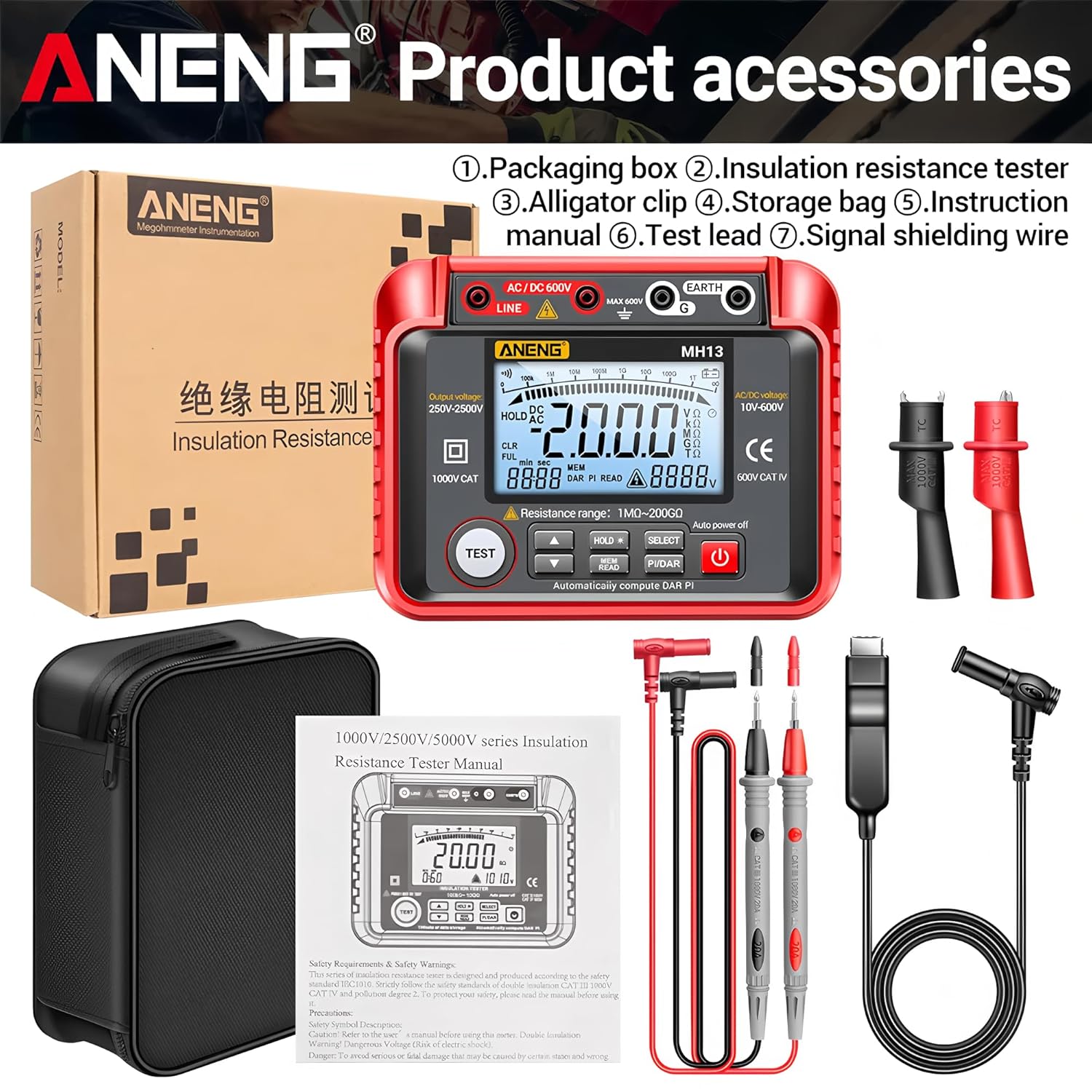
Image 4.1: Contents of the TOOLTOP MH13 package, including the main unit, test leads, alligator clips, storage bag, and user manual.
5. Setup
5.1 Battery Installation
The MH13 requires 8 AA5 batteries for operation. To install or replace batteries:
- Locate the battery compartment on the back of the device.
- Open the battery compartment cover.
- Insert 8 AA5 batteries, ensuring correct polarity (+/-).
- Close the battery compartment cover securely.
5.2 Connecting Test Leads
Connect the test leads to the appropriate input terminals on the MH13. For most measurements, the red lead connects to the 'LINE' terminal and the black lead connects to the 'EARTH (G)' terminal.
6. Operating Instructions
6.1 Power On/Off
Press the red power button (U) to turn the device on or off. The device features an 'Auto power off' function to conserve battery life.
6.2 Insulation Resistance Measurement
This function measures the insulation resistance of electrical systems and components.
- Ensure the circuit under test is de-energized and safely discharged.
- Connect the red test lead to the 'LINE' terminal and the black test lead to the 'EARTH (G)' terminal on the MH13.
- Connect the test leads to the two points of the component or circuit where insulation resistance is to be measured.
- Select the desired output voltage (250V, 500V/1000V, or 2000V/2500V) using the appropriate buttons or selector.
- Press the 'TEST' button to initiate the measurement. The display will show the insulation resistance value.
- Release the 'TEST' button to stop the measurement. The circuit under test will automatically discharge.

Image 6.1: Demonstrates connecting the TOOLTOP MH13 for insulation resistance measurement, showing the test leads connected to an electrical motor and the display indicating a resistance value.
6.3 AC/DC Voltage Measurement
The MH13 can also measure AC and DC voltages.
- In the standby interface, short press the 'SELECT' button to enter the AC voltage function. Press it again to switch to the DC voltage function.
- Connect the red test lead to the 'AC/DC 600V' terminal and the black test lead to the 'EARTH (G)' terminal.
- Insert the test lead probes into the circuit to be measured.
- Read the voltage value displayed on the screen.

Image 6.2: Illustrates the process of measuring AC voltage (left) and DC voltage (right) using the TOOLTOP MH13, showing proper lead connection and display readings.
6.4 Polarization Index (PI) and Absorption Ratio (DAR)
The Polarization Index (PI) and Absorption Ratio (DAR) are critical for assessing the quality and aging problems of insulation in electrical equipment.
- DAR (Dielectric Absorption Ratio): Ratio of insulation resistance at 60 seconds to insulation resistance at 30 seconds.
- PI (Polarization Index): Ratio of insulation resistance at 10 minutes to insulation resistance at 1 minute.
The MH13 can automatically compute DAR and PI. To perform these tests:
- Set up the insulation resistance test as described in Section 6.2.
- Press the 'PI/DAR' button.
- Press the 'TEST' button and hold it for the duration of the test (e.g., 10 minutes for PI). The device will automatically record the necessary resistance values at 1 minute and 10 minutes.
- The calculated PI and DAR values will be displayed. Refer to the judgment standard table for interpretation.

Image 6.3: Explains the Polarization Index (PI) measurement process, showing 1-minute and 10-minute insulation resistance readings and a table for interpreting PI values (Most, Good, Warn, Bad).
6.5 Data Storage and Recall
The MH13 supports storing up to 100 sets of data. Use the 'MEM READ' and 'HOLD' buttons to manage stored measurements. Consult the detailed manual for specific steps on saving and recalling data.
7. Maintenance
7.1 Cleaning
Wipe the instrument with a damp cloth and mild detergent. Do not use abrasives or solvents. Ensure the device is dry before storage or use.
7.2 Battery Replacement
Replace batteries as described in Section 5.1 when the low battery indicator appears on the display. Remove batteries if the instrument will not be used for an extended period.
7.3 Storage
Store the MH13 in a cool, dry place, away from direct sunlight and extreme temperatures. Use the provided storage bag to protect it from dust and physical damage.
8. Troubleshooting
- No Power: Check battery installation and ensure batteries are charged.
- Inaccurate Readings: Verify test lead connections, ensure proper function selection, and check for external interference.
- Display Error: Turn the device off and on again. If the error persists, contact customer support.
- High Voltage Warning: Ensure the circuit under test is de-energized before connecting leads for insulation resistance tests.
9. Specifications
| Parameter | Value |
|---|---|
| Output Voltage | 250V, 500V/1000V, 2000V/2500V |
| Measuring Range (250V) | 1MΩ-10GΩ (±(5%+10d)) |
| Measuring Range (500V/1000V) | 2MΩ-20GΩ (±(5%+10d)) |
| Measuring Range (2000V/2500V) | 5MΩ-40GΩ (±(5%+10d)) |
| Short Circuit Current | 1.8mA |
| AC Voltage | 10-600V (±(1%+5d)) |
| DC Voltage | 10-600V (±(0.8%+5d)) |
| Resistance Range | 1MΩ-200GΩ |
| Max Count | 2000 counts |
| Battery Type | AA5 battery*8 |
| Material | Silica gel/ABS |
| Weight | 640g |
| Pen Material | PVC/brass |
| Overall Length of Test Leads | 108cm |
| Display | HD backlit screen |
| Data Storage | 100 sets |
| Absorption Ratio (DAR) | Supported |
| Polarization Index (PI) | Supported |
| Autoranging | Supported |
| Automatic Discharge | Supported |
| Test Voltage Display | Supported |
| High Pressure Indication | Supported |
| Measurement Time Display | Supported |
| Low Voltage Indication | Supported |
| Back Support | Supported |
| Certifications | CE, RoHS |

Image 9.1: Detailed technical specifications and parameters for the TOOLTOP MH13, including output voltage, measuring ranges, precision, and features.
10. Warranty and Support
The TOOLTOP MH13 is manufactured by TOOLTOP. For warranty information, technical support, or service inquiries, please refer to the contact information provided with your purchase or visit the official TOOLTOP website. Please retain your proof of purchase for warranty claims.


