
1. Introduction
The DALY BMS (Battery Management System) is designed to protect and optimize the performance of 16S 48V LiFePO4 battery packs. This smart Bluetooth-enabled board ensures the safety and extends the lifespan of your lithium battery systems by providing comprehensive protection and real-time monitoring capabilities. It is suitable for various applications including golf carts, electric outboard motors, and solar energy power systems.

Figure 1: DALY BMS 48V 16S 200A LiFePO4 Smart Bluetooth Battery Protection Board.
2. Key Features
- Comprehensive Battery Protection: Provides essential safeguards including low voltage cutoff, high voltage cutoff, short circuit protection, and temperature protection to enhance battery performance and longevity.
- Smart Bluetooth Connectivity: Features an integrated Bluetooth module for easy setup and configuration. Allows real-time monitoring, configuration, and optimization of battery parameters such as State of Charge (SOC), voltage, current, and temperature via a dedicated mobile application.
- Parallel System Support: The built-in parallel circuit supports connecting 8 or more battery packs, enabling scalable capacity expansion for increased power and extended runtime.
- Multiple Interface Functions: Equipped with dual UART communication ports, Bluetooth module, and support for touch display integration. Includes a Bluetooth activation-free function, allowing the BMS to be woken up and connected simply by opening the app.
- Extended Warranty: Comes with a 5-year warranty, ensuring reliability and customer confidence.
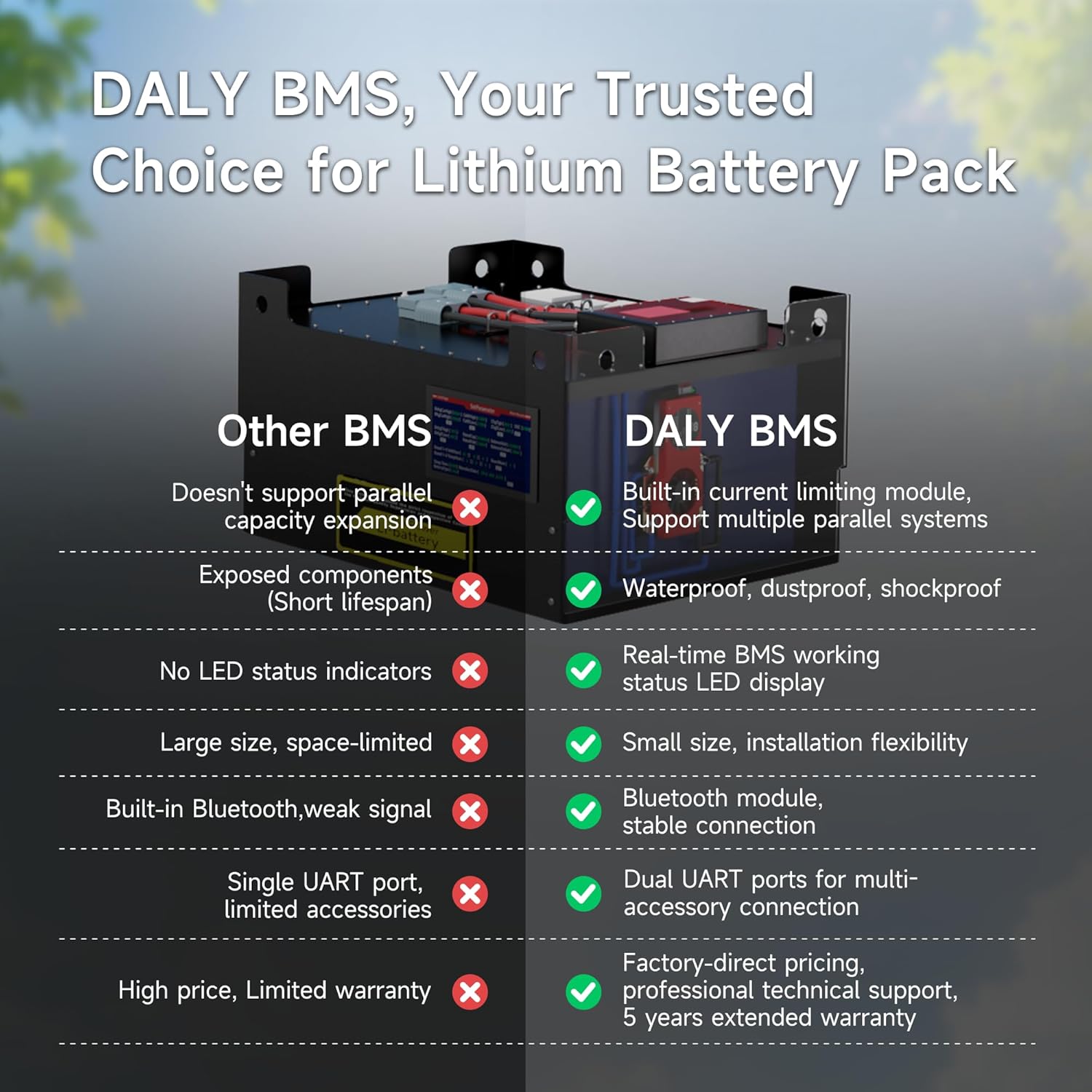
Figure 2: DALY BMS advantages including parallel support, waterproof design, LED status, small size, stable Bluetooth, dual UART, and extended warranty.
3. Packing List and Components
Upon unboxing, please verify that all components listed below are present and undamaged.
- 16S 48V 200 Amps Smart BMS (x1)
- B-P-Output line (x1)
- BT dongle (x1)
- Sampling cable (x1)
- NTC (Temperature Sensor) (x1)
- Instruction Manual (x1)
- Screws (quantity as needed)
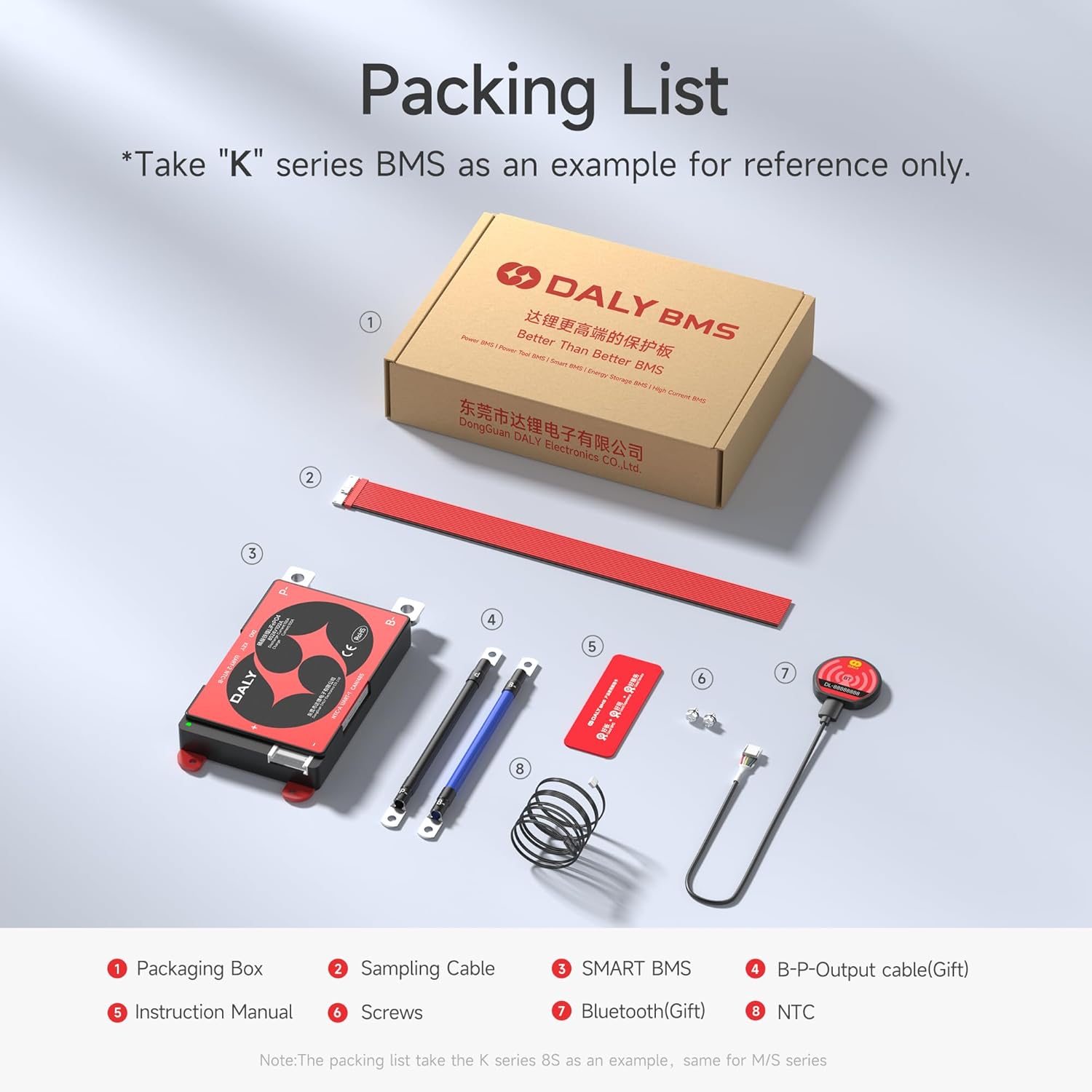
Figure 3: Visual representation of the DALY BMS packing list, including the BMS unit, cables, Bluetooth dongle, and manual.
4. Setup and Installation
Proper installation is crucial for the safe and efficient operation of your DALY BMS. Always ensure the battery pack is disconnected before beginning installation.
4.1 Safety Precautions
- Wear appropriate personal protective equipment (PPE), including insulated gloves and eye protection.
- Ensure all connections are secure and properly insulated to prevent short circuits.
- Verify correct polarity before making any connections.
- Consult a qualified professional if you are unsure about any installation steps.
4.2 Wiring Instructions
- Connect the B- terminal of the BMS to the negative terminal of the battery pack.
- Connect the P- terminal of the BMS to the negative terminal of the load/charger.
- Carefully connect the sampling cable (balance wires) to each cell of the battery pack, starting from the lowest voltage cell (B0) to the highest (B16). Ensure the order is correct.
- Connect the NTC temperature sensor to the battery pack, ensuring good thermal contact.
- Connect the Bluetooth dongle to the designated port on the BMS.
- Once all connections are verified, connect the positive terminal of the battery pack to the positive terminal of the load/charger.

Figure 4: Example of a DALY BMS integrated into a battery system, demonstrating a quick setup configuration.

Figure 5: Detailed view of the DALY BMS connection terminals, including B-, P-, UART, and NTC ports.
5. Operating the Smart BMS (Bluetooth App)
The DALY Smart BMS features Bluetooth connectivity for convenient monitoring and configuration via a mobile application.
5.1 App Download and Connection
- Download the official DALY BMS application from your smartphone's app store (iOS/Android).
- Ensure the Bluetooth dongle is connected to the BMS and powered on.
- Open the DALY BMS app. The app will automatically search for and connect to the BMS (Bluetooth activation-free function).
- If prompted, enter any default password (refer to the specific manual for your app version).
5.2 Monitoring Parameters
The app provides real-time data on your battery system:
- Status Display: View overall battery status, communication protocol, and device name.
- Protection Parameters: Monitor individual cell voltages, total voltage, current (charge/discharge), State of Charge (SOC), and temperature.
- System Settings: Access and adjust various protection thresholds and operational parameters.

Figure 6: Screenshots of the DALY BMS mobile application, illustrating the status display, protection parameters, and system settings interfaces.
6. Parallel System Configuration
The DALY BMS is designed to support multiple battery packs in parallel, allowing for increased capacity and extended runtime. The built-in current limiting module facilitates the connection of 8 or more battery packs.
When connecting multiple battery packs in parallel, ensure that all packs are of the same voltage and State of Charge (SOC) before connecting them. This prevents large current surges between packs. Consult the specific wiring diagrams for parallel connections provided with your battery system or by a qualified technician.

Figure 7: Illustration of how multiple battery packs can be connected in parallel to increase overall system capacity using the DALY BMS.
7. Safety and Protection Features
The DALY BMS provides robust protection mechanisms to safeguard your LiFePO4 battery pack:
- Overcharging Protection: Prevents cells from being charged beyond their safe voltage limit, which can lead to damage and reduced lifespan.
- Overdischarging Protection: Stops discharge when cell voltages drop below a safe minimum, protecting the battery from irreversible damage.
- Overcurrent Protection: Limits the current drawn from or supplied to the battery to prevent damage from excessive loads or charging currents.
- Short Circuit Protection: Immediately cuts off power in the event of a short circuit, preventing severe damage to the battery and potential fire hazards.
- Extreme Temperature Protection: Monitors battery temperature and disconnects the battery if temperatures exceed safe operating ranges (both high and low), preserving battery health.
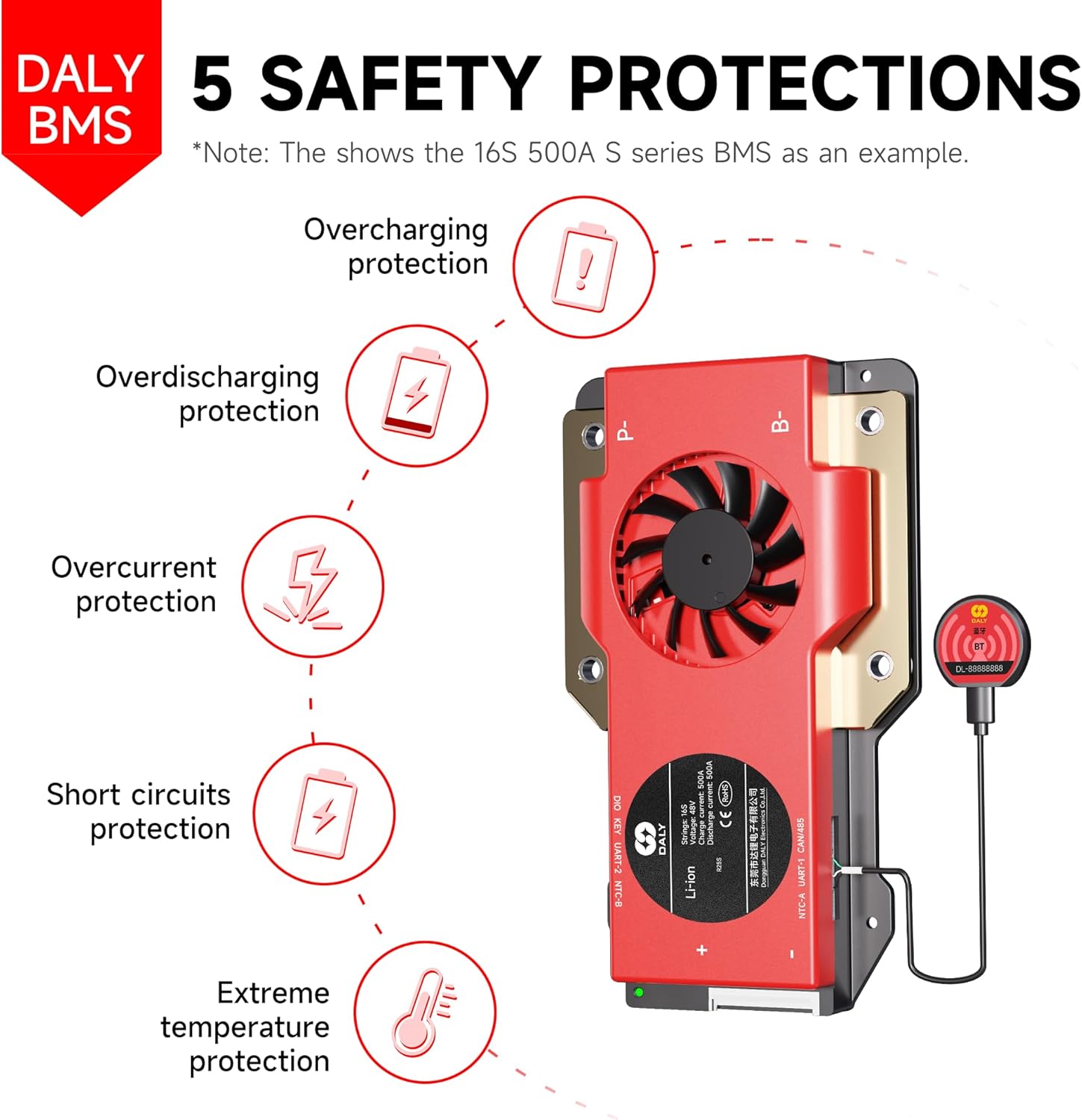
Figure 8: Visual representation of the five core safety protections offered by the DALY BMS: overcharging, overdischarging, overcurrent, short circuit, and extreme temperature protection.
8. Maintenance
Regular maintenance helps ensure the longevity and optimal performance of your DALY BMS and battery system.
- Periodic Visual Inspection: Regularly check the BMS and all connections for any signs of damage, corrosion, or loose wiring.
- Software Updates: Keep the DALY BMS mobile application updated to the latest version to benefit from new features and bug fixes.
- Temperature Monitoring: Ensure the battery system operates within its recommended temperature range. The NTC sensor helps monitor this, and the BMS will protect against extremes.
- Cleanliness: Keep the BMS and battery area clean and free from dust and debris to prevent overheating and ensure proper operation.
9. Troubleshooting
This section addresses common questions and issues related to BMS selection and operation.
Q1: How to determine the correct battery cell type and series connection (Strings)?
A1: Identify whether your battery is Li-ion, LiFePO4, or LTO. The number of cells connected in series (e.g., 16S for 48V LiFePO4) is critical for BMS compatibility.
Q2: How much amperage is needed for the BMS?
A2: To ensure proper protection, the BMS's rated current should meet or exceed your controller's maximum operating current. For example, if your controller peaks at 60A, choose a BMS rated for 60A or higher. Using a mismatched BMS can damage your battery and potentially cause a fire.
Q3: Do I need to monitor or customize all important data?
A3: For detailed monitoring and customization, the DALY Smart BMS with Bluetooth dongle is recommended, allowing easy access via the app or PC software. If advanced monitoring is not required, a multimeter can be used for basic checks.
Q4: How to maximize battery lifespan?
A4: For batteries expected to last more than 1 year or 1,000 charge cycles, a Battery Active Balancer (1A or 5A) is recommended. This helps maintain cell balance, which is crucial for the longevity of series-connected batteries. For new or brand-new cells, a standard non-balancing BMS is a good choice, but an active balancer can significantly extend lifecycles.
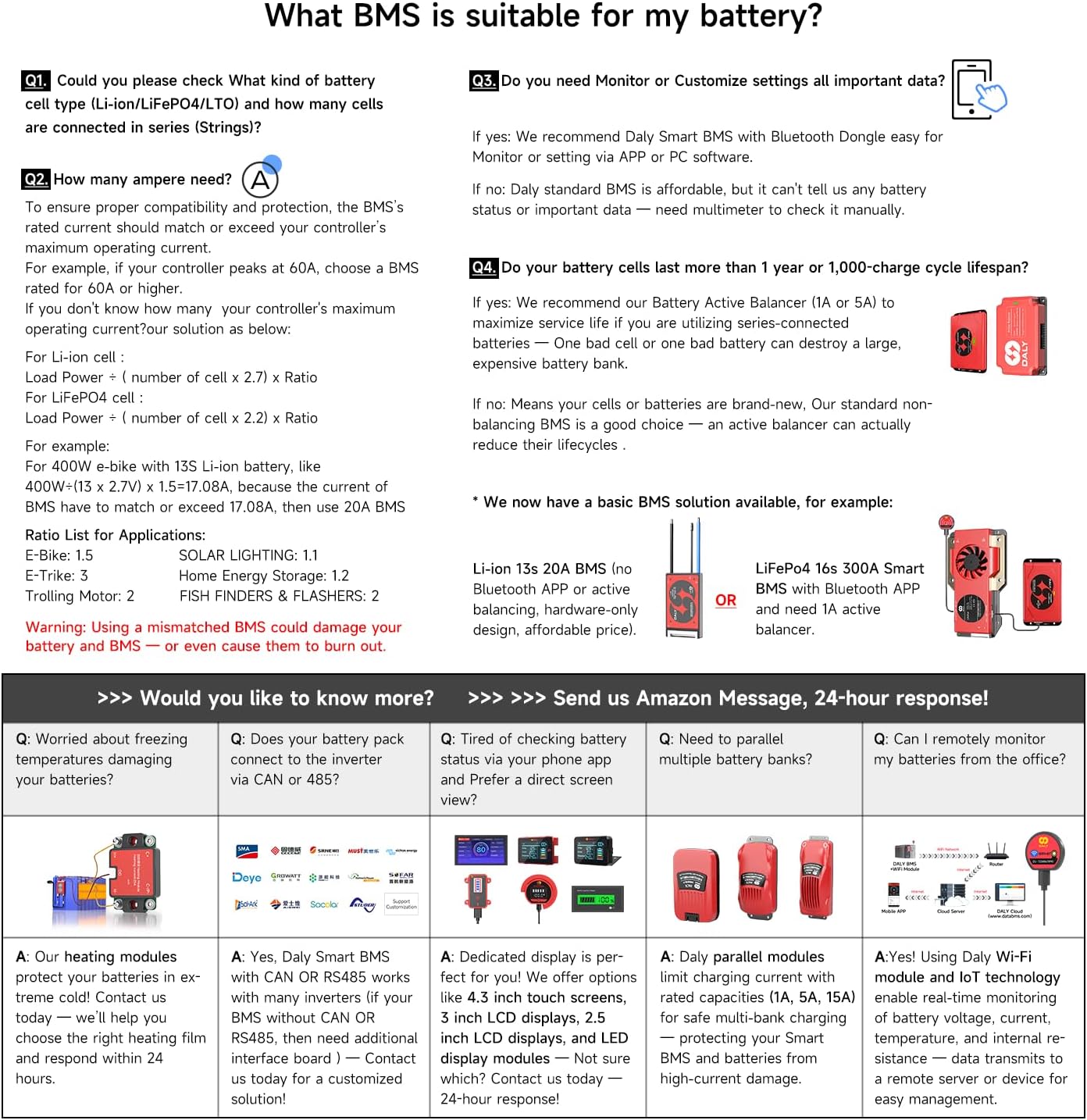
Figure 9: A guide addressing common questions about BMS selection and battery compatibility.
10. Specifications
| Feature | Specification |
|---|---|
| Brand | DALY |
| Model Name | 200A+BT |
| ASIN | B0F5MN9K9R |
| Voltage | 48 Volts |
| Current Rating | 200 Amps |
| Battery Type | LiFePO4 |
| Series Configuration | 16S |
| Package Dimensions | 5 x 5 x 5 inches |
| Item Weight | 1 pounds |
| Recommended Uses | Solar Devices, Golf Carts, Electric Outboard Motors |
| UPC | 753252853077 |
| Manufacturer | Dongguan Daly Electronics Co., Ltd |
| Certifications | ISO/FCC/RoHS/PSE/CE approved |
Detailed Protection Parameters (Reference)

Figure 10: A table detailing various protection parameters such as passive equalization, overcharge/discharge protection, and temperature protection. Note: Actual test results may vary.
11. Warranty and Support
The DALY BMS 48V 16S 200A LiFePO4 Smart Bluetooth Battery Protection Board comes with a 5-year warranty from the date of purchase, covering manufacturing defects and malfunctions under normal use conditions.

Figure 11: DALY BMS 5-year extended warranty badge, signifying product reliability.
For technical support, warranty claims, or any inquiries, please contact the seller directly through the Amazon messaging system. DALY BMS aims to provide professional technical support and factory-to-you savings.
You can also visit the official DALY Store on Amazon for more information and product resources: DALY Store
12. Product Video
Watch the official DALY promotional video for an overview of the product and its features.
Video: DALY BMS promotional video showcasing product design, manufacturing, and applications.