
1. Product Overview
The Wuzhi Audio ZK-AS21P is a high-performance 2.1 channel Bluetooth amplifier board designed for various audio applications. It features a powerful output, multiple audio input options, and robust protection mechanisms.

Figure 1: Wuzhi Audio ZK-AS21P Bluetooth Amplifier Board, showcasing its compact design and integrated cooling fan.
Key Features:
- 2.1 Channel Design: Supports two passive speakers and one subwoofer with independent volume and frequency controls.
- High Fidelity Audio: Powered by dual TPA3255 amplifier chips and six JRC 2068D preamplifiers for clear, low-distortion sound.
- Powerful Output: Delivers 300W per channel (left/right) and 600W for the subwoofer.
- Versatile Audio Inputs: Includes Bluetooth 5.1, 3.5mm AUX, USB flash drive, and USB sound card modes.
- Advanced Protection: Built-in safeguards against undervoltage, overheating, overcurrent, and short-circuits.
- Efficient Cooling: Features a quiet, long-life cooling fan for stable operation.
2. Safety Information
- Power Supply: Use a DC power supply within the 18-50V range. Recommended: 36-48V DC, 12A or higher.
- Polarity: This device does not have reverse polarity protection. Ensure correct positive (+) and negative (-) connections to prevent damage.
- Ventilation: Ensure adequate airflow around the amplifier board to prevent overheating, especially during high-power operation.
- Speaker Impedance: Match speaker impedance to the amplifier's capabilities to avoid damage.
- Environment: Avoid exposing the board to moisture, dust, or extreme temperatures.
3. Package Contents
- ZK-AS21P Bluetooth Amplifier Board
- External Potentiometer Cable (approx. 33 cm)
4. Product Diagram and Components

Figure 2: Labeled diagram of the ZK-AS21P amplifier board, highlighting key input/output ports and control knobs.
- Power Input (18-50VDC): Connect your DC power supply here (5.5x2.5mm DC input jack or 2P terminal block).
- USB Input: For USB flash drives (FAT32, ≤32GB) or USB sound card mode.
- 3.5mm AUX Input: Standard audio input jack.
- Expansion Port 1: Connects to the audio input of a MIC preamp board or 2.0 pure rear stage amplifier input port.
- Expansion Port 2: Connects to the reverb output of a MIC preamp board or the audio output of a Qualcomm decoding board.
- Subwoofer Small Signal Output: Connects to the input port of a pure rear power amplifier board.
- Subwoofer Frequency (20-200Hz): Adjusts the subwoofer crossover frequency.
- Subwoofer R&L Volume: Controls the volume of the subwoofer.
- R&L Treble: Adjusts the high-frequency output for the left and right channels.
- R&L Bass: Adjusts the low-frequency output for the left and right channels.
- Main Volume: Controls overall system volume. Also functions as a multi-function button: Single Press for Play/Pause, Double Press for Next Track, Triple Press for Previous Track, Long Press for Power On/Off.
- External Potentiometer Cable: Approximately 33 cm long, used to connect the external control panel to the main board.
Note: When using Expansion Port 1 and Expansion Port 2, remove the three 0 ohm resistors (R76, R75, and R74) as indicated in the diagram.
5. Setup Instructions
5.1 Power Supply Connection
- Connect a DC power supply (18-50V, 12A or higher recommended) to the Power Input port (1).
- Ensure correct polarity: positive (+) to positive, negative (-) to negative. Incorrect connection will damage the board.

Figure 3: Close-up of the upgrade DC socket, dual TPA3255 chips, and large heat sink with cooling fan, illustrating key internal components for stable operation.
5.2 Speaker Connection
- Connect your passive left and right speakers to the 'L' and 'R' speaker terminals.
- Connect your passive subwoofer to the 'S' subwoofer terminals.
- Observe correct polarity for all speaker connections.
5.3 Audio Input Connection
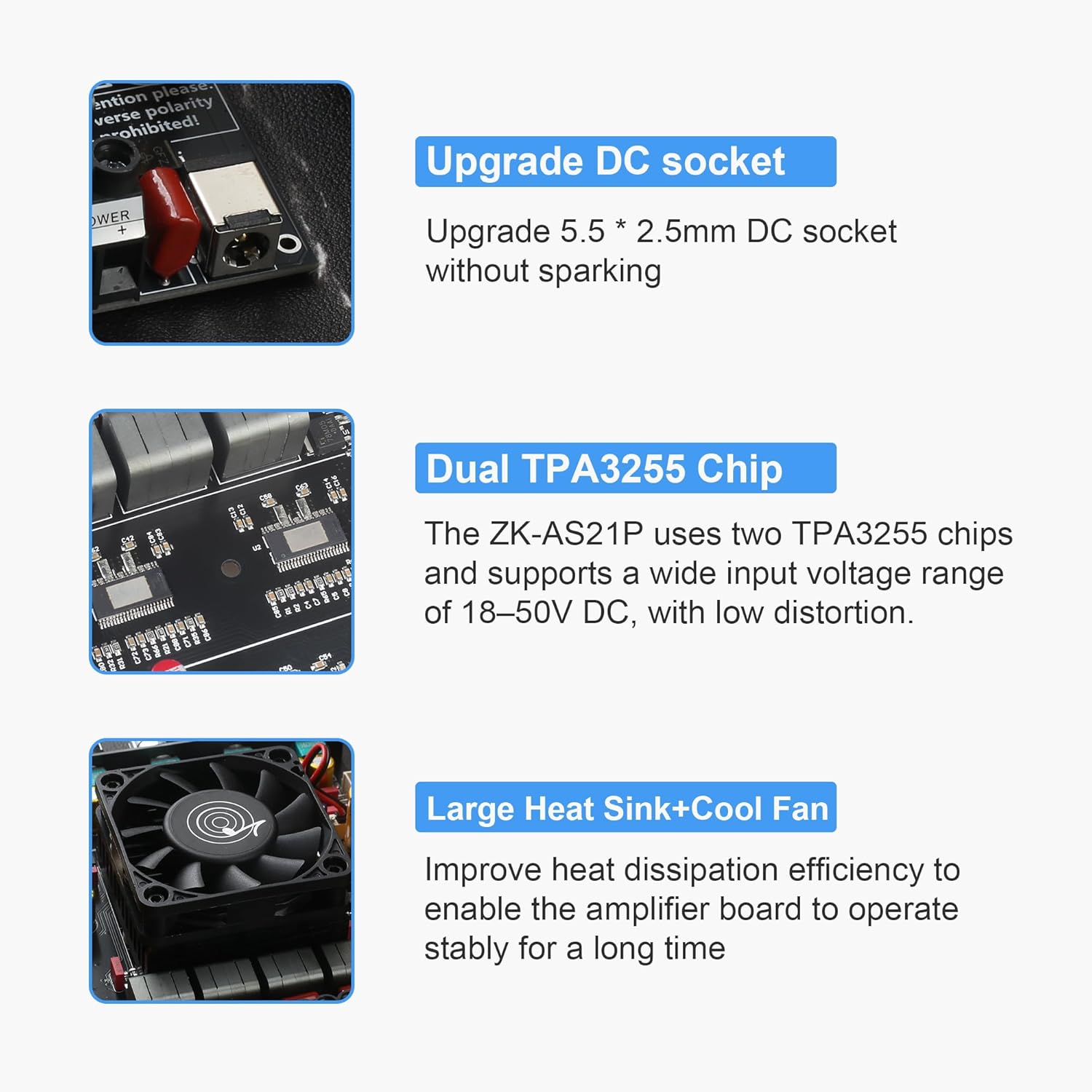
Figure 4: Illustration of the three available audio input modes: Bluetooth, 3.5mm AUX, and USB Input.
- Bluetooth 5.1: Power on the board. The Bluetooth indicator will flash. Search for "BT-WUZHI AUDIO" on your device and pair.
- 3.5mm AUX Input: Connect an audio source using a 3.5mm audio cable to the AUX input jack (3). Disconnect Bluetooth for uninterrupted AUX playback.
- USB Input: Insert a USB flash drive (formatted to FAT32, ≤32GB) into the USB port (2) or connect the board to a computer via USB for USB sound card mode.
6. Operating Instructions
6.1 Power On/Off
- Power On: Long press the Main Volume knob (11).
- Power Off: Long press the Main Volume knob (11).
6.2 Volume and Tone Control
- Main Volume: Rotate the Main Volume knob (11) clockwise to increase, counter-clockwise to decrease.
- Subwoofer Volume: Rotate the Subwoofer R&L Volume knob (8) to adjust the subwoofer output level.
- Subwoofer Frequency: Rotate the Subwoofer Frequency knob (7) to set the subwoofer's crossover frequency (20-200Hz).
- Treble/Bass: Rotate the R&L Treble knob (9) and R&L Bass knob (10) to adjust the high and low frequencies for the main channels.
6.3 Playback Control (via Main Volume Knob)
- Play/Pause: Single press the Main Volume knob (11).
- Next Track: Double press the Main Volume knob (11).
- Previous Track: Triple press the Main Volume knob (11).
7. Specifications

Figure 5: Detailed specifications of the ZK-AS21P Bluetooth Amplifier Board.
| Parameter | Detail |
|---|---|
| Product Name | 2.1 Channel Bluetooth Amplifier Board |
| Model Number | ZK-AS21P |
| Power Supply Operating Voltage Range | 18-50VDC (Max 53V). Recommended: 36-48V DC, 12A or higher. |
| Max Output Power (Left/Right Channel) | 300W@50V, 4Ω; 160W@50V, 8Ω |
| Max Output Power (Subwoofer) | 600W@50V, 2Ω; 300W@50V, 4Ω; 160W@50V, 8Ω |
| Bluetooth Chip | JL (Jerry) 5.1 |
| Bluetooth Transmission Range | 15 meters |
| Input Options | Bluetooth + AUX + USB Flash Drive/Sound Card |
| Channel Configuration | 2.1 (Left + Right + Subwoofer) |
| Amplifier IC | Dual TPA3255 Chips |
| Protection Features | Undervoltage, Overheat, Overcurrent, Short-Circuit Protection (No reverse polarity protection) |
| Product Dimensions (External Potentiometer Version) | 131.5 × 120 × 40mm |
| Net Weight (External Potentiometer Version) | 453g |
| Material Type | PCB |
| Manufacturer | Wuzhi Audio |

Figure 6: Dimensional drawing of the ZK-AS21P amplifier board.
8. Maintenance
- Cleaning: Use a soft, dry cloth to clean the amplifier board. Avoid using liquids or abrasive cleaners.
- Ventilation: Ensure the cooling fan and heat sink remain free of dust and obstructions to maintain optimal heat dissipation.
- Storage: When not in use for extended periods, store the board in a dry, dust-free environment.
9. Troubleshooting
- No Power:
- Check power supply connection and ensure it's within the 18-50V DC range with sufficient current (12A or higher).
- Verify correct polarity of the power connection.
- Ensure the Main Volume knob is long-pressed to power on.
- No Sound:
- Check all speaker connections for correct wiring and polarity.
- Verify the audio input source is properly connected and playing.
- Adjust Main Volume, Subwoofer Volume, Treble, and Bass knobs.
- If using AUX, ensure Bluetooth is disconnected.
- Distorted Sound:
- Reduce the input volume from your audio source.
- Check speaker impedance compatibility.
- Ensure the power supply can deliver adequate current for the output level.
- Bluetooth Connection Issues:
- Ensure the amplifier board is powered on and within 15 meters of the Bluetooth device.
- Forget "BT-WUZHI AUDIO" on your device and try pairing again.
- Ensure no other devices are actively connected to the amplifier via Bluetooth.
10. Warranty and Support
For warranty information and technical support, please refer to the documentation provided at the point of purchase or contact Wuzhi Audio directly through their official support channels. Keep your purchase receipt as proof of purchase.