
1. Introduction
The She's Birdie 3.0 is a compact, personal safety alarm designed to provide an immediate alert in situations where you feel unsafe. It features a loud siren, a high-intensity strobe light, and a built-in flashlight. This device is rechargeable and easily attaches to your keys or bag, offering peace of mind wherever you go.
Please read this manual carefully to understand how to properly use and maintain your Birdie 3.0 personal safety alarm.
2. Product Features
The Birdie 3.0 personal safety alarm is equipped with several key features:
- 130dB Siren: A piercing alarm designed to attract attention and deter potential threats.
- High-Intensity Strobe Light: Flashes simultaneously with the siren to increase visibility and disorient.
- Built-in Flashlight: Provides illumination in low-light conditions.
- Rechargeable Battery: Long-lasting Lithium-Ion battery, rechargeable via USB-C.
- On/Off Switch: Located on the side to prevent accidental activation and conserve battery.
- Charge Indicator Light: Informs you of the charging status.
- Solid Brass Keychain: Durable attachment for keys or bags.

Image: Diagram illustrating the various features of the Birdie 3.0 alarm, including the flashlight, solid brass keychain, on/off switch, loud siren + strobe light, charge indicator light, and rechargeable USB-C port.
3. Setup
3.1 Initial Charging
- Locate the USB-C charging port on the side of your Birdie 3.0 device.
- Connect the provided USB-C cable to the device and plug the other end into a standard USB power adapter (not included) or a computer USB port.
- The charge indicator light will illuminate to show the charging status. Refer to the specifications for typical charging times.
- Once fully charged, disconnect the cable. A full charge provides approximately 120 minutes of continuous siren and light use.
3.2 Attaching to Keychain or Bag
The Birdie 3.0 comes with a solid brass keychain for easy attachment.
- Open the brass keychain by twisting the barrel.
- Thread the top ring of the Birdie 3.0 onto the keychain.
- Securely close the brass keychain.
- Attach the keychain to your keys, purse, backpack, or any other convenient location for quick access.

Image: A yellow Birdie 3.0 alarm attached to the handle of a grey handbag, demonstrating how it can be carried.
4. Operating Instructions
4.1 Power On/Off
Before use, ensure the device is powered on. The On/Off switch is located on the side of the device.
- To Power On: Slide the switch to the 'On' position.
- To Power Off: Slide the switch to the 'Off' position. This is recommended when storing the device for extended periods to conserve battery.
4.2 Activating the Alarm and Strobe Light
In an emergency, activate the alarm quickly:
- Firmly pull the top ring of the Birdie 3.0 away from the main body.
- The 130dB siren will sound immediately, and the high-intensity strobe light will begin flashing.
4.3 Deactivating the Alarm and Strobe Light
To stop the alarm and strobe light:
- Push the top ring back into the main body of the device until it clicks securely into place.
- The siren and strobe light will cease.
4.4 Using the Flashlight
The Birdie 3.0 includes a separate flashlight function for everyday use:
- To turn on the flashlight: Press the central button on the front of the device once.
- To turn off the flashlight: Press the central button again.
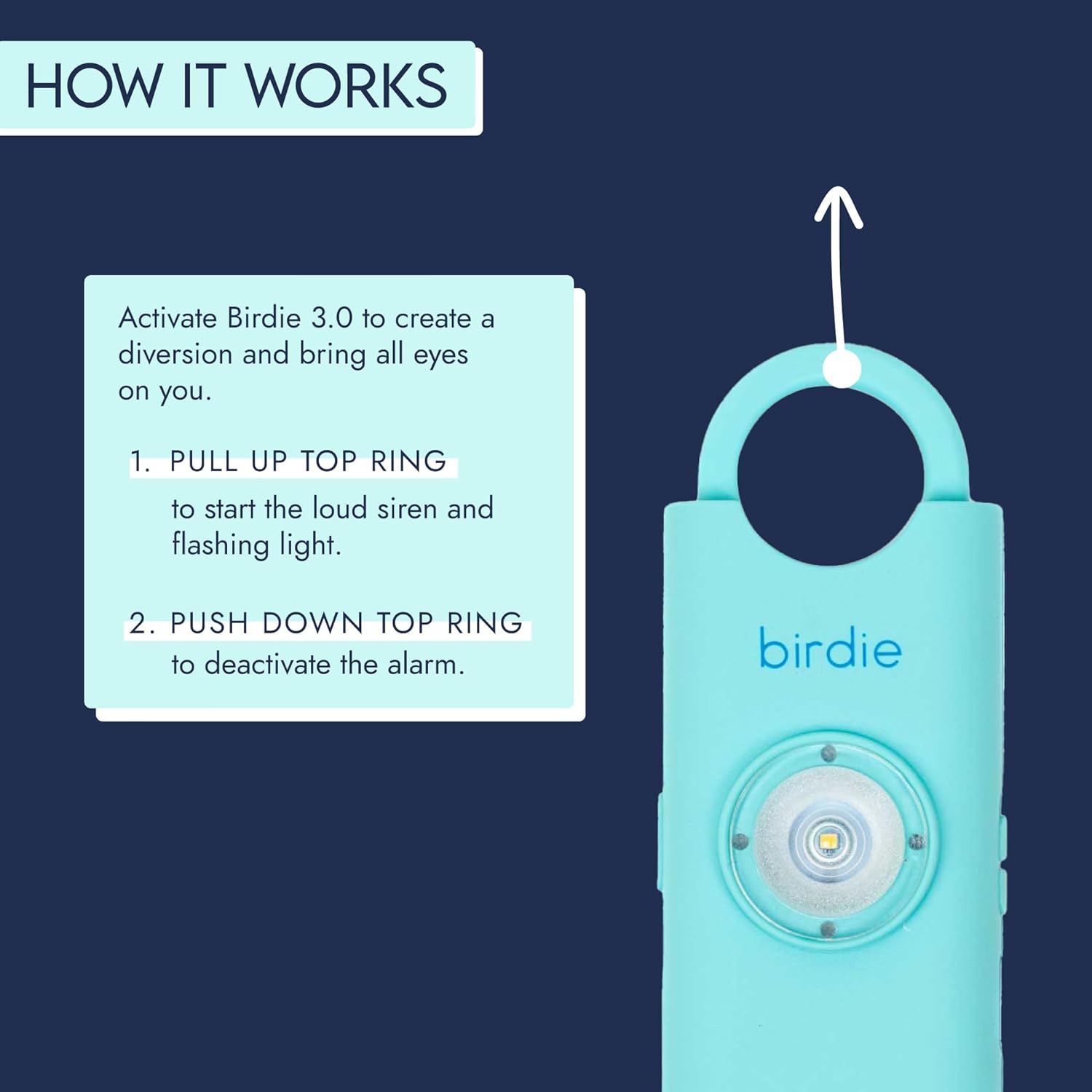
Image: Diagram showing how to activate and deactivate the Birdie 3.0 alarm. Step 1: Pull up top ring to start siren and flashing light. Step 2: Push down top ring to deactivate.
5. Maintenance
5.1 Recharging the Battery
To ensure your Birdie 3.0 is always ready, regularly check its charge level and recharge as needed. The device is reusable and designed for long-term use.
- Recharge the device when the charge indicator light suggests low battery, or after prolonged use.
- Follow the charging instructions in Section 3.1.
5.2 Cleaning
To clean your Birdie 3.0:
- Wipe the exterior with a soft, dry, or slightly damp cloth.
- Do not use harsh chemicals, abrasive cleaners, or immerse the device in water.
6. Troubleshooting
| Problem | Possible Cause | Solution |
|---|---|---|
| Alarm does not sound / Light does not flash | Battery is depleted. Device is powered off. Top ring not pulled far enough. | Recharge the device. Ensure the On/Off switch is in the 'On' position. Pull the top ring firmly until it separates from the body. |
| Flashlight does not turn on | Battery is depleted. Device is powered off. | Recharge the device. Ensure the On/Off switch is in the 'On' position. |
| Device not charging | Cable not properly connected. Faulty USB power source. | Ensure USB-C cable is fully inserted into both the device and the power source. Try a different USB port or power adapter. |
7. Specifications
| Model Name | Birdie 3.0 |
| Model Number | ANI_SOLID_AQ_HC-3 |
| Audible Noise | 130 dB |
| Power Source | Battery Powered |
| Battery Type | Lithium-Ion (Rechargeable) |
| Battery Life (Continuous) | Up to 120 minutes (siren + light) |
| Charging Port | USB-C |
| Product Dimensions (L x W x H) | 1.25" x 0.6" x 3.7" |
| Control Method | Pull/Push Ring, Button |
| UPC | 850066459164 |
8. Safety Information
- Loud Noise Warning: The 130dB siren is extremely loud. Avoid prolonged exposure to the sound, especially near the ears, to prevent potential hearing damage.
- Keep Out of Reach of Children: This device is not a toy and contains small parts. Keep it away from young children to prevent choking hazards or misuse.
- Intended Use: The Birdie 3.0 is intended as a personal safety device. Use it responsibly and only when necessary.
- Battery Safety: Do not attempt to open or replace the internal battery. Do not expose the device to extreme temperatures or dispose of it in fire.
9. Warranty and Support
For warranty information, product support, or to contact customer service, please visit the official She's Birdie website:
Please have your product model and purchase details ready when contacting support.