
Introduction
Thank you for choosing the FOSSiBOT F1200 Portable Power Station. This device is designed to provide reliable power for various applications, from home backup to outdoor adventures. It features a 1024Wh LiFePO4 battery, 1200W AC output (with Power Lifting up to 2400W), and multiple charging options. Please read this manual thoroughly before operating the device to ensure safe and optimal performance.
Important Safety Instructions
- Do not disassemble, repair, or modify the unit. Incorrect reassembly may cause fire or electric shock.
- Do not place the unit near fire or expose it to heat. Keep out of direct sunlight.
- Do not charge, use, or store the unit in a bathroom or in an area exposed to water or moisture.
- Use only the provided charger and cables.
- Do not use the unit if it is damaged or has been dropped.
- Keep out of reach of children and pets.
- Ensure proper ventilation during use and charging. Do not block ventilation openings.
- Avoid extreme temperatures. Operate and store the unit within the recommended temperature range.
- In case of fire, use a dry powder fire extinguisher.
Package Contents
Verify that all items are included in your package:
- FOSSiBOT F1200 Portable Power Station
- AC Charging Cable
- Car Charging Cable (MC4 to Cigarette Lighter)
- Solar Charging Cable (MC4 to XT60)
- Accessory Bag
- User Manual

Image: Standard package contents of the FOSSiBOT F1200, showing the main unit, AC charging cable, car charging cable, solar charging cable, and accessory bag.
Product Overview
The FOSSiBOT F1200 is equipped with various ports and controls for versatile power delivery and charging. Familiarize yourself with the components below.
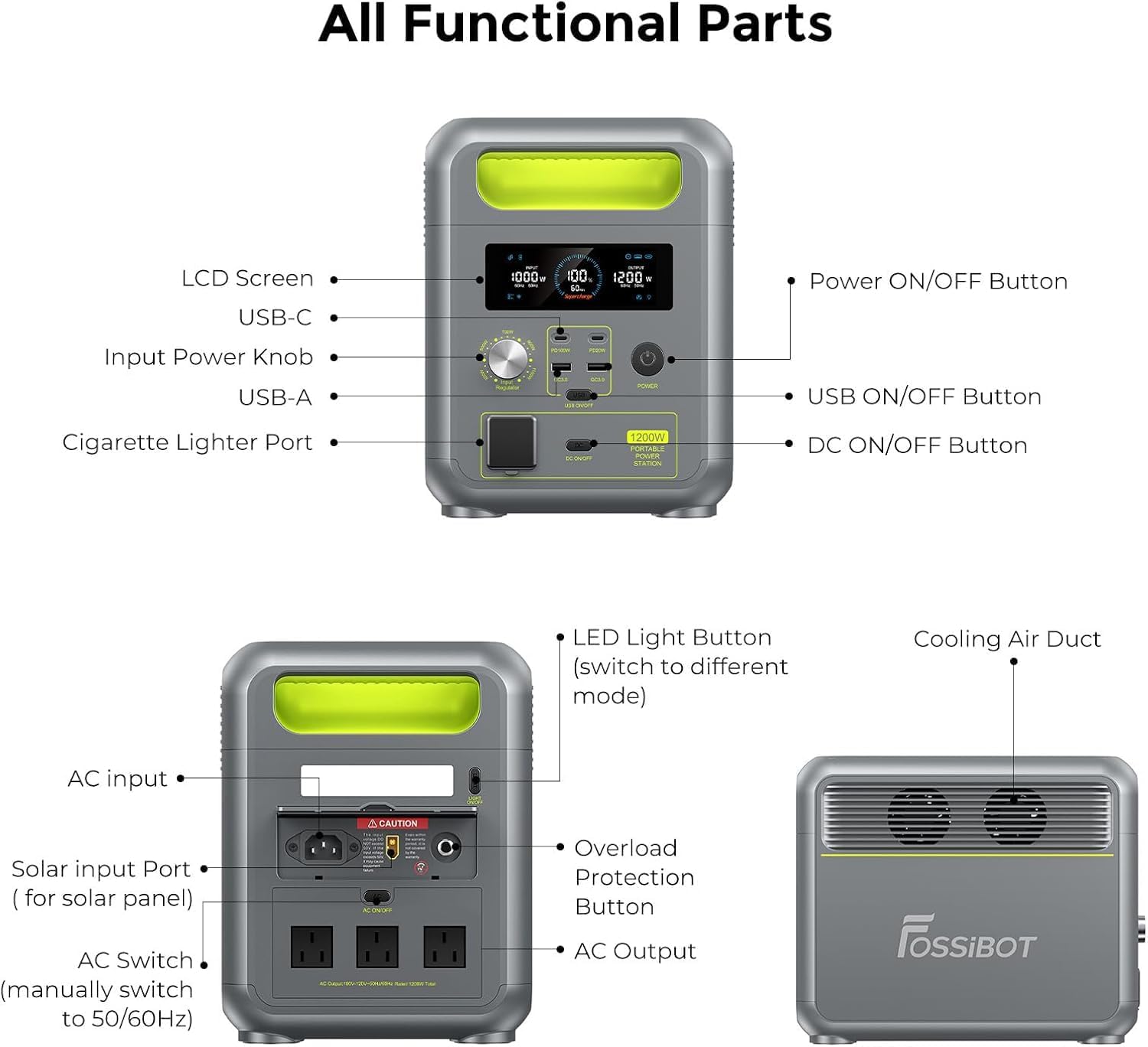
Image: Detailed diagram illustrating all functional parts of the FOSSiBOT F1200, including input/output ports, control buttons, and cooling vents.
Control Panel and Display
The front panel features an LCD screen that displays real-time information about the power station's status, including input/output wattage, battery level, and remaining charge/discharge time. Various buttons control the power output for different port types.

Image: The digital display panel of the FOSSiBOT F1200, showing various indicators and power readings for input and output.
Setup
Initial Charge
Before first use, fully charge the FOSSiBOT F1200. Connect the AC charging cable to the AC input port on the power station and then to a wall outlet. The LCD screen will indicate charging status. A full charge from 0-100% via AC takes approximately 70 minutes.
Placement
Place the power station on a stable, flat surface with adequate ventilation. Ensure that the cooling air ducts are not obstructed.
Operating Instructions
Charging the Power Station
The FOSSiBOT F1200 supports multiple charging methods:
- AC Wall Outlet Charging: Connect the AC charging cable to the AC input port and a wall outlet. The unit supports up to 1000W AC input, achieving 0-80% charge in 49 minutes and 0-100% in 70 minutes.
- Solar Charging: Connect compatible solar panels (not included) to the solar input port using the MC4 to XT60 solar charging cable. The unit supports up to 200W solar input, charging from 0-100% in approximately 6.5 hours.
- Car Charging: Use the provided car charging cable (MC4 to cigarette lighter) to charge the unit from your vehicle's 12V cigarette lighter port. A full charge takes approximately 10.67 hours.
- AC + Solar Charging: Combine AC and solar input for the fastest charging. With 1000W AC and 200W solar, the unit can reach 0-100% in approximately 60 minutes.

Image: Visual representation of the four fast recharge methods for the FOSSiBOT F1200, including AC, solar, combined AC+solar, and car charging, with their respective charging times.
Charging Speed Adjustment
The F1200 features an adjustable input power knob, allowing you to select charging speeds from 200W to 1000W. This provides flexibility for faster charging or slower, more gentle charging to extend battery life.
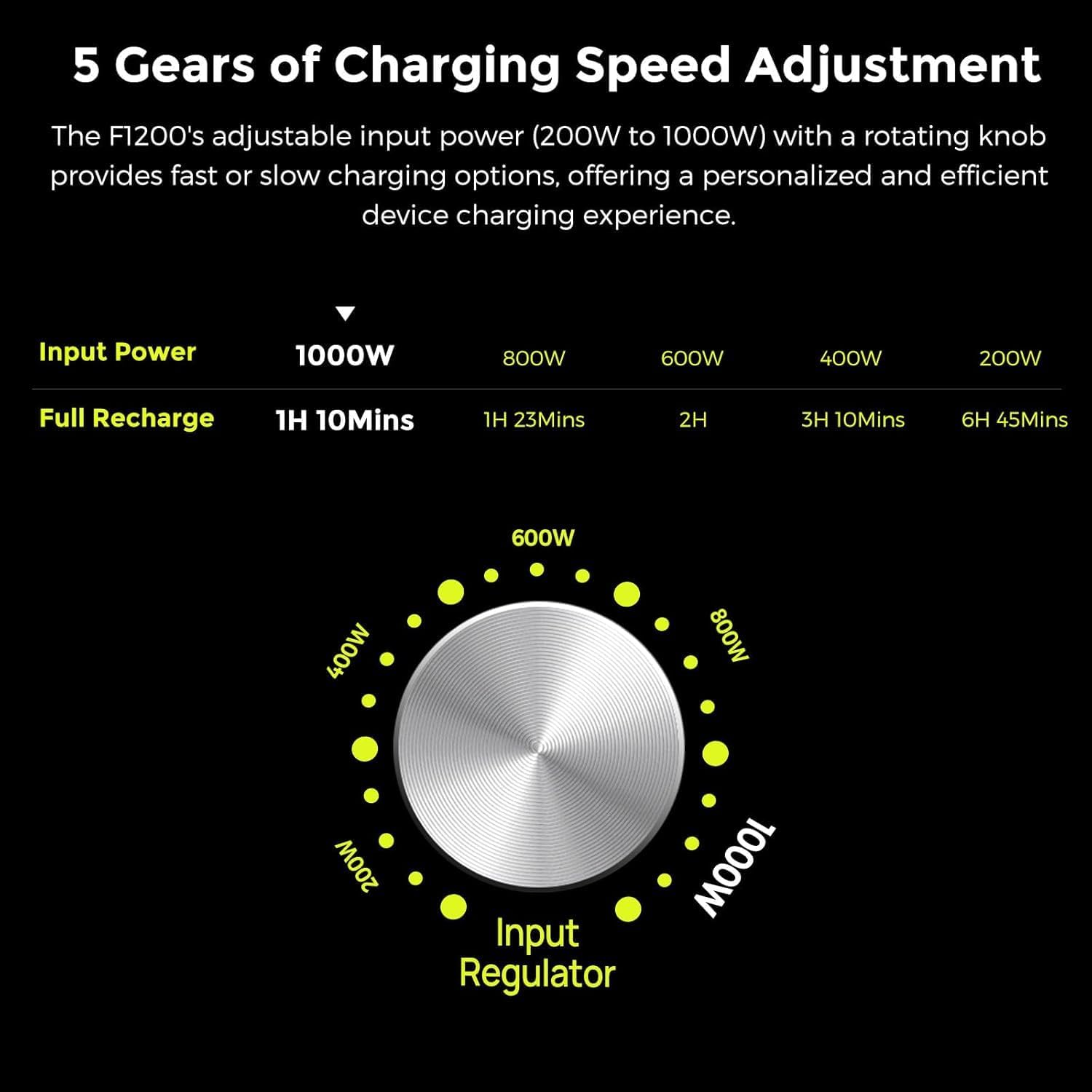
Image: The input regulator dial for adjusting charging speed, showing options from 200W to 1000W and their impact on full recharge time.
Using the Power Station (Discharging)
Press the main Power ON/OFF button to turn on the unit. Then, activate the specific output sections (AC, USB, DC) using their respective ON/OFF buttons.
- AC Output: The F1200 provides two 1200W AC outlets (Power Lifting up to 2400W) with pure sine wave output, suitable for sensitive electronics.
- USB Output: Two USB-A (18W) and two USB-C (100W) ports are available for charging mobile devices, laptops, and other USB-powered gadgets.
- DC Output: A 12V/10A cigarette lighter port is available for DC-powered appliances.
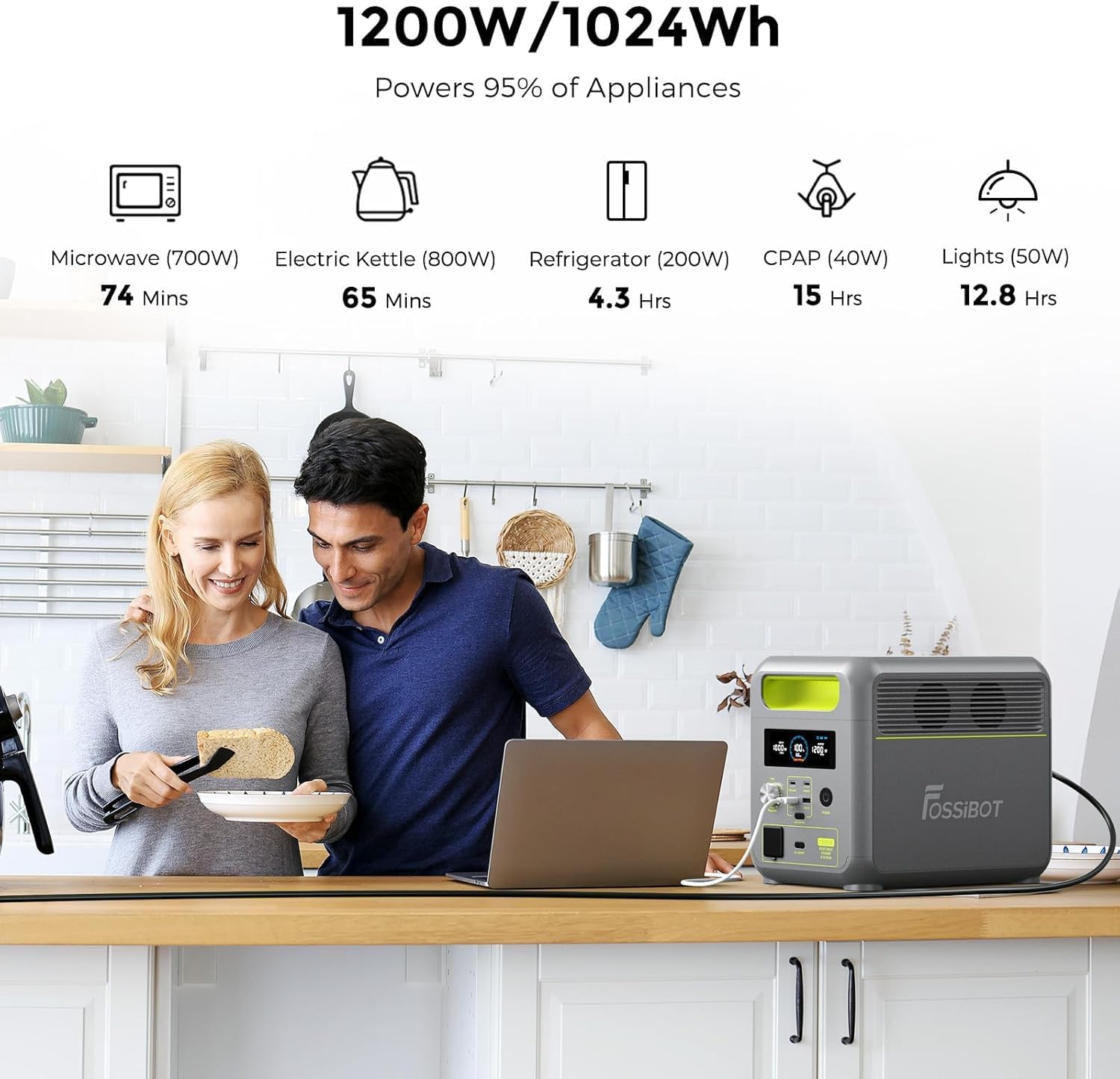
Image: The FOSSiBOT F1200 powering various household appliances, demonstrating its capacity and estimated run times.
Uninterruptible Power Supply (UPS) Function
When connected to an AC wall outlet and powering devices simultaneously, the F1200 can function as an Uninterruptible Power Supply (UPS). In the event of a power outage, it automatically switches to battery power in less than 10 milliseconds, ensuring continuous operation for critical devices like CPAP machines or desktop computers.

Image: The FOSSiBOT F1200 providing uninterrupted power to a computer setup during a power interruption, highlighting its <10ms switchover time.
LED Light Operation
The F1200 includes an integrated LED light with three modes: standard illumination, strong illumination, and strobe. Press the LED Light Button to cycle through the modes.

Image: The FOSSiBOT F1200's integrated LED light demonstrating its three operational modes in a dark environment.
Maintenance
Battery Care
The F1200 uses LiFePO4 batteries, known for their longevity and safety. To maximize battery lifespan (over 10 years and 4000+ cycles to 80% capacity):
- Avoid fully discharging the battery frequently.
- Store the unit with a charge level between 50% and 80% if not used for extended periods.
- Recharge the unit at least once every 3-6 months to prevent deep discharge.
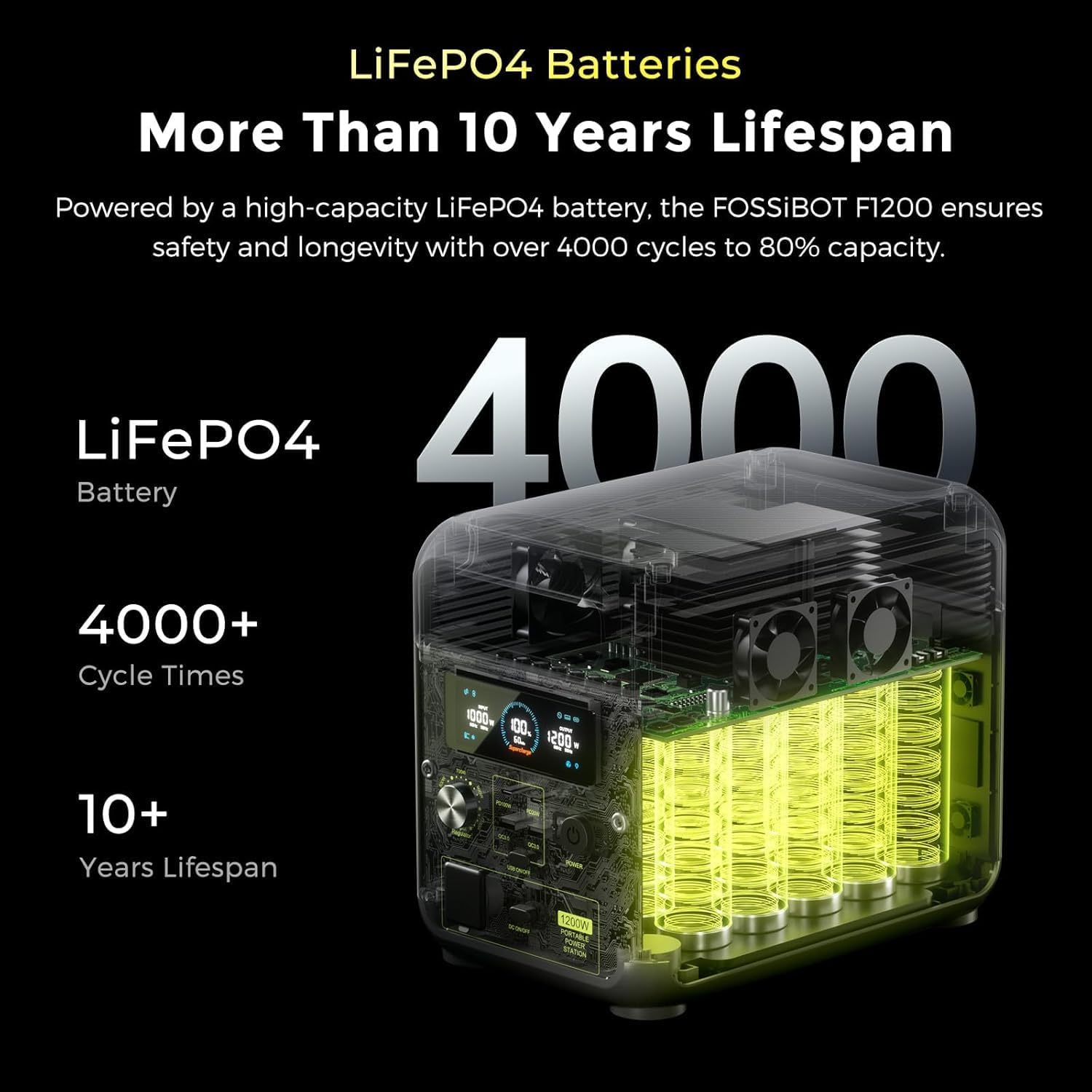
Image: An illustration of the FOSSiBOT F1200's internal LiFePO4 battery structure, emphasizing its long lifespan and cycle count.
Cleaning and Storage
- Wipe the unit with a dry, soft cloth. Do not use abrasive cleaners or solvents.
- Store in a cool, dry place away from direct sunlight and extreme temperatures.
- Ensure the unit is turned off when not in use.
BMS Protection System
The F1200 incorporates an advanced Battery Management System (BMS) to protect against overcharge, over-discharge, over-temperature, low temperature, and short circuits, ensuring safe and reliable operation.

Image: An infographic detailing the various protections offered by the FOSSiBOT F1200's Battery Management System (BMS).
Troubleshooting
If you encounter issues with your FOSSiBOT F1200, please refer to the following common problems and solutions:
- Unit not turning on: Ensure the main power button is pressed. Check if the battery is completely depleted and try charging it.
- No output from ports: Ensure the specific output section (AC, USB, DC) is activated by its respective button. Check if the device you are trying to power is within the power station's output limits.
- Slow charging: Verify that the input power knob is set to a higher wattage. Ensure all charging cables are securely connected.
- Overload warning: If an overload warning appears on the screen, disconnect some devices to reduce the load. The unit may automatically shut down to prevent damage. Press the Overload Protection Button to reset if necessary.
- Unit overheating: Ensure the cooling vents are not blocked and the unit is in a well-ventilated area. If overheating persists, discontinue use and contact support.
For further assistance, please contact FOSSiBOT customer support.
Specifications
| Feature | Detail |
|---|---|
| Model Number | F1200 |
| Battery Type | LiFePO4 |
| Capacity | 1024Wh |
| AC Output | 2 x 1200W (Pure Sine Wave, Power Lifting 2400W) |
| USB-A Output | 2 x 18W |
| USB-C Output | 2 x 100W |
| DC Output (Cigarette Lighter) | 1 x 12V/10A |
| AC Input Power | Adjustable 200W-1000W |
| Solar Input Power | Max 200W (50V max) |
| AC Charging Time (0-80%) | 49 minutes |
| AC Charging Time (0-100%) | 70 minutes |
| Solar Charging Time (0-100%) | 6.5 hours (with 200W solar) |
| Car Charging Time (0-100%) | 10.67 hours |
| UPS Switchover Time | <10ms |
| Dimensions (L x W x H) | 27.6cm x 20.9cm x 23cm |
| Material | ABS + LiFePO4 |
| Special Features | Portable, Overload Protection, USB Port, Dual Fuel (Solar/AC) |
Warranty and Support
FOSSiBOT products come with a standard warranty. For detailed warranty information, technical support, or service inquiries, please refer to the warranty card included in your package or visit the official FOSSiBOT website. Please retain your proof of purchase for warranty claims.