
PUSUN PT-9001 PRO
PUSUN PT-9001 PRO-Elite Pro Tennis Ball Machine User Manual
Smart Training System with App Control
1. Introduction
Thank you for choosing the PUSUN PT-9001 PRO-Elite Pro Tennis Ball Machine. This advanced training system is designed to enhance your tennis skills with its intelligent features and robust performance. This manual provides essential information for safe operation, setup, maintenance, and troubleshooting to ensure you get the most out of your machine.
Key features include:
- Cutting-edge full-featured smartphone app control system for precise parameter adjustments.
- Premium intelligent programming technology with 35 professional landing point locations.
- Tournament-grade one-click selection of 12 professional serving modes.
- Full-court free positioning technology for versatile training.
- Extra-large capacity high-performance imported lithium battery (7-10 hours continuous use).
- Professional-grade vertical and horizontal angle infinite precise adjustment.
- Advanced random ball algorithm for enhanced real-match adaptability.
- Dynamic variable speed ball technology for authentic match rhythm transitions.
- Aerospace-grade ABS and high-strength metal composite materials for durability.
2. Safety Information
- Always read all instructions before operating the machine.
- Keep hands, hair, and loose clothing away from moving parts, especially the ball feeding mechanism.
- Ensure the machine is placed on a stable, level surface before operation.
- Do not allow children to operate the machine without adult supervision.
- Use only standard tennis balls with the machine. Do not use wet, dirty, or damaged balls.
- Disconnect power before performing any maintenance or cleaning.
- Do not expose the machine to extreme weather conditions (rain, snow, direct prolonged sunlight).
3. Package Contents
Verify that all components are present in the package:
- Tennis ball machine (PT-9001 PRO-Elite)
- Charger
- Remote control
- User manual (this document)
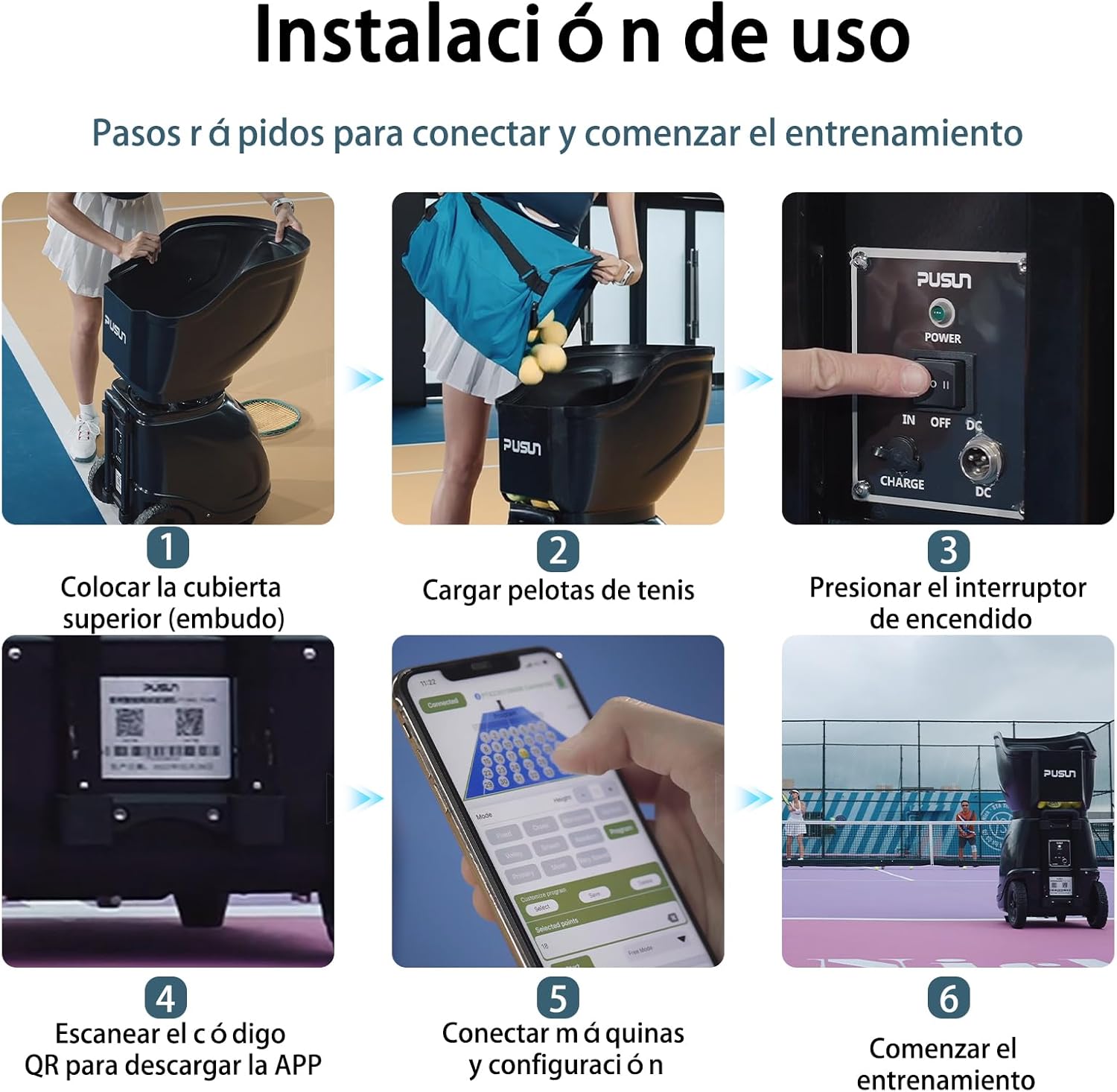
4. Setup Guide
Follow these steps to set up your PUSUN PT-9001 PRO-Elite Tennis Ball Machine:
- Unpack and Assemble: Carefully remove the machine from its packaging. Place the top cover (hopper) onto the main body of the machine.
- Charge the Battery: Connect the charger to the machine's charging port and plug it into a power outlet. Allow the machine to fully charge before first use. The intelligent real-time power monitoring system will indicate charging status.
- Load Tennis Balls: Open the hopper and load up to 150+ tennis balls. Ensure balls are clean and dry to prevent damage to the machine.
- Power On: Locate the power switch on the machine and switch it to the 'ON' position.
- Download the App: Scan the QR code located on the machine (or refer to the manual for app store links) to download the official PUSUN app.
- Connect via Bluetooth: Open the app on your smartphone and follow the on-screen instructions to connect to your PT-9001 PRO-Elite machine via Bluetooth 5.0. The connection range is 50 to 80 meters with stable signal.

5. Operating Instructions
The PT-9001 PRO-Elite offers flexible control options via its smartphone app and a dedicated remote control.
5.1 App Control
The smartphone app provides comprehensive control over all machine functions:
- Mode Selection: Choose from 12 professional serving modes, including Fixed, Cross, Horizontal, Vertical, Volley, Smash, Random, and Program.
- Landing Point Programming: Utilize the intuitive interface to select up to 35 professional landing point locations, allowing you to customize unlimited training mode combinations.
- Parameter Adjustment: Precisely adjust ball speed (20-140 km/h), frequency (1.8-8 balls/second), angle (vertical and horizontal), and spin (topspin/underspin).
- Custom Programs: Create, save, and load your own custom training programs for personalized practice sessions.

5.2 Remote Control
The included remote control offers convenient access to essential functions:
- Start/Stop: Initiate or pause ball feeding.
- Mode Selection: Switch between basic modes.
- Speed/Interval/Spin Adjustment: Fine-tune ball parameters directly from the remote.
5.3 Training Modes and Features
The PT-9001 PRO-Elite offers a variety of training scenarios:
- Fixed Point Shots: Practice consistency by setting the machine to deliver balls to a single, precise location.
- Cross-Court Shots: Simulate match play with balls delivered across the court.
- Vertical and Horizontal Drills: Focus on specific areas of the court with adjustable angles.
- Random Mode: Enhance your reaction time and adaptability with unpredictable ball placements.
- Dynamic Variable Speed: Experience realistic match rhythms with changing ball speeds within a single session.
6. Maintenance
Proper maintenance ensures the longevity and optimal performance of your tennis ball machine.
6.1 Cleaning
- Regularly clean the ball feeding mechanism and internal components to remove tennis ball fibers and dust. Accumulated debris can affect performance.
- Wipe the exterior of the machine with a soft, damp cloth. Avoid abrasive cleaners.
- Ensure the machine is dry before storage.
6.2 Battery Care
- Charge the battery fully after each use, especially if storing for an extended period.
- Do not overcharge or completely drain the battery.
- Store the machine in a cool, dry place when not in use to preserve battery life.
6.3 Storage
The PT-9001 PRO-Elite is designed for easy storage and portability.
- The hopper can be detached and inverted for compact storage, reducing the overall height.
- Utilize the built-in wheels and retractable handle for easy transport.

7. Troubleshooting
If you encounter issues with your PT-9001 PRO-Elite, refer to the following common problems and solutions:
| Problem | Possible Cause | Solution |
|---|---|---|
| Machine does not power on. | Battery is low or depleted; Power switch is off. | Charge the battery fully; Ensure power switch is in the 'ON' position. |
| Balls are not feeding consistently. | Hopper is empty; Balls are wet/dirty; Internal mechanism is jammed. | Refill hopper; Use clean, dry balls; Power off and clear any obstructions. |
| App cannot connect to the machine. | Bluetooth is off; Machine is out of range; App needs restart. | Ensure Bluetooth is enabled on your device; Move closer to the machine; Close and reopen the app. |
| Inaccurate ball placement/speed. | Incorrect settings in app/remote; Worn internal components. | Verify and adjust settings; Contact customer support if issue persists. |
If the problem persists after attempting these solutions, please contact PUSUN customer support.
8. Specifications
| Feature | Specification |
|---|---|
| Model Name | PT-9001 PRO |
| Brand Name | PUSUN |
| Color | Black |
| Material | ABS |
| Item Dimensions (LxWxH) | 22.05 x 15.75 x 34.25 inches (56 x 40 x 87 cm) |
| Item Weight | 23 Kilograms |
| Ball Capacity | 150+ balls |
| Speed Range | 20-140 km/h |
| Battery Life | 7-10 hours (stable continuous use) |
| Control Methods | Smartphone App, Remote Control, Apple Watch (App) |
| Landing Points | 35 professional locations |
| Serving Modes | 12 professional modes |

9. Warranty and Support
PUSUN stands behind the quality of its products.
9.1 Warranty Information
- Personal Use: Exclusive three-year extended warranty.
- Commercial Use: 1.5-year warranty.
- Battery: Standard one-year battery warranty service.
This warranty covers manufacturing defects and malfunctions under normal use. It does not cover damage caused by misuse, accidents, unauthorized modifications, or improper maintenance.
9.2 Customer Support
For technical assistance, warranty claims, or any questions regarding your PUSUN PT-9001 PRO-Elite Tennis Ball Machine, please contact Odison Innovation, the authorized seller and manufacturer.
Please refer to your purchase documentation or the PUSUN official website for the most current contact information.
Ask a question about this manual
Ask about setup, troubleshooting, compatibility, parts, safety, or missing instructions. Manuals+ will review the question and use this page’s manual context to help answer it.